Profit and Loss - Pro Forma
The Balance Sheet - Pro Forma tab is provided to compile the information from the Lender's Guaranty page.
The Balance Sheet - Pro Forma tab is provided to compile the information from the Lender's Guaranty page.
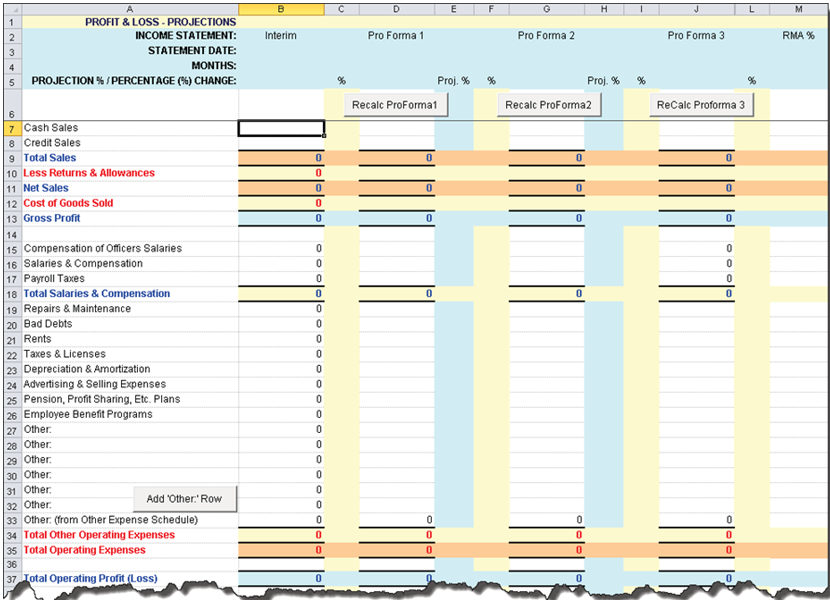
- Income Statement Type (column B): The value of this drop-down box
defaults to Interim but allows you to select Historical Year. This
functionality allows you to be able to decide on a case by case basis if the
starting year is the "Interim" or last full "Historical Year".
- Interim defaults all the values from the Interim column on the Profit and Loss - Historical tab.
- Historical Year defaults all the values from the Historical Year 1 column on the Profit and Loss - Historical tab.
- Recalc Pro Forma 1, Recalc Pro Forma 2, ReCalc Pro Forma 3 buttons provide the ability to gross up the Interim period and do projections for Proforma Year 1, Proforma Year 2 and Proforma Year 3 periods. This is completed by entering a number (i.e. for 10%, type in 10) in the Percentage Increase column on the Spread Setup tab, then click Recalc Pro Forma one through three. The application annualizes your interim year based on the number of months in the previous year and multiplies that by the percentage changed. The application performs the same function for Year Two and Year Three.
- RMA% (column J) - Displays RMA data if an applicable RMA code was chosen in TSoftPlus.
- Proforma 1/ Interest Expense SBA Loan: Populates from the TSoftPlus field First Year Interest found on the Loan Payments screen in the Loan Information tab.
- Proforma 2/ Interest Expense SBA Loan: Populates from the TSoftPlus field Second Year Interest found on the Loan Payments screen in the Loan Information tab.
- Other: (from Other Expense Schedule): - If there are values present in the Total Other row on the Other Expense Schedule - Project, these values automatically default.
- Add Other Row - Allows you to add one or more extra rows, which in turn allows you to enter values to each column of each row (ProForma Yr 1, 2, 3). These values are summed into the Total Other Operating Expenses and Total Operating Expenses.
Note:
Additional "Other" rows added will be automatically added to
the Profit& Loss- Historical worksheet.
- Proj % - When a value is entered in the Proj % column and the
Recalc button is pressed, the system uses that value instead of the
value entered in the Percentage Increase column on the Spread
Setup tab. The values entered can be positive, negative or 0. If a zero
is entered, then the projection amount remains unchanged (i.e., it will not be
changed based on the Percentage Increase value on the Spread Setup tab).
If no value is entered in the Proj % column, then the system uses the value
entered in the Percentage Increase column on the Spread Setup
tab.
- Proforma 1/Interest Expense: Priv Lender: Populates from the TSoftPlus field First Year Interest found on the Private Lender screen in the Loan Information tab. This cannot be edited.
- Proforma 2/Interest Expense: Priv Lender: Populates from the TSoftPlus field Second Year Interest found on the Private Lender screen in the Loan Information tab. This cannot be edited.
- Proforma 3/Interest Expense: Priv Lender: Populates from the TSoftPlus Amortization Schedule in the Private Lender screen. It is the total of all interest paid from periods 25 through 36. This cannot be edited
- Proforma 1/Interest Expense: SBA Loan: Populates from the TSoftPlus field First Year Interest found on the Debenture Pricing screen in the Loan Information tab. This cannot be edited.
- Proforma 2/Interest Expense: SBA Loan: Populates from the TSoftPlus field Second Year Interest found on the Debenture Pricing screen in the Loan Information tab. This cannot be edited.
- Proforma 3/Interest Expense: SBA Loan: Populates from the TSoftPlus Amortization Schedule in the Debenture Pricing screen. It is the total of all interest paid from periods 25 through 36. This cannot be edited.