Adding an Entity Party
The Manage Parties screen allows you to add an entity party. An entity party is a party comprised of a company or group and not a single person.
- From the Loan Transactions section of the main menu, select MANAGE
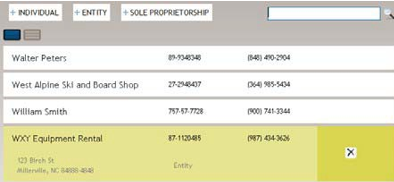
PARTIES. The Manage Parties screen is displayed.Note:To see more party detail, click the expander to the left of a party name.
- Select +ENTITY. The Party Information screen is displayed. Note:The Party ID field is not utilized in TSoftPlus.
- Enter as much information on the new party as possible.
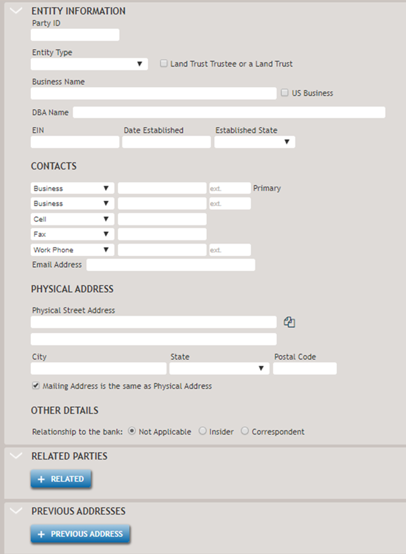 The fields within the Entity Information screen include a number of unique fields:
- The Land Trust Trustee OR A Land Trust checkbox is not selected by default. You should check this checkbox when borrower has a Real Estate Collateral and the State location is Illinois. The data to show that the borrower is Illinois Land Trustee flows to the Note. Previously this question was answered when viewing the Note in Document View.
- The US Business checkbox is not utilized in TSoftPlus.
- Date Established: Date in which the business was established.
- Established State: The state in which the business was formed.
Clicking +RELATED allows you to associate one or more existing related parties to this Entity. Select the +RELATED button for each related party you wish to add.
Note:If there are more than four Related Parties, the scroll bar is enabled for the related parties section, allowing you to scroll to view and edit all related parties.Related Party Data:
- Party Name: Displays the name of the party (Individual, Sole Proprietor or Entity name)
- Owner checkbox: Indicates the related party is an owner of the business entity.
- Ownership %: Conditional - Field is enabled when Ownership check box is checked. Enter the percent ownership this related party has in relationship to the business entity.
- Signer checkbox: Indicates the related party is a signer of the business entity.
- Signer Title: Conditional - Field is enabled when when either the Owner and/or the Signer checkbox is checked. Enter the title of signer.
- Affiliate check box: Indicates that the related party is an
affiliate of the business entity. Note:You will need to set the Affiliate checkbox as needed to meet the SBA Affiliates rule and that at least one owner needs to be an affiliate.
- Subject Individual check box: Indicates the related party is a
subject individual. The system automatically creates a Form
912-Statement of Personal History and 1919- Borrower Information Form
for any individual flagged as a Subject Individual even if they are not
an Owner. Only individuals and sole proprietors can be a subject
individual. Generally individuals and sole proprietors are selected to
be a subject individual.Note:When the entity borrower is owned by another entity, create entity parties for both the entity borrower and the owning entity. To obtain a Form 912 for the owning entity, select the Subject Individual check box for that entity.
- Select SAVE. The new party is created, and you are returned to the Manage Parties screen.