Executive Summary
The Executive Summary spreadsheet is a central collection point for the balance sheet, financial ratios, cash flow coverage calculations and debt summary.
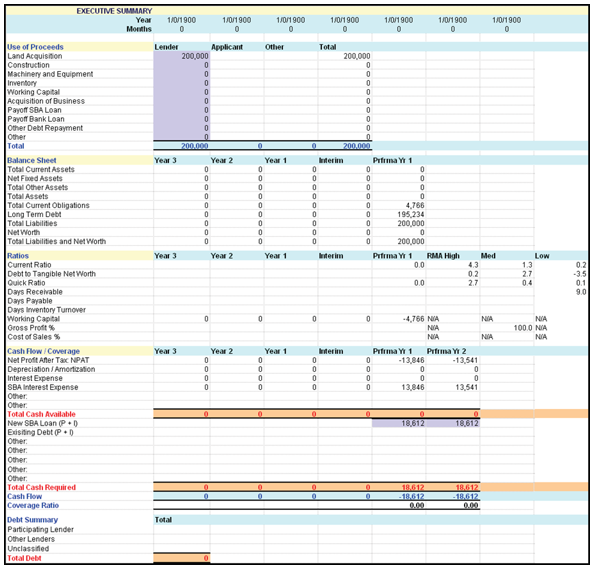
Note the following:
- The Use of Proceeds/Lender is automatically populated by TSoftPlus
and cannot be edited. It is a combination of the following different Use of
Proceeds found on the Loan Information tab.
- Land Acquisition
- Purchase Land only
- Land and Improvements
- Purchase Improvements
- Construction
- Construct a Building
- Add to Existing Building
- Renovate Existing Building
- Pay Off Interim Construction Loan
- Pay Off Lender's Interim Loan
- Leasehold Improvements
- Machinery & Equipment
- Purchase Equipment
- Purchase Furniture and Fixtures
- Inventory Purchase
- Purchase Inventory
- Pay Trade or Accounts Payable
- Working Capital
- Working Capital
- SBA Guaranty Fee
- Acquisition of Business
- Purchase Business Asset
- Purchase Business Stock
- Payoff SBA Loan
- Refinance SBA Loan (Not Same Institution Debt)
- Refinance SBA Loan (Same Institution Debt)
- Payoff Bank Loan
- Pay Notes Payable (not same Institution Debt)
- Other Debt Repayment
- Pay Notes Payable (Same Institution Debt)
- Other
- Other
- Land Acquisition
- You are able to enter information in:
- Use of Proceeds/Applicant
- Use of Proceeds/Other
- Cash Flow/Coverage/Other
- Cash Flow/Coverage/Other
- Cash Flow/Coverage/New SBA Loan (P&I)
- Cash Flow/Coverage/Existing Debt (P&I)
- Cash Flow/Coverage/Other
- Cash Flow/Coverage/Other
- Debt Summary
- The following are calculated by TSoftPlus:
- Use of Proceeds/Total
- Use of Proceeds/Total (Column E)
- Total Cash Available
- Total Cash Required
- Cash Flow
- Coverage Ratio
- Total Debt
If the transaction is a 504 loan, the following rows will be created with the
corresponding defaults:
- Use of Proceeds/Lender: populates from the TSoftPlus. The Total Project Cost will populate the "Other" cell.
- Private Lender Interest Expense: defaults from Profit & Loss Pro Forma "Interest Expense: Priv Lender".
- SBA Interest Expense: defaults from Profit & Loss Pro Forma "Interest Expense: SBA Loan".
- Prfma Yr 1/New SBA Loan (P + I): Populates from the TSoftPlus Amortization Schedule found on the Debenture Pricing screen in the Loan Information tab. It is the Total Payment for Period 12 (or sum of Payments from periods 1 through 12).
- Prfma Yr 2/New SBA Loan (P + I): Populates from the TSoftPlus Amortization Schedule found on the Debenture Pricing screen in the Loan Information tab. It is the sum of Payments from periods 13 through 24.
- Prfma Yr 1/Private Lender (P + I): Populates from the TSoftPlus Amortization Schedule found on the Private Lender screen in the Loan Information tab. It is the Total Payment for Period 12 (or sum of Payments from periods 1 through 12).
- Prfma Yr 2/Private Lender (P + I): Populates from the TSoftPlus Amortization Schedule found on the Private Lender screen in the Loan Information tab. It is the sum of Payments from periods 13 through 24.