Profit and Loss – Historical
The Profit and Loss - Historical spreadsheet is provided to enter the three-year Historical P&L information and the interim information.
The Profit and Loss - Historical spreadsheet, like the Historical Balance Sheet, is provided to enter the three-year Historical P&L information and the interim information.
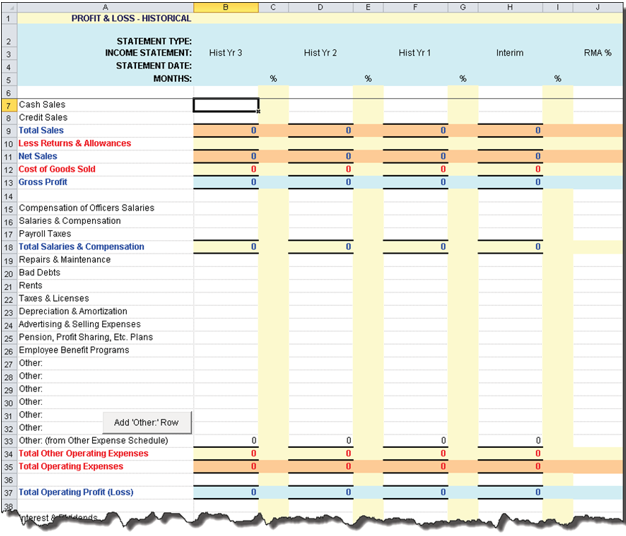
This form is broken down into three years with the oldest information in the left-side column marked Income Statement Hist Yr 3. If only two years of historical data is available, enter the oldest data in the Hist Yr 2 column.
Similarly, if only one year's data is available, begin with the Hist Yr 1 column. Always move from left to right, oldest to most recent.
If your applicant's business is a corporation, partnership or sole proprietorship, you may have some dividends or withdrawals. On the final line of the spreadsheet, enter the dividends or withdrawals. These amounts are reflected in the Net Worth Reconciliation.
- Cash Sales - If there are values present in the Total Cash Sales rows on the Sales Schedule, these values automatically default. If these values are not wanted, you can edit them. Once they have been either typed over or deleted, they will not default again from the Sales Schedule.
- Credit Sales - If there are values present in the Total Credit Sales rows on the Sales Schedule, these values automatically default. If these values are not wanted, you can edit them. Once they have been either typed over or deleted, they will not default again from the Sales Schedule.
- Total Sales - If there are values present in the Total Sales rows on the Sales Schedule, these values automatically default. If these values are not wanted, you cannot edit them. You will need to make sure your Cash Sales and Credit Sales values on the Profit and Loss - Historical sum to the Total Cash Sales that originated from the Sales Schedule.
- Cost of Goods Sold - If there are values present in the Total Cost of Goods Sold rows on the COGS Schedule, these values automatically default. If these values are not wanted, then you can edit them. Once they have been either typed over or deleted, they will not default again from the COGs Schedule.
- Other: (from Other Expense Schedule): - If there are values present in the Total Other row on the Other Expense Schedule - Hist, these values automatically default.
- Add Other Row - Allows you to add one or more extra rows, which in turn allows you to enter values to each column of each row (Hist Yr 3, 2, 1). These values are included in the Total Other Operating Expenses and Total Operating Expenses.
Nothing in columns B through I is carried over from TSoftPlus unless there are values present in the Total Cash Sales, Total Credit Sales and Total Sales rows on the Sales Schedule. These values are automatically carried over to the Profit and Loss - Historical sheet. If these values are not wanted, type over them or delete them. Once they have been either typed over or deleted, they will not default again from the Sales Schedule.
Information entered into Column H, Interim, will transfer over to Column B, Interim, on the Profit & Loss - Pro Forma worksheet.
- Interest Expense: Priv Lender
- Interest Expense: SBA Loan