Monthly Profit and Loss
This spreadsheet allows you to spread the Proforma Year 1 annual profit and loss over a monthly basis.
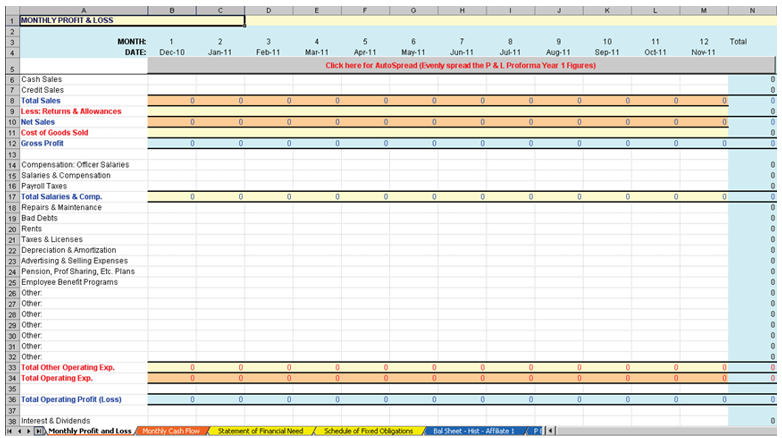
- The Interest Expense: SBA Loan value is populated from the Amortization Schedule. It is the interest paid for each period of periods 1 through 12.
- Date - defaults with today's date shown in "Month-Year" format.
Note:
If the dates do not come over properly, then you need to
install the Analysis ToolPak. This can be installed in Excel by selecting Tools #
Add-Ins and selecting Analysis ToolPak. Click OK to confirm and
install.
- If the transaction is a 504 loan, the following 2 new rows will be created with
the corresponding defaults
- Interest Expense: Priv Lender: populates from the TSoftPlus Amortization Schedule in the Private Lender screen. It is the interest paid for each period of periods 1 through 12. This cannot be edited.
- Interest Expense: SBA Loan: populates from the TSoftPlus Amortization Schedule in the Debenture Pricing screen. It is the interest paid for each period of periods 1 through 12. This cannot be edited.
The following items are editable:
- Date
- Cash Sales
- Credit Sales
- Less: Returns & Allowances
- Cost of Goods Sold
- Compensation: Officer Salaries
- Salaries and Compensation
- Payroll Taxes
- Repairs & Maintenance
- Bad Debts
- Rent Taxes & Licenses
- Depreciation & Amortization
- Advertising & Selling Expenses
- Pension, Profit Sharing, Etc. Plans
- Employee Benefit Programs
- Other (7 rows)
- Interest & Dividends
- Other Income
- Interest Expense (2 rows)
- Income Taxes
- Withdrawals/Dividends
The following items are system generated:
- Total Sales
- Net Sales
- Gross Profit
- Total Salaries & Comp.
- Total Other Operating Exp.
- Total Operating Exp.
- Total Operating Profit (Loss)
- Total Other Income
- Total Interest Expense
- Net Other Income (Expense)
- Earnings (Loss) Before Taxes
- Profit (Loss) After Taxes
- Click here for AutoSpread button
- Provides the ability to spread the Pro Forma Year 1 profit and loss amounts. This does not spread the Interest Expense, as this is already spread when the Payment was computed.
- Data may be edited at any time after the AutoSpread button is pressed.