Balance Sheet - Pro Forma
The Balance Sheet - Pro Forma tab is provided to compile the information from the Lender's Guaranty page.
The Balance Sheet - Pro Forma tab is provided to compile the information from the Lender's Guaranty page.
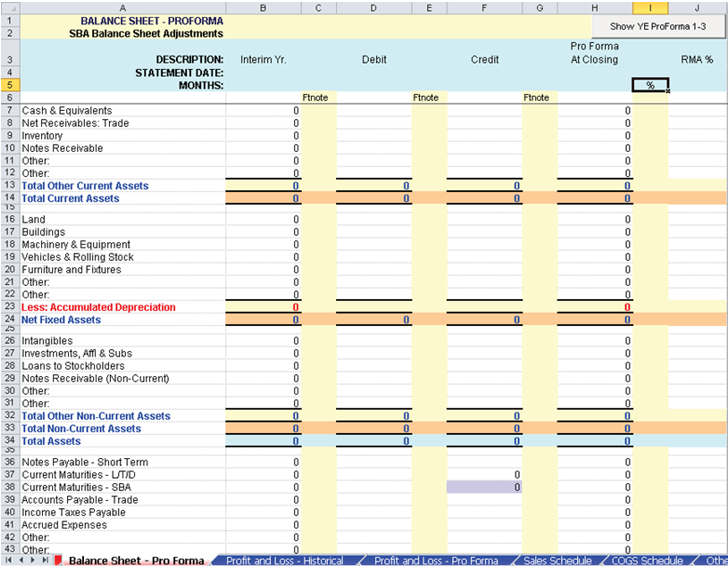
Note the following:
- Data entered on the Interim data on the Balance Sheet- Historical tab, will transfer over to column B.
- Items in the Footnotes (Ftnote) columns next to the Interim Period, Debit, and Credit adjustments are available for you to enter a footnote reference you wish to make to SBA or to the credit file.
- RMA% (column J) - Displays RMA data if an applicable RMA code was chosen
in TSoftPlus.Note:If 0 (zero) is entered as a value, it will simply annualize the previous periods numbers.
- Credit/Current Maturities - L/T/D: Populates from the TSoftPlus field "Current Obligation" found on the Loan Payments screen in the Loan Information tab. This field cannot be edited.
- Credit/Long Term Debt SBA: Populates from the TSoftPlus Long Term Obligation field located on the Loan Payments screen in the Loan Information tab. This field cannot be edited.
- If the transaction is a 504 loan, the following 4 new rows will be created with
the corresponding defaults:
- Credit/Current Maturities - SBA L/T/D populates from the TSoftPlus field Current Obligation found on the Debenture Pricing screen on the Loan Information tab. This field cannot be edited.
- Credit/Current Maturities-Priv Lndr L/T/D populates from the TSoftPlus field Current Obligation found on the Private Lender screen on the Loan Information tab. This field cannot be edited.
- Credit/Long Term Debt - SBA populates from the TSoftPlus field Long Term Obligation found on the Debenture Pricing screen on the Loan Information tab. This field cannot be edited.
- Credit/Long Term Debt - Priv Lndr. populates from the TSoftPlus field Long Term Obligation found on the Private Lender screen on the Loan Information tab. This field cannot be edited.
- The YE Pro Forma 1, YE Pro Forma 2 and YE Pro Forma 3 columns allow you to calculate the end of year Pro Forma Balance Sheets for 3 years, based off the P&L at Closing numbers. Text to the right describes how the items are calculated. These columns are hidden by default and can be shown or hidden again using the Show/Hide YE ProForma 1-3 button located at the upper right of the spreadsheet.
Note:
Note the following about defaulted fields:
- Defaulted fields are disabled (non-editable) with their values rounded up to a whole dollar.
- All fields defaulted from TSoftPlus have a blue background.
- The Footnotes text box at the bottom of the page allows for text detailing the footnotes denoted in the above sections. (Note: a carriage return in an Excel text box is ALT+ENTER.)