Table Elements and Attributes
The Table element may be used to for both layout and data (tabular) tables. Layout tables are used to structure the page layout and for specific spacing requirements. Data tables are used to present information in a tabular format with cell contents that map to logical column and row headers.
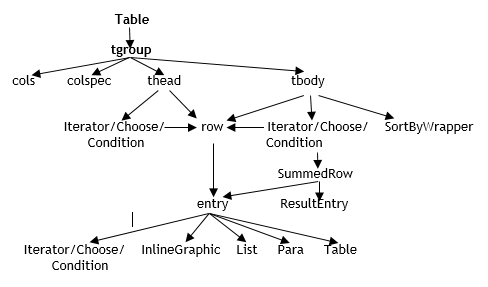
Table Elements
| Element | Description |
|---|---|
| table | The Table element contains attributes that defines the overall
structure of the table such as frame/borders, border weight,
font size, etc. A Table element may contain multiple
tgroup elements and may be added to an entry element
to create a nested table structure. Note: If you
have purchased the Tagged PDF Outputs add-on license, refer
to Accessibility in Tagged
PDF Outputs Implementation Guide for details on
authoring tables. |
| tgroup | The tgroup element is the container to define the table contents. Add the tgroup element as a child of the Table element. Child elements and attributes may be added to the tgroup element to define number of columns, column width, alignment, etc. Add the thead element as a child to further define the table columns. Add the tbody element as a child to define the cell contents. Note: multiple tgroup elements may be added to a given table. |
| thead | The thead element is the container for rows that are the column
headings. Note: If you have purchased the
Tagged PDF Outputs add-on license, refer to Accessibility in Tagged
PDF Outputs Implementation Guide for details on
authoring the thead element. |
| tbody | The tbody element is the container for the body of the table. Add the row>entry element as a child of the tbody to content for each row/cell. |
| Iterator/Choose/Condition | These elements may also be used as a child of the thead and tbody table elements. See Using Rules for information on how to author these elements. |
| row | The row element is the container for the all cells in the row which are represented as entries. |
| entry | An entry element may be added as a child of the row element. The
entry element defines the data/content for the table.
Each entry under a row represents the content for each column;
the first entry is the first column, the second entry is the
second column, etc. Note: A child
Para element is automatically inserted into each
entry when a table is created. This helps to reduce time in
working with tables as the para is the most common
child element for the entry element. |
| SortByWrapper/SummedRow/ResultEntry | See Defining the Number of Rows (SortByWrapper Element) for further information. |
| TotalSummedRow/TotalResultEntry/ SummedEntry | See Authoring for TILA/RESPA Rounding for further information. These new elements have been implemented specifically to support a new rounding method for the TILA/RESPA Loan Estimate document. |
Table Element Attributes
| Element | Attribute | Description |
|---|---|---|
| table | FontSize | This attribute allows the user to specify the font size explicitly (measured in points). This may be needed when a regulatory rule requires a specific font size be used (i.e. 16pt). |
| frame/FrameWeight | These attributes allows the user to specify the frame (borders) and border weight explicitly for the entire table. If the frame is not authored, the default applied is none. The following options are available for the frame attribute: top, bottom, topbot, all, sides, none. The FrameWeight attribute may be specified in either points or inches (i.e. .05in, 1.5pt) | |
| ReadOrder |
Note: If you have purchased the Tagged PDF
Outputs add-on license, refer to Accessibility in Tagged
PDF Outputs Implementation Guide for details on
authoring the ReadOrder element.
|
|
| tgroup | cols | Specify the total number of columns for the table. |
| tgroup/colspec | colwidth | Specify a colspec element for each column to further define the column details. Add the colwidth attribute to each colspec element to define the amount of space each column will reserve. Enter the desired value using inches (1in) or use the asterisk (1.*) to evenly divide the columns based on the total page width. Each colwidth may be different but the total combined colwidths cannot exceed 7.5 inches. |
| thead | FontStyle | When this attribute is added, a default value of
Regular is applied, indicating the associated content
is formatted without bolding or italics. Valid values
include:
|
| row | RowHeight | This attribute allows the user to specify the height of a row explicitly (measured in inches). |
| entry | align | Controls the horizontal alignment of the cells contents. Possible values: left, right, center, justify, char. Default alignment is left. |
| BackgroundColor | Sets the background color or shading of the cell. The following color options are available: Black, Gray, Red, LightGray, IntDiscGray, MetadataValue. Selecting ‘MetadataValue’ will use the color specificed in the stylesheet element InstanceFormattingMetadata/TableCellBackgroundColor element. | |
| TopBorder/RightBorder/BottomBorder/LeftBorder *BorderColor / *Weight |
There are four sets of attributes for each border side (*top, right, bottom and left) and each attribute has a corresponding color and weight attribute. Use these attributes to draw border lines around a cell; use the weight will specify the thickness of the line in points (pt). | |
| colspan | Specifies the number of columns a given cell
spans. The spanning column entries are not authored. For
example, assume the table has a total of 3 columns and the first
column spans both columns 1 & 2. The first entry with the
colspan attribute represents two columns; therefore, only one
additional entry is authored for the third column. Note: If you have purchased the Tagged PDF Outputs
add-on license, refer to Accessibility in Tagged
PDF Outputs Implementation Guide for details on
authoring the colspan element. |
|
| FontSize | This attribute allows the user to specify the font size explicitly (measured in points). This may be needed when a regulatory rule requires a specific font size be used (i.e. 16pt). | |
| padding | Allows user to override default cell padding margins. The default is 1pt for top, right, bottom and left. The attribute value as string of four spaced points in the following format: 1pt, 2pt, 3pt, 4pt (where 1 represents top, 2 is right, 3 is bottom, and 4 if left). If the default margin only needs to change for one side, all four values must still be passed using the 1pt for the others that do not need to change (0pt, 1pt, 1pt, 1pt). | |
| rowhead |
Note: If you have purchased the Tagged PDF
Outputs add-on license, refer to Acessibility in Tagged
PDF Outputs Implementation Guide for details on
authoring the rowhead element.
|
|
| rowspan | Specifies the number of rows a given cell
spans. The spanning row entries are not authored. For example,
assume the table has a total of 3 columns and 2 rows. The first
row’s column entry spans rows 1 & 2. The first row’s column
entry with the rowspan attribute represents two rows; therefore,
the second row would only contain 2 entries for the 2nd and 3rd
column cells of that row as the value for the first column cell
is rowspan contents. Note: If you have purchased
the Tagged PDF Outputs add-on license, refer to Accessibility in Tagged
PDF Outputs Implementation Guide for details on
authoring the rowspan element. |
|
| valign | This attribute controls the vertical alignment of the cells contents. Possible values: top, bottom, middle. The default is top. | |
| ShrinkToCharacterCount/ShrinkToFontSize |
These attributes can be authored to adjust the FontSize for a given entry’s value based on number of characters. ShinkToCharacterCount – specify the number of characters threshold to be met to honor the ShrinkToFontSize font size specified. ShrinkToFontSize - This attribute allows the user to specify the font size explicitly (measured in points i.e. 12pt). If the entry’s number of characters in the resolved value is >= the ShrinkToCharacterCount, the ShrinkToFontSize font size will be honored. Note:
|
|
| SummedRow/ResultEntry, TotalSummedRow/ TotalResultEntry | UseTRIDAddition | Values: Yes, No. A value of ‘Yes’ indicates that the result shall use the new rounding method which aggregates the values first, then rounds. |