The attribute is optional. Identifies an entry element of a data table as being a row heading. If the attribute is not present, the row heading will not be tagged as a heading table tag.
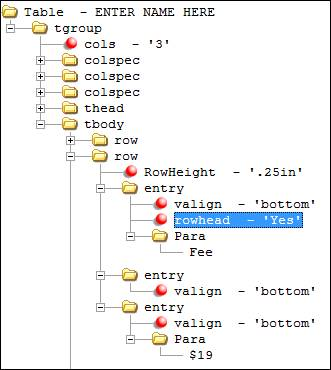
For tables with a row > entry element, a rowhead attribute can be authored to designate a given cell of the table as a row heading. A critical step toward creating an accessible data table is to designate row and/or column headings. Authoring the rowhead attribute creates a heading table tag (<TH>) for the row entry element when producing a Tagged PDF (see Creating a Tagged PDF).
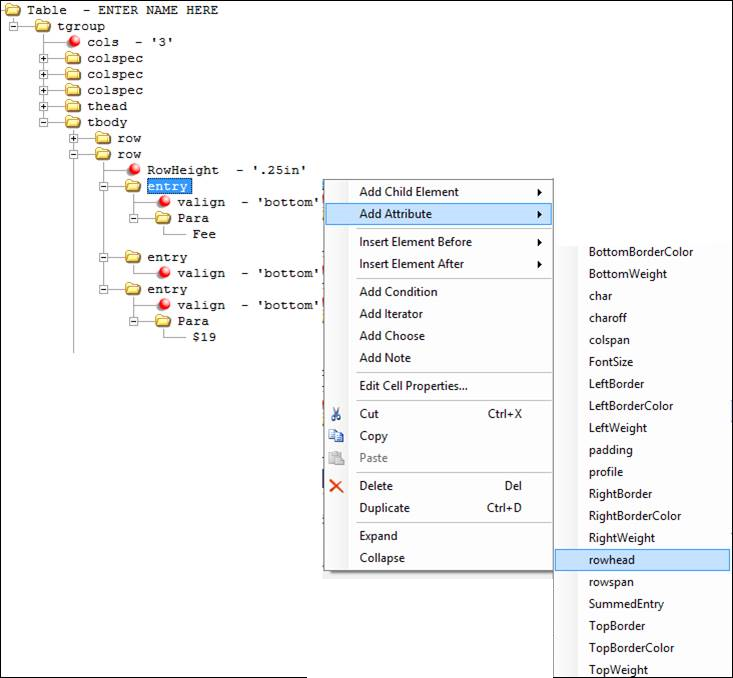
Right-click the entry element and select Add Attribute > rowhead from the shortcut menu.
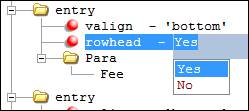
In the rowhead attribute, select either Yes or No to indicate if the entry is a row heading or not. The default value is Yes.
To modify the attribute value, select the attribute and double-click to select a different value. Removing the attribute or setting the attribute value to NO yields the same results.
Data cells of a table can then be associated to the appropriate row/column
headings to allow assistive technologies to navigate the table using table layer
keystrokes and read heading contents to provide context to the reader when navigating a
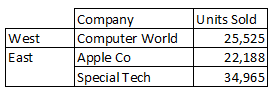
data table. In the example table below, a <TH> table tag will generate for
both the "West" and "East" cell tags if the rowhead attribute was authored for
these table entry elements.Figure 1. Sales by Region Example