Discrete Party
The proper use of Discrete Party elements inside Dynamic and Static Documents.
The Discrete Party element allows you to add information needed for print
fulfillment. The following are valid child elements for Dynamic and Static
documents.
- AccountNumber: Indicates the account to which the document is related
- AddressLine1: The recipients Street Address.
- AddressLine2: If needed, this can be used for additional information for street address, example: apartment number.
- BusinessName: The recipients business name.
- City: City of the recipient.
- CountryCode: Optional country code of the recipient. Used for proper sending of mailed items to foreign addresses.
- Email Address: The email address of the associated Discrete Party.
- ID: A unique id for the recipient.
- MailingMethod: Author will indicate any special mailing methods needed.
- Name: The recipients full name.
- State: State of the recipient.
- SuppressPaperDelivery: If present, electronic copies will be made for associated parties, but paper copies will not be generated. Values are Yes and No.
- ZipCode: Zip code for the recipient.
The following items are only applicable to Static documents and are used within
the same iterator to provide spouse information for the Discrete Party. The descriptions
not defined below are identical to the above elements, but refer only to the spouse information.
- SecondPartyCondition: Entering "include" indicates that the Second elements must be included with the iterator. Note that even if only one Second element has a value, all Second element values will be included in the ERL.
- SecondId
- SecondName
- SecondBusinessName
- SecondAddressLine1
- SecondAddressLine2
- SecondCity
- SecondState
- SecondZipCode
- SecondCountryCode
- SecondMailingMethod
- SecondAccountNumber
- SuppressPaperDelivery: If present, electronic copies will be made for associated parties, but paper copies will not be generated. Values are Yes and No.
Note:
- Only one of each element is supported. Multiples are not allowed.
- You are able to use 'Iterators'.
- Print fulfillment is only available through Wolters Kluwer.
Dynamic Documents Discrete Party
When working inside a Dynamic Document, you will be able to add the DiscreteParty element under the Instances element. Once added, you need to add the elements listed above. If there are any fields that are required when saving the document. it auto-populates the elements with the default values.
Static Document Discrete Party
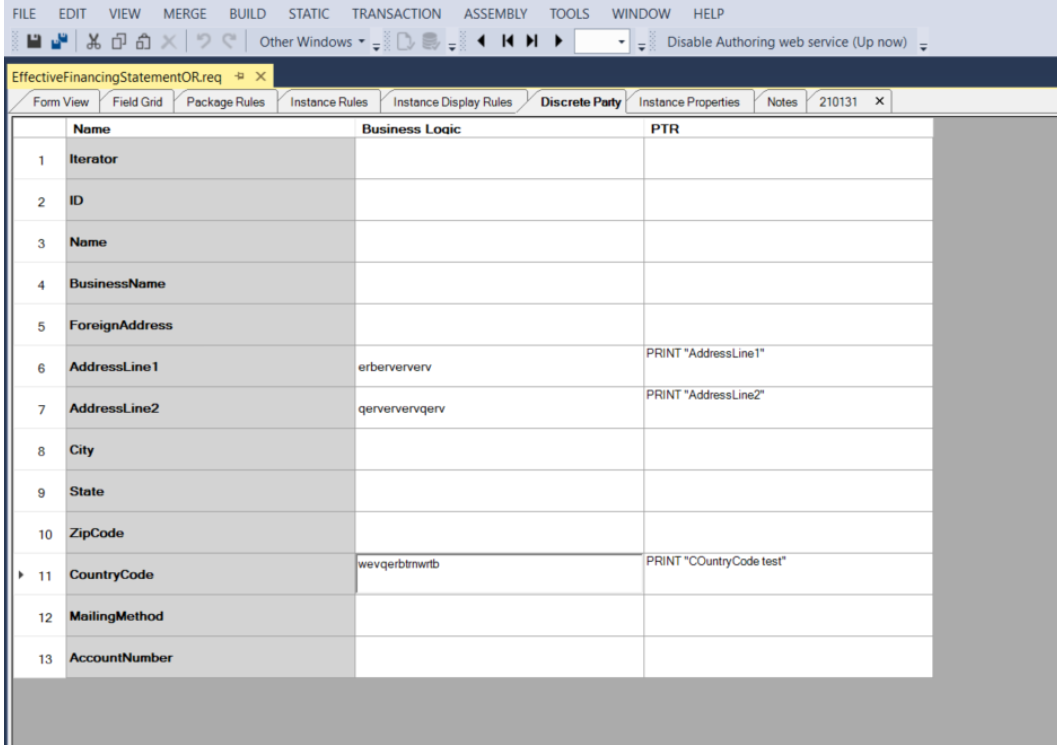
When working inside a Static Document you will have a tab called Discrete
Party (see below). Inside this tab you will have rows with the items listed above,
with a column next to it to fill out the business logic, then another column to fill
specific information on. When you save the document and there are any default
values, it auto-populate those values. The values that are entered use PTR logic
using intellisense.