Fee Schedule
When you select the Fee Schedule button, the Guaranty Fee Calculation screen is displayed.
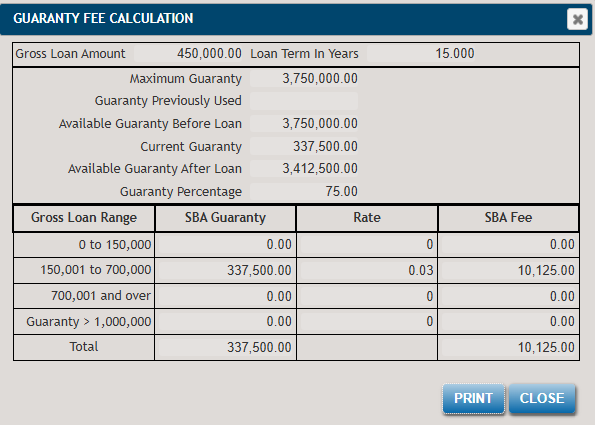
The following list describes the features within the Guaranty Fee Calculation screen.
- Gross Loan Amount
- Total proceeds amount.
- Loan Term in Years
- Loan term in years.
- Maximum Guaranty
- Dollar amount; see above image for Amount Guaranteed.
- Guaranty Previously Used
- Dollar amount.
- Guaranty Before Loan
- Equals the value of "Maximum Guaranty" minus the value of "Guaranty Previously Used". Defaults to $0.00.
- Current Guaranty
- Equals the value of "Total Proceeds" times the value of "Actual Guaranty" or "Guaranty before the loan", whichever is less. Defaults to $0.00.
- Guaranty After Loan
- Equals the value of "Guaranty Before Loan" minus the value of "Current Guaranty". Defaults to $0.00.
- Displays a Print dialog allowing you to print the Guaranty Fee Calculation.
- EXIT
- Closes the Guaranty Fee Calculation screen.
The following table describes the table's cells in the Guaranty Fee Calculation screen for a specific loan type.
| Gross Loan Range | SBA Guaranty | Rate | SBA Fee |
|---|---|---|---|
| 0-150,000 | Current Guaranty when loan amount is less than $150,000 | 0% | = Current Guaranty if less than $150,000 * |
| 150,001 to 700,000 | Current Guaranty amount when loan amount is between 150,001 and 700,000 | 3.0% | = Current Guaranty amount when between 150,001 and 700,000 * .03 |
| 700,001 to 1,000,000 | Current Guaranty amount when loan amount is between 700,001 and 1,000,000 | 3.5% | = Current Guaranty amount between 700,001 and 1,000,000 * .035 |
| Guaranty > 1,000,000 | Current Guaranty portion over 1,000,000 | 3.75% | = Current Guaranty portion over 1,000,000 * .0375 |
| Total | Populated from "Total SBA Guaranty" | Exact: | Exact sum of the above rows |
| Rounded Up: | Exact amount rounded up to nearest dollar (ex. 100.01 becomes 101) |
Depending on your selections within the program, you may see different loan ranges and guaranty fee rates. The program is updated regularly to reflect the latest range and rate changes specified by the SBA for various loan types.