Loan Payments
The Loan Payments section (below) is part of the Loan Information screen, which you can view when you select LOAN INFORMATION from the submenu.
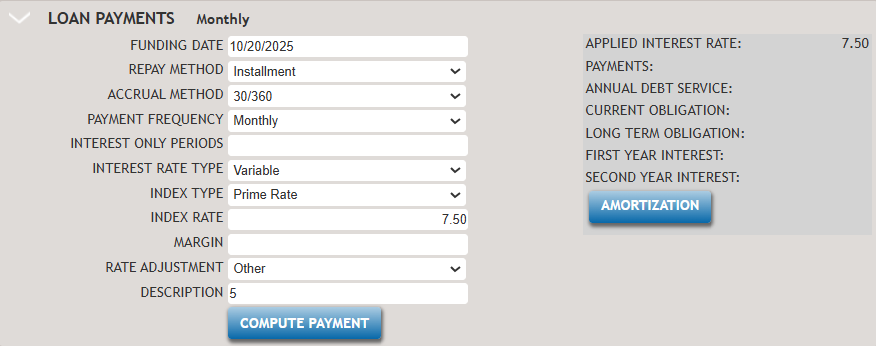
The following list describes the features within the Loan Payments section.
- Funding Date
- It initially defaults to the current date, but it can be edited. A fly-out calendar is also available for date entry.
- Repay Method
- You can select from the following options:
- Installment- An installment loan is a type of loan that
is repaid through a set number of equal periodic payments. This
method is the most common way to amortize an interest-bearing
loan. Each payment includes both the interest on the outstanding
balance and a portion that reduces the principal. As the loan
progresses and the outstanding balance decreases, the interest
portion of each payment also decreases, while the principal
portion increases. This change in distribution is shown in an
amortization schedule.Note:
Principal and Interest can also be referred to as Installment or Standard Amortization.
- Principal Reduction - In a Principal Reduction loan the
principal portion of the installments remains constant for the
whole term of the loan. Each payment consists of the interest on
the outstanding balance and a fixed fraction of the principal
i.e. the loan amount divided by the number of payments. As the
outstanding balance decreases, the interest portion of each
payment decreases. In combination with the fixed principal
portion, this results in higher payments at the start of the
loan, and lower payments towards the end of the loan. Compared
to interest only loans and standard loans, principal reduction
loans generate the lowest total interest charge over the term of
the loan.Note:Principal plus Interest can also be referred to as Principal Reduction or Fixed Principal. This is when interest payments and fixed principal payments are made at the same frequencies on the same payment date.
- Revolving - In a revolving loan, the borrower can take
multiple advances on the loan and may not have the whole loan
amount advanced at all times. Payment of interest only are
usually made and may also include payments of a percent of the
amount advanced.
Since we do not know how much will be outstanding on the loan at any given time, the TSoftPlus assumes that the whole of the proceeds is advanced in the beginning and calculates interest only payment (not accounting for any principal payment at the time) based on the whole proceeds and the entered accrual method, payment frequency, and interest rate information.
This option is only available for the SBA Express, Export Express, and CAPLine. This is not available for the other program types.Note:CAPLines only offer Revolving, they do not offer Installment or Principal Reduction.
The following items are different for Revolving:
- Payment - First month’s interest
- Annual Debt Service - Sum of all payments for first year. No change -- for "Revolving" it would be the sum of the first-year interest only payments.
- Current Obligation-Sum of all principal for the first year. Will always be zero for "Revolving" since there is no principal.
- Long Term Obligation - Loan balance remaining after first year. Will always be the full loan amount for "Revolving" since it's interest only until the final payment.
- First Year Interest - Sum of interest for first year. No change.
- Second Year Interest -Sum of interest for second year. No change.
- Installment- An installment loan is a type of loan that
is repaid through a set number of equal periodic payments. This
method is the most common way to amortize an interest-bearing
loan. Each payment includes both the interest on the outstanding
balance and a portion that reduces the principal. As the loan
progresses and the outstanding balance decreases, the interest
portion of each payment also decreases, while the principal
portion increases. This change in distribution is shown in an
amortization schedule.
- Accrual Method
- The Accrual Method is used by investors for counting the number of days in
each month and in the year. It is used in the calculation of the amount of
interest payable. Options include:
- 30/360
- Actual/360
- Actual/365
- Actual/Actual
- Payment Frequency
- The Payment Frequency is used to determine how often the payment will be
made. Options include:
- Monthly
- Quarterly
- Annually
- Interest Only Periods
-
Interest only payments is when the borrower agrees to pay the minimum monthly due (interest) for a limited number of periods.
Any amount of interest only periods can be entered, ranging from 0-999.
- Interest Rate Type
-
By SBA definition, a fixed rate loan is one that bears the same interest rate for the entire term of the loan. A variable rate loan is one where the interest charged, over the life of the loan, may vary in accordance with an index.
Options are:- Fixed - when Fixed Rate is selected, Index Type and Index Rate
fields appear.
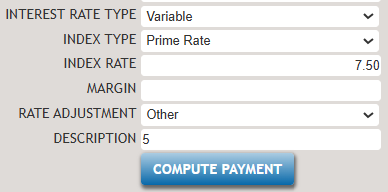
- IndexType-For Fixed Rate, the index type options available are SBA Fixed Base Rate and Prime Rate.
- Variable - when Variable Rate is selected, the following fields
appear.
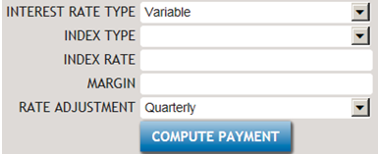
- Index Type -For Variable Rate, options are: Wall Street Journal Prime Rate, SBA Optional Peg Rate. For SBA Express and Export Express variable rate loans, an additional option of Other is available.
- IndexRate-Index Rate is also known as Base Rate.
- Margin - This is the amount over the Index Rate that will be used to establish the Interest Rate for each rate period. Margin is also known as the Spread.
- Rate Adjustment - Options offered are: Annually, Bi-monthly, Each Calendar Quarter, Each Calendar Year, Every Month, Every Year, Every N Years, Semi-annually, Quarterly and Monthly
- Fixed - when Fixed Rate is selected, Index Type and Index Rate
fields appear.
- Interest Rate
- Interest Rate only appears when the Interest Rate Type chosen is Fixed Rateand Index type is SBA Fixed Base Rate.
- COMPUTE PAYMENT
Interest only payments is when the borrower agrees to pay the minimum monthly due (interest) for a limited number of periods.
Any amount of interest only periods can be entered, ranging from 0-999.- Interest Rate Type
-
Select COMPUTE PAYMENT to compute the Payment, Annual Debt Service, Current Obligation, Long Term Obligation, First Year Interest and Second Year Interest based on the criteria previously entered.Note:
Anytime information changes in Use of Proceeds, Loan Term or items in the Loan Payment section, you will need to click COMPUTE PAYMENT again to recompute the values based on the new changes.
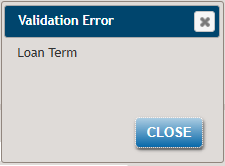
In order for a Payment to be computed, a Loan Term, Use of Proceeds and Interest Rate must be entered. If one of these variables is not entered, a Validation Error message is displayed detailing what items are missing, as shown in the following example.
- AMORTIZATION
-
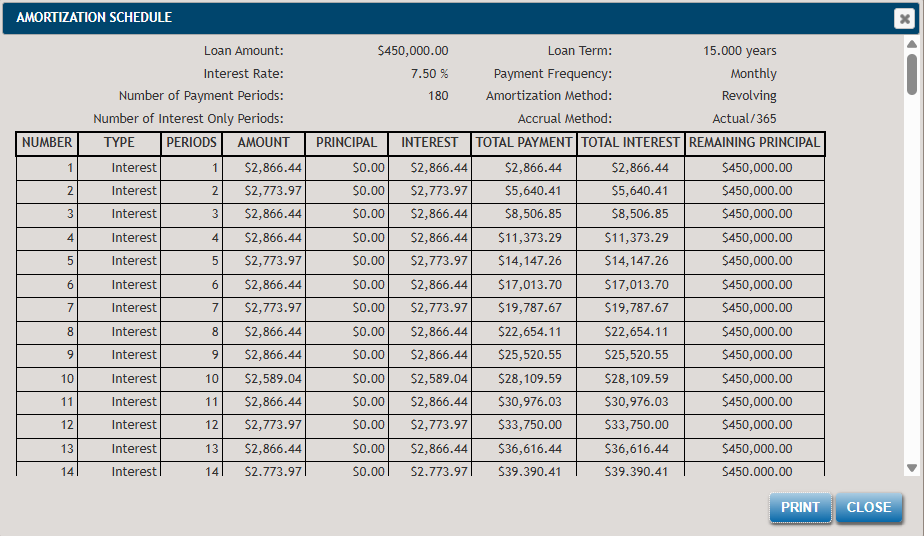
An amortization schedule is a table that shows the periodic payment, interest and principal requirements, and unpaid loan balance for each period of the life of a loan.
Select the AMORTIZATION button to view the Amortization Schedule window.