Import Loans Screen
The Import Loans feature allows you to import loan information into TSoftPlus. The import process utilizes an XML file, which includes Applicant and Principal information, as well as some loan information. This XML file must conform to our Import schema, which can be found on our Software Support website at: https://wolters-kluwer.my.site.com/ComplianceSolutionsSupport/s/. More details can be found in the Importing Loans topic in this guide.
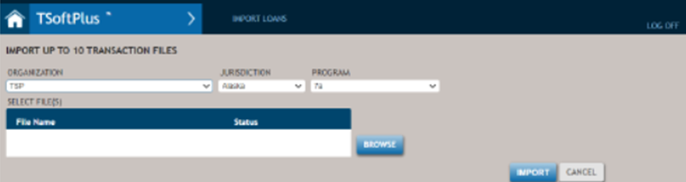
The following list describes the features of the Import FormMaster+ screen.
- Organization
- Allows you to select the organization to which the imported data will be associated. Only organizations that you are associated with are provided as options.
- Jurisdiction
- Allows you to select the state of jurisdiction for the imported data. This feature defaults to the address state for the selected Organization.
- Program
- Allows you to select the type of program for the imported data. Options include the policies that are configured for the selected Organization
- Selected File(s)
- Displays the files currently selected to import, as well as the status of the active import. Clicking the arrow expands and contracts the list to display or hide the files.