Working with Column and Row Headers
Data tables have column and row header cells that provide descriptive categories for the data that line up in each column and row. Table headers with correct mark up and associated data cells provide special meaning for assistive screen reader technologies. When a screen reader reads the content of a table data cell, it can read the table column or row header associated with that cell to provide better understanding and context of the data content.
The first step is to define data cells as either a column or row header in the .REQ file so the system can generate the correct table header mark up (the <TH> element) for all header cells. See the following sections for steps on how to identify column/row headings when authoring .REQ files.
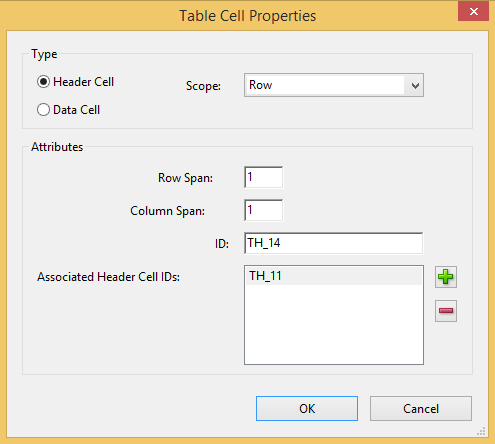
For cells identified as a table header element (<TH>), the Scope attribute value is set to column or row to identify whether the cell is a column header or a row header. The Scope attribute tells the screen readers that everything within a column that is associated to the header with scope="column" in that column, and that a cell with scope="row" is a header for all cells in that row. The scope of a table header applies to all cells over which that header spans (where rowspan or colspan attributes are authored).
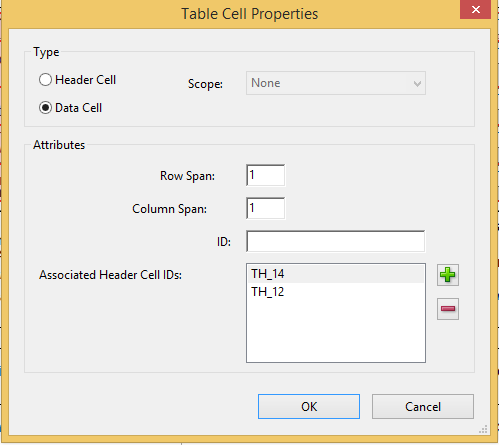
For more complex tables, associating header IDs to data cells is needed in addition to the Scope attribute so screen readers can understand the relationships. Table header elements (<TH>) are assigned a unique ID that is used to associate to cell contents to create a relationship. With this technique, data cell elements (<TD>) within the table (and table header TH cells where multiple levels of headings exist) are given a headers attribute with values that match each <TH> ID value the cell is associated to. If a given cell in the body of a data table is tagged as a row header, it is normally associated with the column header for its column. However, if the body contains a preceding cell in its column that also is row header and has content that is tagged with a heading level (<H2>, <H3>, etc.), the given cell is associated with the cell having both the row header and heading content; this association only takes place if the given cell does not itself have content tagged with a heading level which will then associate as normal to the column header for its column.
In cases where tables have multiple headers on columns and rows, it is necessary to provide this ID information so that screen readers can make sense of the data in the cells. For data tables with more than one column header, the logic to determine the headers for data cells uses the nearest column header with a column span that is equal to or less than that of the data cell. This technique of associating header IDs is used for all data tables in addition to setting the Scope attribute to provide the most information for assistive technologies.
The logic for creating the headers attribute and associating data cells to column/row header IDs treats each nested table as its own independent table. There is no headers attribute association constructed for cells and headers of a nested table to its preceding parent table.
The Table Cell Properties window provides a view of a given cell’s definition and attributes (using Adobe Acrobat Pro, this window is accessed via Touch Up Reading Order > Table Editor option).