Working with Alternate Text for Links and Email Addresses
Overview
Adding alternate text to hyperlinks and email addresses when generating
Tagged PDF documents is required for WCAG-compliant documents.
| Attribute | Usage |
|---|---|
| Hyperlink Attributes > Enter Alternate Text | The attribute is optional. It must be defined to enable screen reading of a link and its alternate text. If the attribute is not present, no alternate text is associated with the link. |
Adding alternate text to a link
In the Requirements Editor tool, locate the desired hyperlink to add alternate text.
Select the hyperlink, right-click, and select Wrap in Hyperlink tag.

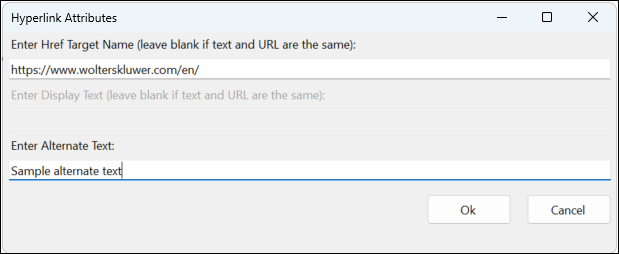
In the Hyperlink Attributes dialog, enter the desired alternate text in the Enter Alternate Text field.
In Adobe Acrobat
Upon generating the Tagged PDF, you can view alternate text for any link or email address by performing the following:
- In the Tag Tree, right-click on the appropriate link or email address and select Properties...
- From the Object Properties dialog, select the Tag tab. The text entered in the Enter Alternate text field above appears in the Alternate Text for Images field.