This help topic encompasses new features, enhancements, and defect corrections
covering all aspects of your hosted environment, including Expere Document Services.
Expere Engine, DocViewer, and Print Fulfillment (for Delivery users).
Note: Consolidated changelogs: Beginning in January 2023,
all products and components used with Hosted Expere are now available within a
single, consolidated set of changelogs. This means all release information for these
products will be available within a single help topic, and you will no longer need
to navigate to individual changelogs to locate relevant release information for each
product.
The changelog is still organized by month; within each release
section, we have grouped the individual changelog entries by product (feature,
enhancement, and defect correction). You can still find archived changelogs for
all previous releases within the Archive page.
We hope you find
the updated changelog format to be an improvement to your workflow, and we look
forward to continually providing you with pertinent release information while
increasing our user documentation efficiency.
Use of dynamic
URL's: the Hosted Expere Changelog uses a dynamic URL to display the
changelogs relevant to your version of the program, and as a result, the URL
changes from release to release. For best results, always access the Changelog
by clicking the hyperlink from the Expere Document Services landing page. If
your desire is to bookmark the changelogs, we recommend bookmarking the landing
page rather than the Changelog.
You may need to clear your cookies,
data, and browsing history. Some users may notice that changelogs do not
appear on this page. If that is the case, clear your cookies.
December
| Expere: SmartSign Plus®
integration |
|
|
Summary: as part of our ongoing work to integrate SmartSign
Plus® with Expere, the following functionality has been
implemented:
- Execution type passed (PBI 767370): The Execution type is now
passed to SmartSign Plus® from the Expere response file.
- Expere eSign is mapped to SmartSign Plus®
E-Sign
- Expere InkSign is mapped to SmartSign Plus®
Paper
- Expere NoSign is mapped to SmartSign Plus® View
Only
- Notary is currently out of scope
- groupName can be passed instead of groupID (PBI 797859): the
groupName can be passed when configuring the
Package API through the
EOriginalSSPlusGroup/GroupName XPath. See Expere Transaction XPaths for
eOriginal for more information.
- Transaction failure logic added in Destruction workflow (PBI
792555): a transaction will fail if the if the eNote has been
deposited in the eVault and
Txn/EOriginalDestructionType = 1 or 2. See
eNote Destruction Workflow
Outline.
- Ability to send eNote documents to SmartSign Plus ®
eVault added (PBI 768330): users may now send eNote
documents to the eVault if the eVault is enabled and if the
following data points must be present in the transaction:
/Txn/EOriginalVaultName containing the
preconfigured value setup within eOriginal SmartSign+./Txn/EOriginalTransactionTypeName
containing the preconfigured value setup within eOriginal
SmartSign+. See eNote Workflow Outline
and Expere Transaction XPaths for
eOriginal for more information.
- Radio Buttons naming convention updated for Dynamic Documents
(PBI 788858): the radio button naming convention has been updated to
consist of the following changes:
- The "tagName" value now contains the REQ-authored "GroupID"
value
- The "label" value now contains the REQ-authored "FieldName"
value
- The "required" value has been removed
For
example: SS+TAG{"type": "RADIO_BUTTON", "tagName": "GroupID", "label":"FieldName", "role": {"type": "Borrower", "num": 1}}
See
PDF Form Field Name
Guidelines for FillableCheckbox for more information.
- Triggering SmartSign Plus ® acroform naming
convention (PBI 789659):
/Txn/EOriginalSSPlusFieldSupport is used with
the ESignatureAndFieldSupport ancillary output type
to trigger the SmartSign Plus® naming conventions in the
generated documents and Expere response file.
|
| WCAG: Expere Engine enhanced to support embedded
and Tagged .PDF's - December |
- Type: Enhancement
- Reference: PBI 797504, 791476, 791351
- Documentation Impacts: See below for any pertinent
links.
|
|
Summary: As a part of our continued effort to create WCAG compatible
documents we have updated the Expere Engine to now support the generation of
Tagged .PDF documents. We will continue making enhancements to the Expere
Engine for Tagged .PDF support, so check back for items being identified and
corrected. As part of our continued work to support Tagged .PDF's, we have
implemented enhancements to resolve the following WCAG-related changes in
the December release: |
| Engine: Watermark processing flow updated for
upcoming iText upgrade |
- Type: Enhancement
- Reference: PBI 762647
|
|
Summary: Internal analysis has determined that an upcoming iText
upgrade would impact the way watermarks function within the Expere Engine.
As a result, watermark processing has been updated within Expere to
accommodate an upcoming iText upgrade. Note: This
upgrade will not affect integrations or generated documents.
|
| DocViewer: Track Changes enhancement |
|
Summary: DocViewer has been enhanced so that changes can be saved and
accessed during a later session. Users may now pass in a
changedDataPoints flag during a
BeginSession, so that additional modifications may be
applied to a new session. Note: The record of changes
appears after submitting documents or ending a current session on the
End Session page within the Changed Transaction Data
section. Users can continue to apply these same changes by selecting the
Transfer changes to new session button on the End
Session page then submitting a
changedDataPoints flag during subsequent sessions.
|
DocViewer: PKGPKT.PackageName behavior enhanced
with BeginSession |
- Type: Defect
- Reference: PBI 800848
|
Issue: Users reported 404 issues when attempting to launch a
BeginSession using an EZ Config PKGPKT.PackageName
content URI. Internal analysis determined that the alias was not being
passed when retrieving the package from EZ Config Packages and Packets when
using a BeginSession. |
Solution: This behavior has been enhanced so that a DocViewer
BeginSession can be started using
PKGPKT.PackageName. |
November
Note: A supplemental November Customer Test (CT) release was
deployed on November 13th that promoted changes made in PBI 799797.
| Generate-Synchronous API issue resolved
|
- Type: Defect
- Reference: PBI 799797
|
|
Issue: A user reported that Generate-Synchronous API calls failed
intermittently in our Customer Test (CT) enviroment for all packages.
Internal analysis determined that an internal component was attempting to
return certain packets without document instances, resulting in these
failures. |
|
Solution: This issue has been resolved so that failure no longer
occur when using a Generate-Synchronous API call. |
Note: The items below were deployed as part of the original
November CT release.
| Expere: SmartSign Plus®
integration |
|
|
Summary: as part of our ongoing work to integrate SmartSign
Plus® with Expere, the following functionality has been
implemented:
- New mapping added to eoCreateSmartDoc schema (PBI 794550):
the
eoCreateSmartDoc template has been updated to
include the mapping of
/Txn/CollateralItems/Collateral/MERSOrOtherNoteHolderRegistryOperatorDesc
to the eO schema registryOperator; see eOriginal data points used for a
fixed or ARM loan for more information.
- Delivery and Vaulting setup in SmartSign Plus®
(PBI 789002): users may now utilize the
/Txn/EOriginalSSPlusDeliveryType XPath to
upload documents for delivery and vaulting in SmartSign
Plus®. See Expere Transaction XPaths for
eOriginal for more information.
- Login logic enhanced (PBI 788751): additional logic has been
added to the eOriginal > SmartSign+ login portion of the workflow
that determines whether to pass or fail a transaction if a merged
PDF is requested as an ancillary output. Refer to the SmartSign
Plus® Feature Guide for more information.
Note:
- If the transaction includes an XPath of
/Txn/EOriginalSSPlusFieldSupport =
                                                1
and the request contains a Merged PDF
ancillary output, the transaction should fail.
- If the transaction includes an XPath of
/Txn/EOriginalSSPlusFieldSupport =
                                                0
and the request contains a Merged PDF
ancillary output, the transaction will be considered
valid.
- Package Name updated (PBI 789671): In order for users to
customize their package name, they can now pass
Txn/EOriginalSSPlusPackageNameDesc, which is a
data string of data that is included in the SmartSignPlus package
name in conjunction with the package name from the Expere response.
This data could include, but is not limited to: Loan Identifier,
Borrower Name, Line of Business, etc.
|
| WCAG: Expere Engine enhanced to support embedded
and Tagged .PDF's - November |
- Type: Enhancement
- Reference: PBI 792908, 693326, 791635, 791882, 772123
- Documentation Impacts: See below for any pertinent
links.
|
Summary: As a part of our continued effort to create WCAG compatible
documents we have updated the Expere Engine to now support the generation of
Tagged .PDF documents. We will continue making enhancements to the Expere
Engine for Tagged .PDF support, so check back for items being identified and
corrected. As part of our continued work to support Tagged .PDF's, we have
implemented enhancements to resolve the following WCAG-related changes in
the November release:
- Path elements marked as Artifacts (PBI 792908): It was
identified that Path elements are required to be marked as
artifacts. Path elements are underlines that appear in the document
(for example: lines that appeared under headings and in the
tagline). This behavior has been enhanced so that these path
elements are now tagged as artifacts.
- LinkText tagging behavior enhanced when LinkReference and
LinkText appear on separate pages (PBI 693326): It was
reported for some Tagged PDF documents where a superscript
(
LinkReference in the native .REQ file) and the
corresponding linked text (Linktext in the native
.REQ file) were present on separate pages, the <Span> tag for the
superscript was incorrect in the tag tree.This behavior has been
resolved so when the superscript and corresponding linked text
appear on separate pages, the <Span> tag appears with the
appropriate linked text.
- <Span> tag contained incorrect information in tag tree
(PBI 791635): it was reported that certain <Span> tags in the
Adobe Acrobat tag tree were incorrectly placed in locations that
were reserved for superscripts for linked text and the corresponding
linked text. This behavior has been enhanced so that the superscript
used for linked text only contains the corresponding linked text.
- Tag tree behavior enhanced for fillable fields (PBI 791882):
It was reported that Tagged PDF’s tag tree order is incorrect when
including a value for a field that was authored as a fillable field
but for the given scenario, the Tagged PDF does not include fillable
fields. For example, an REQ file is authored using a common file for
notaries, but the REQ itself is not an eSignable document. In this
scenario, some of the values in the signature and notary sections
were out of order in the tag tree.
This behavior has been
addressed so that the tag tree displays values in the correct
order.
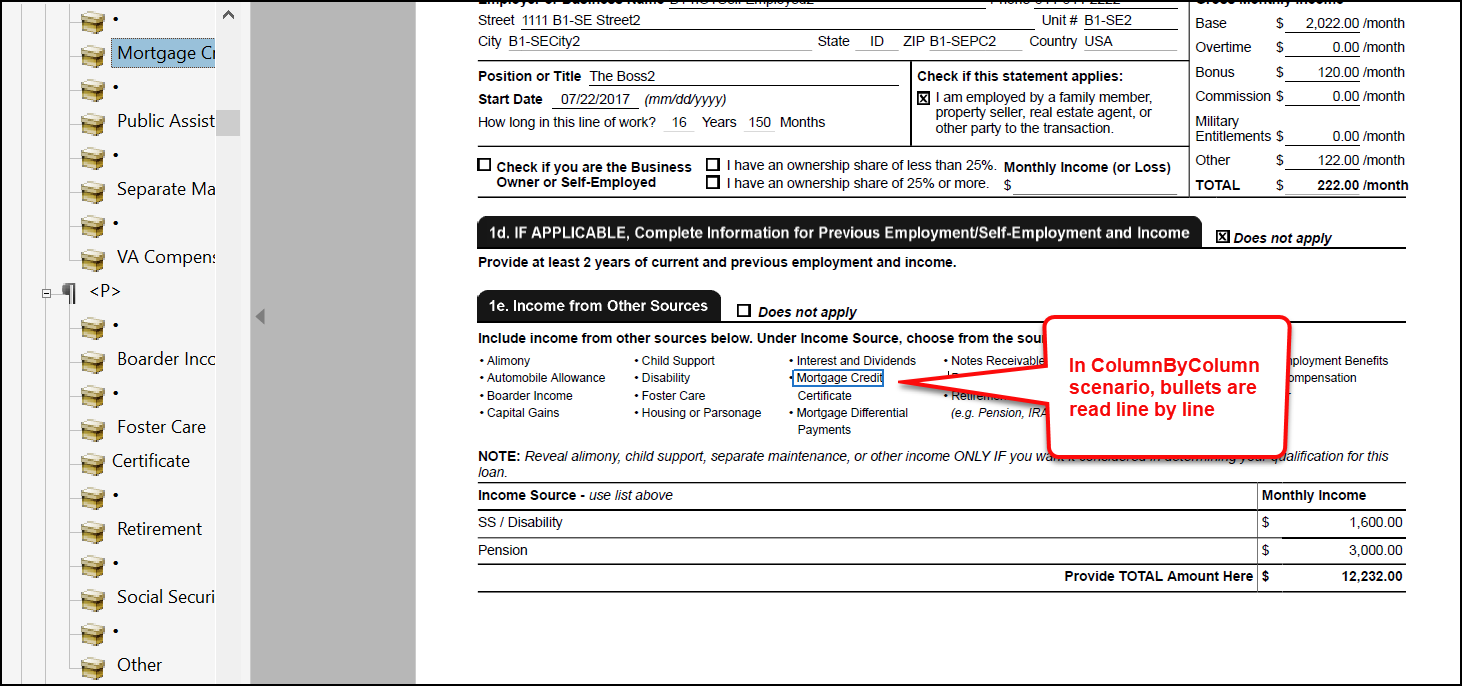
- Tag tree behavior enhanced with tables embedded into bulleted
lists (unsequenced lists) (PBI 772123): it was reported that
the tag tree in Adobe Acrobat was incorrect with respect to the
following issues:
- When a table was present within a sequenced list that
contained a heading with a superscript. That tag tree did
not correctly tag the superscript.
- When multiple unsequenced lists were present in the same
row of a table. The separate unsquenced lists were
being placed into the same list in the tag tree.
The Engine has been updated to addressed the above scenarios
so that the tag tree flows through the document in the correct
order.
|
| Engine: fillable date field behavior identified
in Embedded PDF; additional logging functionality added |
- Type: Enhancement
- Reference: PBI 795571
- Documentation Impacts: ADA Implementation Guide > Troubleshooting
|
|
Summary: During internal testing for a separate work item, it was
identified that one of the date fields did not generate as a fillable field
when eSignatureAndFieldSupport was specified for a specific Embedded PDF REQ
file. Analysis revealed that the specific Embedded PDF REQ file required an
additional content update, and thus, no coding changes were implemented.
However, additional logging functionality was added in order to identify
this issue if it occurs by providing a list of fields that need to be
removed and re-added so the document generates with the correct fillable
fields. |
| Expere: Engine updated to use Amazon Corretto
Java 17 for use with WildFly |
|
|
Summary: The Expere Engine has been updated to use Amazon Coretto
Java 17 when using Wildfly. |
| Expere Document Services: response updated to
return SmartDoc element |
- Type: Enhancement
- Reference: PBI 791590
- User Impacts: Users must update their WSDL to accept this
change.
|
Summary: As part of our overall work to support a new
SmartDoc element in the Expere Document Services
(DocServices) WSDL, the Expere response will now return this new
SmartDoc element within the
DocDescriptor container if specified in the transaction
request. For more information, see Expere Document Services Web Services
Guide > DocDescriptor. |
| Document Services: response updated to return
SmartDoc element |
- Type: Enhancement
- Reference: PBI 791618
- User Impacts: Users must update their WSDL to accept this
change.
|
Summary: As part of our overall work to support a new
SmartDoc element for use with the
DocumentServices REST API, the Expere response will now return
this new SmartDoc element within the
DocDescriptor schema if specified in the transaction
request. For more information, see Expere Document Services Web Services
Guide > Document Services REST API > DocDescriptor. |
| DGS Tool Suite: SmartSign Web credentials issue
resolved |
- Type: Defect
- Reference: PBI 793453
|
|
Issue: It was reported that only the SmartSign Web MERS eVault
Credentials and Non-MERS eVault Credentials sections groups
were available for data entry in the Document Generation Services Tool Suite
> SETUP page. The SmartSign Web Test on Demand and
SmartSign Web Preview on Demand sections only displayed after
data was entered into the former groups, saved, and SETUP page
reopened for the same account. |
|
Solution: This behavior has been addressed; all SmartSign Web
sections are now available for a given account when accessing the
SETUP page. |
| DocViewer: new Support Required Data parameter
added |
|
Summary: DocViewer has been enhanced to determine if required
documents should be available for viewing in the Document Drawer.
This functionality is enabled when passing in a
SupportRequiredData=yes parameter through
BeginSessionRequest. When this parameter is passed in
the request, only those documents that are considered "Required" are
available for viewing in the Document Drawer. |
| Expere / eOriginal: schema 14.5 schema update to
include new attribute values XPath (SmartSign Plus® and SmartSign
Web) |
|
|
Summary: The eOriginal schema has been updated to version 14.5 and
consists of the following attribute updates to
/Txn/FHAAmendedGSEInd:
- If
/Txn/FHAAmendedGSEInd=0 or is blank or missing,
<xs:attribute name="fhaAmended" is set to
"false"
- If
/Txn/FHAAmendedGSEInd=1,
<xs:attribute name="fhaAmended" is set to
"true".
|
| SmartSign Web: new mapping added to
eoCreateSmartDoc schema |
|
|
Summary: The eoCreateSmartDoc template has been
updated to include the mapping of
/Txn/CollateralItems/Collateral/MERSOrOtherNoteHolderRegistryOperatorDesc
to the eO schema registryOperator; see eOriginal data points used for a fixed or
ARM loan for more information. |
Note: A supplemental October CT release was
deployed on October 16th that promoted changes made in PBI
793159.
| Engine: Adobe Acrobat Bookmark display in Custom
tab enhanced |
|
|
|
Issue: It was reported that when using an authored packet with
specified print order and multiple copies of the same document resulted in
an Expere transaction failing. It was discovered during researching this
issue that the work done for PBI 788680 did not accommodate this
scenario; the value of which is accessible in the Name column in
Adobe Acrobat > Document Properties > Custom tab. |
|
Solution: This behavior has been addressed; the Expere Engine has
been updated to support an authored packet with specified print order and
multiple copies of the same document in in the Name column in Adobe
Acrobat > Document Properties > Custom tab. Additionally, we
have implemented a scheduled update to use the InstanceDisplayName
value authored in the native .REQ file in the Name column for a
merged PDF document, noted as the File Name in Document
Properties > Initial View tab > Show dropdown.
|
Note: The items below were deployed as part of the
original October CT release.
| Expere: SmartSign Plus® integration -
eNote Destruction workflow added |
|
|
|
Summary: the ability to destruct an eNote has been added as part of
our SmartSign Plus® integration development. |
| WCAG: Expere Engine enhanced to support embedded
and Tagged .PDF's - October |
- Type: Enhancement
- Reference: PBI 792055, 786394, 787821, 787784, 788477
- Documentation Impacts: See below for any pertinent
links.
|
Summary: As a part of our continued effort to create WCAG compatible
documents we have updated the Expere Engine to now support the generation of
Tagged .PDF documents. We will continue making enhancements to the Expere
Engine for Tagged .PDF support, so check back for items being identified and
corrected. As part of our continued work to support Tagged .PDF's, we have
implemented enhancements to resolve the following WCAG-related changes in
the October release:
- Embedded PDF field behavior enhanced (PBI 792055): It was
reported that a specific Embedded PDF did not generated properly.
After internal analysis, it was determined that PDF tagging updates
were required to ensure each field of the imported PDF is tagged as
individual form fields. See the ADA Implementation Guide >
Standard PDF and Tagged PDF - important information > Field
Tagging Requirement: one field per <Form> element for
more information. Enhancements were also made to the Expere Engine
to ensure all non-fillable fields of the imported PDF are
flattened.
- Accessibility validated with fillable fields and esignatures for
non-signable documents (PBI 786394): internal analysis was
conducted to verify document tag tree order and accessibility
checker for tagged PDF documents when including fillable fields and
specific eSignature settings. Enhancements to ensure the
accessibility checker passes were made for the following scenarios:
- REQ document containing fillable fields, eSignatures are
enabled, and an eSignatureAndFieldSupport ancillary output
is not passed in the request.
- REQ document containing fillable fields, eSignatures are not
enabled, and an eSignatureAndFieldSupport ancillary output
is not passed in the request.
Note: The scenarios listed above
reference eSignatures being enabled or disabled, the
functionality of which is conducted within the Requirements
Editor application > Properties dialog > eSignature
Document (checkbox is checked or unchecked).
- Embedded PDF not producing the instance display name for standard
PDF (PBI 787821): it was reported when generating a standard
PDF from a specific Embedded PDF REQ file, the Document Title
value (found in Adobe Acrobat > Document Properties >
Initial View > Show dropdown) was specified rather
than the File Name value. Expere has been enhance to specify
the File Name value when generating a standard PDF from the
specific Embedded PDF REQ file.
- Embedded PDF displaying fillable fields in tagline for standard
PDF (PBI 787784): it was reported that when generating a
standard PDF from a specific Embedded PDF REQ file, the tagline
fields appeared as fillable fields. The expected behavior is that in
the generated PDF document, the tagline fields should appear with
populated information supplied in the Expere transaction request.
This behavior has been enhanced so that a standard PDF document
generated from the specific Embedded PDF REQ file now displays
flattened data in the tagline fields.
- Standard PDF / Tagged PDF known differences documented (PBI
788477): the ADA implementation Guide has been updated to include
known differences between FOP 2.8 standard PDF and Tagged PDF. For a
comprehensive list, click here:
Note: This online help topic will be updated
periodically as differences are identified.
|
| Expere: option to specify Barcode Height for
transaction barcodes - additional updates |
|
|
Summary: The Expere Engine has been enhanced to support a specified
transaction barcode height through the use of a new "Height" element in the
Requirements Editor. This new element value is modified in the Requirements
Editor and can be used with Barcode PDF 417. Note: A
previous release included functionality for Barcode Inter 25, Barcode 3
of 9, and Barcode 128. QR Barcode is not supported with Transaction
Barcodes. Note: If changing the barcode
height, it is recommended to test with scanning software to ensure
readability.
|
| Engine: Apache FOP version in Adobe Acrobat
displayed for merged PDF documents |
|
|
Summary: Per user request, we have enhanced the Expere Engine to
populate an Adobe Acrobat PDF properties with the Apache FOP version that
was used to generate the PDF in a merged PDF document. The PDF
Producer field accessible through Adobe Acrobat > Document
Properties dialog box > Description tab displays the FOP
version for individual PDF documents, for merged PDF documents, it displays
the iText version. Users can now view the FOP version used for merged PDF
documents in the Document Properties dialog box > Custom
tab; the FOP version will appear under the Value column for each
document. |
| Engine: Merging with duplicate feename behavior
Additional enhancements |
|
Summary: We previously enhanced the Engine to support duplicate
account-level fees (see Expere: Merging with duplicate feename behavior
enhanced). This behavior has been augmented to support the
following:
- Multiple accounts and their associated products (PBI 781761):
if a minimum balance fee with the same
/NameDesc
and / or account fees with the same /FeeName are
present in a policy, multiple accounts and their associated products
(one product per account) now merge duplicate fees in the order
specified in the policy.
- When XPath data exists in Expere transaction (PBI 784661):
Expere has been enhanced so that when data exists for the Xpath's
below in the Expere transaction but also exists within incoming EZ
Config data, the Expere transaction data will be present in the
merged transaction and / or generated PDF.
/Txn/Deposit/Accounts/Account/Fees//Txn/Deposit/Accounts/Account/MinimumBalanceFees/
|
| Expere: special characters supported in barcode
value when applied by a mask in %docname% |
- Type: Enhancement
- Reference: PBI 740517
|
|
Summary: It was reported that document generation fails when an
ancillary barcode value utilizing %docname% (instance display name) contains
a DTA with the "$1,234.50" output format. Analysis determined that special
characters (i.e. “$”) being applied by the output format (i.e. “$1,234.50”)
was not being handled properly. Expere has been enhanced so that ancillary
barcodes containing special characters (i.e "$") being applied by an output
format (i.e. “$1,234.50”) result in successful document generation with the
appropriate barcode value. |
| Expere Document Services: WSDL updated to support
SmartDoc element |
- Type: Enhancement
- Reference: PBI 791593
- User Impacts: Users must update their WSDL to accept this
change.
|
Summary: The Expere Document Services (DocServices) WSDL has
been updated to include a new SmartDoc element within the
DocDescriptor container, which provides additional
definition for the requested document; the SmartDoc element
will contain a string of alphanumeric characters used to incidate the
SmartDoc document version. The value should be "1.02." For more information,
see Expere Document Services Web Services
Guide > DocDescriptor. |
| Expere Document Services: CASS functionality
removed from DocServices WSDL |
|
|
Summary: Previously, we informed you in the September changelog that
we deprecating the CASS address feature used in a
SelectGenerateAndDeliver request. The CASS address
feature used in a SelectGenerateAndDeliver request will no
longer be available for Hosted Expere users in the October release.
Additionally, Fulfillment Manager users can consult the user guide for more information on this change.
|
| Expere Document Services: Callback IP addresses
updated for CT environment |
|
|
Summary: The Expere Document Services Callback IP addresses have been
updated to the following:
- 198.147.32.0/24
- goes from 198.147.32.0 to 198.147.32.255
- 198.147.34.0/24
- goes from 198.147.34.0 to 198.147.34.255
|
| Expere Document Services: internal changes
implemented for transaction errors |
- Type: Enhancement
- Reference: PBI 791403
|
|
Summary: Expere Document Services has been enhanced to address an
issue where SelectGenerateAndDeliver calls were sporadically failing.
|
| DocViewer: scrolling behavior updated |
- Type: Enhancement
- Reference: PBI 772637
|
|
Summary: When clicking on the “Additional Appointment of Agents”
field in the Data Entry drawer (left-hand pane), it did not advance
to the corresponding location in the Document Display (body of the
document in DocViewer). This behavior has been modified so that DocViewer
now scrolls correctly to the correct location in the document. |
Note: A supplemental September CT and
Production release was deployed on September 27th that promoted changes made in
PBI's 792090 and 788826.
| Expere Document Services:
ApplyPoliciesAndReturnTransaction merge behavior enhanced |
- Type: Defect
- Reference: PBI 792090
|
Issue:A user reported that data submitted through the
ApplyPoliciesAndReturnTransaction method did not merge
with Expere transaction data. Note: This behavior
occurred in the Customer Test (CT) environment only. |
Solution: This behavior has been addressed; data submitted
through the ApplyPoliciesAndReturnTransaction method now
merges successfully with Expere transaction data |
| Expere / eOriginal: schema updated to include new
TXN (SmartSign Plus® and SmartSign "Web") |
|
Summary: The eOriginal schema has been updated to version 14.4 and
consists of the following change:
Txn/OrgExemptInd - optional field
- If "0", or if the value is missing or blank: element
excluded
- If "1": if true, the financial organization is exempt from
state licensing requirements. Licensing requirements are
different by state, so all organizations, including
federally regulated organizations, need to review and
understand the requirements of the states they operate in to
validate whether they are exempt from state
requirements.
|
Note: The items below were deployed as part of the
original September CT and Production release.
| Expere / eOriginal: schema updated to version
14.4 (SmartSign Plus® and SmartSign "Web") |
- Type: Enhancement
- Reference: PBI 757338
|
|
Summary: The eOriginal schema has been updated to version 14.4.
Follow up PBI to add new TXN data point completed in above PBI
788826. |
| Expere: new Augment Transaction functionality
supported |
|
Summary: The Augment Transaction file provides the ability to author
logic for setting an XPath value based on the transaction xml and have the
transaction xml updated (augmented) prior to autoselection and document
generation. For example: the value of
/Txn/Notes/Note/NoteCommercialsStandardType can be set
in the AugmentTransaction file based on other XPaths in the transaction xml.
Then /Txn/Notes/Note/NoteCommercialsStandardType’s value
can be referenced in PTRs verses repeating the logic defined in the Augment
Transaction file in the numerous PTRs throughout the content. Expere can
update, or "augment" an incoming request if the transaction xml contains an
/Txn/AugmentTransactionInd = true element and value.
When this value is provided, Expere resolves the XPath(s) in the related
line of business Augment Transaction file based on the transaction XML and
sets the XPath(s) in the transaction. Remaining autoselection logic is
employed and documents are generated. This functionality can be utilized
with content packages or EZ Config Packages and Packets’ Packages.
- (PBI 775874) From an application standpoint, DocViewer has been
updated to support this new Augment Transaction functionality using
the logic outlined above. There is no setup required by the
user.
Note: In order to utilize this feature, users
must consume an updated base content package that supports this feature.
The content used with this feature must have been built with version
23.3 or newer. |
| Expere: SmartSign Plus®
integration |
|
|
Summary: the following functionality has been implemented:
- eNote returned in SOAP Response (PBI 779003): the eNote is
now returned in the Expere response file.
- SmartSign Plus® Feature Guide available for
use (PBI 786120) The SmartSign Plus®
Feature Guide is now available for viewing here.
|
| Expere: SmartSignTM Plus integration:
Acroform field naming established and updated; guidelines for Notary
signatures |
|
|
|
Summary: As part of the Expere integration with
SmartSignTM Plus, the Engine has been updated to incorporate
a new internal service that names the acroform fields as a post-processing
step to align with that of SmartSignTM Plus. |
| OPPSA references removed from Hosted Expere and
Document Generation Services applications; user documentation updated for
Expere On-Prem, Hosted Expere, and Document Generation Services |
- Type: Feature
- Reference: Feature PBI 676799; 764447, 781548, 778581, 781549
- Documentation Impacts:
|
Summary: We have removed references to OPPSA-related components in
our user documentation. Actual OPPSA references in our software code,
including the WSDL, will be removed from our Expere On-Prem, Hosted Expere,
and Document Generation Services products in the following releases:
- Expere On-Prem: a future release
- Hosted Expere, Document Service, and Document Generation Services:
September 2023
Note: Expere has not supported OPPSA since Fall
2021. |
| WCAG: Expere Engine enhanced to support embedded
and Tagged .PDF's - September |
- Type: Enhancement
- Reference: PBI 766405, 774614
- Documentation Impacts: See below for any pertinent
links.
|
Summary: As a part of our continued effort to create WCAG compatible
documents we have updated the Expere Engine to now support the generation of
Tagged .PDF documents. We will continue making enhancements to the Expere
Engine for Tagged .PDF support, so check back for items being identified and
corrected. As part of our continued work to support Tagged .PDF's, we have
implemented enhancements to resolve the following WCAG-related changes in
the September release:
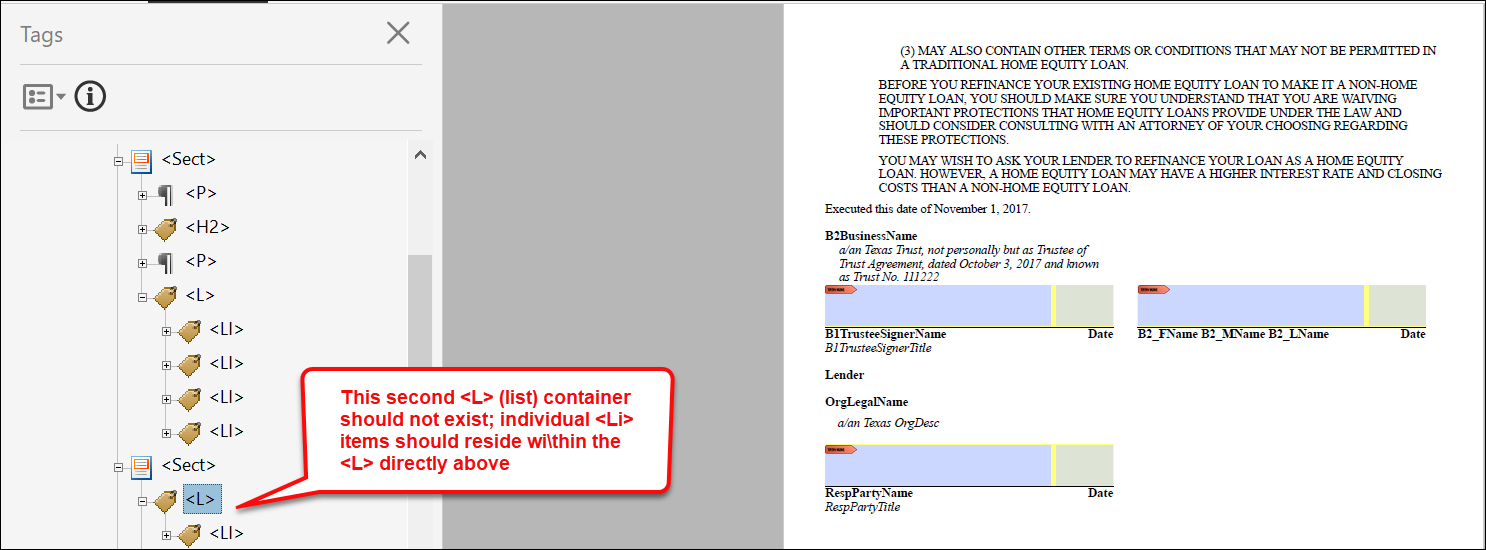
- Tag Tree incorrectly displays lists across multiple pages for
dynamic documents (PBI 766405): It was reported that a list
that was split on a Tagged PDF would appear in two separate
containers within the Adobe Acrobat Tag Tree. The expected behavior
is that regardless of whether or not a list is split across pages
within a Tagged PDF, it should exist within one container in the Tag
Tree. As a result, this behavior has been enhanced so that lists
split across pages appear within one container in the tag tree
within a Tagged PDF.
- Table-related MergedPDF accessibility issues with EmbeddedPDF
document (PBI 774614) It was reported that Table-related
accessibility issues were present with Embedded PDF's when
generating a Tagged PDF with the MergedPDF option. The
Expere engine has been enhanced to support tables in Merged PDFs so
it does not have Table Regularity failures in Adobe Acrobat
Accessibility Check.
|
| Expere: Dynamic documents enhanced when using
radio buttons / GroupIDs with a merged PDF |
|
Summary: When generating Dynamic documents into a merged PDF
containing radio buttons (mutually exclusive checkboxes), fields were not
named uniquely across the individual documents within the merged PDF. This
behavior has been enhanced for Dynamic documents using radio buttons with
GroupIDs. As a result, Expere now sets the GroupIDs uniquely between
different document instances when a PdfMerge or MergeCopyPDF
ancillary output is specified by appending "_#" to existing field names
(UniqueName _#; for example:
"OfferGroup_1"). |
| Expere: option to specify Barcode Height added
for transaction barcodes |
|
Summary: The Expere Engine has been enhanced to support a specified
transaction barcode height through the use of a new "Height" element in the
Requirements Editor. This new element value is modified in the Requirements
Editor and can be used with the following barcode types:
- Barcode Inter 25
- Barcode 3 of 9
- Barcode 128
|
| Expere: Electronic signings enhanced when Signer
Name is unknown - all party types |
- Type: Enhancement
- Reference: PBI 783614
|
Summary: The Expere Engine has been updated to set the value for
<SignatureText> to an underscore ('_') in the Expere
response when the party type does not have a Name value in the
transaction request (and is not determined until the actual signing
process). Previously, PBI
775499 was completed to set this value for notary and witness
party types. |
| Expere: CASS address functionality deprecated
from WSDL |
- Type: Enhancement
- Reference: PBI 781543
|
Summary: The CASS address feature used in a
SelectGenerateAndDeliver request will no longer be
available for Hosted Expere users in the October release.
- WSDL Deprecation
- <xs:element minOccurs="1" maxOccurs="1" name="CASS"
type="xs:boolean"/>
- Code being removed for the Cass address lookup
- classes
- services
- types
- flags
- config elements (clients, service endpoints, etc)
- Toolsuite UI is updated and the Cass check box is not
available
|
| DocViewer: Supports Mortgage content with
additional customer organizations |
- Type: Enhancement
- Reference: PBI 788486
|
|
Summary: DocViewer supports using Mortgage content and using two
different customer organizations with the same base content. |
| Expere: support added for custom Embedded PDF
documents when no desire to produce a Tagged PDF output |
- Type: Defect
- Reference: PBI 786325
|
|
Issue: It was reported if an Embedded PDF was not completely tagged
(fillable fields not tagged) that generating a standard PDF resulted in an
error. |
|
Solution: The Expere Engine was updated to generated standard PDF's
when an Embedded PDF document is not completely tagged. Note: While these Embedded PDF documents will generate
as a Tagged PDF, they will not comply with WCAG
standards. |
August
| Expere: SmartSign Plus®
integration |
|
|
Summary: the following functionality has been implemented:
- Document addition (PBI 759530): document(s) can be added to a
package.
- Package finalization (PBI 767343): the document package is
released to participants.
- eNote returned in SOAP response (PBI 767344): eNote is
returned in the SOAP response.
Additionally, the SmartSign+ Feature Guide is now available for
consumption here. |
| WCAG 2.0: Expere Engine enhanced to support
embedded and Tagged .PDF's - August |
- Type: Enhancement
- Reference: PBI 771419, 762960, 771116, 709726
- Documentation Impacts: See below for any pertinent
links.
|
|
Summary: As a part of our continued effort to create WCAG 2.1
compatible documents we have updated the Expere Engine to now support the
generation of Tagged .PDF documents. We will continue making enhancements to
the Expere Engine for Tagged .PDF support, so check back for items being
identified and corrected. As part of our continued work to support Tagged
.PDF's, we have implemented enhancements to resolve the following WCAG
2.1-related changes in the August release: |
| Expere: Electronic signings enhanced when Signer
Name is unknown |
|
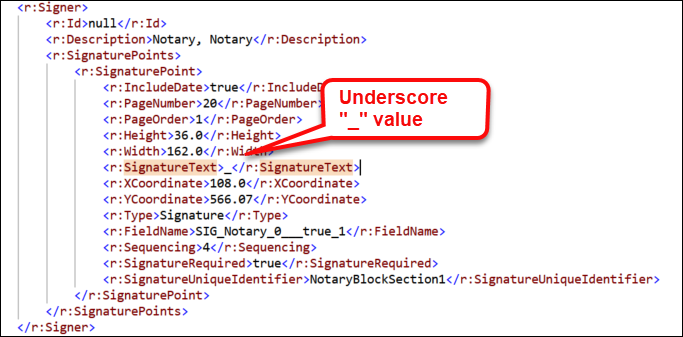
Summary: The Expere Engine has been updated to set the value for
<SignatureText> to an underscore ('_') in the Expere
response when the notary or witness does not have a Name value in the
transaction request (and is not determined until the actual signing
process).
|
| Expere: Merging with duplicate feename behavior
enhanced |
|
Summary: It was reported that when duplicate fee names for
/Txn/Deposit/Accounts/Account/Fees/Fee/FeeName and
/Txn/Deposit/Accounts/Account/MinimumBalanceFees/MinimumBalanceFee/NameDesc
existed in Expere EZ Config Default Data, a resulting merge into the Expere
transaction only presented the last instance of the duplicated fee name /
value. The expected behavior is that duplicate fee names should be present
within a merged Expere transaction and in the order that they were entered
in Expere EZ Config Default Data. Expere has been enhanced to support the
present of multiple, duplicated fee names in a merged transaction. Note: Fees are merged only if the Expere transaction
does not contain these fees. If the Expere transaction does contain
these fees, the fees will not merged with the Expere transaction.
Note:
This enhancement also resolved the following issue:
A product containing two stepped rates with identical terms resulted
in only one of the stepped rates being merged with Expere
transaction data.
User action: it is recommended that users resave the Default
Data policy and reattempt the Default Data and Expere transaction
data merge (It was determined that saving the policy added an index
thus merging the data successfully).
|
| Expere EZ Transform: internal component
upgraded |
- Type: Enhancement
- Reference: PBI 779134
|
|
Summary: As part of a regular cadence to review and upgrade any items
used with our Expere applications, we have updated the Jackson-Databind
component in the Expere EZ Transform application to version
2.15.2. |
| DocViewer: caching protocol updated |
- Type: Enhancement
- Reference: PBI 771907
|
|
Summary: DocViewer has been enhanced to only cache those documents
that are autoselected, rather than all documents for a particular package.
|
| DocViewer: date output format behavior enhanced
|
- Type: Enhancement
- Reference: PBI 770620
|
|
Summary: DocViewer has been updated to support additional date output
formats to match the generated PDF document. For example, instead of a
dd/mm/yyyy format as "07/06/2023," it appeared instead as "20230607." |
| Fulfillment Manager: ERROR SEARCH page
removed |
- Type: Enhancement
- Reference: PBI 781329
|
|
Summary: The ERROR SEARCH page within Fulfillment Manager has
been removed. |
July
| Expere enhanced to support optional override
behavior between eSign / eNotary with recordable documents |
- Type: Enhancement
- Reference: PBI 723515
- Documentation Impacts: No documentation impact
|
Summary: Expere was enhanced in 2021 to generate recordable documents
with eSignature and eNotary functionality. Expere customers requested the
ability to suppress this functionality in certain scenarios. As a result,
the Expere API methods have been updated so that when
Txn/ExcludeESignatureAndENotaryInd is
'true' and the document contains a
NotaryBlockSection element or is recordable (set in the
.REQ file as an attribute of Instance > InstanceDocumentRef >
Document where Recordable - 'Yes,') eSignature
and eNotary functionality is suppressed and only allows for an ink / wet
signature. Note: At this time, this enhancement is
supported in PDF documents but not RTF documents. |
| WCAG 2.0: Expere Engine enhanced to support
embedded and Tagged .PDF's - July |
- Type: Enhancement
- Reference: PBI 774222, 777009, 760325
- Documentation Impacts: See below for any pertinent
links.
|
|
Summary: As a part of our continued effort to create WCAG 2.0
compatible documents we have updated the Expere Engine to now support the
generation of Tagged .PDF documents. We will continue making enhancements to
the Expere Engine for Tagged .PDF support, so check back for items being
identified and corrected. As part of our continued work to support Tagged
.PDF's, we have implemented enhancements to resolve the following WCAG
2.0-related changes in the July release: |
| eOriginal / SmartSign Web: enumerated value and
description change |
|
|
Summary: The /Txn/EOriginalUploadTransactionType
enumerated values have been updated to the following:
- 1 = MERs Vault
- 2 = Non MERs Vault
Additionally, the description has been changed to the following:
"Specifies to which eOriginal vault documents should be
uploaded." |
| eOriginal / SmartSign Web: security code behavior
enhanced |
|
|
Summary: The use of a security code to access SmartSign web is no
longer required. However, if a user wishes to pass in a unique passcode,
they may do so using a new Txn path:
/Txn/EOriginalIncludeUniquePasscodeInd. |
| eOriginal / SmartSign Web: SmartDocXHTML behavior
enhanced in response |
|
|
Summary: Users can now determine whether or not they wish to return a
SmartDoc in the Expere response file through the of a new Txn path:
/Txn/EOriginalIncludeSmartDocXHTMLInResponseInd
. |
| DocViewer: Date display behavior addressed in
DATA Entry drawer |
- Type: Enhancement
- Reference: PBI 772700
|
|
Summary: Users reported that when entering date information in the
DATA Entry drawer (left fly-out panel) using the calendar
display, then clicking out of that calendar display and corresponding field,
the value entered was not preserved. Note that this behavior was only
exhibited when the Track XPath flag was enabled. DocViewer has
been enhanced so that the date is now preserved when using the calendar
function. |
| Document Service: log file messaging
enhanced |
- Type: Enhancement
- Reference: PBI 774657
|
Summary: As part of a continued effort to improve our logging
capabilities, the Account Number and ContentIdentifier have
been added to the Elapsed time log entry; for
example:[INF] Elapsed time to complete generate-synchronous for EDSId 1163 (Account: 1, ContentIdentifier: BaseLibrary.PKG.Deposit): 00:00:02.8931185
|
June
Note: There are no Expere Engine-related changes associated with
the June Customer Test deployment scheduled for 6/6. Another communication will be
sent when Expere Engine changes are deployed.
Hosted Expere / Document Services integrators:
<LinkToSignerIdentifier/> mapped |
|
|
Summary: As part of our feature to support associating Notaries and
Witnesses with a known or unknown signer to make the entire signing process
eSignable, we have enhanced the following API's (depending on SOAP or REST
usage)
- Hosted Expere (DocServices / SOAP, PBI 772872):
Previously, we added a new
<LinkToSignerIdentifier/> element to the
DocServices WSDL to be returned in the Expere Response
file. We have now mapped this new element in order to achieve
complete functionality.
- Hosted Expere (DocumentService / REST PBI 772873): we
have updated the
SignaturePoint property to include
a new LinkToSignerIdentifer element that will be
returned in the Expere Response file; no user action is required.
|
| Expere: SmartSign Plus®
integration |
|
|
Summary:
- Package creation (PBI 759519): we have implemented
functionality to create a package.
- Participant addition (PBI 759529, 765844): we have
implemented functionality to add participants.
|
Hosted Expere integrators: DocServices
WSDL UPDATED with new <LinkToSignerIdentifier>
|
|
|
Summary: Expere has been enhanced to support associating Notaries and
Witnesses with a known or unknown signer to make the entire signing process
eSignable. As a result, a new <LinkToSignerIdentifier/>
element has been added to the <SignaturePoint/>
container in the EDS DocServices WSDL. This element associates a
known signer with a notary or witness and uses the same value as the
in-scope signer ID.Note: A corresponding content
update is required in order to use this functionality. There is no
user action at this time. Example Notary response
snippet:
<r:Signer>
	<r:Id>null</r:Id>
	<r:Description>Notary</r:Description>
	<r:SignaturePoints>
		<r:SignaturePoint>
			<r:IncludeDate>false</r:IncludeDate>
			<r:PageNumber>19</r:PageNumber>
			<r:PageOrder>1</r:PageOrder>
			<r:Height>36.0</r:Height>
			<r:Width>198.0</r:Width>
			<r:SignatureText>_</r:SignatureText>
			<r:XCoordinate>93.6</r:XCoordinate>
			<r:YCoordinate>190.44</r:YCoordinate>
			<r:Type>Signature</r:Type>
			<r:FieldName>SIG_Notary_0__true_1</r:FieldName>
			<r:Sequencing>2</r:Sequencing>
			<r:SignatureRequired>true</r:SignatureRequired>
			<r:LinkToSignerIdentifier>b1</r:LinkToSignerIdentifier>
		</r:SignaturePoint>
	</r:SignaturePoints>
</r:Signer>
Example Witness response
snippet:
<r:Signer>
	<r:Id>b1-witness</r:Id>
	<r:Description>Witness</r:Description>
	<r:SignaturePoints>
		<r:SignaturePoint>
			<r:IncludeDate>false</r:IncludeDate>
			<r:PageNumber>19</r:PageNumber>
			<r:PageOrder>1</r:PageOrder>
			<r:Height>36.0</r:Height>
			<r:Width>198.0</r:Width>
			<r:SignatureText>_</r:SignatureText>
			<r:XCoordinate>93.6</r:XCoordinate>
			<r:YCoordinate>190.44</r:YCoordinate>
			<r:Type>Signature</r:Type>
			<r:FieldName>SIG_Witness_0_b1-witness_true_1</r:FieldName>
			<r:Sequencing>2</r:Sequencing>
			<r:SignatureRequired>true</r:SignatureRequired>
			<r:LinkToSignerIdentifier>b1</r:LinkToSignerIdentifier>
		</r:SignaturePoint>
	</r:SignaturePoints>
</r:Signer>
|
| DocViewer: eSignature field behavior enhanced
with Embedded PDFs |
- Type: Enhancement
- Reference: PBI 768237
|
|
Summary: It was reported that the Product Technical Rules (PTR) used
to generate certain data within an .REQ file were appearing in eSignature
fields in DocViewer. This behavior has been enhanced so that no PTR code
appears in the eSignature fields. |
| DocViewer: InstanceDisplayName behavior enhanced
for Embedded PDF documents |
- Type: Enhancement
- Reference: PBI 767182
- Documentation Impacts: No documentation impact
|
Summary: It was reported that when viewing documents in DocViewer,
the Form to View First dropdown did not display a form name, which is
derived from the InstanceDisplayName in the requirements
(.REQ file). As a result, DocViewer has been enhanced to display the
InstanceDisplayName in the Form to View First dropdown. |
| DocViewer Integrators: Audit feature
functionality added |
|
Summary: As part of our EZ Config Audit feature functionality,
DocViewer has been enhanced to include a new <Prompt>
element in the EndSession response. Note: This is an internal change and will not impact
external users. No user action is required. |
Note: The items below are scheduled for a second June Customer
Test deployment on 6/8.
| Engine: Support for Embedded PDF documents for
Tagged PDFs |
|
|
Summary: Expere has been enhanced to support a new authoring format,
embedded PDF, that has an imported PDF file in the content file (.REQ file).
This new .REQ type allows user to import a tagged PDF and specify fields
(checkbox or test) as fillable or not. Embedded PDF also has the ability to
have signatures which can be configured to be electronically signed if
desired. In this release, Embedded PDF functionality supports tagging for
WCAG 2.0 compatibility, when a Tagged PDF document option is
specified. |
| WCAG 2.0: Expere Engine enhanced to support
embedded and Tagged .PDF's - June |
- Type: Enhancement
- Reference: PBI 760325
- Documentation Impacts: See below for any pertinent
links.
|
Summary: As a part of our continued effort to create WCAG 2.0
compatible documents we have updated the Expere Engine to now support the
generation of Tagged .PDF documents. We will continue making enhancements to
the Expere Engine for Tagged .PDF support, so check back for items being
identified and corrected. As part of our continued work to support Tagged
.PDF's, we have implemented enhancements to resolve the following WCAG
2.0-related changes in the June release:
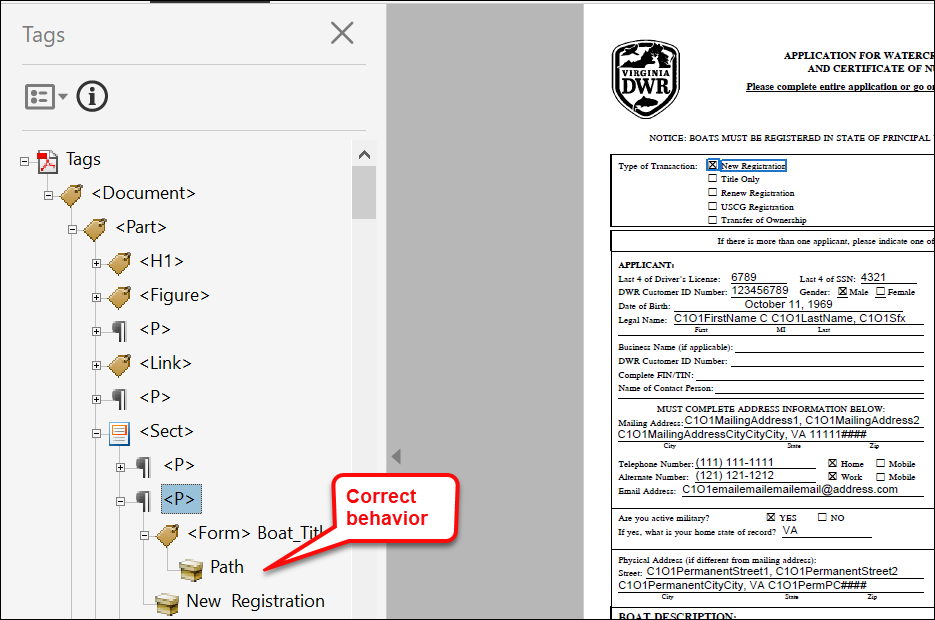
- Embedded PDF - tagging behavior with checkboxes enhanced (PBI
764256): when generating tagged PDFs containing checkboxes, the
Adobe Acrobat tag tree miss represented the checkboxes. The Adobe
Acrobat tag tree now has the checkbox Form name populated when
generating a tagged PDF. Note that the "Path" tag will only display
a value if the checkbox is checked.
Note: When utilizing a screen reader with
the Tagged PDF output to read checkboxes, the users should
expect the following:
- checked checkboxes will be read as checkbox is
marked
- unchecked checkboxes will be read as checkbox is
not marked
- text fields with values will be read in their
entirety
- empty text fields will not be read and will be
skipped
- ADA Implementation Guide updated (PBI 760325): the ADA
Implementation Guide has been revised in conjunction with
the April release of Expere Content and the Hosted Expere
application, which includes released WCAG 2.0-compliant documents
and supporting technology. For more information, consult the ADA Implementation Guide.
|
| Engine: Barcode processing flow updated for
upcoming iText upgrade |
- Type: Enhancement
- Reference: PBI 762635
|
|
Summary: Internal analysis has determined that an upcoming iText
upgrade would impact the way barcodes function within the Expere Engine. As
a result, barcode processing has been updated within Expere to accommodate
an upcoming iText upgrade. Note: This upgrade will not
affect integrations or generated documents. |
| Engine: Encryption behavior enhanced |
|
|
Summary: Previously, a transaction using an Encryption ancillary
output and containing a combination of RTF and PDF document options would
fail as Encryption can only be applied to PDF documents. Expere has been
enhanced so that while an Encryption ancillary output can still only be
applied to PDF documents, the transaction will not fail and a document
package can be generated. |
| Engine: Notary fillable field behavior enhanced
|
|
Summary: It was reported that despite the electronic signature
("eSignature") for a borrower being suppressed, and thus unable to be
electronically signed, the fields in the Notary section within the same
document appeared as fillable in the generated PDF. The expected behavior is
that when signatures are "wet sign", the notary and all associated fields
should not appear as fillable. Additionally, the presence of
<SuppressESignature/> in a particular element (for
example: a Notary section) within the .REQ file will result in those fields
not appearing as fillable. |
May
| WCAG 2.0: Expere Engine enhanced to support
embedded and Tagged .PDF's - May |
- Type: Enhancement
- Reference: PBI 760512, 768023, 729340, 765661, 764256,
767178
- Documentation Impacts: See below for any pertinent
links.
|
Summary: As a part of our continued effort to create WCAG 2.0
compatible documents we have updated the Expere Engine to now support the
generation of Tagged .PDF documents. We will continue making enhancements to
the Expere Engine for Tagged .PDF support, so check back for items being
identified and corrected. As part of our continued work to support Tagged
.PDF's, we have implemented enhancements to resolve the following WCAG
2.0-related changes in the May release:
- Embedded PDF - Barcodes supported on multiple page Embedded PDF
documents (PBI 760512): Expere has been updated to produce
barcodes on multiple page embeddedPDF REQ files. The requested
barcode (ancillary or transaction barcode) will be present on each
page where the
Form_Barcode[] fields are present.
If no barcode is requested, the document generates without the
barcode and Form_Barcode[] fields removed.
- Embedded PDF - Enhanced Barcode/Cover Page functionality (PBI
768023): Expere has been enhanced so the Adobe Acrobat tag tree in
the resulting Tagged PDF is correct and passes the Accessibility
Check when using a barcode or barcode cover page.
- Dynamic - linking enhancement (PBI 729340): Previously, Adobe
Acrobat tag tree and reading order issues occurred when two
locations utilized an "*" to link to additional text; only the first
instance that used the "*" appeared as a tags in the tag tree. The
second instance did not appear in the tag tree. Users should expect
to see the following in the tag tree:
- The text in the body of the tagged PDF document using a "*"
and the linked text containing the footnote
- Multiple instances of the aforementioned body text and
linked text
This behavior has been enhanced to now display multiple instances
of text containing a "*" and the linked text in the Adobe
Acrobat tag tree when the REQ is updated to name each of the
linked text so that Expere can differentiate between two or more
Linked texts with the same display value. Note:
- Users must update their content libraries and files in
order to utilize the new LinkName attribute.
- For more information on linking text in the Requirements
Editor, refer to the following help topic: Authoring
Superscripts Using LinkText/LinkReference for PDF
Tagging.
- In order to use the new LinkName attribute, users
should ensure they are using content stylesheet version
22.8 or later.
- Dynamic - Tagged PDF updated to support PdfMerge and
MergeCopyPDF (PBI 765661): Expere has been enhanced so that
when generating a tagged PDF from multiple dynamic REQ files using
the PdfMerge and MergeCopyPDF ancillary outputs,
fillable fields appear in the tag tree in the order they appear in
the merged PDF document.
- Embedded PDF - fillable checkboxes checked by default (PBI
767178): it was identified that fillable checkboxes were selected by
default when generating an Embedded PDF REQ document. The Engine has
been enhanced so that when generating an Embedded PDF REQ document,
a fillable checkbox is ONLY selected if the corresponding PTR in the
REQ file results in
PRINT "Checked:true;".Note: In the REQ file, a fillable checkbox PTR
will contain the following syntax if a checkbox is checked by
default when generating a document: PRINT
"Checked:true;"; an unchecked checkbox will either
contain no syntax or the following syntax: PRINT
"Checked:false;".
|
| Engine: fillable checkboxes checked by default
with static documents |
- Type: Enhancement
- Reference: PBI 767178
|
Summary: it was identified that fillable checkboxes were selected by
default when generating a Static document. The Engine has been enhanced so
that when generating a Static document, a fillable checkbox is ONLY selected
if the corresponding PTR in the REQ file results in PRINT
"Checked:true;".Note: In the REQ file, a
fillable checkbox PTR will contain the following syntax if a checkbox is
checked by default when generating a document: PRINT
"Checked:true;"; an unchecked checkbox will either contain
no syntax or the following syntax: PRINT
"Checked:false;". |
| Engine: SelectAndGenerate call behavior
enhanced |
- Type: Enhancement
- Reference: PBI 768197
|
Summary: A user reported that a transaction failed to generate and
return documents with a SelectAndGenerate method. Internal
analysis determined that an Expere assembly service incorrectly handled a
unique ID that was present within the content library. Expere has been
enhanced so that internally, any unique ID present in a document package is
handled so that the package generates successfully. |
| Engine: Show dropdown / File Name behavior
enhanced |
- Type: Enhancement
- Reference: PBI 764341
|
|
Summary: It has been identified that when generating a dynamic
document with the most recent version of FOP (2.8) as a standard PDF,
Document Title value (found in Adobe Acrobat > Document
Properties > Initial View > Show dropdown) is
specified rather than the File Name value. Expere has been enhance to
specify the File Name value when generating a standard PDF using the
most recent version of FOP (2.8) from a dynamic REQ file. |
| Engine: Borrower element naming convention
enhanced for SMARTDocs |
|
|
Summary: To work more consistently with eOriginal workflows, Expere
has updated the SignatureIDRef naming convention to use _RoleType's value
plus _SignatureOrderNumber's value plus the text of 'SignatureLine' within
the <SIGNATURE_MODEL> for each signer; for example: the
SignatureIDREF="Borrower1SignatureLine",
SignatureIDREF="Borrower2SignatureLine"). |
| eOriginal: EClosingType=2 supported |
- Type: Enhancement
- Reference: PBI 767102
|
Summary: Within a request transaction, users can now pass an
EClosingType=2 element and value with an
EOriginalNotUsedInd=1 element and value to receive an
eNote without sending the eNote to eOriginal.
EClosingType=2 indicates a full "eClosing" while
EOriginalNotUsedInd=1 indicates that the
Expere-generated eNote will not be sent to eOriginal.
Note: If /Txn/EOriginalDestructionType
= "1", "2", or "3" and/or /Txn/EOriginalUploadInd = "1"
then /Txn/EOriginalNotUsedInd should = "0".
|
| Expere Document Services Tool Suite: Loan Number
enhancement for REST Generate callbacks |
|
|
|
Summary: Based on a user requirement to return a transaction loan
number in the response, we have enhanced the Tool Suite SETUP page to
allow users to specify XPath names and paths to return in a REST Generate
callback. |
April
Note: A supplemental April CT release was deployed on April 17th
that promoted a change that addressed a defect found in DocViewer; see PBI
768371.
| Engine: fillable field naming convention updated
for static and dynamic documents |
|
|
Summary: We had previously updated the Expere eSignature naming
convention to replace "dots" or "periods" (".") with "underscores" ("_") for
Signature fields and Signature Date fields when generating dynamic, static,
and embedded PDF REQ's. In this release we have enhanced the naming
convention for Non-Signature and Signature Data fields to now use
"underscores" ("_") instead of "dots" or "periods" ("."); for example:
BR_1_Phone_VA or Community_Number for
FillableFields and
Signatory_Attest_Checkbox or
Flood_Hazard_Yes for
FillableCheckboxes. Note:
- With static and dynamic documents, Expere will automatically
change periods / dots (".") to underscores ("_") for all fields
(i.e. signature, signature date, checkboxes, text fields);
therefore, no user action is required for the Expere content.
However, it is recommended that integrations are reviewed if
they are using or expecting specific field names.
- This naming convention applies to embedded PDF, static, and
dynamic REQ's.
|
| WCAG 2.0: Expere Engine enhanced to support
embedded and Tagged .PDF's - April |
- Type: Enhancement
- Reference: PBI 759760, 741147, 758040, 763976, 763975
- Documentation Impacts: See below for any pertinent
links.
|
Summary: As a part of our continued effort to create WCAG 2.0
compatible documents we have updated the Expere Engine to now support the
generation of Tagged .PDF documents. We will continue making enhancements to
the Expere Engine for Tagged .PDF support, so check back for items being
identified and corrected. As part of our continued work to support Tagged
.PDF's, we have implemented enhancements to resolve the following WCAG
2.0-related changes in the April release:
- Embedded PDF - Accessibility Checker failed with tagged PDF
(PBI 759760): when generating a single or multi-page tagged PDF for
an embeddedPDF document, Adobe Acrobate Accessibility Check reported
a "Tagged Content - Failed" error. The tagged PDF functionality has
been enhanced to eliminate the "Tagged Content - Failed" error from
Adobe Acrobat Accessibility Check in this scenario.
- Dynamic - Tagged PDF tags displayed in incorrect order (PBI
741147 / 758040 / 763976 / 763975): Expere was enhanced to better
support tagging with Dynamic documents for the following
functionality:
- Text containing emphasis tags; when testing
CertificationOfBeneficialOwners.req, the tag tree
order was incorrect for some text. The tagged PDF
functionality has been enhanced to tag text with ‘emphasis’
tags in the proper order in the Adobe Acrobat tag tree.
- Fillable fields; when testing
AutomaticTransferAuthorizationPlainLanguage.req,
the Adobe Acrobat tag tree order was incorrect when fillable
fields were present. For example: the phrase "Routing
Number" and the corresponding fillable field should have
appeared in sequential order in the tag tree; however, the
fillable field appeared further down in the tag tree. The
tagged PDF functionality has been enhancd so that tags used
for fillable fields appear in the proper order in the Adobe
Acrobat tag tree.
- List items / bulleted lists: tags associated to lists
(i.e. bulleted items within a document) appeared out of
order in the Adobe Acrobat tag tree for dynamic documents.
The tagged PDF functionality has been enhanced so that tags
used with list items appear in the proper order in the Adobe
Acrobat tag tree.
- Dynamic - PDF tagging behavior with fillable fields enhanced
(PBI 763976): users reported that certain fillable fields appeared
out of order within the Adobe Acrobat tag tree for dynamic
documents.
|
| EZTransform: Tomcat component upgrade |
- Type: Enhancement
- Reference: PBI 748304
|
|
Summary: EZTransform has been updated to use Apache Tomcat version
9.0.73. |
| Engine: SMARTDoc missing formatted value
|
|
|
Issue: During the course of testing a separate SMARTDoc-related item,
internal users discovered that an exception was thrown when no value was
present for formats requiring a numeric value, such as currency, dates, and
percent fields. As a result, a document was not generated. |
|
Solution: This issue has been resolved: Expere now allows an empty
string (no value) for numerical formats with a SMARTDoc. |
| Tool Suite: Aliases & Packages List Order
updated |
|
|
Summary: The list of available Aliases and Packages
accessible when clicking the Generate button in the Content
Identifier section has been updated to display the aliases in
ascending order chronologically, and packages in alphabetical order. |
| DocViewer: overlay behavior enhanced |
- Type: Defect
- Reference: PBI 768371
|
|
Issue: DocViewer users reported that when using an overlay,
suppression was not honored resulting in additional fields available for
data entry. |
| Solution: This issue has been resolved: suppression is now being
honored when using an overlay. |
| DocViewer: tabbing order behavior enhanced with
embedded PDF documents |
- Type: Enhancement
- Reference: PBI 766572
|
|
Summary: DocViewer has been enhanced when using an Embedded PDF to
honor the tabbing order. As a result, the user can populate the information
in the correct order. In addition the sums are also calculated in the proper
order. |
| DocViewer: entry behavior in Document Drawer and
Document Display page enhanced |
- Type: Enhancement
- Reference: PBI 762557
|
|
Summary: Users reported that a value selected from a dropdown list of
items (for example: a list of States) in the Document Drawer did not
match the value displayed in the Document Display page; a different
state appeared instead of the state selected from Document Drawer.
This was caused by users using the up/down keys to quickly
advance to the state compared to using the dropdown selection. This behavior
has been enhanced so that values selected from the Document Drawer
matches that of the Document Display page. |
| DocViewer: XPath Attributes behavior
enhanced |
- Type: Enhancement
- Reference: PBI 751602
|
|
Summary: A user reported that adding a custom XPath attribute
resulted in an "[object Object]" value to display in an editable field
rather than the actual value. As a result, DocViewer has been enhanced to
support the use of custom XPath attributes: "[object Object]" no longer
appears in a corresponding dropdown. |
| DocViewer: underline special characters behavior
enhanced |
- Type: Enhancement
- Reference: PBI 757168
|
Summary: A user reported that a discrepany existed in the way an
underlined word appeared in DocViewer compared to a standard PDF. For
example: in the REQ, a "product technical rule" (PTR) is used to add
business logic and rules to underline the last name of the parties for a
particular state using HTML code <u>"./LastName
"</u> in the PTR to produce the underline. When
generating a PDF, the state was underlined correctly. However, when using
DocViewer, the HTML Code
<u>LastName</u> appeared
instead. This behavior has been modified so that DocViewer will no longer
display the HTML code used to add underlines. |
March
| Expere: Document List / Partial Document List
functionality - March |
|
|
Summary: We have enhanced the Expere Engine to support the selection
of either a full or partial document list. In conjunction with a
Requirements Editor update allowing users to select either a Document List
(full document list) or Partial Document List, the Engine has been updated
to include a new optional <PartialDocumentList/>
element. <DocDescriptor>
<PartialDocumentList>true</PartialDocumentList>
</DocDescriptor>
|
| WCAG 2.0: Expere Engine enhanced to support
embedded and Tagged .PDF's - March |
- Type: Enhancement
- Reference: PBI 750644, 756865, 708011, 695045, 745396,
760507, 760760
- Documentation Impacts: See below for any pertinent
links.
|
Summary: As a part of our continued effort to create WCAG 2.0
compatible documents we have updated the Expere Engine to now support the
generation of Tagged .PDF documents. We will continue making enhancements to
the Expere Engine for Tagged .PDF support, so check back for items being
identified and corrected. As part of our continued work to support Tagged
.PDF's, we have implemented enhancements to resolve the following WCAG
2.0-related changes in the March release:
- LinkText behavior enhanced with multiple references in dynamic
document (PBI 745396): users reported that when using the
Link – element and the referenced appeared on a different
page, the tagged PDF did not include the reference correctly in the
tag tree. As a result, Expere has been enhanced to tag references on
different pages correctly.
- Embedded - PDF tagline tagging behavior modified (PBI
750644): the following changes were implemented:
- On certain documents (for example: "Request for Verification
of Employment FNMA 1005"), the fields below were incorrectly
appearing in the Adobe Acrobat tag tree when generating a
tagged PDF using an embedded PDF REQ document; note also the
naming convention and examples appeared as the following:
Form.WarrantyControl has been changed to
Form_WarrantyControl. See ADA Implementation Guide >
Working with Taglines > Embedded PDF tagline tagging -
naming convention for more information.
- Embedded PDF - "IsTagged" behavior enhanced when selecting
standard PDF (PBI 756865): users reported that when creating
a standard PDF document from an embedded PDF REQ file, a "Tags"
value is appearing in the tag tree in Adobe Acrobat. The expected
behavior is that "No Tags Available" should appear. We have enhanced
this behavior so that "No Tags Available" appears in the Adobe
Acrobat tag tree when generating a standard PDF from an embedded PDF
REQ file.
- Incorrect tagging with Electronic Remote Online Notary (ERON)
when generating dynamic documents (PBI 708011): users
reported that tags for the electronic notary section within certain
tagged PDF documents appeared out of order within the Adobe Acrobat
tag tree. Tags for the electronic notary are now tagged in the
correct order in the Adobe Acrobat tag tree.
- Fillable signature / date fields and checkboxes behavior
enhanced (PBI 695045): users reported the following issues
when generating a tagged PDF of the
HUD92541BuildersCertificationAndAgreeToExecuteBuildersWarranty-M2.req
dynamic document:
- The tag order for fillable checkboxes was incorrect
- The tags for some fillable fields, namely
SignatureField and
SignatureDate fields, were missing from
the tag tree
These issues have been resolved; fillable checkboxes are now
tagged in the correct order, and SignatureField
and SignatureDate fields are present in the tag
tree.
- Embedded PDF enhancement (PBI 760507): Embedded PDF
functionality has been enhanced to ensure consistent generation of
tagged PDF documents (i.e. merging of tagged PDF).
- Non-fillable WKES checkboxes supported with Embedded PDF's
(PBI 760760): Users reported that non-fillable WKES checkboxes were
not tagged correctly in Embbeded PDF documents. The expected
behavior is the naming convention in the tag tree should match that
of standard non-fillable fields and checkboxes.
For example: in
the tag tree, the naming convention should consist of the
following regardless of whether a standard or WKES non-fillable
field or checkbox is used:
- Form
- <name>_OBJR (for example:
Owner_Resident_Yes_OBJR)
This behavior has been enhanced so that the checkbox
name should be the same between standard non-fillable and WKES
fields and checkboxes when generating Embedded PDF
documents.
|
| Engine: eSignature field naming convention
updated for static and dynamic documents |
|
|
Summary: we had previously updated the Expere eSignature naming
convention to reflect the items below for Signature fields and Signature
Date fields when generating embedded PDF REQ's. We have now updated static
and dynamic document functionality to match the embedded PDF naming
convention functionality:
- Signature fields now use "underscores" ("_") instead of "dots" or
"periods" ("."); for example:
SIG_Borrower_1_1_true_1_eSig or
PurchaserSignatureArea_eSig
- Signature Date fields now use the above mentioned Signature field
naming convention and "_eSigDate;" for example:
SIG_Borrower_1_1_true_1_eSig_eSigDate or
PurchaserSignatureArea_eSig_eSigDateNote:
- With static and dynamic documents, Expere will
automatically change periods / dots (".") to underscores
("_") for Signature and Signature Date fields;
therefore, no user action is required for the Expere
content. However, it is recommended that integrations
are reviewed if they are using or expecting specific
field names.
- Non-Signature and Signature Data fields using periods /
dots will be accounted for in a future Engine release;
for example: checkboxes and text fields.
- This naming convention applies to embedded PDF, static,
and dynamic REQ's.
|
| Engine: Enhanced support of multiple MiddlePages
when signatures are included in footers |
- Type: Enhancement
- Reference: PBI 751216
|
|
Summary: when the page count exceeded three pages in a transaction
where the FannieMae1003FreddieMac65URLAContinuationPage
("Continuation Page") was included, the document would throw an exception
when no fillable fields were present for that document; this was not
intended functionality and has been corrected with this release. |
| Engine: Mandatory attribute behavior enhanced
with fillable checkboxes |
- Type: Enhancement
- Reference: PBI 750941
|
Summary: users reported an Expere response file contained a
Mandatory attribute set to No for a fillable checkbox
(FillableCheckbox), despite it being set to Yes
in the .REQ file, in this case the
AttorneyorTitleInsuranceCompanyPreferenceNotice.req. This
behavior has been addressed: when the Mandatory attribute is set to
Yes in the .REQ file for a fillable checkbox, the corresponding
response value reflects this value. |
| eOriginal: Destruct, Reverse Registration, and
Upload logic enhanced |
|
|
Summary: Users no longer need to pass eClosingType
in the transaction in order to enter the eOriginal workflow. Previously, no
eOriginal tasks could be performed without passing in an
eClosingType indicator. |
| DocViewer: incorrect formatting behavior
enhanced |
- Type: Enhancement
- Reference: PBI 662167
|
|
Summary: When a value was entered in DocViewer that resulted in an
invalid character error, the file that tracked the XPath changes saved the
invalid value rather than the NULL or the previous value. This behavior has
been enhanced so that when an invalid character error appears, DocViewer
does not track the invalid characters but rather the the original value in
the on the EndSession page. |
| DocViewer: messaging behavior enhanced |
- Type: Enhancement
- Reference: PBI 756574
|
|
Summary: Users reported that when attempting to close a document
within DocViewer, an "Are you sure you want to leave this page?" message
appeared, implying that the user made a change in DocViewer even if no
change had been made. As a result, we have enhanced DocViewer so that no
message will appear if changes have not been made. |
| DocViewer: latency issues addressed |
- Type: Enhancement
- Reference: PBI 758965
|
|
Summary: Users reported that the Authority document experienced
considerable delay when loading the document and selecting fields in
DocViewer. Internal analysis revealed that an unnecessary overlay dictionary
was stored in the session when the session state was stored in SQL. Whenever
a change was made, DocViewer retrieved the overlay dictionary, storing it in
the session cache. This issue has been resolved: latency issues have been
resolved in DocViewer. |
| DocViewer: Condition Behavior addressed |
- Type: Enhancement
- Reference: PBI 743075
|
|
Summary: DocViewer has been enhanced to now display the prompt from
the Xpath in a condition (COND.<x> authored in the .REQ file) if a note
was not authored in the .REQ file. This prompt appears to right of the "+" /
"-" sign in DocViewer. |
February
| Expere: Incorrect page number on commercial
content |
- Type: Defect
- Reference: PBI 755961
|
|
Issue: During the course of testing a separate work item, users
reported that the page numbering on the recording page of any commercial
content was incorrect specifically when using the FOP 2.8 renderer. For
example: on a three page document, the tagline page numbering stated: "Page
3 of 2." |
|
Solution: This issue has been resolved: when generating commercial
documents using FOP 2.8, the page numbering is correct. |
| Expere: Document List functionality enhancement -
February |
|
|
|
Summary: A user requested an Expere enhancement to provide the
Closing Instructions when no other documents would be created; as a result,
we have enhanced the Document List functionality to allow for the creation
of an empty document list. |
| WCAG 2.0: Expere Engine enhanced to support
embedded and Tagged .PDF's - February |
- Type: Enhancement
- Reference: PBI 755798, 755714, 750118
- Documentation Impact: See below for any pertinent links
|
Summary: As a part of our continued effort to create WCAG 2.0
compatible documents we have updated the Expere Engine to now support the
generation of Tagged .PDF documents. We will continue making enhancements to
the Expere Engine for Tagged .PDF support, so check back for items being
identified and corrected. As part of our continued work to support Tagged
.PDF's, we have implemented enhancements to resolve the following WCAG
2.0-related changes in the February release:
- Embedded PDFs: cover page being tagged in Standard PDF (PBI
755798): users reported that when generating a standard PDF using an
embedded PDF REQ document and an ancillary barcode with cover page,
the cover page text was inadvertently tagged in the Adobe Acrobat
tag tree. This behavior has been enhanced so that when generating a
standard PDF using an embedded PDF REQ document and ancillary
barcode with cover page, the cover page text does not appear in the
Adobe Acrobat tag tree.
- FirstPageOnly behavior modified when using ancillary barcodes
with embedded PDF REQ documents (PBI 755714): users reported
that ancillary barcodes appeared on all pages of an embedded PDF
when selecting
<FirstPageOnly>"true"</FirstPageOnly> as
a child element of an ancillary barcode option. Using this
<FirstPageOnly>"true"</FirstPageOnly>
element should have resulted in barcodes only appearing on the first
page of the document. This behavior has been addressed: when
selecting
<FirstPageOnly>"true"</FirstPageOnly>
with an ancillary barcode option using an embedded PDF REQ document,
only the resulting first page of the embedded PDF displays a
barcode.
- Dynamic document accessibility checker error (PBI 750118):
when generating a dynamic document as a tagged PDF with a barcode,
the resulting document failed the Adobe Acrobat accessibility
checker. This behavior has been resolved so that a dynamic document
can be generated as a tagged PDF with a barcode.
Note: Although we continue to work on
enhancements regarding Embedded PDF REQ files, base content containing
Embedded PDF REQ files will be released in the future. |
| DocViewer: Representative Entity behavior
enhanced with overlay |
- Type: Enhancement
- Reference: PBI 751098
|
|
Summary: Users reported persistent issues existed with Representative
Entity Xpaths not honoring suppression values defined at the first level
when using an overlay. This behavior has been addressed: Representative
Entity Xpaths are honored at all levels when using an overlay. |
January
| WCAG 2.0: Expere Engine enhanced to support
embedded and Tagged .PDF's - January |
- Type: Enhancement
- Reference: PBI 747400, 746356, 747377, 750351, 746699,
728082, 739329, 750531, 750142, 748774
- Documentation Impact: See below for pertinent links
|
Summary: As a part of our continued effort to create WCAG 2.0
compatible documents we have updated the Expere Engine to now support the
generation of Tagged .PDF documents. We will continue making enhancements to
the Expere Engine for Tagged .PDF support, so check back for items being
identified and corrected. As part of our continued work to support Tagged
.PDF's, we have implemented enhancements to resolve the following WCAG
2.0-related changes in the January release:
- Integrators: Update DocumentType to support PDF - Mapping For
EDS (PBI 747400): In our December Hosted Expere release, we
updated the
DocumentTypeEnum parameter in the
Expere Document Services DocServices WSDL to include a new
"PDF" enumerated value; this work was done as part of PBI
746355. In conjunction with that work item, we have
completed the requisite mapping of this new enumerated value for the
January release. See Expere Document Services Web
Services Guide: DocumentTypeEnum.
- Integrators: Update DocumentType to support PDF -
DocumentService (PBI 746356): in order
to support our new Embedded PDF document type, the
DocumentTypeEnum parameter in the Expere
Document Services DocumentService REST API to include a new
"PDF" enumerated value. See Expere Document Services Web
Services Guide > Document Service REST API >
DocumentTypeEnum.
- Assembly error addressed (PBI 747377): users reported an
assembly error when attempting to generate a Tagged PDF version of
the Deed of Trust document (FNMAFHLMCDeedOfTrust-M2); as a
result, Expere has been enhanced so that the Deed of Trust document
can be generated as a Tagged PDF. With this upgrade all Tagged PDFs
and API requests using the FOP26 parameter will be generated
using FOP 2.8.
- Tooltip behavior enhanced (PBI 728082): users reported that
tool tips appeared and were read for all fields, consisting of
fillable and non-fillable fields on embedded PDF documents. The
expected behavior is that fillable fields are only generated for
fillable fields. Expere has been enhanced so that tool tips now only
appear and are read with fillable fields on embedded PDF documents.
- Barcode field generates on executed PDF containing
FillableFields (PBI 750351): users reported that an embedded
PDF document contained a fillable field where the barcode was
present in the tagline. The expected behavior is that no fillable
field should be present in the tagline. As a result, Expere has been
enhanced so that no fillable field appears in the tagline.
- Barcode39 displaying text below barcode as ancillary output in
embedded PDF (PBI 746699): users reported that text appeared
below the barocde when using a Barcode39 ancillary output with an
embedded PDF. The expected behavior is that any text passed in the
<pattern/> element within the Barcode39
ancillary output should appear above the barcode. Expere has been
enhanced to place any text above the barcode. For more information
on using barcodes as ancillary outputs, see the Expere Document Services
Implementation Guide > Barcodes.
- Embedded PDF - radio button support enhanced (PBI 739329):
Expere has been enhanced to support ESignature and Wolters Kluwer
E-Sign radio buttons in generated embedded PDF documents; users will
note the proper naming convention now appears in the tag tree for
each radio button.
- ESignature field naming convention updated (PBI 750531): the
Expere eSignature naming convention has been updated to reflect the
following for Signature fields and Signature Date fields when
generating embedded PDF REQ's:
- Signature fields now use "underscores" ("_") instead of
"dots" or "periods" ("."); for example:
SIG_Borrower_1_1_true_1_eSig or
PurchaserSignatureArea_eSig
- Signature Date fields now use the above mentioned Signature
field naming convention and "_eSigDate;" for example:
SIG_Borrower_1_1_true_1_eSig_eSigDate
or
PurchaserSignatureArea_eSig_eSigDate
- Barcode cover page tagging behavior enhanced (PBI 750142):
users reported that when generating an embedded PDF or dynamic REQ
with a barcode cover page
(
<UsecoverPage="true">), the following occurred
in Adobe Acrobat:
- the resulting tagged PDF document failed the accessibility
checker
- The barcode cover page text did not appear in the resutling
tag tree
This behavior has been modified so that the generated PDF will
pass the Adobe Acrobat accessibility checker and subsequent barcode
cover page text will appear in the tag tree when using a barcode
cover page with an embedded PDF or dynamic REQ.
- InstanceDisplayName behavior with embedded PDF documents
enhanced (PBI 748774): users reported the following when
generating an embedded PDF document as a standard PDF:
- the Document Title value (found in Adobe
Acrobat > Document Properties > Initial
View > Show dropdown) was set to use
Title of the document and appeared in the upper
left corner of the document; the File Name value
should have appeared instead (found in the same Show
dropdown as stated above).
- Generating a standard PDF from an embedded PDF resulted in
Tagged PDF: Yes appearing in the Document
Properties > Advanced section.
These behaviors have been addressed:
- when an embedded PDF is generated as a standard PDF, the
File Name value is used as the Title
of the document and appears in the upper left corner of
the document.
- Tagged PDF: No now appears in the Document
Properties > Advanced section when
generating a standard PDF from an embedded PDF.
Note: Although we continue to work on
enhancements regarding Embedded PDF REQ files, base content containing
Embedded PDF REQ files will be released in the future. |
| Engine: SMARTDoc validator error with 12.345%
value displayed |
- Type: Defect Correction
- Reference: PBI 747390
|
|
Summary: Results of the eOValidator indicated that there was a
mismatch between the mask value and the amount displayed on the SMARTDoc for
the 12.345% format value when a four digit decimal (i.e. 0.1212) is
provided: only three decimal places appeared. As a result, Expere has been
enhanced so that four decimals now appear for the mask value on the SMARTDoc
and PDF. For example: .1212%; the MaskDescription value
in the XML file requires four decimal places (e.g.
"####"). |
| Expere: EZ Config Deposit Default Data merge
behavior enhanced when using multiple accounts and different product
values |
- Type: Enhancement
- Reference: PBI 742356
|
|
Summary: Users reported that merged transactions failed when two or
more accounts were present in tandem with two or more different products.
When merging either single or multiple accounts using the same product, the
merge was successful. This issue has been addressed: multiple accounts with
two or more different products can now be merged successfully. |
| Expere Document Services Web Services guide
updated with revised IP addresses for November Azure Migration for Disaster
Recovery (DR) environment |
|
|
|
Summary: As part of our internal Lumen to Microsoft Azure data
migration, the Expere Document Services Web Services Guide has been revised
with application-specific IP addresses for the Disaster Recovery (DR)
environment. |
| DocViewer: scrolling behavior updated |
- Type: Enhancement
- Reference: PBI 751112
|
|
Summary: Users reported that clicking on certain fields in the
Data Entry drawer (left-hand pane) did not advance them to the
corresponding location in the Document Display (body of the document
in DocViewer). This behavior has been modified so that DocViewer now scrolls
correctly to the correct location in the document |
| DocViewer: dash "-" removed with alpha percent
masks |
- Type: Enhancement
- Reference: PBI 736797
|
|
Summary: DocViewer has been enhanced so that dashes ("-") are removed
when working with alpha percent masks; for example "twelve and one-half" is
now "twelve and one half." This behavior is consistent with other mask
enhancements that have been made when working with SMART Docs. |