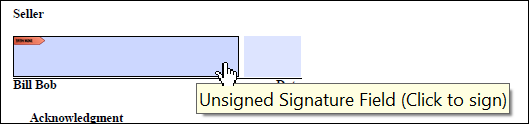
Customizing Electronic Signature Tooltip
The
bsi.properties file contains two separate properties to set
the text to use when creating a Tooltip for eSignature and eInitial fields. By default,
these properties contain the following values:eSignatureTooltip: "Unsigned Signature Field"eSignatureInitialsTooltip: "Unisigned Initials Field"
When the property is populated and eSignatures is supported (for example: through the use
of the eSignatureAndFieldSupport ancillary output), a tooltip is
created based on the value specified in the eSignatureAndFieldSupport
ancillary output. This value would take precedence over the value specified in the
bsi.properties file. See sample
eSignatureAndFieldSupport ancillary output below:
<AncillaryOutputsDoc>
	<AncillaryOutput>
		<OutputType>ESignatureAndFieldSupport</OutputType>
		<ESignatureAndFieldSupport>
			<!-- A boolean value to determine if eSignatures should be repressed in favor of X/Y coordinates. -->
			<!-- Values: true, false -->
			<eSignatureCoordinatesOnly>false</eSignatureCoordinatesOnly>
			<!-- A boolean value to determine if eSignature date is supported. -->
			<eSignatureDateSupport>true</eSignatureDateSupport>
			<!-- The text that will be used for the eSignature tooltip -->
			<eSignatureTooltip>ESignature ToolTip</eSignatureTooltip>
			<!-- The text that will be used for the eSignature initials tooltip -->
			<eSignatureInitialsTooltip>ESignature Initials ToolTip</eSignatureInitialsTooltip>
			<!-- A boolean value to determine if all acroform fields that are not eSignature should be repressed in favor of X/Y coordinates. -->
			<!-- Values: true, false -->
			<NonSignatureFieldCoordinatesOnly>false</NonSignatureFieldCoordinatesOnly>
			<!-- A boolean value to determine if eSignatures initial fields should render as Text fields -->
			<!-- Values: true, false -->
			<eSignatureWKES>false</eSignatureWKES>
		</ESignatureAndFieldSupport>
	</AncillaryOutput>
</AncillaryOutputsDoc>
Users may override the
eSignatureInitialsTooltip default value in the
Requirements Editor by passing in an eSignatureAndFieldSupport
ancillary output in the transaction with the
<eSignatureInitialsTooltip/> element containing the desired
string value. <AncillaryOutputsDoc>
<AncillaryOutput>
<OutputType>ESignatureAndFieldSupport</OutputType>
<ESignatureAndFieldSupport>
<!-- A boolean value to determine if eSignatures should be repressed in favor of X/Y coordinates. -->
<!-- Values: true, false -->
<eSignatureCoordinatesOnly>false</eSignatureCoordinatesOnly>
<!-- A boolean value to determine if eSignature date is supported. -->
<eSignatureDateSupport>true</eSignatureDateSupport>
<!-- The text that will be used for the eSignature tooltip -->
<eSignatureTooltip>ESignature ToolTip</eSignatureTooltip>
<!-- The text that will be used for the eSignature initials tooltip -->
<eSignatureInitialsTooltip>ESignature Initials ToolTip</eSignatureInitialsTooltip>
<!-- A boolean value to determine if all acroform fields that are not eSignature should be repressed in favor of X/Y coordinates. -->
<!-- Values: true, false -->
<NonSignatureFieldCoordinatesOnly>false</NonSignatureFieldCoordinatesOnly>
<!-- A boolean value to determine if eSignatures initial fields should render as Text fields -->
<!-- Values: true, false -->
<eSignatureWKES>false</eSignatureWKES>
</ESignatureAndFieldSupport>
</AncillaryOutput>
</AncillaryOutputsDoc>Example:
The property for the electronic signature tooltip in the bsi.properties file:
com.bankerssystems.expere.render.eSignatureTooltip=Unsigned Signature
                    Field
.
Note: Only self-hosted users can modify the the
bsi.properties file.