eNote Destruction Workflow Outline
The Destruction workflow is used when a transaction is resubmitted for updated document generation. This can include generating an updated eNote, due to transaction detail changes, or conversion from eNote to Paper Note.
The Destruction workflow is initiated through various transaction data points and indicators.
- Txn/EOriginalDestructionType
- 0 = Do NOT execute
- Destruction logic within eOriginal will NOT be run.
- 1 = Destroy managed doc profiles only
- Documents previously uploaded to eOriginal by Expere, including the eNote, will be destroyed.
- 2 = Destroy ALL doc Profiles
- Documents previously uploaded by Expere, including the eNote, as well as any manually uploaded documents through eOriginal Command Center will be destroyed.
- 3 = Destroy Transaction
- Removes the entire transaction from eOriginal.
- 0 = Do NOT execute
Note: Consider the following:
- If Txn/EOriginalDestructionType is NOT included in the request it is treated the same as a '0'.
- Destruction will occur even if a transaction is no longer valid and if documents are not uploaded.
Destruct Workflow
This section explains the Destruct workflow between applications.
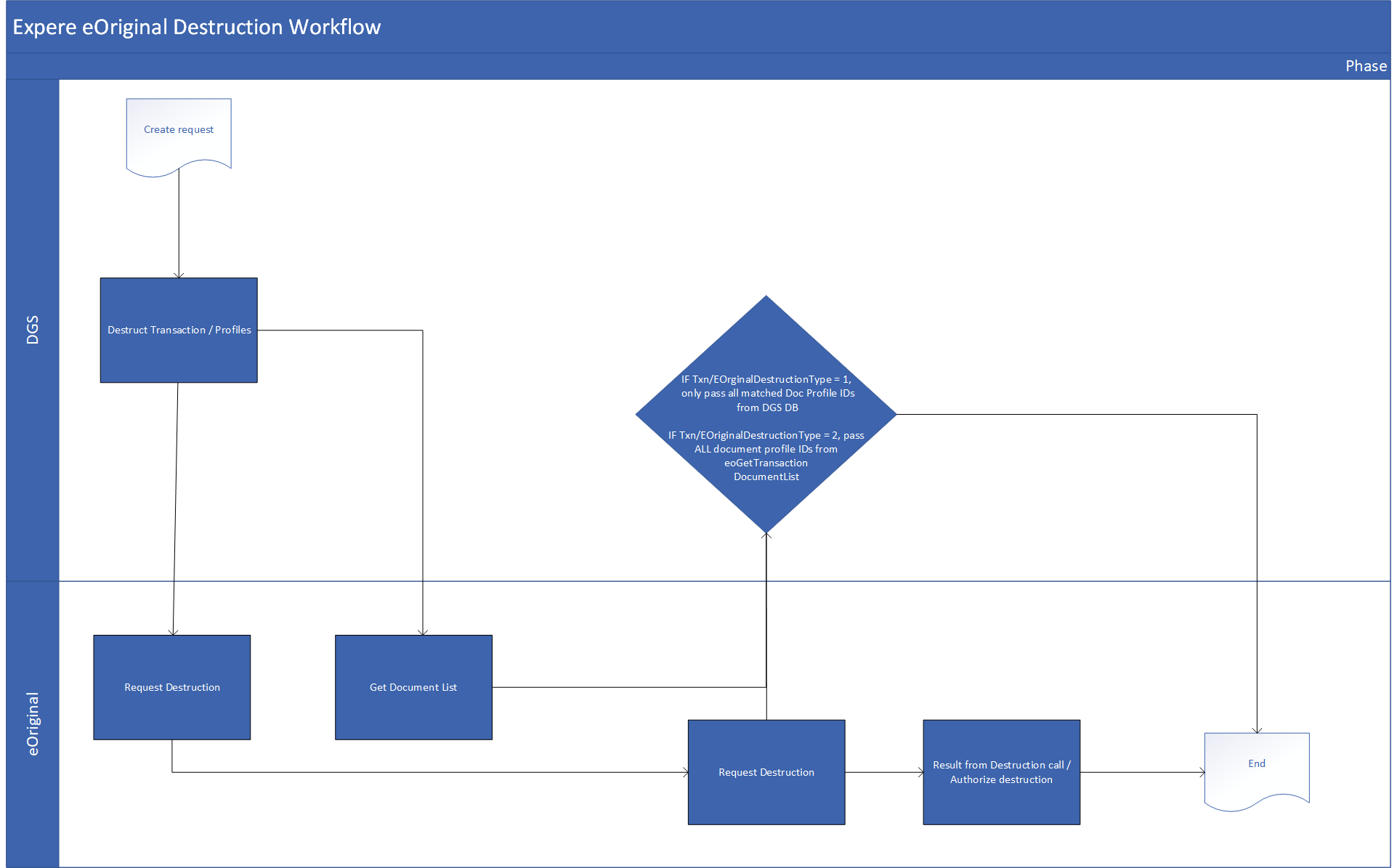
Note: The Destruct workflow assumes that documents are signed
which is performed through a
eoSearchSignature call; if they are
not signed, they must be rescinded using an eoRescindSignaturePath
call. If the signature results statuses are returned, the Destruct workflow is
initiated:- All Signers Complete
- No Longer Valid
- Expired
- A Signer Has Withdrawn
- In Document Generation Services (DGS), the user submits the transaction using
Txn/EOriginalDestructionType= 1, 2, or 3. - Document Management verifies if the loan number exists in the database.
- Document Management sends the request to eOriginal.
- In eOriginal, if
Txn/EOriginalDestructionType= "3," the transaction is destructed from eOriginal using theeoRequestDestructioncall. - In eOriginal, if
Txn/EOriginalDestructionType= "1," only managed Document Profile IDs are destructed; if the value is "2," all Document Profile IDs are destructed and document list is obtained through theeoGetTransactionDocumentListcall. - Document Management requests destruction from eOriginal using the
eoRequestDestructioncall and is authorized / not authorized through theeoAuthorizeDestructioncall.
How do we identify a transaction is being resubmitted vs. new?
- Transactions submitted with the same loan number (Txn/LoanIdentifier) under the
same Account ID. Upon creation of an eNote, the
<eOriginalTransactionID>is returned from eOriginal and stored in the Expere Database. Upon receiving the Expere request, there is a check to see if the loan number submitted in the request has an<eOriginalTransactionID>associated to it. If so, then it is known this is a redraw and the same<eOriginalTransactionID>will be used for creation of a new eNote, or the eO transaction will be destructed/removed if an eNote is no longer applicable.
How do we identify a redraw of an eNote vs. convert to paper note?
- A redraw or convert to paper is determined from the autoselection of the eNote
(driven off of EClosingType) and the following transaction data point:
Txn/EClosingType- 0 or Not Present = Paper Note
- When submitted on a transaction, where an eNote was previously generated, this indicates the eNote needs to be removed and a paper note is to be generated.
- 1 = eNote
- When submitted on a transaction, where an eNote was previously generated, this indicates the existing eNote needs to be removed and a new eNote is to be generated.
- 2 = Full eClosing (not supported at this time)
- 0 or Not Present = Paper Note
How do we identify Destruction of the eOriginal Transaction vs. destruction of the Document Profiles?
eOriginal transaction destruction or document profile destruction is based on a combination of the following two data points:
Txn/EOriginalUploadInd- 0 or Not Present = Other Expere documents are NOT uploaded to eOriginal.
eOriginal is not the preferred eSigning provider.
- When submitted on a transaction, where an eNote was previously generated, this indicates the eOriginal Transaction does not need to be preserved for eSigning of non-eNote documents through eOriginal.
- 1 = Upload ALL documents to eOriginal. eOriginal is the preferred
eSigning Provider, even when an eNote is not applicable.
- When submitted on a transaction, where an eNote was previously generated, this indicates the eOriginal Transaction needs to be preserved for eSigning of documents through eOriginal.
- 0 or Not Present = Other Expere documents are NOT uploaded to eOriginal.
eOriginal is not the preferred eSigning provider.