Using SMART Doc functionality / dynamic Expere eNotes
Overview
Wolters Kluwer enhanced Expere to generate MISMO SMART Doc version 1.02. A MISMO SMART Doc is an electronic document that meets specified standards set forth by the Mortgage Industry Standards Maintenance Organization (MISMO). SMART is an acronym that stands for Securable, Manageable, Archivable, Retrievable, and Transferable. The MISMO SMART Doc is the industry standard for eNotes. The SMART Doc format links the visual representation or text of the note along with data included in the note and the signature. They can be viewed using a variety of technologies, most commonly PDF, and they are electronically sealed to prevent tampering. This format ensures that what a borrower signs on their computer screen is the exact document that will be stored. Once an eNote is signed, it is transferred to an electronic vault or eVault where the original file is securely stored and where it can be transferred to another eVault as needed.
Base functionality
How is a SMART Doc generated? SMART Doc generation is driven specifically when the authoring document (.REQ) is set to create a SMART Doc in the document's properties.
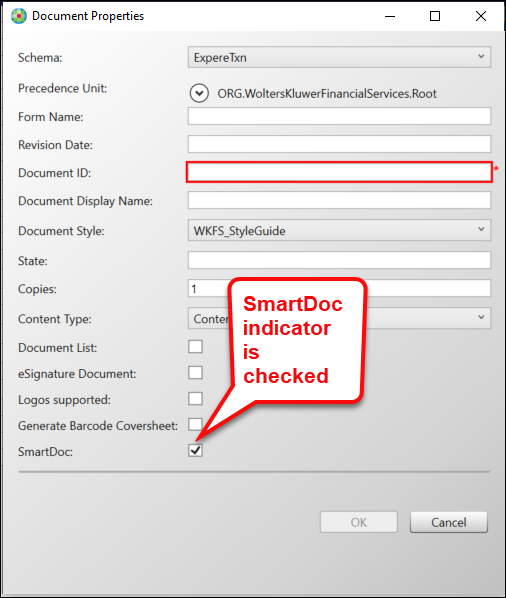
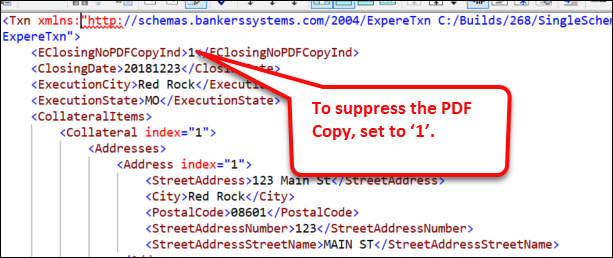
By default, the eNote will create a SMART Doc and a complimentary PDF Copy which is a
Review Copy. If the PDF Copy is not desired, then the transaction should include
<EClosingNoPDFCopyInd/> set to "1".
SMART Doc output
SMART Docs are generated as .XML and embedded .XHTML files in addition to the PDF document package.
SMART Doc validation
Expere supports multiple masks for the various types of data. When generating PDFs and RTFs, these masks are defined to meet state and federal regulation on how the data should be presented. With the SMART Doc, Expere needs to meet MERS regulations and standard so that MERS can accept the SMART Doc. The following masks will behave differently in the SMART Docs than for non SMART Docs.
- Percentages:
REQ Output Format Sample Value SMART Doc Mask SMART Doc Data Value SMART Doc View AlphaPercent 1.23 lower(wordsfraction()) 1.23 one and 23 hundredths Raw7% 1.23 #.##% 1.23 1.23% 1.234 #.###% 1.234 1.234% 10.12 ##.##% 10.12 10.12% 12.345% 1.23 #.##% 1.23 1.23% 12.34 ##.##% 12.34 12.34% 1.234 #.###% 1.234 1.234% Note: The SMART Doc Masks listed are samples; there are additional SMART Doc Masks that could be specified, which are dependent on the value in the incoming transaction. - Non-currency Numbers
REQ Output Format Sample Value SMART Doc Mask SMART Doc Data Value SMART Doc View Alpha 1 lower(words()) 1 one Raw7 1.23 #.## 1.23 1.23 1.234 #.### 1.234 1.234 10.12 ##.## 10.12 10.12 #th 1 ord( ) 1 1st mmmm d,yyyy 20180201 MMMM d, yyyy 2018-02-01 February 1, 2018 dth 20221012 ord(d) 2022-10-12 12th mmmm,yyyy 20221012 MMMM, yyyy 2022-10-12 October, 2022
- Currency
REQ Output Format Sample Value SMART Doc Mask SMART Doc Data Value SMART Doc View $1,234.50 1002.30 $#,###.## 1002.30 $1,002.30 1002 $#,###.## 1002.00 $1,002.00 Alpha Check Amount 1.00 one One and 00/100 - Alpha Check Amount:
- When the value is a whole number the SMART Doc does not include ‘and 00/100’. For example: “12” will appear as “twelve” rather than “Twelve and 00/100”
- Values will appear in all lower case
- Alpha Check Amount:
- Other
REQ Output Format Sample Value SMART Doc Mask SMART Doc Data Value SMART Doc View String FirstName FirstName FirstName Blank FirstName FirstName FirstName
- Masking only supports up to four (4) decimals. If the value contains more than four decimals, an exception is thrown.
- Numbers larger than 999 are now represented as #,###; for example: 10,000 appears as #,###.
InstanceSigningInstructions
InstanceSigningInstructions
element in the Expere response should contain the following values: - PDF: NoSignatures
- SMART Doc: ESignNote: This "ESign" value is assigned only if the document contains signatures, otherwise a "NoSignatures" value will appear.
_FormNumberIdentifier value
The _FormNumberIdentifier value that appears in the SMART Doc is extracted from an internal value of the corresponding document.
Hosted Expere users only
Signer List
Expere's natively-generated eNotes are uploaded to the eOriginal Command Center in
order for Borrower's to sign them. The Signer list is generated by combining signer
information from the request and the SmartDoc XML; the information from this list,
SIGNER_RoleType=Borrower, is required in order to sign into the
eOriginal Command Center. The signer information is comprised of the value used with
the Borrower in the Expere response file.
Reverse Registration
EOriginalMERSReverseRegistrationInd:- 0=false (reverse registration will not occur)
- 1=true (reverse registation will occur)
Destruction
Users can destruct transactions containing Expere's natively-generated eNotes. In the
request transaction, users must pass in one of the following for the
EOriginalDestructionType:
- 1 = Destruct managed doc profiles only –> Get Document List
- 2= Destruct ALL doc Profiles –> Get Document List
- 3 = Destruct Transaction –> Request Destruction (full eO Txn)
A note about Street Address parsing logic
If the incoming _StreetAddress value is 100 characters or less,
Expere will place that entire value into _StreetName. This will
help prevent incorrect parsing when the address is more unique (i.e. does not have a
road designation, for example:. "St", "Ave", "Ln", etc). If the
_StreetAddress value is greater than 100 characters, Expere
will continue to parse _StreetAddress into its various component,
for example: _HouseNumber, _DirectionPrefix, etc.
_StreetName.Iteration sequencing available for SmartDocData
SmartDocData://LOAN/_APPLICATION/BORROWER[#]//CUSTOM/TRUST[#]//CUSTOM/TRUST[#]/TRUSTEE[#]
Additional TRUST Container indexing information
When executing SmartDoc transactions that include both borrowers and trusts,
trust-related data operates independently from borrower data. Trust entries begin
indexing at [1], ensuring clear separation and preventing the
creation of blank containers.
Additional Signer support
<SMART_DOCUMENT xmlns="http://www.mismo.org" MISMOVersionIdentifier="1.02" PopulatingSystemDocumentIdentifier="FNMA_3200" _ID="ENOTE" xmlns:emrtg="http://www.mismo.org" xmlns:xlink="http://www.w3.org/1999/xlink">
  <HEADER _ID="Head01">    <DOCUMENT_INFORMATION MustBeRecordedIndicator="False" NegotiableInstrumentIndicator="True" SMARTDocumentCategoryType="1" _FormNumberIdentifier="3200e" _StateType="Signed" _Type="Note"/>
    <SIGNATURE_MODEL>
     <SIGNER AreaIDREF="Borrower1SignatureArea" DataIDREF="Data01" SectionIDREF="BorrowerSignatures"
        SignatureIDREF="Borrower1SignatureImage" SignatureType="Image" TargetsIDREFS="View01" _RoleType="Borrower"
        _SignatureOrderNumber="1"/><SIGNER AreaIDREF="Borrower1SignatureArea" DataIDREF="Data01" SectionIDREF="BorrowerSignatures"
        SignatureIDREF="Borrower1SignatureImage" SignatureType="Image" TargetsIDREFS="View01" _RoleType="Other"
        _RoleTypeOtherDescription="IntervivosTrustee" _SignatureOrderNumber="1"/>
     <SIGNER SignatureIDREF="TamperSealer01" SignatureType="DigitalSignature" TargetsIDREFS="Head01 Data01 View01
        AuditTrail01 BorrowerSignatures TamperSealer01_DTS" _RoleType="TamperSealer"/></SIGNATURE_MODEL>
 </HEADER>