Data merging
This section outlines several scenarios when merging Expere EZ Config data and Expere transaction data.
Note: To utilize multiple product scenario support with Deposit, IRA
and Commercial lines of business, integrators will need to use the EZ Gateway
UpdateTransaction method. For more information, see the following:
Support for Multiple Commercial Notes in Single Transaction
- Multiple Commercial Notes can be submitted in one transaction and have EZ Config
Default Data Commercial Product values merged in by specifying an EZ Config
Default Data Commercial product for each Note’s
<EZConfigCommercialProductDesc/>(/Txn/Notes/Note/EZConfigCommercialProductDesc). In EZ Config Default Data, a "Note" policy type should be included when setting up a product. For those products used in a given transaction, all non-"Note" policies should be the same for all the Products in a Commercial Transaction. The value specified in the transaction for<EZConfigCommercialProductDesc/>must match that value entered in EZ Config Default Data.- The EZ Config Default Data Product Name is placed in
<EZConfigCommercialProductDesc/>for each<Notes><Note/></Note></Notes>container; see below:<Txn xmlns=http://schemas.bankerssystems.com/2004/ExpereTxn> <Notes> <Note> <EZConfigCommercialProductDesc>Commercial Product One</EZConfigCommercialProductDesc> </Note> <Note> <EZConfigCommercialProductDesc>Commercial Product Two</EZConfigCommercialProductDesc> </Note> <Note> <EZConfigCommercialProductDesc>Commercial Product Three</EZConfigCommercialProductDesc> </Note> </Notes> </Txn>
- The EZ Config Default Data Product Name is placed in
Support for Multiple IRA plans in Single Transaction
- Multiple IRA plans can be submitted in one transaction and have EZ Config
Default Data IRA Booklet Policy values merged in by specifying an EZ Config
Default Data IRA product for each plan's
<EZConfigIRAPlanProductDesc/>(/Txn/Deposit/IRAPlans/IRAPlan/EZConfigIRAPlanProductDesc). In EZ Config Default Data, a plan's policy type should be included when setting up a policy. To ensure proper merging, for those products used in a given transaction for the IRA Plans, they must only contain the IRA Booklet Policy. For those products specified in the same transaction for the Accounts, they can contain all other Deposit Policy Types except an IRA Booklet Policy. The value specified in the transaction for/Txn/Deposit/IRAPlans/IRAPlan/EZConfigIRAPlanProductDescis used to specified which Product should apply to each IRAPlan. The<EZConfigIRAPlanProductDesc/>value must match that value entered in EZ Config Default Data.- The EZ Config Default Data Product Name is placed in
<EZConfigIRAPlanProductDesc/>for each<IRAPlans><IRAPlan/></IRAPlan></IRAPlans>container; see below:<Txn xmlns:p="http://schemas.bankerssystems.com/2004/ExpereTxn\"> ... <IRAPlans> <IRAPlan> <EZConfigIRAPlanProductDesc>NewRothIRAProduct</EZConfigIRAPlanProductDesc> <Type>2</Type> </IRAPlan> <IRAPlan> <EZConfigIRAPlanProductDesc>NewTraditionalIRAProduct</EZConfigIRAPlanProductDesc> <Type>1</Type> </IRAPlan> </IRAPlans> ... </Txn>
- The EZ Config Default Data Product Name is placed in
Common scenarios / Troubleshooting
This section presents various scenarios and resolutions that users may encounter:
- Expere UpdateTransaction functionality supports duplicate fee names for
/Txn/Deposit/Accounts/Account/Fees/Fee/FeeNameand/Txn/Deposit/Accounts/Account/MinimumBalanceFees/MinimumBalanceFee/NameDescas entered in Expere EZ Config Default Data. Expere will merge this data when there is a single account with a single product as well as when there are multiple accounts with associated products (one product per account). The resulting merged transaction and /or generated PDF will present duplicate fee names in the order specified in the policy.Note: When data exists for these XPaths in the Expere transaction but also exists within incoming EZ Config data, the Expere transaction data will be present in the merged transaction and / or generated PDF. - A number of updates have been implemented to enhance or resolve behavior regarding the EZ Config Default Data merge functionality of EZ Config Default Data. If users encounter a scenario where Default Data and Expere transaction data do not merge correctly, it is recommended to resave the Default Data policy and reattempt the Default Data and Expere transaction data merge.
Indexing
The merged transaction resulting from Expere’s
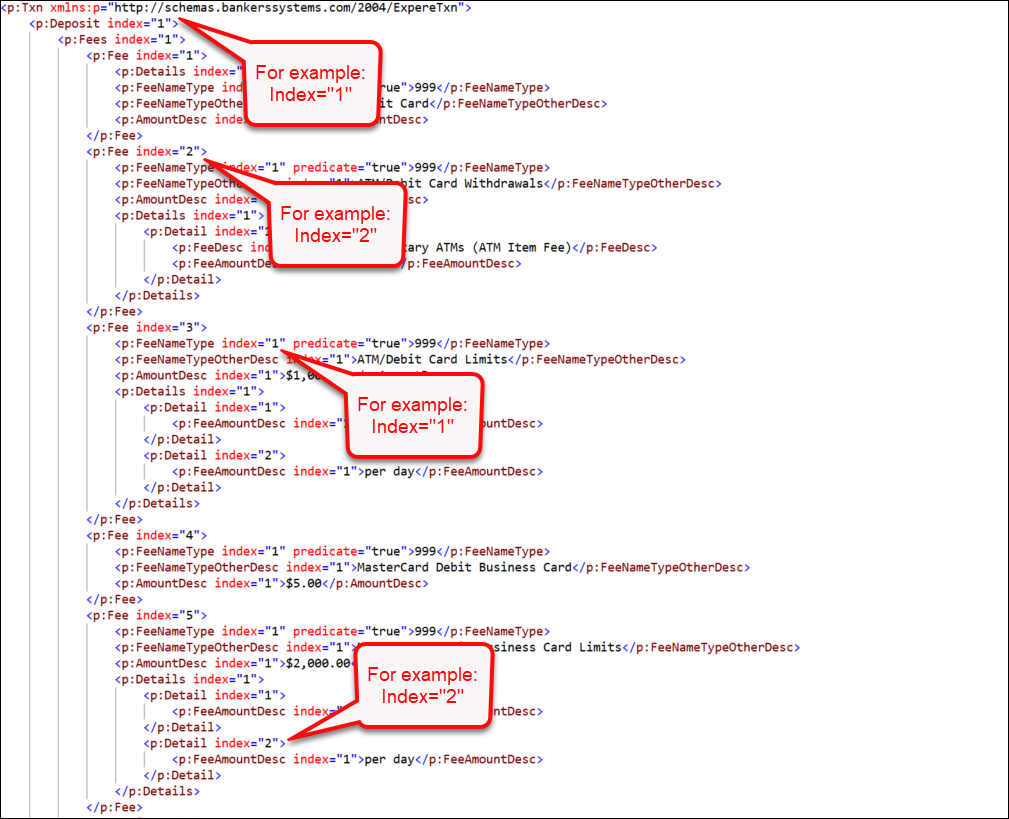
UpdateTransaction
call includes Indexes for all elements sequentially, retaining the order of the
items as they exist. In the example below, the "collection container", in this case,
the <Fees> and each child <Fee> element
contain an index attribute with a corresponding value.