Using Credit Scoring
Use the Credit Score capability to pre-score a loan without having to submit the loan for
approval. You can use this information to evaluate a loan and decide if it is worthwhile
to submit.
Note:
E-Tran will not accept loan submissions
through our system if any Owner/Principal is not a U.S. citizen. In such cases, you
will need to create the loan directly on the E-Tran website, where the
required citizenship documentation can be uploaded.
- To begin the credit scoring submission process, select SUBMIT to open the
details screen.
 Note:
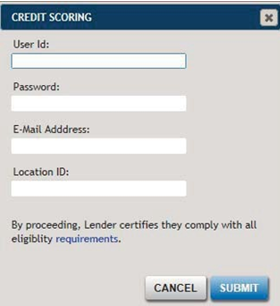
Note:- The User ID, E-Mail address, and Location ID fields appear blank if no submissions have previously been made. Once populated and submitted, the values are stored locally and automatically populate for subsequent submissions.
- Selecting the requirements link displays the eligibility questions set forth by the SBA.
- The Location ID identifies a Lender's physical location. Each lender has a Location ID for each location when applicable. Your Location ID was part of your institution's SBA GLS authorization registration.
- In the Credit Scoring dialog box (as shown above), enter your user ID, password, email address, and location ID in the appropriate fields, then click SUBMIT.
- A numerical credit score will be returned.
