Updating content references through the command line
This procedure explains how to resolve content references as a prerequisite to using the Document Generation Services Management Tool to deploy a library with custom content.
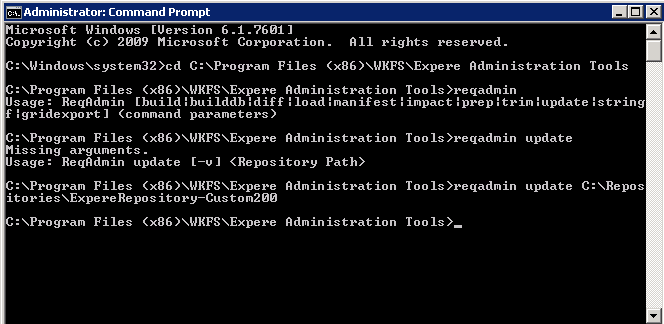
- Locate the installation path of the Expere Admin Tool; for example: C:\Program Files (x86)\WKFS\Expere Administration Tools.
- Open the command prompt as an administrator.
- From the command prompt, enter cd C:\Program Files (x86)\WKFS\Expere Administration Tools and click Enter to return the Expere Admin Tool installation location.
- Enter reqadmin to display the Expere Admin Tool usage.
- Enter reqadmin update and the location of the repository to update the content references; for example: Reqadmin update C:\Users\<username>\Documents\Repositories\Multipleorgs\ExpereRepository_Sprint22Custom50. Click Enter.Note: Verify that no spaces exist within the repository location to avoid errors.
- Navigate to the repository folder. Select all of the desired files within this folder that should exist within the repository.
- Right-click on the files and select Send to - Compressed (zipped) folder.