Note: The information presented in each section is deployed on a
monthly basis; work with your Professional Services liaison if you wish to consume
this release.
December
This release utilizes the following Nuget Packages:
- Document Generation Services version: 25.11.24.5550
- Expere Engine version: 25.4.0.6350
- DocViewer version: 25.10.1.1163
- Document Generation Services Core version: 25.11.3.231
- Document Generation Services Core DocViewer version: 25.11.3.231
- Security Administration version: 7.0.0.1902
- Expere Document Services: 25.11.10.2461
- Expere Document Services Tool Suite: 25.6.23.2415
- DocumentServices: 25.11.25.401
- Expere EZ Transform 2: 2025.11.18.1
- EZ Config:
- EZConfig Packages and Packets version: 2025.11.7.3409
- EZConfig Default Data version: 2025.11.7.1149
- EZ Config Service version: 2025.11.21.888
- EZ Gateway version: 2025.11.7.881
- Databases:
- Document Generation Services Database version: 25.11.24.5550
- EZConfig Packages and Packets version: 2025.11.7.3409
- EZConfig Default Database version: 2025.11.7.1149
- Security Administration Database version: 7.0.0.1902
- Expere Document Services Database version: 25.6.18.2411
Installation / Upgrade Notes
Note the following installation and upgrade changes in the December release:
- Transform variable changes:
- Octopus variable changes:
- Installation and upgrade changes:
- WSDL Changes:
- REST API Changes
| Expere: SmartSign Plus®
integration |
- Type: Feature
- Reference: PBI 906301, 885502, 871078, 901254
- Documentation Impacts:
|
Summary: as part of our ongoing work to integrate SmartSign
Plus® with Expere, the following functionality has been
implemented for the December release:
- Improved Handling of Package Destruction Requests (PBI
906301): the SmartSign Plus integration was enhanced to handle
package IDs more gracefully in redraw requests.
- Ignored Unknown Package IDs: if a package ID is not
found in the database, the system will ignore it without
error.
- Skip Destruction Without Package ID: when destruction
is requested but no package ID is provided, the destruction
process will be skipped.
- Logging Verification: system logs now clearly
indicate that destruction was not executed in these cases,
ensuring transparency and traceability.
- Multiple RembrandID values now result in a single Participant
(PBI 885502): Expere has been enhanced so that when multiple unique
RembrandID values are present for the same person responsible for
multiple roles, only one Participant ID is created in SmartSign
Plus. See SmartSign+ Feature Guide: Print
fulfillment workflow > Participant-level > NOTE > First
Bullet and SmartSign+ Feature Guide: Expere
Transaction XPaths for eOriginal > Participants collection >
...RembrandtIDRefs for more information.
- (Hosted Expere / DocumentService) Support for Credential Passing
Added (PBI 901255, 901254): integrators can now pass
credentials directly within the request. Credentials and the
appropriate Package ID* can be included as a base64-encoded JSON
string in a custom http header
(
X-SmartSignPlus-Configuration) within the
following fields of the request.
- Login ID
- API Key
- Client ID
- Client Secret
- Organization ID
- Lender Name
- Package ID (used for redraws)
Sample JSON
string:
{
  "loginId": "xxxxxxxxxxx",
  "apiKey": "xxxxxxxxxxxxxxxxxxxxxxxxxxxxxxxx",
  "clientId": "xxxxxxxxxxxxxxxxxxxxxxxxxxxxxxxxxxx",
  "clientSecret": "xxxxx-xxxxxxxxxxx-xxxxx",
  "organizationId": "123456789",
  "lenderName": "xxxxxxxxxx",
  "packageId": ""
}
|
| WCAG: Expere Engine enhanced to support embedded
and Tagged .PDF's |
- Type: Enhancement
- Reference: PBI 845003, 884956
|
Summary: as a part of our continued effort to create WCAG compatible
documents we have updated the Expere Engine to now support the generation of
Tagged .PDF documents. We will continue making enhancements to the Expere
Engine for Tagged .PDF support, so check back for items being identified and
corrected. As part of our continued work to support Tagged .PDF's, we have
implemented enhancements to resolve the following WCAG-related changes in
the January release:
- Reference symbols / notes tagging behavior enhanced (PBI
845003): reference symbols (for example: "SM" or "*") and their
related notes are now tagged using the
<Reference> and <Note>
tags, respectively, in the Adobe Acrobat tag tree for dynamic and
Embedded PDF documents. This provides the user with proper context
and allows them to navigate and interact with the data at their
discretion.
<Lbl> tagging behavior enhanced (PBI
884956): the Expere Engine has been enhanced so that
<P> tags are no longer present as child tags
of <Lbl> tags in a tagged dynamic or Embedded
PDF document. |
| Expere: Improved PDF Tag Structure for Overflow Field Descriptions |
- Type: Enhancement
- Reference: 895760
|
|
Summary: the tagging and bookmark logic has been enhanced for embedded
PDF documents to align with accessibility standards and provide a better user
experience. |
What's Changed?
- Heading-Based Bookmarks: Bookmarks are now authored with
appropriate heading tags when applicable; for example:
H1 -
                                <HeadingText>
.
- Overflow Page Tagging: Overflow pages are displayed as
<P> tags in the tag tree, ensuring proper
semantic structure.
- Bookmark Exclusions: Overflow page descriptions are no longer
added as bookmarks, reducing clutter and improving navigation.
|
|
Impact: these updates enhance document accessibility and ensure
compliance with tagging best practices, making navigation clearer for assistive
technologies. |
| Expere Engine: Improved filesystem-only configuration |
- Type: Enhancement
- Reference: 903121
|
|
Summary:
Expere will no longer attempt to connect to a database if it is not configured
to do so in its properties, thus avoiding extraneous error messages from being
printed to the log files. |
|
Impact: Expere Engine |
| Expere Document Services Toolsuite: Virus Scanning
for Uploaded Files Implemented |
- Type: Maintenance
- Reference: 865470
|
|
Summary: Virus scanning capability has been implemented for files
uploaded through the EDS Toolsuite. |
| SmartSign Web: Enhanced Sort Order Handling for
Reverse Register Indicator |
|
|
|
Summary: when a reverse register indicator is passed from
Expere to eCore, and a new e-note is generated and
deposited in the vault, the EO Configure Sort Order process has been
updated to ensure accurate document sequencing. |
What's changed:
- The sort order now includes only the Doc ID of the newly
generated e-note.
- The previously signed e-note is excluded from the signing
process, preventing duplicate or unnecessary signing
actions.
|
| Impact: this enhancement ensures that only the latest e-note is
considered for signing when a reverse register indicator triggers a new
document creation, improving compliance and reducing operational
errors. |
November
This release utilizes the following Nuget Packages:
- Document Generation Services version: 25.10.27.5520
- Expere Engine version: 25.4.0.6329
- DocViewer version: 25.10.1.1163
- Document Generation Services Core version: 25.10.27.228
- Document Generation Services Core DocViewer version:
25.10.27.228
- Security Administration version: 7.0.0.1902
- Expere Document Services: 25.10.21.2454
- Expere Document Services Tool Suite: 25.6.23.2415
- DocumentServices: 25.10.27.397
- EZ Config:
- EZConfig Packages and Packets version: 2025.10.24.3404
- EZConfig Default Data version: 2025.10.24.1141
- EZ Config Service version: 2025.10.23.882
- EZ Gateway version: 2025.10.23.877
- Databases:
- Document Generation Services Database version: 25.10.27.5520
- EZConfig Packages and Packets version: 2025.10.24.3404
- EZConfig Default Database version: 2025.10.24.1141
- Security Administration Database version: 7.0.0.1902
- Expere Document Services Database version: 25.6.18.2411
Installation / Upgrade Notes
Note the following installation and upgrade changes in the November release:
- Transform variable changes:
- Octopus variable changes:
- Installation and upgrade changes:
- WSDL Changes:
- REST API Changes
| Expere: SmartSign Plus®
integration |
|
|
|
Summary: as part of our ongoing work to integrate SmartSign
Plus® with Expere, the following functionality has been
implemented for the November release: |
| Document Generation Services: ability to switch
databases available |
|
|
Summary: in our October release, we introduced PBI's 890100,
890179 by which Document Generation Services has been updated to
provide users the option to use Azure Dev Ops BLOB storage through the use
of new OD variables to store PDF's and transaction data. As part of this
effort, we have made the following enhancements:
- (PBI 896382) the default retry count has been updated to "five"
retries with a one second delay between retries, both of which are
configurable through the following new transform properties within
DGSTransformVar:
BlobStorageRetryCount: sets the number of
retries before a transaction failsBlobStorageRetryDelayMs: sets the interval
(in milliseconds) between retries.
- (PBI 897373) the DGS Health Check page now includes an Azure Blob
Storage entry and will return all components as part of its health
check in JSON format; for example:
{
  "status": true,
  "version": "2025.7.21.3369",
  "conditions": {
    "[DocGenServices Host] Check: DGS Host Service Response": true,
    "[SQL Server] Check: Database Access": true,
    "[ExpereRepository] Check: File System Access": true,
    "[STS] Check: STS HealthCheck Response": true,
    "[EZTransform] Check: Service Connectivity": true,
    "[Expere] Check: Document Generation": true,
    "[AzureBlobStorage] Check: Service Connectivity": true,
    "[DocGenService System] Check: System Health": true
  },
  "checkTime": "2025-09-05T20:59:06.9859343+00:00"
}
|
| Document Generation Services and Hosted Expere
integrators: new JSON health check pages added |
- Type: Feature
- Reference: PBI 902376, 897374
|
Summary: integrators may now access new Document Generation Services
and Hosted Expere Health Check pages in JSON format. A sample health check
appears as follows:
{
  "status": true,
  "version": "20xx.x.xx.xxxx",
  "conditions": {
    "[DocService] Ping of DocService at https://xx-xx-xx.fsbmi-apps.com/xxxxxxxx/xxxxxx/xxx/xx/xxxxxxxxx.svc": true,
    "[CallbackHandler] Ping of callback handler at https://xx-xx-xx.fsbmi-apps.com/xxxxxxxx/xxxxxx/xxx/xx/xxxxxxxxx.svc": true,
    "[DeliverResponse] Ping of delivery response at https://xx-xx-xx.fsbmi-apps.com/xxxxxxxx/xxxxxx/xxx/xx/xxxxxxxxx.svc": true,
    "[DeliveryService] Ping of DeliveryService at https://xx-xx-xx.fsbmi-apps.com/xxxxxxxx/xxxxxx/xxx/xx/xxxxxxxxx.svc": true,
"[SQLServer]": true
  },
  "checkTime": "2025-09-05T20:59:06.9859343+00:00"
}
|
| Document Generation Services Management Tool:
uploading and scanning support added |
- Type: Feature
- Reference: PBI 865632
|
|
Summary: the Document Generation Services Management Tool has been
enhanced for increased security. |
| Expere: merged PDF behavior enhanced |
- Type: Enhancement
- Reference: PBI 898176
|
|
Summary: users reported an error when attempting to generate a merged
PDF document package. It was discovered during our initial triage that a
field name value contained an "_" (underscore) as the last character in the
value, resulting in the error. As a result, Expere has been enhanced to
successfully parse field name values containing underscores. |
| DocViewer: JSON health check endpoint
added |
- Type:
Enhancement
- Sprint:
19
- Reference: 897518
|
|
Summary: The DocViewer application now exposes a machine-readable
JSON health check endpoint in addition to the existing HTML
health check page. This enables the orchestration pipeline to validate
service health programmatically. The new endpoint returns the overall
status, build version, a set of boolean condition checks (for content
location, schemas folder, session state DB, STS, SWT key), and a
timestamp. |
|
| Expere: Security issue and Monthly component
upgrades |
- Type: Enhancement
- Reference: PBI 898285, 891874, 891882, 891885, 892146,
892148
|
Summary: As part of a regular cadence to review and upgrade any
items used with the Expere Engine for security issue and monthly component
upgrades, we have upgraded the following items to the latest version:
- Security Issue Upgrades:
- WildFly
- Apache Commons Collections
- Maintenance Upgrades
- Amazon Corretto Java
commons-imagingdom4jlog4j- SLF4J API Module (
org.slf4j:slf4j-api)
Note: No user action is
required. |
| Expere: Web Services Guide enhanced with updated
request parameter for Hosted REST API users |
|
|
|
Summary: per user feedback, each individual method within the REST
API section of the Expere Document Services Web Services Guide has been
enhanced with updated request parameters. |
| Expere: Overflow page description order updated
for EmbeddedPDF documents |
- Type: Defect Correction
- Reference: PBI 876384
|
Issue: users reported that after generating an EmbeddedPDF document
containing an Overflow page, the corresponding Overflow descriptions did not
appear chronologically in the order they were authored in the .REQ file.
This was the expected output: 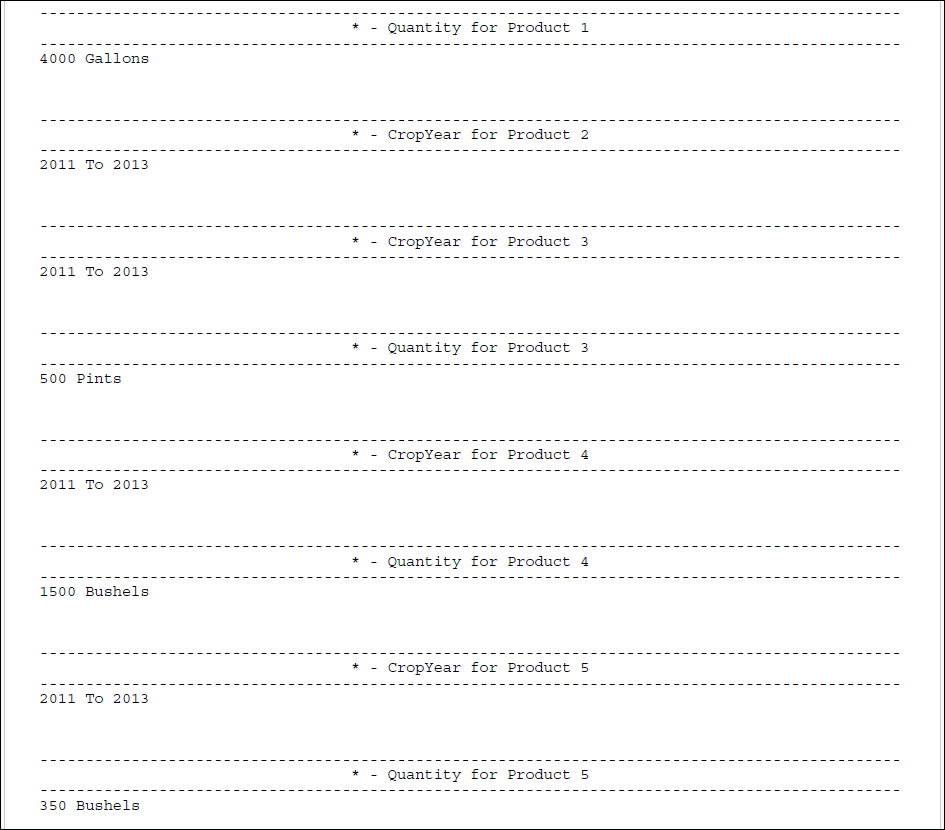 This was actual result: 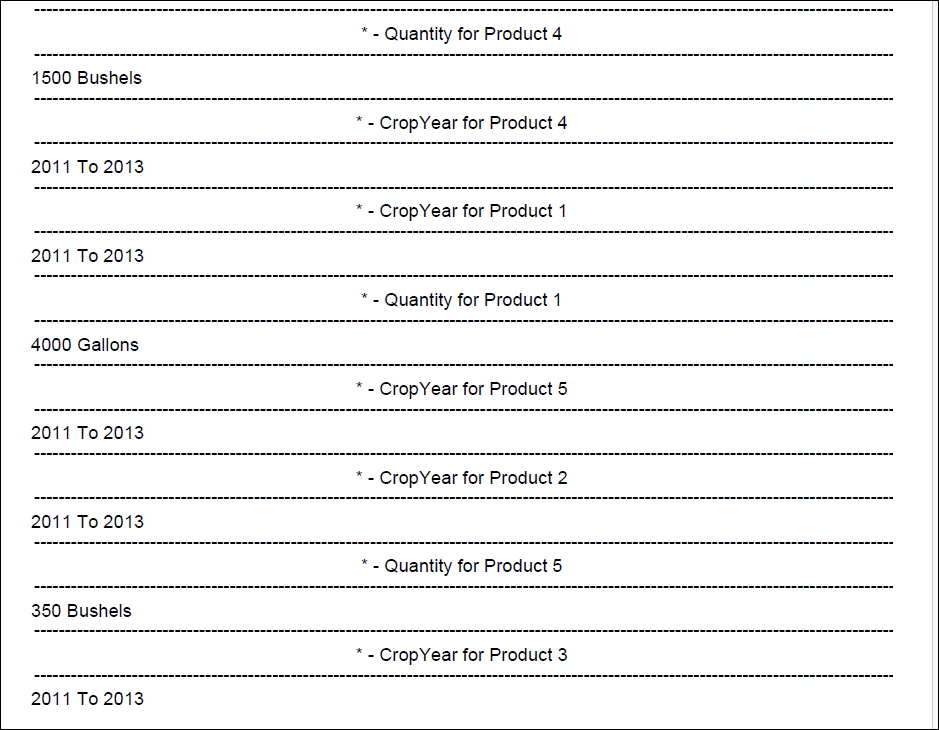 |
|
Solution: Expere has been updated so that the Overflow page
descriptions on a generated EmbeddedPDF document appear, chronologically, in
the order in which they were authored in the .REQ file. |
October
This release utilizes the following Nuget Packages:
- Document Generation Services version: 25.9.22.5461
- Expere Engine version: 25.4.0.6308
- DocViewer version: 25.8.13.1160
- Document Generation Services Core version: 25.8.5.226
- Document Generation Services Core DocViewer version: 25.8.5.226
- Security Administration version: 7.0.0.1880
- Expere Document Services: 25.8.19.2446
- Expere Document Services Tool Suite: 25.6.23.2415
- DocumentServices: 25.9.8.386
- EZ Config:
- EZConfig Packages and Packets version: 2025.9.4.3388
- EZConfig Default Data version: 2025.9.4.1123
- EZ Config Service version: 2025.9.19.844
- EZ Gateway version: 2025.9.4.872
- Databases:
- Document Generation Services Database version: 25.9.22.5461
- EZConfig Packages and Packets version: 2025.9.4.3388
- EZConfig Default Database version: 2025.9.4.1123
- Security Administration Database version: 7.0.0.1880
- Expere Document Services Database version: 25.6.18.2411
Installation / Upgrade Notes
Note the following installation and upgrade changes in the October release:
- Transform variable changes:
- Octopus variable changes:
- Installation and upgrade changes:
- WSDL Changes:
- REST API Changes
| Expere: SmartSign Plus®
integration |
|
|
|
Summary: as part of our ongoing work to integrate SmartSign
Plus® with Expere, the following functionality has been
implemented for the October release: |
| Expere: WebSphere and Oracle support
removed |
|
|
|
Summary: the Expere Engine no longer supports WebSphere nor Oracle
as the integration middleware and database. All references to WebSphere and
Oracle have been removed from the Expere Implementation Guide, per the link
above. |
| Expere: Security issue and Monthly component
upgrades |
- Type: Enhancement
- Reference: PBI 894060, 889834, 890075
|
Summary: As part of a regular cadence to review and upgrade any
items used with the Expere Engine for security issue and monthly component
upgrades, we have upgraded the following:
- Security Issue Upgrades:
- WildFly upgraded to the latest available version
- Apache Commons Lang, version 3.18.0
- Maintenance Upgrades
Note: No user action is
required. |
| Expere / SMARTDoc: Indexing Issues when Iterating
over CUSTOM paths resolved |
- Type: Defect Correction
- Reference: PBI 896048
- Documentation Impacts
|
Issue: the following issues were identified when executing
SmartDoc transactions that include both borrowers and trusts in the
SmartDocData:
- TRUST Container Indexing: TRUST containers in the ARC data
are not starting at index [1] as expected. Instead, indexing
continues from the last borrower entry. For example, if there are 4
borrowers, the first TRUST container starts at [5], leaving [1]
through [4] empty.
- INTER_VIVOS_TRUSTEE Indexing Behavior: when multiple trustees
are included in the transaction data but only one is applicable, the
ARC data still returns containers for all trustees. This results in
empty containers for the inapplicable trustees and an unexpected
index (e.g., INTER_VIVOS_TRUSTEE[3] instead of starting at [1] for
the applicable trustee).
- _SequenceIdentifier Inconsistency: The _SequenceIdentifier
value for TRUST containers is returned as "UpdateSequence". In
contrast, BORROWER and INTER_VIVOS_TRUSTEE containers return a
numeric value, leading to inconsistency in the ARC data
structure.
|
Solution: the following updates have been implemented to address
these issues
- TRUST Container Indexing: when executing SmartDoc
transactions that include both borrowers and trusts, trust-related
data now operates independently from borrower data. Trust entries
begin indexing at
[1], ensuring clear separation
and preventing the creation of blank containers.
- INTER_VIVOS_TRUSTEE Optimization: SmartDoc will no longer
return empty containers for trustees marked as inapplicable within
the
INTER_VIVOS_TRUSTEE data. This streamlines the
output and improves clarity.
- Consistent Sequence Identifier Usage: the
_SequenceIdentifier field is now applied
consistently across all iterated parties, ensuring uniformity and
simplifying downstream data processing.
|
| Expere: XPath compatibility message
addressed |
- Type: Defect Correction
- Reference: PBI 897849
|
|
Issue: a user reported receiving an XPath 2.0 Compatibility error
message despite having the XPath 1.0 checkbox enabled in the Document
Generation Services (DGS) Management Tool. |
|
Solution: the XPath 2.0 Compatibility error message no longer appears
if the XPath 1.0 checkbox is enabled in the DGS Management
Tool. |
September
This release utilizes the following Nuget Packages:
- Document Generation Services version: 25.8.25.5436
- Expere Engine version: 25.4.0.6291
- DocViewer version: 25.8.13.1160
- Document Generation Services Core version: 25.8.5.226
- Document Generation Services Core DocViewer version: 25.8.5.226
- Security Administration version: 7.0.0.1877
- Expere Document Services: 25.8.19.2446
- Expere Document Services Tool Suite: 25.6.23.2415
- DocumentServices: 25.8.11.381
- EZ Config:
- EZConfig Packages and Packets version:
2025.8.13.3386
- EZConfig Default Data version: 2025.8.13.1119
- EZ Config Service version: 2025.8.7.832
- EZ Gateway version: 2025.8.5.870
- Databases:
- Document Generation Services Database version:
25.8.25.5436
- EZConfig Packages and Packets version:
2025.8.13.3386
- EZConfig Default Database version: 2025.8.13.1119
- Security Administration Database version: 7.0.0.1877
- Expere Document Services Database version: 25.6.18.2411
Installation / Upgrade Notes
Note the following installation and upgrade changes in the September release:
- Transform variable changes:
- Octopus variable changes:
- Installation and upgrade changes:
- WSDL Changes:
- REST API Changes
| Expere: SmartSign Plus®
integration |
|
|
|
Summary: |
| WCAG: Expere Engine enhanced to support embedded
and Tagged .PDF's |
- Type: Enhancement
- Reference: PBI 889352
|
Summary: as a part of our continued effort to create WCAG compatible
documents we have updated the Expere Engine to now support the generation of
Tagged .PDF documents. We will continue making enhancements to the Expere
Engine for Tagged .PDF support, so check back for items being identified and
corrected. As part of our continued work to support Tagged .PDF's, we have
implemented enhancements to resolve the following WCAG-related changes in
the September release:
- Embedded PDF fillable field behavior enhanced (PBI 889352):
it was reported that when attempting to generate a standard PDF
using the
ESignatureAndFieldSupport ancillary
option, fields that should have been fillable were flattened instead
(for example: signature fields). This behavior has been enhanced so
that generating a standard PDF using the
ESignatureAndFieldSupport ancillary option once
again results in fillable fields.
|
| Document Generation Services: database
enhancement |
- Type: Enhancement
- Reference: PBI 890100
|
|
Summary: Document Generation Services has been updated to store PDF
and RTF documents in Azure Blob Storage instead of SQL, in order to reduce
the database size. |
| Callback enhancement |
- Type: Enhancement
- Reference: PBI 884716
|
|
Summary: DocGenService Host has been enhanced to reduce the number
of callbacks to mitigate transactions from timing out. More specifically,
the “CallBackRetryCount” has been reduced from eight (8) to two (2). |
Expere: post processing added to support merging
select individual documents when using DocumentService REST
API |
|
|
Summary: the DocumentService REST API has been
enhanced to include a new PostProcess-Synchronous API call
to merge select individual documents. A user can now pass in the encrypted
Base64 for desired documents through the
PostProcess-Synchronous call, which in turn provides a
merged PDF of these select documents back to the user. |
| Expere: Barcode2D behavior enhanced for
EmbeddedPDF documents |
- Type: Enhancement
- Reference: PBI 887987
|
Summary: Expere has been enhanced so when using a Barcode2D with an
EmbeddedPDF it results in a barcode that is the same as a Static PDF and can
be scanned successfully.This was the output before the enhancement: 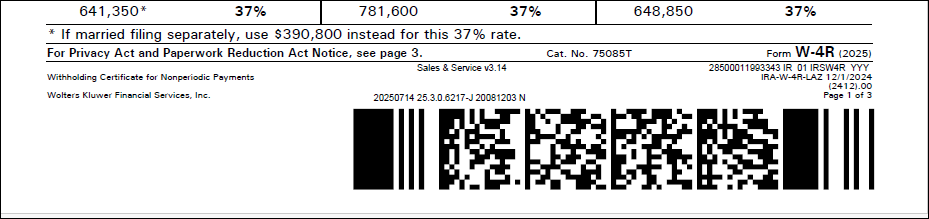 This was output after the
enhancement: 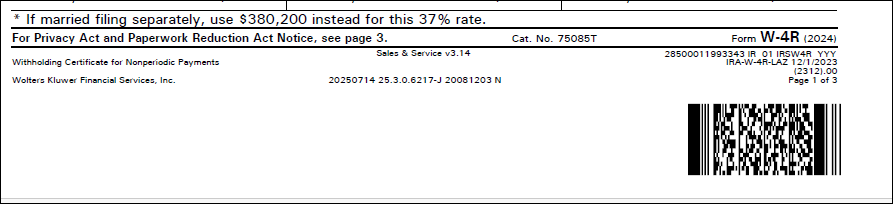 |
| Expere: Security issue and Monthly component
upgrades |
- Type: Maintenance
- Reference: PBI 892765
|
Summary: As part of a regular cadence to review and upgrade any items
used with the Expere Engine for security issue and monthly component
upgrades, we have upgraded the following:
- Security Issue Upgrades:
- Maintenance Upgrades
Note: No user action is required. |
| DocViewer: Security issue and Monthly component
upgrades |
- Type:
Enhancement
- Reference: PBI 888153
|
| Summary: As part of a regular cadence to review and upgrade any
items used with the DocViewer for security issue and monthly component
upgrades, we have upgraded the following: |
August
This release utilizes the following Nuget Packages:
- Document Generation Services version: 25.7.16.5418
- Expere Engine version: 25.3.0.6270
- DocViewer version: 25.7.17.1143
- Document Generation Services Core version: 25.4.3.222
- Document Generation Services Core DocViewer version: 25.4.3.222
- Security Administration version: 7.0.0.1871
- Expere Document Services: 25.6.9.2408
- Expere Document Services Tool Suite: 25.6.23.2415
- DocumentServices: 25.5.28.376
- EZ Config:
- EZConfig Packages and Packets version: 2025.7.21.3369
- EZConfig Default Data version: 2025.7.30.1112
- EZ Config Service version: 2025.6.17.821
- EZ Gateway version: 2025.7.21.866
- Databases:
- Document Generation Services Database version:
25.7.16.5418
- EZConfig Packages and Packets version: 2025.7.21.3369
- EZConfig Default Database version: 2025.7.30.1112
- Security Administration Database version: 7.0.0.1871
- Expere Document Services Database version: 25.6.18.2411
Installation / Upgrade Notes
Note the following installation and upgrade changes in the August release:
- Transform variable changes:
- Expere:
ALLOW_XPath_1, OD Variable should be
added to Expere transform variable and set to "false"
- Octopus variable changes:
- Default Data: Update OD transform variable
DefaultData.GenerateDocumentsOn inside of Octopus
variable DefaultDataTransformVar
<Property Id="DefaultData.GenerateDocumentsOn" Value="true"
                                />
- Installation and upgrade changes:
- WSDL Changes:
| Expere: SmartSign Plus®
integration |
|
|
|
Summary: as part of our ongoing work to integrate SmartSign
Plus® with Expere, the following functionality has been
implemented for the August release:
|
| Expere: Error when Header/FooterNotice includes
MiddlePage and LinkText |
- Type: Defect Correction
- Reference: PBI 870350
|
|
Issue: a user reported that a custom document failed to generate as
a Tagged PDF. Internal analysis revealed that the issue was caused by a
footer enhancement deployed during our March Hosted Expere release.
|
Solution: Expere has been updated so that Tagged PDF documents
successfully generate when they include any of the following combinations:
- A
FooterNotice or HeaderNotice,
either MiddlePage='Yes' / 'No' and
document contains a LinkText element.
- Fillable fields in
FooterNotices and are generated
when FirstPage='Yes' and
MiddlePages='Yes', and
LastPage='No' .
|
| Engine: Saxon upgrade to 12.7 |
- Type: Enhancement
- Reference: PBI 872377
|
|
Summary: As part of the regular comprehensive security tests that
are run against Expere components, we have updated the Expere Engine to use
Saxon version 12.7. |
| Expere: CUSTOM path support added for SMARTDoc
data |
- Type: Enhancement
- Reference: PBI 871568, 886050
- Documentation Impacts
|
Summary: users reported execution errors when attempting to map data
under CUSTOM/TRUST in the SMARTDoc. As a result, Expere SMARTDoc
functionality has been updated to allow iteration over the
//CUSTOM/TRUST[#] and
//CUSTOM/TRUST[#]/TRUSTEE[#]) XPaths. |
| Expere: Security issue and Monthly component
upgrades |
- Type: Maintenance
- Reference: PBI 885917
|
Summary: As part of a regular cadence to review and upgrade any items
used with the Expere Engine for security issue and monthly component
upgrades, we have upgraded the following:
- Maintenance Upgrades
- Amazon Corretto Java 21.0.8_9
Note: No user action is required. |
| Expere: new Overview Guide available available
for Hosted and Self-Hosted Expere users |
|
Summary: a new Expere Workflow Guide is now available that provides
a launching point for understanding Expere; items discussed include the
following:
- Technical details
- Expere workflow processes and charts
- Security when calling Expere
- Wolters Kluwer / Expere Support structure
- Environment monitoring
- Integration process
- Supported tools
|
| DocViewer: Security Enhancement |
- Type:
Enhancement
- Reference: PBI 885930
|
| Summary: As part of the regular comprehensive security tests, we
have updated mganss/HtmlSanitizer to version 7.1.542. |
July
This release utilizes the following Nuget Packages:
- Document Generation Services version: 25.7.16.5418
- Expere Engine version: 25.3.0.6270
- DocViewer version: 25.6.23.1136
- Document Generation Services Core version: 25.4.3.222
- Document Generation Services Core DocViewer version: 25.4.3.222
- Security Administration version: 7.0.0.1871
- Expere Document Services: 25.6.9.2408
- Expere Document Services Tool Suite: 25.6.23.2415
- DocumentServices: 25.5.28.376
- EZ Config:
- EZConfig Packages and Packets version: 2025.7.21.3369
- EZConfig Default Data version: 2025.7.30.1112
- EZ Config Service version: 2025.6.17.821
- EZ Gateway version: 2025.7.21.866
- Databases:
- Document Generation Services Database version:
25.7.16.5418
- EZConfig Packages and Packets version: 2025.7.21.3369
- EZConfig Default Database version: 2025.7.30.1112
- Security Administration Database version: 7.0.0.1871
- Expere Document Services Database version: 25.6.18.2411
Installation / Upgrade Notes
Note the following installation and upgrade changes in the July release:
- Transform variable changes:
- Expere:
ALLOW_XPath_1, OD Variable should be
added to Expere transform variable and set to "false"
- Octopus variable changes:
- Default Data: Update OD transform variable
DefaultData.GenerateDocumentsOn inside of Octopus
variable DefaultDataTransformVar
<Property Id="DefaultData.GenerateDocumentsOn" Value="true"
                                />
- Installation and upgrade changes:
- WSDL Changes:
| Document Generation Services / Expere: XPath 1.0
Compatibility Mode update |
- Type: Enhancement
- Reference: PBI 874798, 850403, 856662
- Documentation Impacts:
|
Summary: in preparation of our feature to disable XPath 1.0
Compatibility Mode, we have updated the following:
- Document Generation Services has been enhanced to only use XPath 1.0
compatibility if
com.bankerssystems.expere.xPath_1_0_Compatibility
element has been set to "false" in the
bsi.properties file and by checking the
XPath 1.0 checkbox in the Document Generation Services
Management Tool.
com.bankerssystems.expere.xPath_1_0_Compatibility
element has been set to "false" in the
bsi.properties file. |
| Document Generation Services / Expere.NET: Logo
height and width behavior enhanced |
- Type: Enhancement
- Reference: PBI 878723 / 877157
|
Summary: Expere .NET has been updated to allow an empty value for
either the <HeightInInches/> or
<WidthInInches/> element when passing in a logo as
an ancillary output. The expected behavior is that users can pass in either
a <HeightInInches/> or
<WidthInInches/> element and Expere will auto-scale
the logo; see example below:
<AncillaryOutputsDoc>
	<AncillaryOutput>
		<OutputType>Logo</OutputType>
		<Logo>
			<Image>/9j/4AA...Br9abRRQA1+lNoooA//2Q==</Image>
			<Justification>Center</Justification>
			<Placement>AllPages</Placement>
			<HeightInInches>1.8</HeightInInches>
			<WidthInInches></WidthInInches>
			<AlternateText>Test Logo</AlternateText>
		</Logo>
	</AncillaryOutput>
</AncillaryOutputsDoc>
Expere .NET has been updated to
allow either a <HeightInInches/> or
<WidthInInches/> element with an empty value
when passing in a logo as an ancillary output. |
DocumentService (Document
Generation Services SOAP API): docRequiresSignature removed |
|
|
Summary: docRequiresSignature has been removed from
DocServices SOAP API > DocDescriptor
element. |
| WCAG: Expere Engine enhanced to support embedded
and Tagged .PDF's |
- Type: Enhancement
- Reference: PBI 877546, 879578
|
|
Summary: as a part of our continued effort to create WCAG compatible
documents we have updated the Expere Engine to now support the generation of
Tagged .PDF documents. We will continue making enhancements to the Expere
Engine for Tagged .PDF support, so check back for items being identified and
corrected. As part of our continued work to support Tagged .PDF's, we have
implemented enhancements to resolve the following WCAG-related changes in
the July release: |
| Expere: Logo height and width behavior
enhanced |
- Type: Enhancement
- Reference: PBI 877157
|
Summary: Expere .NET has been updated to allow an empty value for
either the <HeightInInches/> or
<WidthInInches/> element when passing in a logo as
an ancillary output. The expected behavior is that users can pass in either
a <HeightInInches/> or
<WidthInInches/> element and Expere will auto-scale
the logo; see example below:
<AncillaryOutputsDoc>
	<AncillaryOutput>
		<OutputType>Logo</OutputType>
		<Logo>
			<Image>/9j/4AA...Br9abRRQA1+lNoooA//2Q==</Image>
			<Justification>Center</Justification>
			<Placement>AllPages</Placement>
			<HeightInInches>1.8</HeightInInches>
			<WidthInInches></WidthInInches>
			<AlternateText>Test Logo</AlternateText>
		</Logo>
	</AncillaryOutput>
</AncillaryOutputsDoc>
Expere .NET has been updated to
allow either a <HeightInInches/> or
<WidthInInches/> element with an empty value
when passing in a logo as an ancillary output. |
| Expere: Security issue and Monthly component
upgrades |
- Type: Enhancement
- Reference: PBI 869411
|
|
Summary: As part of a regular cadence to review and upgrade any
items used with the Expere Engine for security issue and monthly component
upgrades, we have upgraded the following: |
| Expere: list of supported special characters
available |
- Type: Enhancement
- Reference: PBI 841785
- Documentation Impacts
|
|
Summary: As part of a request to identify supported and unsupported
characters, we have enhanced our user documentation to provide a list of
supported characters. |
| Expere: user documentation enhanced for
DiscreteParty scenarios |
- Type: Enhancement
- Reference: PBI 872351
- Documentation Impacts
|
|
Summary: the Expere user documentation has been updated to better
communicate how Discrete Parties are returned in the response in certain
signing and merging scenarios. |
| Expere: new indexing indicator added |
- Type: Defect Correction
- Reference: PBI 885574
|
|
Issue: users reported an issue when passing in elements with indexes
in their transactions as a result of the feature rolled out in PBI 784650.
|
Solution: Expere has been updated so users can pass in a new
<ReIndexTransactionInd> = '1' element and value in
the transaction in order to utilize indexes. No user action is required;
by default the <ReIndexTransactionInd> indicator is
set to '0' and is not required to be passed in the transaction.
|
Note: After updating to June, and if
ALLOW_XPath_1 is set to "true", users should monitor
C:\ProgramData\WKFS\DGS\Erl.log for "Due to an XPath 2.0
compatibility issue". If this statement appears in the log file, users should
address this before taking a future Expere release. June supports the fallback to
1.0 compatibility, but at some point in the future the ability to fail back will be
removed.
This release utilizes the following Nuget Packages:
- Document Generation Services version: 25.5.20.5369
- Expere Engine version: 25.3.0.6192
- DocViewer version: 25.4.29.1127
- Document Generation Services Core version: 25.4.3.222
- Document Generation Services Core DocViewer version: 25.4.3.222
- Security Administration version: 7.0.0.1828
- Expere Document Services: 25.5.12.2384
- Expere Document Services Tool Suite: 25.4.3.2365
- DocumentServices: 25.5.28.376
- EZ Config:
- EZConfig Packages and Packets version: 2025.4.11.3318
- EZConfig Default Data version: 2025.5.28.1082
- EZ Config Service version: 2025.4.3.817
- EZ Gateway version: 2025.5.15.856
- Databases:
- Document Generation Services Database version:
25.5.20.5369
- EZConfig Packages and Packets version: 2025.4.11.3318
- EZConfig Default Database version: 2025.5.28.1082
- Security Administration Database version: 7.0.0.1828
- Expere Document Services Database version: 25.4.3.2364
Installation / Upgrade Notes
Note the following
installation and upgrade changes in the June release:
- Transform variable changes:
- Octopus variable changes:
- Installation and upgrade changes:
- Microsoft.AspNetCore.Metadata 8.0.15
- WildFly 36.0.0
- Amazon Corretto Java 21.0.7.6.1
- WSDL Changes:
| Expere: SmartSign Plus®
integration |
- Type: Feature
- Reference: PBI 872181, 870321, 861050, 861051, 871220,
871714
- Documentation Impacts:
|
Summary: as part of our ongoing work to integrate SmartSign
Plus® with Expere,
/Txn/EOriginalSSPlusDeliveryType 0, Blank, or
Missing logic updated (PBI 872181): the
/Txn/EOriginalSSPlusDeliveryType 0, Blank, or
Missing logic has been updated to now fully support an
Expere-generated eNote. For more information, refer to Expere - SmartSign Plus®
Integration Guide > Expere-generated eNote placeholder and
Expere-generated dynamic eNote Workflow Outline > Step 7
Note- Participant mailing behavior enhanced (PBI 870321): the
Expere SmartSign Plus® integration has been enhanced so
that the package will succeed when multiple recipients along with
mailing information are passed to SmartSign Plus; however, not all
participants are intended to be a signer of any given document. For
more information, refer to Expere - SmartSign
Plus® Integration Guide > Print Fulfillment
Workflow.
Note:
- For transactions that fall under this use case a
"Successful with Warnings" message will be returned. "A
mailing request was not generated for Rembrandt ID {id}
due to missing participant."
- The package will be mailed to the participants that
fulfill all the SmartSignPlus mailing requirements.
- SmartSignPlusPackageStatus API created for SOAP and REST
integrations (PBI 861050 / 861051):
- users can now retrieve a SmartSignPlus package status with
either a new SmartSignPlusPackageStatus SOAP or REST
API call, depending on their integration. For more
information, refer to the following topics within the Expere
Document Services Web Services Guide:
- Optional Custom Packet Document Data (PBI 871220): the
Generate and SelectAndGenerate Request and
Responses (used with Expere EZ Config Packages and
Packets in this case) have been updated to include a new optional
PacketDocumentCustomDataItems element within
the DocumentRef element. For more information,
refer to Expere Document Services Web Services Guide > DocumentRef and PacketDocumentCustomDataItems. Note: The
PacketDocumentCustomDataItems name / value
pair appears as an attribute of the DocInstance
element in the Expere response.
- Expiration Setup-related XPaths deprecated (PBI 871714): the
following XPaths have been removed from the Expiration Setup
table in the SmartSign Plus® Integration Guide:
- /Txn/EOriginalSSPlusSingleElectronicPackageEmailAddress
- /Txn/EOriginalSSPlusSingleElectronicPackageFirstName
- /Txn/EOriginalSSPlusSingleElectronicPackageLastName
For more information, refer to Expere - SmartSign Plus®
Integration Guide > Expere Transaction XPaths for
eOriginal.
|
| Expere: EmbeddedPDF Overflow pages
enhancements |
- Type: Feature
- Reference: PBI 874959, 876382, 871238, 874971
|
|
Summary: Expere has been enhanced to support field overflow
functionality on EmbeddedPDF documents through the following work items: |
Expere: indexes added for elements for
UpdateTransaction |
- Type: Enhancement
- Reference: PBI 784650
- Documentation Impacts
|
Summary: a user requested that Index values be added to all elements
to all "collection containers" (i.e. parent elements) in
UpdateTransaction returned transaction. As a result,
the merged transaction resulting from Expere’s
UpdateTransaction has been updated to include Indexes
for all elements sequentially, retaining the order of the items as they
exist. |
| Expere: SMARTDoc _StreetAddress parsing logic
updates |
- Type: Enhancement
- Reference: PBI 868106
- Documentation Impacts
|
Summary: Expere has enhanced the Street Address inside a SMARTDoc.
If the incoming _StreetAddress value is 100 characters or
less, Expere will place that entire value into _StreetName.
This will help prevent incorrect parsing when the address is more unique
(i.e. does not have a road designation, for example:. "St", "Ave", "Ln",
etc). If the _StreetAddress value is greater than 100
characters, Expere will continue to parse _StreetAddress
into its various component, for example: _HouseNumber,
_DirectionPrefix, etc. Note: The
100 character limit is a MERS restriction on the length of
_StreetName. |
| Expere: Logging enhanced |
- Type: Enhancement
- Reference: PBI 877158, 878579, 872893
|
Summary: we have made the following logging enhancements:
- (PBI 877158) Logging was updated to include references to FOP rather
than FOP 2.6.
- (PBI 878579) As part of a larger effort to analyze usage of
ESignatureAndFieldSupport and
SignaturePointSet ancillary outputs, we have
added an INFO level logging message when
ESignatureAndFieldSupport and
SignaturePointSet ancillary outputs are used
together in the same transaction request.
- (PBI 872893) Expere has been enhanced to now log a WARN message if
the transaction data provides the same ID for two or more different
parties.
|
DocumentService:
docRequiresSignature removed |
|
|
Summary: docRequiresSignature has been removed from
DocumentService REST API >
DocDescriptor element. |
| Expere: Security issue and Monthly component
upgrades |
- Type: Maintenance
- Reference: PBI 869003, 869373
|
Summary: As part of a regular cadence to review and upgrade any items
used with the Expere Engine for security issue and monthly component
upgrades, we have upgraded the following:
- Security Issue Upgrades:
- Microsoft.AspNetCore.Metadata 8.0.15
- WildFly 36.0.0
- Maintenance Upgrades
- Amazon Corretto Java 21.0.7.6.1
Note: No user action is required. |
This release utilizes the following Nuget Packages:
- Document Generation Services version: 25.4.25.5349
- Expere Engine version: 25.2.0.6178
- DocViewer version: 25.4.7.1119
- Document Generation Services Core version: 25.4.3.222
- Document Generation Services Core DocViewer version: 25.4.3.222
- Security Administration version: 7.0.0.1816
- Expere Document Services: 25.4.24.2374
- Expere Document Services Tool Suite: 25.4.3.2365
- DocumentServices: 25.4.25.359
- EZ Config:
- EZConfig Packages and Packets version: 2025.4.3.3316
- EZConfig Default Data version: 2025.4.3.1054
- EZ Config Service version: 2025.4.3.817
- EZ Gateway version: 2025.4.3.851
- Databases:
- Document Generation Services Database version:
25.4.25.5349
- EZConfig Packages and Packets version: 2025.4.3.3316
- EZConfig Default Database version: 2025.4.3.1054
- Security Administration Database version: 7.0.0.1816
- Expere Document Services Database version: 25.4.3.2364
Installation / Upgrade Notes
Note the following
installation and upgrade changes in the May release:
- Transform variable changes:
-
DocumentServiceTransformVar contains a new
DocumentService.EZTransformHealthCheckURL property.
See PBI
872200.
- Octopus variable changes:
- Installation and upgrade changes:
- Microsoft.AspNetCore.Metadata 8.0.15
- WSDL Changes:
| Expere: EmbeddedPDF Overflow pages
enhancements |
- Type: Feature
- Reference: PBI 869646, 871232
|
|
Summary: Expere has been enhanced to support field overflow
functionality on EmbeddedPDF documents through the following work items: |
| Expere: SmartSign Plus®
integration |
|
|
Summary: as part of our ongoing work to integrate SmartSign
Plus® with Expere,
- SmartSignPlusPackageStatus SOAP API created (PBI 860706):
users can now retrieve a SmartSignPlus package status with a new
SmartSignPlusPackageStatus SOAP API call.
- Participants behavior enhanced (PBI 870982): Expere has been
enhanced to omit calling the SmartSign Plus Add Participants API
when no participants are included in the transaction. Previously,
the following would appear if no participants were included in the
transactions:
- field":"participants","message":"size must be between 1 and
2147483647"
|
| Document Services: new property added to
DocumentServiceTransformVar |
|
|
Summary: the DocumentServiceTransformVar OD
variable has been updated to include a new
DocumentService.EZTransformHealthCheckURL property.
|
Expere: indexes added for elements for
UpdateTransaction |
- Type: Enhancement
- Reference: PBI 784650
- Documentation Impacts
|
Summary: a user requested that Index values be added to all elements
to all "collection containers" (i.e. parent elements) in
UpdateTransaction returned transaction. As a result,
the merged transaction resulting from Expere’s
UpdateTransaction has been updated to include Indexes
for all elements sequentially, retaining the order of the items as they
exist. |
| Document Generation Services: monthly component
and security updates |
- Type: Maintenance
- Reference: PBI 861734, 864107
|
Summary: we have reviewed and upgraded items used with Document
Generation Services for monthly component and security updates, per the PBI
numbers referenced directly above.
- 861374: DocViewer
- 864107: STS
|
| Engine: Discrete party behavior enhanced in
response file |
- Type: Enhancement
- Reference: PBI 869216, 872335
- Documentation Impacts:
|
Summary: users reported that the non-authored discrete party
information was not being returned in the response file when the
<DiscreteParty> element was manually authored in the
REQ source file. The expected behavior is that Expere should return discrete
party information automatically in the response. This behavior has been
enhanced so discrete party information is always returned in the
response. Note: Expere will not return duplicate
<DiscreteParty> elements in the response. In
the scenario in which there are duplicate discrete parties, the
manually authored <DiscreteParty> and its
elements will be the one provided in the response. |
| Expere: Logging enhanced for packet-level
ancillary output options |
- Type: Enhancement
- Reference: PBI 868637
|
|
Summary: we have modified logging regarding packet-level ancillary
output options as part of the development completed for PBI's 851089 and 848145. |
| Document Generation Services: monthly component
and security updates |
- Type: Maintenance
- Reference: PBI 861734, 864107, 869003
|
Summary: we have reviewed and upgraded items used with Document
Generation Services for monthly component and security updates, per the PBI
numbers referenced directly above.
- 861374: DocViewer
- 864107: STS
- 869003: Microsoft.AspNetCore.Metadata 8.0.15
|
| Expere: Security issue and Monthly component
upgrades |
- Type: Maintenance
- Reference: PBI 869003
|
Summary: As part of a regular cadence to review and upgrade any items
used with the Expere Engine for security issue and monthly component
upgrades, we have upgraded the following:
- Security Issue Upgrades:
- Microsoft.AspNetCore.Metadata 8.0.15
Note: No user action is required. |
| Engine: Signature in FooterNotice behavior
addressed when generating a Tagged PDF |
- Type: Defect Correction
- Reference: PBI 869991
|
|
Issue: a user reported that Tagged PDF documents failed to generate.
Internal analysis revealed that If a footer or header containing a signature
field was present on the last page of a document without any other tagged
content, the document would fail to generate. |
|
Solution: Expere now generates Tagged PDF documents successfully if
a Footer Notice or Header Notice includes a Signature Field and is the only
content present on the last page of a document. |
| Engine: functionality reverted related to header
and footer notices |
- Type: Defect Correction
- Reference: PBI 870220
|
|
Issue: a user reported that a custom document failed to generate
with a Tagged PDF document format. We determined the enhancement deployed
for PBI
860750 inadvertently caused this issue. |
|
Solution: We have rolled back the changes related to PBI 860750. We
will release enhancements related to PBI 860750 in a future release.
|
| Expere: TaggedPDF overrides DocumentRef element
attribute for docFormat |
- Type: Defect Correction
- Reference: PBI 866545, 877868
|
|
Issue: it was determined that when a packet contains documents in
which some are specified to generate as Tagged PDF and some are specified to
generate as a standard PDF, all documents were generated as a Tagged
PDF. |
|
Solution: Expere now generates Tagged PDF and standard PDF documents
when specified in the request. Note: If generating a
merged PDF document, a message will appear in the logs stating the
merged PDF document contains a combination of standard and Tagged PDF
documents. |
April
This release utilizes the following Nuget Packages:
- Document Generation Services version: 22.2.0.5252
- Expere Engine version: 25.2.0.6137
- DocViewer version: 23.1.0.1092
- Document Generation Services Core version: 23.1.0.220
- Document Generation Services Core DocViewer version: 23.1.0.220
- Security Administration version: 7.0.0.1799
- Expere Document Services: 22.2.0.2344
- Expere Document Services Tool Suite: 22.2.0.2345
- DocumentServices: 22.2.0.332
- EZ Config:
- EZConfig Packages and Packets version: 2025.3.0.3313
- EZConfig Default Data version: 2025.4.3.1053
- EZ Config Service version: 2025.3.0.813
- EZ Gateway version: 2025.3.0.847
- Databases:
- Document Generation Services Database version:
22.2.0.5252
- EZConfig Packages and Packets version: 2025.3.0.3313
- EZConfig Default Database version: 2025.4.3.1053
- Security Administration Database version: 7.0.0.1799
- Expere Document Services Database version: 22.2.0.2334
Installation / Upgrade Notes
Note the following installation and upgrade changes in the April release:
- Transform variable changes:
- Octopus variable changes:
- Installation and upgrade changes:
- WSDL Changes:
| Document Generation Services Management Tool:
XPath 1.0 checkbox added |
- Type: Feature
- Reference: PBI 845831
- Documentation Impacts:
|
|
Summary: in preparation of our feature to disable XPath 1.0
Compatibility Mode, the Document Generation Services Management Tool has
been updated with a new XPath 1.0 checkbox that allows users to
enable XPath 1.0 Compatibility Mode for a desired alias. |
| Document Generation Services: Package ID now
passed back in the SOAP callback |
- Type: Enhancement
- Reference: PBI 863689
|
Summary: the Package ID "DocSetPackageIDRef" is now
returned in the SOAP callback. |
| WCAG: Expere Engine enhanced to support embedded
and Tagged .PDF's - April |
|
|
Summary: as a part of our continued effort to create WCAG compatible
documents we have updated the Expere Engine to now support the generation of
Tagged .PDF documents. We will continue making enhancements to the Expere
Engine for Tagged .PDF support, so check back for items being identified and
corrected. As part of our continued work to support Tagged .PDF's, we have
implemented enhancements to resolve the following WCAG-related changes in
the April release:
- <Figure> tag behavior updated in Tag Tree (PBI 845789):
users reported that <Figure> tags were appearing as direct
children under <P> tags when part of a list (in a <Lbl> tag)
in some Tagged PDF documents. Per WCAG requirements, <Figure>
tags should appear as children of <Lbl> when part of a list. This
behavior has been modified so that <Figure> tags appear as direct
children of <Lbl> tags when part of a list in a Tagged PDF
document.
- Support added for hyperlink and email address alternative
text (PBI 847317): users reported that some hyperlinks in
dynamic Tagged PDF documents did not contain corresponding alternate
text, which is a WCAG requirement. Alternate text is available
within the Object Properties > Tag > Alternate
Description for Links dialog. for the appropriate tag and is
read by the screen reader.
As a result, Expere has been updated
so that authored dynamic documents contains corresponding
alternate text when generated as a Tagged PDF document. For more
information, see ADA Implementation Guide >
Working with Alternate Text for Links and Email
Addresses.
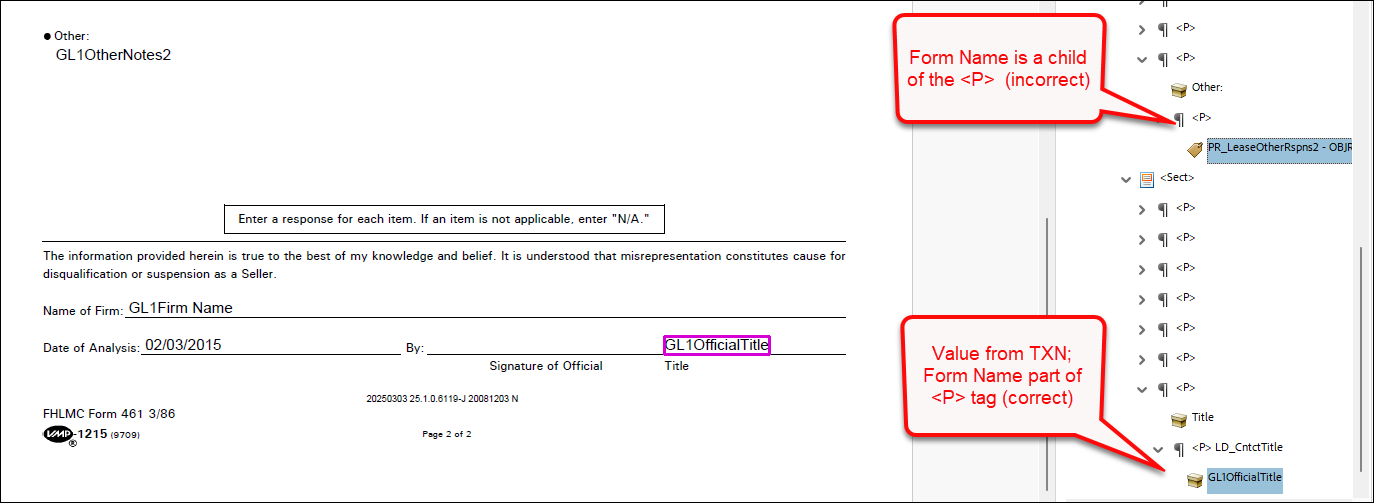
- Assembled PDF Form field tags (PBI 855362): it was reported
that form fields were not being tagged consistently in Tagged
EmbeddedPDF documents. Some fields were tagged with the Form Name
passed in the parent <P> tag and text passed in the transaction
XPath value, while other tag names incorrectly contained the Field
Name instead of the transaction XPath value. This behavior has been
modified so that tag names now correctly display the transaction
XPath value for embedded PDF documents.
Note: This enhancement has been implemented for individual Tagged
EmbeddedPDF documents only; further development is required for
merged Tagged EmbeddedPDF documents.
|
| DocumentService: unused API calls removed
|
|
|
Summary: we have removed the following API calls from the
DocumentService API:
/api/v1/Document/account/{accountId}/deliver/api/v1/Document/account/{accountId}/WKES/register/api/v1/Document/account/{accountId}/transaction/{transactionIdentifier}/images/{WKESTrackingId}/api/v1/Document/account/{accountId}/deliver/{transactionId}/api/v1/Document/account/{accountId}/WKES/packages |
| EZTransform: internal implementation change with
Document Generation Services and Document Service |
- Type: Enhancement
- Reference: PBI 825108, 825109
|
|
Summary: Document Generation Services and Document Service are now
configured to utilize a new internal EZTransform API. No user action is
required. |
| DocViewer: General Updates |
- Type: Enhancement
- Reference: PBI 867207
|
|
Summary: general updates this release are limited to reviewing all
dependent components and making any necessary updates. |
| Security Administration (Hosted users): General
Updates |
- Type: Enhancement
- Reference: PBI 864107
|
|
Summary: we have reviewed and upgraded items used with Security
Administration for monthly component and security updates, per the PBI
number referenced directly
above. |
| Expere: Package ID now passed back in SOAP and
REST callbacks |
|
|
Summary: Hosted Expere has been enhanced to now include the
Package ID "DocSetPackageIDRef" in REST and SOAP
callbacks. |
| Expere: DocumentList errors when using a Generate
call with inline packages |
- Type: Enhancement
- Reference: PBI 864317
|
Summary: users reported errors when attempting to generate documents
with an inline package (Expere EZ Config Packages and Packets) that
contained two documents with the <DocumentList/>
descriptor. This issue was confined only to Generate API calls.This
behavior has been enhanced so that documents generate successfully using
a Generate API call with an inline package containing two documents with
the <DocumentList/> descriptor. |
| Expere: Internal Code Optimization |
- Type: Enhancement
- Reference: PBI 868765
|
|
Summary: as part of a regular cadence to review and upgrade any
items used with our Expere application, the Engine has undergone code
optimization in the document generation micro services when generating
documents for use with SmartSign Plus®. |
| Expere: Internal Code Optimization when using
Radio Buttons |
- Type: Enhancement
- Reference: PBI 838692
|
|
Summary: as part of a regular cadence to review and upgrade any
items used with our Expere application, the Engine has undergone a code
optimization so that radio buttons no longer return Unique ID's in the
response. |
| Expere / eOriginal: schema 25.0 updated for use
with SmartSign Plus® and SmartSign Web |
- Type: Enhancement
- Reference: PBI 863452
|
|
Summary: The eOriginal Schema has been updated from 24.4 to 25.0 for
use with SmartSign Plus® and SmartSign Web. Note: No user action is required. |
| SMARTDoc user documentation
enhancements |
|
|
|
Summary: the Raw7 REQ format in the SMART Doc
validation > Non-currency number table has been updated to
include an updated SMART Doc Mask entry; additionally, Raw has
been removed from this same table as it will not return values in a SMART
Doc > ARC data. |
| Expere: transaction failure issue
addressed |
- Type:
Defect Correction
- Reference: PBI 871240
|
|
Issue: users reported that some transactions failed to generate
documents after the March Production deployment that occurred on March 20.
Internal research determined that the issue was cause by XPath 2.0
Compatibility issues. |
| Solution: Changes were made to allow transactions to use XPath
1.0 compatibility mode. |
March
This release utilizes the following Nuget Packages:
- Document Generation Services version: 22.2.0.5146
- Expere Engine version: 25.2.0.6142
- DocViewer version: 23.1.0.1085
- Document Generation Services Core version: 23.1.0.220
- Document Generation Services Core DocViewer version: 23.1.0.220
- Security Administration version: 7.0.0.1788
- Expere Document Services: 22.2.0.2337
- Expere Document Services Tool Suite: 22.2.0.2338
- DocumentServices: 22.2.0.322
- EZ Config:
- EZConfig Packages and Packets version: 2025.2.0.3312
- EZConfig Default Data version: 2025.2.0.1037
- EZ Config Service version: 2025.2.0.812
- EZ Gateway version: 2025.2.0.846
- Databases:
- Document Generation Services Database version:
22.2.0.5146
- EZConfig Packages and Packets version: 2025.2.0.3312
- EZConfig Default Database version: 2025.2.0.1037
- Security Administration Database version: 7.0.0.1788
- Expere Document Services Database version: 22.2.0.2334
Installation / Upgrade Notes
Note the following installation and upgrade changes in the March release:
- Transform variable changes:
- Octopus variable changes:
- Installation and upgrade changes:
- See PBI
869156 / 865693 changelog: the following scripts should be
run after the applications are deployed:
- Scripts to be run on stored procedures updated on DocGenService
database
WKFS_DGS_Delete_Processing_V2.sqlWKFS_DGS_Load_Deletes_WorkItems_Process.sqlNote:
- The stored procedure must be renamed to
include
V_2
- SQL job is updated to point to the new stored
procedure
- WSDL Changes:
| Expere: ability to return document instance
information |
- Type: Feature
- Reference: PBI 858408, 858412, 858413, 864173, 858414
- Documentation Impacts
|
Summary: as part of our feature to integrate additional properties
into a document instance, Expere now returns a new
InstanceProperty element and Name and
Value child elements in the Expere response when
authoring Dynamic or EmbeddedPDF REQ document. For example, these elements
can be authored to return non-signing entity information in the response.
Note:
- There is a WSDL and simultaneous code change required for this
feature.
- Static documents are out of scope for this feature.
|
| Expere: XPath 1.0 Compatibility Mode
update |
|
|
|
Summary: in preparation of our feature to disable XPath 1.0
Compatibility Mode, Expere log files have been updated to a WARN status when
transactions fall into XPath1.0 Compatibility Mode but do not fail.
Additional details, such as the XPath in question, are now displayed in the
exception. |
| Expere: SmartSign Plus®
integration |
- Type: Feature
- Reference: PBI 863465, 863472, 859935, 860854
- Documentation Impacts:
|
Summary: as part of our ongoing work to integrate SmartSign
Plus® with Expere, the following functionality has been
implemented for the March release:
- Participation information returned in response (PBI 863465,
863472, 860854) SmartSign Plus® participant information
is now returned in the Expere response file. Within the response,
the
eOriginal element now contains a new
Participants child element.
- One-Time PIN functionality updated (PBI 859935): Expere has
been updated so that smsOtp
(
/Txn/EOriginalSSPlusParticipants/EOriginalSSPlusParticipant/IdentityVerificationSMSOneTimePINInd)
is not dependent on Custom Pin
(/Txn/EOriginalSSPlusParticipants/EOriginalSSPlusParticipant/IdentityVerificationCustomPINInd).
|
| WCAG: Expere Engine enhanced to support embedded
and Tagged .PDF's - March |
- Type: Enhancement
- Reference: PBI 855580, 813755
|
|
Summary: as a part of our continued effort to create WCAG compatible
documents we have updated the Expere Engine to now support the generation of
Tagged .PDF documents. We will continue making enhancements to the Expere
Engine for Tagged .PDF support, so check back for items being identified and
corrected. As part of our continued work to support Tagged .PDF's, we have
implemented enhancements to resolve the following WCAG-related changes in
the March release: |
| Document Generation Services: stored procedures
updates |
- Type: Enhancement
- Reference: PBI 869156, 865693
|
Summary: Document Generation Services users must run the
WKFS_DGS_Delete_Processing_V2.sql and
WKFS_DGS_Load_Deletes_WorkItems_Process.sql scripts to
update two stored procedures on the DocGenService database. These stored
procedures include include new <InstanceProperty> and
SmartSign Plus SmartSignPlusParticipantInfo tables, and an
update to the existing ResultMessage table. |
| Expere: installation enhanced to use
JRE |
- Type: Enhancement
- Reference: PBI 864409
|
|
Summary: the Expere Installation with WildFly has been updated to
use a Java Runtime Environment (JRE) instead of a Java Developer Kit (JDK)
in order to reduce the installation size. |
DocumentService:
generate-results call includes optional parameter for
documentId |
|
|
Summary: users can now filter a generate-results
call with a new optional documentId parameter. |
Expere Document Services Web Services Guide:
Document Service REST API > AncillaryOutputTypeEnum updated
with new merging options |
|
|
Summary: the list of avaiable enumerated values within the
AncillaryOutputTypeEnum help topic has been updated to
include the following new merging options:
PdfMergeDiscretePartyMergedCopyPDFDiscretePartyPdfMergeWithDocInstancesDiscreteParty
|
| SMARTDoc user documentation
enhancements |
|
|
|
Summary: the SMART Doc validation tables in the Using SMART Doc functionality / dynamic
Expere eNotes online help topic has been updated to include a
comprehensive list of defined Output Format selections and their
corresponding SMART Doc Mask options. |
| Expere: Security Issue and Monthly component
Upgrades |
- Type: Maintenance
- Reference: PBI 853704, 858126, 864522
|
Summary: As part of a regular cadence to review and upgrade any items
used with Expere Engine for security issue and monthly component upgrades,
we have upgraded the following:
- Security Issue Upgrades:
- Upgrades:
- Amazon Corretto 21.0.6.7.1
Note: No user action is required. |
| Expere: FooterNotice’s MiddlePages attribute
update |
- Type: Enhancement
- Reference: PBI 860750
|
Summary: users reported that initial fields in the
FooterNotice were not fillable for all middle pages
when MiddlePages=yes was specified in the .REQ file. This
behavior has been enhanced so that when MiddlePages=yes is
specified in the FooterNotice, all middle pages will have
fillable initial fields in the FooterNotice for standard
and Tagged PDF documents. |
February
This release utilizes the following Nuget Packages:
- Document Generation Services version: 22.2.0.5115
- Expere Engine version: 25.1.0.6075
- DocViewer version: 23.1.0.1079
- Document Generation Services Core version: 23.1.0.218
- Document Generation Services Core DocViewer version: 23.1.0.218
- Security Administration version: 7.0.0.1781
- Expere Document Services: 22.2.0.2315
- Expere Document Services Tool Suite: 22.2.0.2305
- DocumentServices: 22.2.0.3214
- EZ Config:
- EZConfig Packages and Packets version: 2025.1.0.3304
- EZConfig Default Data version: 2025.1.0.1021
- EZ Config Service version: 2025.1.0.808
- EZ Gateway version: 2025.1.0.836
- Databases:
- Document Generation Services Database version:
22.2.0.5115
- EZConfig Packages and Packets version: 2025.1.0.3304
- EZConfig Default Database version: 2025.1.0.1021
- Security Administration Database version: 7.0.0.1781
- Expere Document Services Database version: 22.2.0.2223
Installation / Upgrade Notes
Note the following installation and upgrade changes in the February release:
- Transform variable changes:
- Octopus variable changes:
- Installation and upgrade changes:
- WSDL Changes:
| Expere: Overflow pages on Embedded PDF
documents |
|
|
Summary: Expere has been enhanced to support field overflow
functionality on EmbeddedPDF documents through the following work items:
- Single Line source field using Overflow functionality
enhanced (PBI 857684):
Expere
has been enhanced so that line leading is not applied to single line
fields, resulting in the text and forwarding message fitting in the
field horizontally.
- Source and target field line leading adjusted (PBI 857682):
Expere
has been updated so that the source field and target field line
leading is configured to a value compatible with the Helvetica font.
The use of any other font with overflow functionality will result in
an Expere error and failure to generate documents.
- Field display order on Overflow page enhanced (PBI 857683):
Expere
has been updated so that fields overflow in the order they appear in
the document: top to bottom and left to right.
|
| Expere: Expanding merging PDF options |
|
|
Summary: we have completed the work to support merged PDF documents
by Discrete Parties. Expere now supports generating multiple merged PDF
documents based on the discrete party or parties specified for each
document. The following options can now be used as part of the request or by
specifying in Expere EZ Config Packages and Packets:
- EDS
EDocService WSDL for SOAP users can now use the
following new ancillary options:
PdfMergeDiscretePartyMergedCopyPDFDiscretePartyPdfMergeWithDocInstancesDiscreteParty
- EDS
DocumentService REST APIs can now use the
following new ancillary options:
PdfMergeDiscretePartyMergedCopyPDFDiscretePartyPdfMergeWithDocInstancesDiscreteParty
|
| Expere: XPath 1.0 Compatibility Mode
updates |
|
|
Summary: In preparation of our feature to disable XPath 1.0
Compatibility Mode, we have made the following update:
- New OD Variable (PBI 843921): We have added the ability to
set the XPath Compatibility Mode using the OD variable of
ALLOW_XPath_1. This OD variable will be set to
"true". This variable will update the BSI properties variable
com.bankerssystems.expere.xPath_1_0_Compatibility
value.
- Add New Parameter to APIs (PBI 843914): SelectAndGenerate and
Generate APIs have been updated to accept an optional boolean
parameter
XPath_1_0_Compatibility. This parameter
will overwrite the value set in BSI.Properties'
com.bankerssystems.expere.xPath_1_0_Compatibility.
Currently the default value for
com.bankerssystems.expere.xPath_1_0_Compatibility
is true.
Note: In an upcoming release, the OD Variable
default value will be changed to "false", which has the potential of
causing transactions to fail. See the Feature page for more details. |
| Expere: SmartSign Plus®
integration |
|
|
Summary: as part of our ongoing work to integrate SmartSign
Plus® with Expere, the following functionality has been
implemented for the February release:
- SmartSign Plus Third Party eDelivery Service functionality
enhanced (PBI 836326): closing documents can now be sent to
one or many Settlement Agent/Closing Agent via eDelivery; the
following XPaths have been added:
- /Txn/EOriginalUseSSPlusInd
/Txn/EOriginalSSPlusThirdPartyEDeliveryInd
- /Txn/EOriginalSSPlusThirdPartyEDeliveries
- /Txn/EOriginalSSPlusThirdPartyEDeliveries/EOriginalSSPlusThirdPartyEDelivery
- /Txn/EOriginalSSPlusThirdPartyEDeliveries/EOriginalSSPlusThirdPartyEDelivery/EmailAddress
- /Txn/EOriginalSSPlusThirdPartyEDeliveries/EOriginalSSPlusThirdPartyEDelivery/FirstName
- /Txn/EOriginalSSPlusThirdPartyEDeliveries/EOriginalSSPlusThirdPartyEDelivery/LastName
- /Txn/EOriginalSSPlusThirdPartyEDeliveries/EOriginalSSPlusThirdPartyEDelivery/PhoneNumber
- /Txn/EOriginalSSPlusThirdPartyEDeliveries/EOriginalSSPlusThirdPartyEDelivery/IdentityVerificationCustomPINInd
- /Txn/EOriginalSSPlusThirdPartyEDeliveries/EOriginalSSPlusThirdPartyEDelivery/IdentityVerificationCustomPINValue
- /Txn/EOriginalSSPlusThirdPartyEDeliveries/EOriginalSSPlusThirdPartyEDelivery/IdentityVerificationCustomPINHintInd
- /Txn/EOriginalSSPlusThirdPartyEDeliveries/EOriginalSSPlusThirdPartyEDelivery/IdentityVerificationCustomPINHintDesc
- /Txn/EOriginalSSPlusThirdPartyEDeliveries/EOriginalSSPlusThirdPartyEDelivery/IdentityVerificationCustomPINSMSDeliveryInd
- /Txn/EOriginalSSPlusThirdPartyEDeliveries/EOriginalSSPlusThirdPartyEDelivery/IdentityVerificationSMSOneTimePINInd
As a result of this enhancement, the existing "eDelivery" Xpaths have
been deprecated:
- /Txn/EOriginalSSPlusSingleElectronicPackageInd
- /Txn/EOriginalSSPlusSingleElectronicPackageEmailAddress
- /Txn/EOriginalSSPlusSingleElectronicPackageFirstName
- /Txn/EOriginalSSPlusSingleElectronicPackageLastName
|
| WCAG: Expere Engine enhanced to support embedded
and Tagged .PDF's - February |
- Type: Enhancement
- Reference: PBI 851484, 852050
|
Summary: as a part of our continued effort to create WCAG compatible
documents we have updated the Expere Engine to now support the generation of
Tagged .PDF documents. We will continue making enhancements to the Expere
Engine for Tagged .PDF support, so check back for items being identified and
corrected. As part of our continued work to support Tagged .PDF's, we have
implemented enhancements to resolve the following WCAG-related changes in
the February release:
- List tagging behavior updated (PBI 851484): it was reported
that lists that did not contain a "marker" (in other words: a
numerical value or a bullet) displayed a tag for a nonexistent
marker in the Adobe Acrobat tag tree. This behavior has been updated
so that these nonexistent markers no longer appear as tags in the
Adobe Acrobat tag tree.
- Alternate Text for Spanish Checkboxes (PBI 852050): it was
reported that the alternate text for checkboxes in Spanish on
documents generated from EmbeddedPDF REQ were in English. This
behavior has been updated so that the alternate text for checkboxes
indicated as Spanish (i.e. entire document is in Spanish or a
section is in Spanish) reads in Spanish
|
Expere: docSetPackageIDRef
behavior enhanced with response |
- Type: Enhancement
- Reference: PBI 859720, 851157
|
Summary: we informed you in January per PBI 849971
that the docSetPackageIDRef value had displayed the wrong
value in the Expere response; as a result, Expere had been updated so that
the response specified the docSetPackageIDRef value based
on specific criteria. Additional component work was identified so
docSetPackageIDRef is returned in the response. Note: Additional development is required before this
enhancement is completely functional. |
| Expere: Enhanced ancillary output
functionality |
- Type: Enhancement
- Reference: PBI 859754
|
|
Summary: It was identified that when inline packages were passed in
without any ancillary options, the transaction would fail. We have enhanced
Expere to handle an inline package (Package from EZ Config Packages and
Packets) without an ancillary option. |
| Expere: SmartSign Plus ® and SmartSign
Web post process addressed |
- Type: Defect
- Reference: PBI 860844
|
Summary: users reported that the MergedCopyPDF
ancillary option was not being honored when generating an Expere Dynamic
eNote. As a result, MergedCopyPDF is now honored when
generating an Expere Dynamic eNote. |
January
This release utilizes the following Nuget Packages:
- Document Generation Services version: 22.2.0.5087
- Expere Engine version: 24.3.0.6032
- DocViewer version: 23.1.0.1057
- Document Generation Services Core version: 23.1.0.218
- Document Generation Services Core DocViewer version: 23.1.0.218
- Security Administration version: 7.0.0.1758
- Expere Document Services: 22.2.0.2295
- Expere Document Services Tool Suite: 22.2.0.2308
- DocumentServices: 22.2.0.308
- EZ Config:
- EZConfig Packages and Packets version: 2024.7.0.3296
- EZConfig Default Data version: 2024.7.0.1013
- EZ Config Service version: 2024.12.0.804
- EZ Gateway version: 2024.7.0.822
- Databases:
- Document Generation Services Database version:
22.2.0.5087
- EZConfig Packages and Packets version: 2024.7.0.3296
- EZConfig Default Database version: 2024.7.0.1013
- Security Administration Database version: 7.0.0.1758
- Expere Document Services Database version: 22.2.0.2295
Installation / Upgrade Notes
Note the following installation and upgrade changes in the January release:
- Transform variable changes:
- Octopus variable changes:
- Installation and upgrade changes:
- STSv7 troubleshooting topic added to OD Install Guide
- WSDL Changes:
| Expere: Overflow pages on Embedded PDF
documents |
|
|
Summary: Expere has been enhanced to support field overflow
functionality on EmbeddedPDF documents through the following work items:
- "ContinueOnOverflowPage" behavior enhanced when providing / not
providing an overflow description (PBI 844642, 844526):
EmbeddedPDFs now allow data to carry over to a "destination page"
when ContinueOnOverflowPage is specified in the
Behavior field in the REQ file > Field Grid >
Overflow section. The overflow page is only supported as
the last page of the document.
Users can enter the following
additional information:
- When specified, the Overflow Description value
defined in the REQ appears on the overflow page above the
text that carries over.
- When specified, the Forwarding message value defined
in the REQ appears at the end of the source field following
an asterisk (for example: *See Attached), and the
remaining text in printed on the Page specified in
the REQ.
- "ReduceFontAndTruncate" behavior enhanced (PBI 844525):
Expere has been updated so that when ReduceFontAndTruncate is
specified in the Behavior dropdown, the text font size will
be reduced in size down to 8 point font at minimum. If text still
does not fit at 8 point font, then the text will be truncated.
- "PrintEntireContentOnTheOverflowPage" behavior enhanced (PBI
844739): Expere has been updated so that when
PrintEntireContentOnTheOverflowPage is specified in the
Behavior dropdown, the entire value specified for the
source field would appear on the overflow page. If a Forwarding
Message value is specified, it appears in the source field
in the document.
- Tagged PDF functionality supported (PBI 848167): Expere is
updated so that EmbeddedPDF documents with overflow Pages can be
generated as Tagged PDF documents.
- Truncate behavior supported (PBI 850405): Expere has been
updated so that when Truncate is specified in the
Behavior dropdown, any text that exceeds the source field
is truncated.
-
"Return" characters behavior enhanced in source and destination
fields (PBI 855381): during internal testing, it was
determined that the source and destination fields did not handle
"return" characters (for example: line breaks) properly; as a
result, some characters and words did not appear in the fields.
This behavior has been enhanced: the source and destination
fields have been updated to support "return" characters and thus
display all characters and words.
|
| Expere: SmartSign Plus®
integration |
|
|
|
Summary: as part of our ongoing work to integrate SmartSign
Plus® with Expere, the following functionality has been
implemented for the January release:
|
Expere: DocSetPackageIDRef
behavior enhanced |
- Type: Enhancement
- Reference: PBI 849726, 849971
|
Summary: users reported that that the
DocSetPackageIDRef value displayed the wrong value in
the Expere response. As a result, Expere has been updated so that the
response specifies the "docSetPackageIDRef" value as follows:
- If an PKGPKT is specified in the content URI, the value of the
DocSetPackageIDRef is set to the package name
specified in Expere EZ Config Package and Packets.
Additionally, "PackageName" is now returned as an
attribute on the <InlinePackage> element in the
inline package response. Note:
- No changes when the content URI specifies the PKG.
- Additional development is required before this enhancement is
completely functional.
|
| Document Generation Services: STSv7
troubleshooting topic added to OD Install Guide |
|
|
|
Summary: a new STSv7 troubleshooting section has been added to the
DGS OD Install Guide that helps users navigate any issues that may occur
when upgrading from STSv6 to STSv7. |
| WCAG: Expere Engine enhanced to support embedded
and Tagged .PDF's - January |
- Type: Enhancement
- Reference: PBI 845069, 846766, 849713
|
Summary: as a part of our continued effort to create WCAG compatible
documents we have updated the Expere Engine to now support the generation of
Tagged .PDF documents. We will continue making enhancements to the Expere
Engine for Tagged .PDF support, so check back for items being identified and
corrected. As part of our continued work to support Tagged .PDF's, we have
implemented enhancements to resolve the following WCAG-related changes in
the January release:
<Form>
tags replaced with <P> tags in certain
situations (PBI 845069): a user reported that
<Form> tags were incorrectly present in the
Adobe Acrobat tag tree instead of a more appropriate
<P> tag. This behavior has been enhanced to
use <P> tags rather than the
<Form> tag when populating the document with
conditional data.<Form>
tags replaced with <Figure>
tags in certain situations (PBI 846766): a user reported
that <Form> tags were incorrectly present in the
Adobe Acrobat tag tree instead of a more appropriate
<Figure> tag when using checkboxes and radio
buttons. This behavior has been enhanced to use
<Figure> tags rather than the
<Form> tag for checkboxes and radio buttons
when these options are not fillable fields.- Table behavior enhanced when empty
<TH> cells
are present (PBI 849713): a user reported that empty heading
cells in a table were being tagged as a <TH> in
the Adobe Acrobat tag tree. This behavior has been enhanced to now
tag empty table heading cells as <TD> intead of
a <TH> tag.
|
| Expere: Logging enhanced for packet-level
ancillary output options |
- Type: Enhancement
- Reference: PBI 851089
|
|
Summary: we have enhanced logging to provide more details about
whether or not packet-level ancillary output options are being used.
|
Expere: PackageName returned as attribute on
<InlinePackage> element in response |
- Type: Enhancement
- Reference: PBI 849971
|
Summary: "PackageName" is now returned as an
attribute on the <InlinePackage> element in the inline
package response. |
| Expere: XPath 1.0 Compatibility Mode logging
updated |
|
|
Summary: As part of our feature to disable XPath 1.0 Compatibility
Mode while continuing to generate documents, we have increased our logging
support when a transaction falls into XPath 1.0 Compatibility Mode, to
include document information. An example log message would contain portions
of the following (including the document
name):2024-11-25 10:34:19,087 ERROR [com.pingdynasty] [][acf5e72fac194775bb9c27d8cf362c4d][PKG.Mortgage2Closing][INS.UniformResidentialLoanApplication-M2]
|
| Expere: Logging enhanced for packet-level
ancillary output options |
- Type: Enhancement
- Reference: PBI 851089, 848145
|
|
Summary: we have enhanced logging regarding packet-level ancillary
output options. Additional details, including the stack trace, are provided
about whether or not packet-level ancillary output options are being used.
|
| Expere: Internal Code Optimization when using
Expere EZ Config Packages and Packets logos |
- Type: Enhancement
- Reference: PBI 850491, 850662
|
|
Summary: as part of a regular cadence to review and upgrade any items
used with our Expere application, the Engine has been undergone a code
optimization to better support logos used with Expere EZ Config Packages and
Packets. |
| Expere: Logging enhanced |
- Type: Enhancement
- Reference: PBI 848421
|
Summary: we have enhanced logging to provide more details about how
long it takes to complete a transaction.Note: No user
action is required. Integrators may notice an increase in the size of
Expere log files; if noticing a slight performance issue, additional
logging can be turned off through the following line in the
log4j2.xml
file: <Logger name="performance.com.bankerssystems.framework.services.Microflow"
additivity="false" level="info"> <AppenderRef ref="CONSOLE"/></Logger>
|
| Expere: SmartDoc/eNote ARC validation
updated |
- Type: Enhancement
- Reference: PBI 851965
|
Summary: when the mask $#,###.## was being passed, the
DataLinkDescription value was not appending the cents
to the dollar amount. Expere has been updated so that the correct number of
zeroes are now appended in order to match the format of the mask; for
example: "1000" becomes "1000.00". |
| Expere: internal component upgrade to resolve
security issue |
- Type: Maintenance
- Reference: PBI 844857, 826968, 840186, 848185, 840187,
840188, 846840
|
Summary: as part of a regular cadence to review components used by
Expere Engine for security issues, we have upgraded the following
components:
- Apache Commons IO, version 2.17.0
- WildFly 34.0.1
- Amazon Corretto 21.0.5
- FOP 2.10
Note: No user action is required. |
| EZ Transform: internal component upgrade to
resolve security issue |
- Type: Maintenance
- Reference: PBI 852487
|
Summary: as part of a regular cadence to review components used by
Expere Engine for security issues, we have upgraded the following
components:
- Apache Tomcat 10.1.34
- Apache Struts 6.4.0
Note: No user action is
required. |
| Expere: large XML request optimization |
- Type: Maintenance
- Reference: PBI 850716
|
|
Summary: As part of a regular cadence to review and upgrade any items
used with our Expere applications, our code was optimized to better handle
how our microservices handle large XML requests; no user impact is
expected. |