Note: The information presented in each section is deployed on a
monthly basis; work with your Professional Services liaison if you wish to consume
this release.
Note: The Document Generation Services Changelog uses a dynamic
URL to display the changelogs relevant to your version of the program, and as a
result, the URL changes from release to release. For best results, always access the
Changelog by clicking the hyperlink from the Document Generation Services landing
page. If your desire is to bookmark the changelogs, we recommend bookmarking the
landing page rather than the Changelog.
You may need to clear your cookies,
data, and browsing history. Some users may notice that changelogs do not
appear on this page. If that is the case, clear your cookies.
December
This release utilizes the following Nuget Packages:
- Document Generation Services version: 22.2.0.5042
- Expere Engine version: 24.3.0.5993
- DocViewer version: 23.1.0.1057
- Document Generation Services Core version: 23.1.0.218
- Document Generation Services Core DocViewer version: 23.1.0.218
- Security Administration version: 7.0.0.1749
- Expere Document Services: 22.2.0.2278
- Expere Document Services Tool Suite: 22.2.0.2280
- DocumentServices: 22.2.0.308
- EZ Config:
- EZConfig Packages and Packets version: 2024.7.0.3296
- EZConfig Default Data version: 2024.7.0.1013
- EZ Config Service version: 2024.7.0.798
- EZ Gateway version: 2024.7.0.820
- Databases:
- Document Generation Services Database version:
22.2.0.5042
- EZConfig Packages and Packets version: 2024.7.0.3296
- EZConfig Default Database version: 2024.7.0.1013
- Security Administration Database version: 7.0.0.1749
- Expere Document Services Database version: 22.2.0.2223
Installation / Upgrade Notes
Note the following installation and upgrade changes in the December release:
- Transform variable changes:
- Octopus variable changes:
- Installation and upgrade changes:
- WSDL Changes:
| Expere: Overflow pages on Embedded PDF
documents |
|
|
Summary: Expere has been enhanced to support field overflow
functionality on EmbeddedPDF documents through the following work items:
- "ReduceFontAndTruncate" behavior enhanced (PBI 844739):
Expere has been updated so that when ReduceFontAndTruncate is
specified in the Behavior dropdown, the text font size will
be reduced in size down to 8 point font at minimum. If text still
does not fit at 8 point font, then the text will be truncated.
- "PrintEntireContentOnTheOverflowPage" behavior enhanced (PBI
844739): Expere has been updated so that when
PrintEntireContentOnTheOverflowPage is specified in the
Behavior dropdown, the entire value specified for the
source field would appear on the overflow page. If a Forwarding
Message value is specified, it appears in the source field
in the document.
Note: Additional development is still needed
before this feature is available for use, including when generating
Tagged PDF documents. |
| Expere: Expanding merging PDF options |
|
|
|
Summary: we want to make you aware of an upcoming functionality
that will be available in the future. As part of our effort to
support merging PDF documents by Discrete Parties, the following
enhancements have been made to Expere:
Note: Additional development is still needed before it
is available for use. |
| Expere: XPath 1.0 Compatibility Mode logging
updated |
|
|
Summary: As part of our feature to disable XPath 1.0 Compatibility
Mode while continuing to generate documents, we have increased our logging
support when a transaction falls into XPath 1.0 Compatibility Mode, to
include document information. An example log message would contain portions
of the following (including the document
name):2024-11-25 10:34:19,087 ERROR [com.pingdynasty] [][acf5e72fac194775bb9c27d8cf362c4d][PKG.Mortgage2Closing][INS.UniformResidentialLoanApplication-M2]
|
| Expere: SmartSign Plus®
integration |
|
|
Summary: as part of our ongoing work to integrate SmartSign
Plus® with Expere, the following functionality has been
implemented for the December release:
- "Email" AccessMethod behavior enhanced (PBI 844630):
SmartSign Plus updated the email address to be an optional field; as
a result, a warning message will only appear if
/Txn/EOriginalSSPlusParticipants/EOriginalSSPlusParticipant/AccessMethodType
                                    = EMAIL
and the Email is missing for the participant.
See Expere Transaction XPaths for
eOriginal > /Txn/.../AccessMethodType
for more information.
- SmartSign+ Feature Guide updates made (PBI 824166): the
SmartSign+ Feature Guide has been updated with the following
information:
- New
/Txn/EOriginalUseSSPlusInd XPath added
(PBI 848171): a new /Txn/EOriginalUseSSPlusInd
XPath has been added that indicates whether or not to use SmartSign
Plus.
|
| Expere: large XML request optimization |
- Type: Maintenance
- Reference: PBI 850716
|
|
Summary: As part of a regular cadence to review and upgrade any items
used with our Expere applications, our code was optimized to better handle
how our microservices handle large XML requests; no user impact is
expected. |
| Expere: monthly component upgrade |
- Type: Maintenance
- Reference: PBI 840187
|
|
Summary: As part of a regular cadence to review and upgrade any items
used with Expere Engine, we have upgraded the following components:
Note: No user action is required. |
November
This release utilizes the following Nuget Packages:
- Document Generation Services version: 22.2.0.5024
- Expere Engine version: 24.3.0.5982
- DocViewer version: 23.1.0.1057
- Document Generation Services Core version: 23.1.0.207
- Document Generation Services Core DocViewer version: 23.1.0.207
- Security Administration version: 7.0.0.1720
- Expere Document Services: 22.2.0.2273
- Expere Document Services Tool Suite: 22.2.0.2220
- DocumentServices: 22.2.0.299
- EZ Config:
- EZConfig Packages and Packets version: 2024.7.0.3287
- EZConfig Default Data version: 2024.7.0.1003
- EZ Config Service version: 2024.7.0.792
- EZ Gateway version: 2024.7.0.806
- Databases:
- Document Generation Services Database version:
22.2.0.5024
- EZConfig Packages and Packets version: 2024.7.0.3287
- EZConfig Default Database version: 2024.7.0.1003
- Security Administration Database version: 7.0.0.1720
- Expere Document Services Database version: 22.2.0.2223
Installation / Upgrade Notes
Note the following installation and upgrade changes in the November release:
- Transform variable changes:
- Octopus variable changes:
- Installation and upgrade changes:
- WSDL Changes:
- Miscellaneous
| Expere: Expanding merging PDF options |
|
|
Summary: we have begun work on supporting merged PDF documents by
Discrete Parties. The following functionality is supported:
- Expere supports generating multiple merged PDF documents based on
the discrete party or parties specified for each document through
the use of new
MergedCopyPDFDiscreteParty and
PdfMergeDiscreteParty options.
- Expere has been enhanced so that when either a
MergedCopyPdfDiscreteParty or
PdfMergeDiscreteParty ancillary output is
passed the merged PDF files' Document Title is set to the
original PacketName. The packet name is specified in the PKG
file in the content library or in EZ Config Packages and Packets.
- Both
MergedCopyPDFDiscreteParty and
PdfMergeDiscreteParty ancillary outputs are
supported when Packets are authored as part of the PKG file in the
content library.
Note: Additional development is still needed
before it is available for use |
| Expere: Overflow pages on Embedded PDF
documents |
|
|
Summary: Expere has been enhanced to support field overflow
functionality on EmbeddedPDF documents through the following work items: Note: Additional development is still needed
before this feature is available for use, including when generating
Tagged PDF documents. |
| Expere: SmartSign Plus®
integration |
- Type: Feature
- Reference: PBI 839983, 839606, 834324
|
Summary: as part of our ongoing work to integrate SmartSign
Plus® with Expere, the following functionality has been
implemented for the November release:
- PDF extension behavior updated (PBI 839983): the ability to
upload external documents has been enhanced so when the document is
viewed in SmartSign Plus, the PDF extension does not appear
twice.
- Package name updated (PBI 839606): the package name has been
updated so when viewing it in SmartSign Plus, the
/
Txn/EOriginalSSPlusPackageNameDesc value
appears before the Expere package name. For more information see
Expere Transaction XPaths for
eOriginal >
Txn/EOriginalSSPlusPackageNameDesc.
- Non-eNote workflow documented (PBI 834324): a new Non-eNote workflow has
been documented and added to the SmartSign Plus®
Integration Guide.
|
| Expere: Internal Code Optimization when using
Expere EZ Config Packages and Packets logos |
- Type: Enhancement
- Reference: PBI 850662
|
|
Summary: as part of a regular cadence to review and upgrade any items
used with our Expere application, the Engine has been undergone a code
optimization to better support logos used with Expere EZ Config Packages and
Packets. |
Expere: Embedded PDF updated to support a
SignatureType of "Initials" |
- Type: Enhancement
- Reference: PBI 823346
|
Summary: users requested that the Expere Engine be updated so that
the SignatureType element can be set to "Initials" for an
Embedded PDF document, resulting in a <SignaturePoint>
element containing a <Type> value of "Initials". This is
done in the Product Technical Rule (PTR) in the native REQ file; see Modifying the PTR for the Signature Areas
- Static/PDF > Step Two (2) in the Requirements Editor (RE4) User
Guide for more information.Expere is updated so that when
"SignatureType:Initials" is authored for a field on
an EmbeddedPDF, the Expere Response includes a
<SignaturePoint> with <Type>
value of "Initials". |
| Expere: PDF behavior enhanced when attempting to
digitally sign multi-signature document |
- Type: Enhancement
- Reference: PBI 843273
|
|
Summary: users reported that when digitally signing a multi-signature
PDF document would result in an error when saving the document. Users were
forced to close Adobe Acrobat and reopen it in order to digitally sign and
then save the document. Expere has been enhanced so that users are not
required to exit Adobe Acrobat and reopen a document in order to sign it
multiple times. |
| Expere: Logging enhanced |
- Type: Enhancement
- Reference: PBI 848421
|
Summary: we have enhanced logging to provide more details about how
long it takes to complete a transaction.Note: No user
action is required. Integrators may notice an increase in the size of
Expere log files; if noticing a slight performance issue, additional
logging can be turned off through the following line in the
log4j2.xml
file: <Logger name="performance.com.bankerssystems.framework.services.Microflow"
additivity="false" level="info"> <AppenderRef ref="CONSOLE"/></Logger>
|
| Expere: Sequencing issue of Signature / Signature
Date fields for WKES |
- Type: Defect
- Reference: PBI 840807
|
Issue: it was reported that the signature date field was being
sequenced higher than the signature field when using Wolters Kluwer E-Sign
(WKES) ancillary output; this sequencing value is part of the signature date
field naming convention (for example:
WKES_Signdate_firstname_lastname@domain.com_10028-28).
WKES has a requirement that signature fields are the highest sequenced field
for our signers. As a result, the signature date field did not display a
value on the signed document. |
|
Solution: This behavior has been enhanced so that signature date
fields once again display a value on the signed document by modifying the
sequencing so that signature fields contain the highest sequenced number in
its naming convention. |
| Expere: internal component upgrade to resolve
security issue |
- Type: Maintenance
- Reference: PBI 844857
|
Summary: as part of a regular cadence to review components used by
Expere Engine for security issues, we have upgraded the following
components:
- Apache Commons IO, version 2.17.0
Note: No user action is required. |
| Expere: component upgrade - WildFly |
- Type: Maintenance
- Reference: PBI 826968, 840186
|
|
Summary: As part of a regular cadence to review and upgrade any items
used with Expere Engine, we have upgraded the following components: Note: No user action is
required. |
October
This release utilizes the following Nuget Packages:
- Document Generation Services version: 22.2.0.4996
- Expere Engine version: 24.3.0.5939
- DocViewer version: 23.1.0.1042
- Document Generation Services Core version: 23.1.0.201
- Document Generation Services Core DocViewer version: 23.1.0.201
- Security Administration version: 6.1.0.1646
- Expere Document Services: 22.2.0.2212
- Expere Document Services Tool Suite: 22.2.0.2191
- DocumentServices: 22.2.0.289
- EZ Config:
- EZConfig Packages and Packets version: 2024.7.0.3284
- EZConfig Default Data version: 2024.5.0.872
- EZ Config Service version: 2024.5.0.750
- EZ Gateway version: 2024.7.0.803
- Databases:
- Document Generation Services Database version:
22.2.0.4996
- EZConfig Packages and Packets version: 2024.7.0.3284
- EZConfig Default Database version: 2024.5.0.872
- Security Administration Database version: 6.1.0.1646
- Expere Document Services Database version: 22.2.0.1981
Installation / Upgrade Notes
Note the following installation and upgrade changes in the October release:
- Transform variable changes:
- Octopus variable changes:
- Installation and upgrade changes:
- WSDL Changes:
| Expere: SmartSign Plus®
integration |
|
|
Summary: as part of our ongoing work to integrate SmartSign
Plus® with Expere, the following functionality has been
implemented for the October release:
- Ability to finalize a package added (SOAP) (PBI 837795):
users can now finalize a package to eOriginal Closing Center using a
SOAP request. For more information, see Expere Web Services Guide >
SmartSignPlusFinalize.
- Destruction behavior enhanced for in-progress packages (PBI
838694): the following statuses have been updated when destructing
packages:
- STARTED: Available Destruction Types changed from
"1", "2", "3" to "None"
- EDEPOSITED: Available Destruction Types changed from
"3" to "None"
- EDEPOSIT_PENDING: Available Destruction Types changed
from "1", "2", "3" to "None"
- Canceled: Available Destruction Types changed from
"1", "2", "3" to "3"
- EXPIRED_PRINT_PENDING: Available Destruction Types
changed from "3" to "None"
- EXPIRED_MAILOUT_PENDING: Available Destruction Types
changed from "3" to "None"
Refer to eNote Destruction Workflow
Outline > Package status definitions and actions for a
comprehensive list of statuses, definitions, and any potential
actions.
- Expere eNotes supported (PBI 825950): An Expere eNote can now
be passed to SmartSign Plus when
/Txn/EClosingNoteInd =
                                    1
and deposited into a customer's eVault. Previously,
the SmartSign Plus workflow only accepted Expere eNote placeholders.
See eNote Workflow Outline > Passing
an Expere-generated eNote for more information.
- Single Electronic Package execution behavior enhanced for
"Paper" (PBI 837507): when
/Txn/EOriginalSSPlusSingleElectronicPackageInd =
                                    1
, the corresponding SmartSign+ execution type is now
"Paper".
- Integration Guide enhanced for Expere-generated eNote placeholder
and Expere-generated dynamic eNote Workflow topic (PBI
834323): The Expere - SmartSign Plus® Integration Guide has been
updated to document the workflows when using either an
Expere-generated eNote placeholder or Expere-generated dynamic
eNote. For more information, see Step 5: Expere-generated eNote
placeholder and Expere-generated dynamic eNote Workflow
Outline.
|
| Expere: UpdateTransaction method enhanced to
support multiple IRA plans |
|
|
Summary: in April, we had released PBI 810106 but had to remove the
changes due to issues found during customer testing (PBI 821935). This issue
has been resolved (PBI 790242) while reintroducing changes made in PBI
810106. These updates include the ability to submit multiple IRA plans in
one transaction and be assigned a specific product for each IRA plan when
/Txn/Deposit/IRAPlans/IRAPlan/EZConfigIRAPlanProductDesc
is passed in the transaction. When needing to support the multiple IRA Plans
in a given transaction, for the data to merge properly, the EZConfig Default
Data Product associated to the IRA Plans must only contain an IRA Booklet
Policy and the EZ Config Default Data Product associated to the Account
should not contain an IRA Booklet Policy.Note:
- The
/Txn/Deposit/IRAplan/OrgResponsibilityType
XPath now has a flag of "ApplyToAll" set so each
IRAPlans/IRAPlan gets this value set when there are Multiple IRA
Plans in a transaction. As a result, users must consume an
updated base content package that supports this feature. The
content used with this feature must be consumed with version
24.03 or newer as data points were moved between the
EZ Config Default Data .REQ files; see the March 2024.03 content
release notes for more information.
- To utilize multiple product scenario support with Deposit, IRA
and Commercial lines of business, integrators will need to use
the EZ Gateway UpdateTransaction method.
For more information, see the following: |
| Expere: UpdateTransaction method enhanced to
support multiple commercial notes |
|
|
Summary: in April, we had released PBI 801194 but had to remove the
changes due to issues found during customer testing (PBI 821935). This issue
has been resolved (PBI 790242) while reintroducing changes made in PBI
801194. These updates include the ability to submit multiple Commercial
Notes in one transaction and be assigned a specific commercial product for
each Commercial Note when
/Txn/Notes/Note/EZConfigCommercialProductDesc is passed
in the transaction.Note:
- In order to utilize this feature, users must consume an updated
base content package that supports this feature. The content
used with this feature must be consumed with version
24.01 or newer as data points were moved between the
EZ Config Default Data .REQ files; see the January 2024.01
content release notes for more information.
- To utilize multiple product scenario support with Deposit, IRA
and Commercial lines of business, integrators will need to use
the EZ Gateway UpdateTransaction method.
For more information, see the following: |
| Expere: Expanding merging PDF options |
|
Summary: we have begun work on supporting merged PDF documents by
Discrete Parties. In the near future, Expere will support generating
multiple merged PDF documents based on the discrete party or parties
specified for each document through the use of new
MergedCopyPDFDiscreteParty and
PdfMergeDiscreteParty options.Note: Additional development is still needed before it
is available for use |
| Expere: FOP 2.9 upgrade |
- Type: Enhancement
- Reference: PBI 833154
|
|
Summary: as part of a regular cadence to review and upgrade any items
used with our Expere application, the Expere Engine has been updated to use
FOP 2.9 when generating standard PDF and Tagged PDF documents. |
| Expere: Internal Code Optimization with
UpdateTransaction |
- Type: Enhancement
- Reference: PBI 834658, 790242, 836432, 835949
|
Summary: as part of a regular cadence to review and upgrade any items
used with our Expere application, the UpdateTransaction functionality has
undergone a code optimization. As part of this update, the following known
issue was addressed: if passing an element with an attached Key Path with
the incoming transaction, an error is thrown if the element being targeted
by the Key Path does not exist. An example Xpath that exhibits this behavior
is
Txn/Deposit/Accounts/Account/DelayedAvailabilityFormType.
|
| Expere: Embedded PDF - Conditioning Fillable
Field |
- Type: Enhancement
- Reference: PBI 823345
|
Summary: currently fillable fields on Embedded PDF documents do not
honor conditional logic on when the field appears as a fillable field.
Expere has been enhanced so that conditional logic can be added to
FieldFields of all types (i.e. ‘Initial’, ‘Text’) to
allow users to electronically enter data. |
September
This release utilizes the following Nuget Packages:
- Document Generation Services version: 22.2.0.4967
- Expere Engine version: 24.2.0.5916
- DocViewer version: 23.1.0.1042
- Document Generation Services Core version: 23.1.0.197
- Document Generation Services Core DocViewer version: 23.1.0.188
- Security Administration version: 6.1.0.1646
- Expere Document Services: 22.2.0.2197
- Expere Document Services Tool Suite: 22.2.0.2191
- DocumentServices: 22.2.0.283
- EZ Config:
- EZConfig Packages and Packets version: 2024.5.0.3277
- EZConfig Default Data version: 2024.5.0.872
- EZ Config Service version: 2024.5.0.750
- EZ Gateway version: 2024.5.0.792
- Databases:
- Document Generation Services Database version:
22.2.0.4967
- EZConfig Packages and Packets version: 2024.5.0.3277
- EZConfig Default Database version: 2024.5.0.872
- Security Administration Database version: 6.1.0.1646
- Expere Document Services Database version: 22.2.0.1981
Installation / Upgrade Notes
Note the following installation and upgrade changes in the September release:
- Transform variable changes:
- Octopus variable changes:
- Installation and upgrade changes:
- WSDL Changes:
| Expere: SmartSign Plus®
integration |
|
|
Summary: as part of our ongoing work to integrate SmartSign
Plus® with Expere, the following functionality has been
implemented for the September release:
- Fillable Fields of type: Multi Line Text for Static REQs (PBI
834530): when
FieldType - 'Alphanum' and
MultiLine - 'true' the corresponding
FieldName has been updated with the following
naming convention: SS+TAG{"tagName": "Enter FillableText
ID", "type": "MULTI_LINE_TEXT", "role": {"type": "Borrower",
"num": 1}, “required”: true}. For more information, see
PDF Form Field Name Guidelines
for FillableField > Multi-line text.
- All statuses supported when destructing packages (PBI
792573): all statuses are now supported when destructing packages.
Refer to eNote Destruction Workflow
Outline > Package status definitions and actions for a
comprehensive list of statuses, definitions, and any potential
actions.
- “Injectable Issued Date” enhancement implemented (PBI
820639): when
/Txn/SystemGeneratedIntegratedDisclosureDateIssuedInd="1"
(true) and the FillableField FieldName (as authored
in the REQ) value is IssuedDate, Expere now applies
the SmartSign Plus naming convention for “injectable issued dates”.
An "Injectable Issued Date" is a field that SmartSign Plus uses to
populate the date field based upon when the document was made
electronically available and viewed by the consumer or when the
document went to print. For more information, see PDF Form Field Name Guidelines
for FillableField > Date.
- New REST "SmartSignPlusFinalize" API created (PBI 764108): a
new REST "SmartSignPlusFinalize" API now allows users to finalize a
SmartSignPlus package and assign it to the eOriginal Closing Center.
See EDS Web Services Guide >
SmartSignPlusFinalize for more information.
/Txn/EOriginalSSPlusPrintMailingCostCenterDesc
updated to be "Optional" (PBI 833451):
/Txn/EOriginalSSPlusPrintMailingCostCenterDesc
is now an optional element and is not required to be passed in the
transaction. For more information, see Expere Transaction XPaths for
eOriginal. - Ability to support templates (PBI 827473): if a user would
like to utilize Document Templates (for example: Charm Booklet, Your
Own Home Loan Toolkit, etc) via SmartSign Plus, they must have the
template configured in SmartSign Plus> Administration
> Settings > Document Templates and include the
templateId in the transaction. The
templateId is the unique SmartSign Plus
identifier given to a template upon creation. For more
information, see Expere Transaction XPaths for
eOriginal > Document Collection.
- SmartSign Plus feature / Expere Document Services web services
guides updated (PBI 771400): the following information has
been added to the SmartSign Plus feature and Expere Document
Services web service guides:
- SmartSign Plus feature guide: A new Before You Begin
topic containing a list of supported / non-supported
scenarios.
-
Expere Document Services web service guide: the PackageInformation
topic includes all supported elements.
- "Num" behavior enhanced (PBI 823449): SmartSign Plus now
supports a scenario when a "num" and corresponding value are not
present in the Expere response file.
|
Expere:
<InstanceBarcodeValue> displays in Expere
response |
- Type: Enhancement
- Reference: PBI 838313
|
Summary: a user reported that a null pointer error would appear when
a Barcode type (for example: "PDF417") was not authored in a
Tagline element that contained a barcode (commonly
referred to a "Transaction barcode"). A previous version of the Expere
Engine was configured to allow a user to bypass the Barcode type and still
receive an <InstanceBarcodeValue> element and value in
the Expere response. However, the latest version of the Expere Engine did
not allow this. As a result, the Expere Engine has been updated to include
an <InstanceBarcodeValue> in the response for
Transaction barcodes where the type of barcode is not authored. Also, note
that by including the <InstanceBarcodeValue> value, the
response will include the <AncillaryOutputOption>
container, for example:
...
<r:InstanceBarcodeValue>987987201</r:InstanceBarcodeValue>
<r:AncillaryOutputOption>
	<r:OutputType>Barcode</r:OutputType>
	<r:Barcode>
		<r:Pattern>987987201</r:Pattern>
		<r:UseCoverPage>false</r:UseCoverPage>
		<r:FirstPageOnly>false</r:FirstPageOnly>
	</r:Barcode>
</r:AncillaryOutputOption>
...
|
| Expere: eSignature date field length
enhanced |
- Type: Enhancement
- Reference: PBI 823496
|
|
Summary: users reported that when using an eSignature date field, the
generated fillable date field did not fully display a date using "mm/dd/yy
format". Instead, the last "y" character was truncated (for example:
"10/12/2"). This behavior has been enhanced so when using an
eSignature date field, the complete date using a "mm/dd/yy" format is
displayed. Note: Users can opt for either a
"mm/dd/yy" or "mm/dd/yyyy" date format. |
| Expere: EmbeddedPDF response updated for Signer
Description |
- Type: Enhancement
- Reference: PBI 832759
|
Summary: it was reported that when using a previous version of a
document that was authored as a Static document, entering a value of
"Notary, Notary" in the SignerRole resulted in the same value appearing in
the <Description> element in the Expere response file.
Only "SignerRole:Notary" was honored.
<r:Signer>
	<r:Id>NotaryID</r:Id>
	<r:Description>Notary, Notary</r:Description>
	<r:SignaturePoints>
		<r:SignaturePoint>
			<r:IncludeDate>true</r:IncludeDate>
			<r:PageNumber>1</r:PageNumber>
			<r:PageOrder>1</r:PageOrder>
			<r:Height>26.25</r:Height>
			<r:Width>197.54999</r:Width>
			<r:SignatureText>_</r:SignatureText>
			<r:XCoordinate>155.25</r:XCoordinate>
			<r:YCoordinate>249.75</r:YCoordinate>
			<r:Type>Signature</r:Type>
			<r:FieldName>SIG_Notary, Notary_0_NotaryID_false_1_GrantorNotary_eSig</r:FieldName>
			<r:Sequencing>7</r:Sequencing>
			<r:SignatureRequired>false</r:SignatureRequired>
		</r:SignaturePoint>
	</r:SignaturePoints>
</r:Signer>
However, after this document was converted to an
EmbeddedPDF, users could no longer add a "Notary, Notary" value for the
Signer Role. As a result, Expere has been updated to support a "Notary,
Notary" SignerRole value which will be honored in the Expere response file.
Note: The "SignerRole:Notary" value will continue
to be honored and is the recommended value for SignerRole when authoring
documents with Notaries. |
| Expere: RTF output behavior enhanced |
- Type: Enhancement
- Reference: PBI 834813
|
|
Summary: a user reported that the Acknowledgment section on a
generated RTF document did not preserve space to enter data. As a result,
the Acknowledgement section on a generated RTF document preserves space
to physically enter data. Data fields authored to contain an underline
are presented in an RTF document; additionally, updates were made so
that checkboxes display similiarly to those on a PDF
document. |
| Expere: internal component upgrade to resolve
security issue |
- Type: Maintenance
- Reference: PBI 798912, 813365
|
Summary: As part of a regular cadence to review components used by
Expere Engine for security issues, we have upgraded the following
components:
io.swagger.core.v3 2.2.22jackson-databind_2.16.2
jackson-core_2.16.2 Note: No user action is
required. |
| Expere: 2D Barcode compression behavior
enhanced |
- Type: Defect
- Reference: PBI 831295, 837547
|
|
Issue: a user reported a barcode discrepancy between two different
versions of content where a 2D Barcode was generated on the cover page of
the document. This 2D Barcode that was applied to an older, Static version
of the content resulted in a scannable barcode. However, after that same
content was converted to an Embedded PDF, the barcode was compressed,
resulting in an issue with scanning. |
| Solution: This behavior has been enhanced; as a result, using a
2D Barcode results in a barcode size equivalent to that of a Static and
Dynamic document. Functionality has also been updated so that 2D Barcodes
height closely matches the barcode field height on the Embedded PDF
pages. Note: For any barcode type that contains
text in the barcode, users may notice a font size difference, however
the barcode and value will remain the same. |
| Expere: EmbeddedPDFs to support line
breaks |
- Type: Defect
- Reference: PBI 818892
|
Issue: a user reported that an Embedded PDF document containing line
breaks in transaction data (coded as <br/>) displayed
the actual <br/> syntax in the generated PDF document
instead of adding line breaks to the transaction data. |
|
Solution: Expere has been updated so that generated EmbeddedPDF
documents display actual transaction data containing line breaks. |
| Expere: SOAP Callback behavior enhanced
|
- Type: Enhancement
- Reference: PBI 836007
|
|
Summary: It was determined that values were not being returned in the
REST callback when the originating request was made with SOAP. Values were
only being returned in the REST callback if the originating request was
REST. This behavior has been enhanced so that values are returned in the
REST callback when a SOAP call is made. |
| Expere: monthly component upgrade |
- Type: Maintenance
- Reference: PBI 826967
|
Summary: As part of a regular cadence to review and upgrade any items
used with Expere Engine, we have upgraded the following components:
- Amazon Corretto 21.0.4.7.1
- WildFly 33.0.0
Note: No user action is required. |
This release utilizes the following Nuget Packages:
- Document Generation Services version: 22.2.0.4937
- Expere Engine version: 24.2.0.5894
- DocViewer version: 23.1.0.1042
- Document Generation Services Core version: 23.1.0.188
- Document Generation Services Core DocViewer version: 23.1.0.188
- Security Administration version: 6.1.0.1593
- Expere Document Services: 22.2.0.2174
- Expere Document Services Tool Suite: 22.2.0.2159
- DocumentServices: 22.2.0.264
- EZ Config:
- EZConfig Packages and Packets version: 2024.5.0.3277
- EZConfig Default Data version: 2024.5.0.872
- EZ Config Service version: 2024.5.0.750
- EZ Gateway version: 2024.5.0.792
- Databases:
- Document Generation Services Database version:
22.2.0.4937
- EZConfig Packages and Packets version: 2024.5.0.3277
- EZConfig Default Database version: 2024.5.0.872
- Security Administration Database version: 6.1.0.1593
- Expere Document Services Database version: 22.2.0.1981
Installation / Upgrade Notes
Note the following installation and upgrade changes in the August release:
- Transform variable changes:
- Octopus variable changes:
- Installation and upgrade changes:
- WSDL Changes:
| Expere: SmartSign Plus®
integration |
|
|
Summary: as part of our ongoing work to integrate SmartSign
Plus® with Expere, the following functionality has been
implemented for the August release:
- SmartSign Plus eDelivery Service functionality added (PBI
825773): closing documents can now be sent to a Settlement
Agent/Closing Agent via eDelivery; the following XPaths have been
added:
/Txn/EOriginalSSPlusSingleElectronicPackageInd/Txn/EOriginalSSPlusSingleElectronicPackageEmailAddress/Txn/EOriginalSSPlusSingleElectronicPackageFirstName/Txn/EOriginalSSPlusSingleElectronicPackageLastName
Note: SmartSign Plus eDelivery service
supports the electronic delivery of documents to Settlement
Agents/Closing Agents for printing/ wet signing documents. A
wet signature is a physical signature made with wet ink on a
document. The SmartSign Plus eDelivery service does not
support electronic delivery of eNotes because eNotes are
signed electronically.
For more information, see Expere Transaction XPaths for
eOriginal > eDelivery
- Closing Center assignment functionality added (PBI 790237):
the following XPaths have been added that allow users to include the
email address for the user accessing the eOriginal Closing
Center:
/Txn/EOriginalClosingCenterAssignments/Txn/EOriginalClosingCenterAssignments/EOriginalClosingCenterAssignment
/Txn/EOriginalClosingCenterAssignments/EOriginalClosingCenterAssignment/EmailAddress For more information, see Expere Transaction XPaths for
eOriginal > Closing center assignments.
- Package finalization (PBI 805334): this work item was
completed in order for Expere Document Services to support the
finalization of a package through SmartSign Plus.
- Ability to add a "Lender Name" during SmartSign Plus setup
(PBI 779994): as part of the initial SmartSign Plus configuration,
users can now add a Lender Name value in the Document
Generation Services Tool Suite > SETUP Page. For more
information, see SETUP page > SmartSign+
Credentials section and Implementation Guidelines >
Document Generation Service Tool Suite settings.
- SmartSign Plus® naming convention supported with
Embedded PDF and Static documents (PBI 767471, 767472,
820395): Expere has been updated to support the SmartSign
Plus® naming convention for fillable fields and
fillable checkboxes for use with Embedded PDF and Static documents.
For more information, see PDF Form Field Name
Guidelines and supporting topics.
- Identity Verification updated (PBI 824701): functionality has
been added to support identity verification through a custom PIN
number, the custom PIN hint, and PIN SMS delivery system. For more
information, see Expere Transaction XPaths for
eOriginal.
- Date format translation updated (PBI 829741): Expere users
can pass in date formats as YYYYMMDD or YYYY-MM-DD. Date formats
entered as YYYYMMDD are converted to YYYY-MM-DD when
passed to SmartSign Plus®.
- Integration Guide > XPath topic updated (PBI 834321): the
Expere Transaction XPaths for
eOriginal help topic, which contains a comprehensive list
of XPaths used when working with eOriginal transactions, has been
separated into the following sub-tables:
- Package collection
- Expiration setup
- Participants collection
- Return Address collection
- Closing Center assignments
- eDelivery
- Document collection
|
| Ability to add a "Lender Name" during SmartSign
Plus setup |
|
|
|
Summary: as part of the initial SmartSign Plus configuration, users
can now add a Lender Name value in the Document Generation
Services Tool Suite > SETUP Page. For more information, see SETUP page > SmartSign+ Credentials section
|
| Expere Engine: Fillable Field Default Behavior
Change - released in August |
- Type: Feature
- Reference: PBI 813121
- Documentation Impacts: Features page
|
Summary: we recently informed you via PBI 819179 that Expere was being enhanced to
generate Fillable Fields when specified rather than producing them by
default. These changes simplify the logic and makes Expere more
maintainable. This change will now be available in the following
releases:
- Hosted Expere users: August production release
- On-prem, self-hosted Expere users: Expere 2024 Release Two
Note: This enhancement was previously released to
the Customer Test (CT) environment on July 9th. |
Expere: <SuppressESignature/>
logic updated |
- Type: Enhancement
- Reference: PBI 829776
|
Summary: It was identified that signature fields were not being
removed in the PDF and Tagged PDF in certain scenarios when the
<SuppressESignature/> element resulted in true.
Expere has been updated so that signature fields are removed on the PDF and
Tagged PDF when <SuppressESignature/> element results in
true. |
Engine: <StaticSignature/>
behavior updated |
|
|
Summary: it was reported that when a the source document (REQ file)
used the <StaticSignature/> element, and it was the only
signature on the document, the Expere response file specified that the
document was an "InkSign" document
(<InstanceSigningInstructions/>="InkSign"Expere has been updated so that
when a document contains <StaticSignature/> and
<SignerNameAboveLine/> elements and when no
other non-<StaticSignature/> signatures are present
on the document, the <InstanceSigningInstructions/>
value is NoSignatures in the Expere response
file. |
| EZ Transform enhancements |
- Type: Feature
- Reference: PBI 825743, 826209, 814064
|
Summary: EZ Transform has been updated to include the following:
- A new internal API that will be utilized by future enhancements to
EZ Transform. External-facing user documentation will available in
the near future.
- Apache Tomcat 10.1.24
|
| Expere: iText8 upgrade / enhancement |
- Type: Enhancement
- Reference: PBI 825821, 810591, 818440
|
Summary: the Expere Engine has updated to use iText8. With this
update, we have identified and addressed certain known issues; these are
listed below. Customers may notice differences in the generated PDF.
- Known differences:
- If smart quotes are authored in tooltips when generating
Tagged PDFs, Expere will convert the smart quotes to
standard quotes. Smart quotes in other parts of the
document, if they exist, will remain.
- Checkbox borders appear slightly thicker.
- Hovering over a radio button will display the field name
(for non-WKES radio buttons)
- Issues resolved:
- PDF generation behavior resolved (PBI 825821): users
reported that certain Tagged PDF documents failed to
generate a merged PDF document when using either the
MergePdf or MergedCopyPdf ancillary output
option while generating succesfully as individual PDF
documents. This behavior has been enhanced so that using
either the MergePdf or MergedCopyPdf ancillary
output option generates a merged PDF document successfully.
|
| Engine: internal component upgrade to resolve
security issue |
- Type: Maintenance
- Reference: PBI 829927, 822068, 798914, 829639
|
Summary: As part of a regular cadence to review components used by
Expere Engine for security issues, we have upgraded the following
components:
- Batik 1.17
- Windows Installer XML (WiX) 3.14.1
- JSON-Java 20231013
- p7zip_17.05
Note: No user action is
required. |
| Expere Engine: monthly component
upgrade |
- Type: Maintenance
- Reference: PBI 826965
|
|
Summary: As part of a regular cadence to review and upgrade any items
used with Expere Engine, we have upgraded the following components:
|
| Expere EZTransform: internal components
upgraded |
- Type: Maintenance
- Reference: PBI 814064
|
|
Summary: As part of a regular cadence to review and upgrade any items
used with Expere EZ Transform, we have upgraded the following component to
the latest version to address a security issue:
Note: No user action is required. |
| Expere EZTransform: internal components
cleanup |
- Type: Maintenance
- Reference: PBI 830522
|
|
Summary: Some analysis was performed on Expere EZTransform and it was
identified that it referenced some third-party components that weren’t
actually used. Updates were made to remove these third-party
components. Note: No user action is
required. |
| Expere: document generation update to handle
single radio button null pointer |
- Type: Defect
- Reference: PBI 836611
|
|
Issue: Expere document generation failed on a dynamic document when
the radio group resulted in only having a single radio button. This issue
was discovered through log monitoring and was caused by our iText8
upgrade. |
|
Solution: Expere has been updated to successfully generate documents
when there is a single radio button in a radio group. |
| Expere: Fillable Fields appearing in response
file behavior addressed |
- Type: Defect
- Reference: PBI 834791
|
|
Issue: a user reported that fillable fields were present in the
Expere response file for a particular Embedded PDF document when no fillable
fields were authored in the native REQ document. |
|
Solution: Expere no longer produces fillable fields in the Expere
response file when the native REQ is not authored to produce fillable
fields. |
| Expere: EmbeddedPDF Document Generation
enhanced |
- Type: Defect
- Reference: PBI 827803
|
|
Issue: It was identified that for a specific EmbeddedPDF REQ
(HUD203KSpecificationOfReparis-M2.req), document generation would error.
|
|
Solution: Expere has been updated to generate this document
successfully, |
July
This release utilizes the following Nuget Packages:
- Document Generation Services version: 22.2.0.4904
- Expere Engine version: 24.2.0.5765
- DocViewer version: 23.1.0.1042
- Document Generation Services Core version: 23.1.0.188
- Document Generation Services Core DocViewer version: 23.1.0.188
- Security Administration version: 6.1.0.1593
- Expere Document Services: 22.2.0.2154
- Expere Document Services Tool Suite: 22.2.0.2159
- DocumentServices: 22.2.0.264
- EZ Config:
- EZConfig Packages and Packets version: 2024.5.0.3277
- EZConfig Default Data version: 2024.5.0.909
- EZ Config Service version: 2024.5.0.778
- EZ Gateway version: 2024.5.0.792
- Databases:
- Document Generation Services Database version:
22.2.0.4904
- EZConfig Packages and Packets version: 2024.5.0.3277
- EZConfig Default Database version: 2024.5.0.909
- Security Administration Database version: 6.1.0.1593
- Expere Document Services Database version: 22.2.0.1981
Installation / Upgrade Notes
Note the following installation and upgrade changes in the July release:
- Transform variable changes:
- DGSCore: DGSCORE.DGSCONNECTIONSTRING "Encrypt" default value now
"true"
- Octopus variable changes:
- Installation and upgrade changes:
- DGS Core enhanced to use .NET 8
- WSDL Changes:
| DGS Core enhanced to use .NET 8 |
|
|
|
Summary: DGS Core has been enhanced to use .NET 8. Users should
upgrade to .NET 8 when using this component. |
| DGS Core upgraded |
|
|
Summary: As part of a regular cadence to review and upgrade any items
used with our Document Generation Services-related applications, we have
upgraded SQL used with DGS Core. There is potentially user action required
as the "Encrypt" parameter has changed to "true" in the
DGSCORE.DGSCONNECTIONSTRING property. By default, "Encrypt" is
set to "true". Users should manually change the value to "false" if
encryption is not necessary or wanted. Users must change the
<Property Id="DGSCORE.DGSCONNECTIONSTRING" Value="data source=Database.wkmnlab.net;Initial Catalog=DocGen;Integrated Security=true" Secure="yes" Encrypt="true"/>
|
| STS: Rock Solid License Key updated |
- Type: Enhancement
- Reference: PBI 808897
|
|
Summary: the STS application has been updated with the new Rock Solid
License Key. No user action is required. |
| Fillable Field Default Behavior Change |
- Type: Feature
- Reference: PBI 824672, 824670
|
|
Summary: Expere has been updated to generate Fillable Fields when
specified rather than producing them by default. These changes simplify the
logic and makes Expere more maintainable. The previous default allowed
documents to support fillable fields but not eSignature fields. The new
behavior will support fillable fields when eSignatureAndFieldSupport
options are specified in the request; otherwise, fillable fields will not be
generated on the documents. (Please see Feature Page for more details). Users will notice that
bookmarks for Signature Fields in Tagged PDF documents will not appear
in Adobe Acrobat when the following configuration settings are
present:
AcroformSupport = falseeSignatureAndFieldSupport = trueeSignatureCoordinatesOnly = true
NonSignatureFieldCoordinatesOnly = false
|
| Expere: internal code optimization with XY
Coordinate and Wolters Kluwer E-Sign (WKES) functionality |
- Type: Enhancement
- Reference: PBI 819077, 820296, 819072, 829380, 828961
|
|
Summary: As part of a regular cadence to review and upgrade any items
used with our Expere applications, the XY Coordinate and WKES, functionality
has undergone a code optimization; no user impact is expected. |
| Expere Engine: internal components
upgraded |
- Type: Enhancement
- Reference: PBI 825653, 822599, 826091, 798744
|
Summary: As part of a regular cadence to review and upgrade any items
used with our Expere applications, we have upgraded the following:
- Wildfly 32.0.1
- Apache Santuario 4.0.2
- Amazon Corretto Java 17.0.11_9
Note: No user action is
required. |
| Embedded PDF document not honoring
eSignatureDateSupport Ancillary Option |
|
Issue: it was reported that generating an Embedded PDF file using an
ESignatureAndFieldSupport ancillary output >
eSignatureDateSupport = "false" the resulting date
field was fillable and appeared as a <SignaturePoint/>
in the corresponding Expere response file. |
Solution: This behavior has been resolved so that if using an
ESignatureAndFieldSupport ancillary output >
eSignatureDateSupport = "false", the resulting date
field is not signable, and the Expere response file should only display a
SignaturePoint container for the signature field with
an IncludeDate = "true". |
June
This release utilizes the following Nuget Packages:
- Document Generation Services version: 22.2.0.4854
- Expere Engine version: 24.2.0.5683
- DocViewer version: 23.1.0.1042
- Document Generation Services Core version: 23.1.0.167
- Document Generation Services Core DocViewer version: 23.1.0.167
- Security Administration version: 6.1.0.1558
- Expere Document Services: 22.2.0.2154
- Expere Document Services Tool Suite: 22.2.0.2155
- DocumentServices: 22.2.0.264
- EZ Config:
- EZConfig Packages and Packets version: 2024.5.0.3258
- EZConfig Default Data version: 2024.5.0.872
- EZ Config Service version: 2024.5.0.750
- EZ Gateway version: 2024.5.0.788
- Databases:
- Document Generation Services Database version:
22.2.0.4854
- EZConfig Packages and Packets version: 2024.5.0.3258
- EZConfig Default Database version: 2024.5.0.872
- Security Administration Database version: 6.1.0.1558
- Expere Document Services Database version: 22.2.0.1981
Installation / Upgrade Notes
Note the following installation and upgrade changes in the June release:
- Transform variable changes:
- Octopus variable changes:
- Installation and upgrade changes:
- Document Service enhanced to use .NET 8
- WSDL Changes:
| DGS Management: FOP 2.6 field removed |
|
|
|
Summary: We previously removed the FOP 2.6 functionality from the DGS
Management Tool (noted in the changelog for PBI 818091). As part of this continued effort, we have completed
code optimization that removes all FOP 2.6-related functionality from DGS.
|
| Document Service enhanced to use .NET 8 |
|
|
|
Summary: Document Service has been enhanced to use .NET 8. Users
should upgrade to .NET 8 when using this component. |
| Upcoming Fillable Field Default Behavior Prep
Work |
- Type: Feature
- Reference: PBI 819179
|
Summary: In preparation for the upcoming Fillable Field Default
Behavior changes scheduled for July/August 2024 (Please see Feature Page for
more details), users will notice that bookmarks for Signature Fields in
Tagged PDF documents will not appear in Adobe Acrobat when the following
configuration settings are present:
- AcroformSupport = false
- eSignatureAndFieldSupport = true
- eSignatureCoordinatesOnly = true
- NonSignatureFieldCoordinatesOnly = false
|
WSDL Update: new elements added to
<EOriginal> and <RequestStatus>
elements; Tool Suite SUPPORT page updated with new status |
|
|
Summary: the following updates have been updated:
- The
<EOriginal> element has been updated to
include new <ExperePackageName and
<Messages> elements.
- The
<RequestStatus> element has been updated to
include a new CompleteWithWarnings parameter.
- The Tool Suite > SUPPORT page has been updated to
include a new "Complete_With_Warnings" status.
|
PackageInformation child
element name changes |
- Type: Enhancement
- Reference: PBI 819943
- Documentation Impacts: See pertinent links below.
|
Summary: the following PackageInformation data type
child elements have been renamed and can be included in the request,
response, or PKG files:
EOriginalSSPlusPrintMailingCostCenter is now
EOriginalSSPlusPrintMailingCostCenterDescEOriginalSSPlusPrintMailingCarrierType is now
EOriginalSSPlusPrintMailingCarrierName, while
all enumerated values for this element have been removed. EOriginalSSPlusPrintMailingReturnAddress /
EOriginalSSPlusPrintMailingReturnAddressLine1 is now
EOriginalSSPlusPrintMailingReturnAddress /
                                    EOriginalSSPlusPrintMailingReturnAddressStreetAddress
EOriginalSSPlusPrintMailingReturnAddress /
EOriginalSSPlusPrintMailingReturnAddressLine2 is now
EOriginalSSPlusPrintMailingReturnAddress /
                                    EOriginalSSPlusPrintMailingReturnAddressStreetAddress2
EOriginalSSPlusPrintMailingReturnAddress /
EOriginalSSPlusPrintMailingNumCopies is now
EOriginalSSPlusPrintMailingCopiesCount See PackageInformation and EOriginalSSPlusPrintMailingReturnAddress for more
information. |
| SMART Doc address logic enhanced |
- Type: Enhancement
- Reference: PBI 821734
|
Summary: The Expere Engine updated how the following values within
the <PARSED_STREET_ADDRESS> inside the
<PROPERTY> element of the SMARTDoc are set (see
screenshot below):
_DirectionSuffix (i.e. SW)_StreetSuffix (i.e. HIGHWAY)

Additionally, Expere will no
longer set a value for _StreetType.
|
| Expere Engine: WildFly build
enhancement |
- Type: Enhancement
- Reference: PBI 822568, 825419
|
|
Summary: updates were made to automate how Wildfly is incorporated in
the the build. Note: No user action is
required. |
| Engine: Saxon upgrade to 10.9 |
- Type: Enhancement
- Reference: PBI 818520
|
|
Summary: As part of the regular comprehensive security tests that are
run against Expere components, we have updated the Expere Engine to use
Saxon version 10.9. This upgrade was conducted to resolve issues where font
settings were not being preserved in the field when line breaks were present
in the transaction data. |
| Expere Engine: Font and Bold emphasis behavior
enhanced when using <br/> |
- Type: Enhancement
- Reference: PBI 800837, 740793
|
Summary: The following line break (br/>)-related
functionality has been enhanced by upgrading to Saxon 10.9:
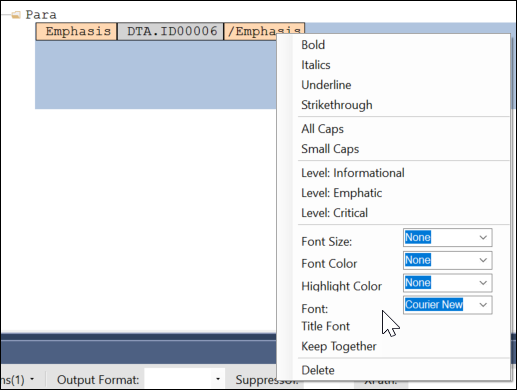
- It was reported that when a DTA in an .REQ file contained a phrase
or sentence authored with a specific font (e.g. using an "Emphasis"
tag and a Font of "Courier New"), a line break
(
<br/>) in the code resulted in the
subsequent text reverting to a default font (e.g "Times New Roman"),
rather than preserving the specified font. After the Saxon 10.9
upgrade, a font selected through an "Emphasis" tag is preserved
regardless if line breaks are used.
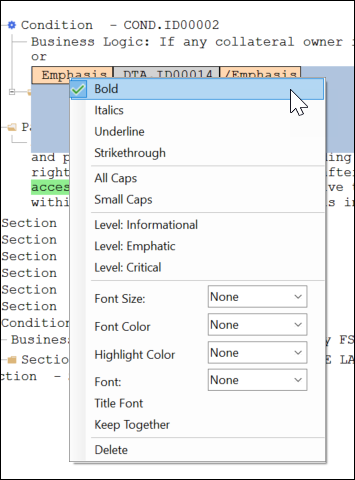
- It was reported that when a DTA in an .REQ file contained a phrase
or sentence authored with a "Bold" Emphasis tag, a line break
(
<br/>) resulted in the subsequent text not
being bolded, rather than bolding the entire phrase or sentence.
After the Saxon 10.9 upgrade, a Bold emphasis selected is preserved
regardless if line breaks are used
|
| Expere: internal code optimization with XY
Coordinate and Wolters Kluwer E-Sign (WKES) functionality |
- Type: Enhancement
- Reference: PBI 819077, 820296, 819072
|
|
Summary: As part of a regular cadence to review and upgrade any items
used with our Expere applications, the XY Coordinate and WKES, functionality
has undergone a code optimization; no user impact is expected. |
| DocViewer: Third Party Cookie Phaseout |
- Type: Enhancement
- Reference: PBI 822257
|
|
Summary: Google is implementing a new "Tracking Protection" feature
that will limit the use of "third-party cookies" that track internet usage
when using Google Chrome. As part of this "third-party cookie phaseout",
DocViewer will continue to be accessible for our Expere users. |
May
This release utilizes the following Nuget Packages:
- Document Generation Services version: 22.2.0.4805
- Expere Engine version: 24.2.0.5604
- DocViewer version: 23.1.0.1034
- Document Generation Services Core version: 23.1.0.167
- Document Generation Services Core DocViewer version: 23.1.0.167
- Security Administration version: 6.1.0.1558
- Expere Document Services: 22.2.0.2144
- Expere Document Services Tool Suite: 22.2.0.2104
- DocumentServices: 22.2.0.247
- EZ Config:
- EZConfig Packages and Packets version: 2024.4.0.3236
- EZConfig Default Data version: 2024.4.0.810
- EZ Config Service version: 2024.4.0.736
- EZ Gateway version: 2024.4.0.778
- Databases:
- Document Generation Services Database version:
22.2.0.4805
- EZConfig Packages and Packets version: 2024.4.0.3236
- EZConfig Default Database version: 2024.4.0.810
- Security Administration Database version: 6.1.0.1558
- Expere Document Services Database version: 22.2.0.1981
Installation / Upgrade Notes
Note the following installation and upgrade changes in the May release:
- Transform variable changes:
- Octopus variable changes:
- Installation and upgrade changes:
- WSDL Changes:
| DocViewer: FooterNotice element now
ignored |
- Type: Enhancement
- Reference: PBI 813734
|
| Summary: DocViewer has been updated to now ignore the
FooterNotice element. Previously, DocViewer did not display any FooterNotice
elements; however, if the REQ included any xpath data items within the
FooterNotice, it caused problems with subsequent locations for the xpath in
the document display. As a result, FooterNotice elements are now ignored in
addition to not being displayed within DocViewer. |
| DGS Management: FOP 2.6 field removed |
|
|
|
Summary: As noted in the previous release, the Expere Engine has been
updated to use FOP 2.8 exclusively when generating documents. Because 2.6 is
no longer required, we have removed the FOP 2.6 field from the DGS
Management Tool. |
| DGS Management: Validate uncompressed file
size |
- Type: Enhancement
- Reference: PBI 820577
|
|
Summary: This release includes an update to the DGS Management Tool
to validate the uncompressed size of any uploaded zipped files prior to
unzipping them and to reject the upload if the uncompressed size exceeds the
limit, which is currently set to 5 GB. |
April
This release utilizes the following Nuget Packages:
- Document Generation Services version: 22.2.0.4801
- Expere Engine version: 24.2.0.5583
- DocViewer version: 23.1.0.1032
- Document Generation Services Core version: 23.1.0.167
- Document Generation Services Core DocViewer version: 23.1.0.167
- Security Administration version: 6.1.0.1558
- Expere Document Services: 22.2.0.2118
- Expere Document Services Tool Suite: 22.2.0.2104
- DocumentServices: 22.2.0.247
- EZ Config:
- EZConfig Packages and Packets version: 2024.1.0.3224
- EZConfig Default Data version: 2024.1.0.769
- EZ Config Service version: 2024.1.0.720
- EZ Gateway version: 2024.1.0.758
- Databases:
- Document Generation Services Database version:
22.2.0.4763
- EZConfig Packages and Packets version: 2024.1.0.3224
- EZConfig Default Database version: 2024.1.0.769
- Security Administration Database version: 6.1.0.1558
- Expere Document Services Database version: 22.2.0.1981
Installation / Upgrade Notes
Note the following installation and upgrade changes in the April release:
- Transform variable changes:
- Octopus variable changes:
- Installation and upgrade changes:
- WSDL Changes:
| DocViewer: Mortgage acknowledgement section and
Authority document updated |
- Type: Defect Correction
- Reference: PBI 820322
|
|
Summary: DocViewer has been updated to ensure that the values for
by, of, and of in the Acknowledgement section of
the Mortgage document now populate with data when both collateral owners are
individuals. Additionally, the Note Information Inclusion
dropdown field now correctly displays on the Authority document.
Previously, these values were blank. |
| DocViewer: Default Data information now passed
with BeginSession call |
|
|
Summary: Document Generation Services (DGS), Expere Document Services
(EDS), and DGS Core were enhanced so that Expere EZ Config Organization and
Product information can now be passed to DocViewer with a BeginSession API
call along with an Expere Generate API call. Note: Refer to the links above for detailed information on using this new
functionality. |
| DocViewer retains Completed/Create PDF checkboxes
when Packages and Packets is used |
- Type: Enhancement
- Reference: PBI 709564
|
|
Summary: The Completed and Create PDF checkboxes are
now retained in DocViewer when EZ Config Packages and Packets is used. This
functionality already existed for documents and packages passed in without
Packages and Packets. |
| DocViewer: Aggregate adjustment amount |
- Type: Enhancement
- Reference: PBI 815534
|
|
Summary: DocViewer has been updated to ensure that the Aggregated
Adjustment amount now displays on the Closing Disclosure and Loan Estimate
documents displayed within DocViewer. Previously the Aggregated Adjustment
amount was not visible within DocViewer despite successfully displaying
within the generated PDF. |
March
This release utilizes the following Nuget Packages:
- Document Generation Services version: 22.2.0.4706
- Expere Engine version: 24.1.0.5519
- DocViewer version: 23.1.0.1015
- Document Generation Services Core version: 23.1.0.162
- Document Generation Services Core DocViewer version: 23.1.0.162
- Security Administration version: 6.1.0.1549
- Expere Document Services: 22.2.0.2110
- Expere Document Services Tool Suite: 22.2.0.2104
- DocumentServices: 22.2.0.240
- EZ Config:
- EZConfig Packages and Packets version: 2024.1.0.3188
- EZConfig Default Data version: 2024.1.0.713
- EZ Config Service version: 2024.1.0.702
- EZ Gateway version: 2024.1.0.737
- Databases:
- Document Generation Services Database version:
22.2.0.4706
- EZConfig Packages and Packets version: 2024.1.0.3188
- EZConfig Default Database version: 2024.1.0.713
- Security Administration Database version: 6.1.0.1549
- Expere Document Services Database version: 22.2.0.1981
Installation / Upgrade Notes
Note the following installation and upgrade changes in the March release:
- Transform variable changes:
- Octopus variable changes:
- Installation and upgrade changes:
- Expere updated to exclusively use FOP 2.8.
- WSDL Changes:
| Engine: FOP 2.8 upgrade |
|
|
Summary: the Expere Engine has been updated to use FOP 2.8
exclusively when generating documents; users will no longer need to pass in
a FOP26=true element and value in transaction when
generating documents. If it is necessary to continue using FOP 1.1, users
would need to manually set FOP26=false in their installed
BSI.Properties file.Note:
- As part of this upgrade, Expere will no longer generate
documents using FOP 1.1.
- The
FOP26 element will be removed in a future
release.
|
| DocViewer: Stylesheet and version information now
passed with Generate request |
|
|
Summary: Document Generation Services (DGS), Expere Document Services
(EDS), and DGS Core were enhanced so that the stylesheet and version
information can now be passed to DocViewer with a BeginSession API call
along with an Expere Generate API call. Previously, when a Generate request
was used for merging transaction data between Expere and EZ Config Default
Data, stylesheet and version information must be passed in a separate API
call. Note: Refer to the links above for detailed
information on using this new functionality. |
| Engine: Document assembly behavior updated when
using images with a Tagged PDF |
- Type: Enhancement
- Reference: PBI 799727
|
|
Summary: It was reported that images failed to display on some
generated Tagged PDF documents. After internal analysis was conducted, it
was determined that Expere should be updated to fail transactions and not
generate documents when images are not located and cannot be printed on the
document. Note: This enhancement will only affect
those documents assembled with FOP 2.8. |
| Engine: Saxon 10.9 upgrade |
- Type: Enhancement
- Reference: PBI 810458
|
|
Summary: As part of the regular comprehensive security tests that are
run against Expere components, we have updated the Expere Engine to use
Saxon version 10.9. |
| Expere Engine: Font and Bold emphasis behavior
enhanced when using <br/> |
- Type: Enhancement
- Reference: PBI 800837, 740793
|
Summary: The following line break (br/>)-related
functionality has been enhanced by upgrading to Saxon 10.9:
- It was reported that when a DTA in an .REQ file contained a phrase
or sentence authored with a specific font (e.g. using an "Emphasis"
tag and a Font of "Courier New"), a line break
(
<br/>) in the code resulted in the
subsequent text reverting to a default font (e.g "Times New Roman"),
rather than preserving the specified font. After the Saxon 10.9
upgrade, a font selected through an "Emphasis" tag is preserved
regardless if line breaks are used.
- It was reported that when a DTA in an .REQ file contained a phrase
or sentence authored with a "Bold" Emphasis tag, a line break
(
<br/>) resulted in the subsequent text not
being bolded, rather than bolding the entire phrase or sentence.
After the Saxon 10.9 upgrade, a Bold emphasis selected is preserved
regardless if line breaks are used
|
| Expere EZTransform: internal components upgraded
|
- Type: Enhancement
- Reference: PBI 808933, 805138, 809282
|
Summary: As part of a regular cadence to review and upgrade any items
used with our Expere applications, we have upgraded the following:
EZTransform to use the following third-party components:
- Tomcat 10
- Java EE 10
- Java SE 21
|
| Expere: new Expere Workflow Guide
available |
|
|
Summary: A new Expere Workflow Guide has been created that provides
detailed information on various common workflows when using Expere.
Additionally, this guide contains information about key Expere-related
concepts, such as Autoselection and Callbacks. Note: This guide will be periodically updated with additional workflows, key
concepts, and other pertinent information. |
| DocViewer: US Territories supported |
- Type: Enhancement
- Reference: PBI 811107
|
Summary: DocViewer has been updated to support the following US
Territories:
- American Samoa (AS)
- Guam (GU)
- Commonwealth of Northern Mariana Islands (MP)
- Commonwealth of Puerto Rico (PR)
- U.S. Virgin Islands (VI)
|
| DocViewer: Sorting behavior enhanced |
- Type: Enhancement
- Reference: PBI 779680
|
Summary: DocViewer has been enhanced so that fees are sorted for any
document that contains a SortByValue, including the Loan
Estimate Addendum. |
| DocViewer: expected language not
appearing |
- Type: Enhancement
- Reference: PBI 808874
|
|
Summary: On the Note Commercial Line of Credit Non Revolving,
there is certain language which was not appearing in DocViewer. This
language should appear, depending upon whether an element exists in the XML.
DocViewer has been enhanced to accommodate if the element exists or does not
exist and to display the proper language. |
February
This release utilizes the following Nuget Packages:
- Document Generation Services version: 22.2.0.4655
- Expere Engine version: 24.1.0.5443
- DocViewer version: 23.1.0.948
- Document Generation Services Core version: 23.1.0.157
- Document Generation Services Core DocViewer version: 23.1.0.157
- Security Administration version: 6.1.0.1521
- Expere Document Services: 22.2.0.2061
- Expere Document Services Tool Suite: 22.2.0.2045
- DocumentServices: 22.2.0.240
- EZ Config:
- EZConfig Packages and Packets version: 2024.1.0.3145
- EZConfig Default Data version: 2024.1.0.647
- EZ Config Service version: 2024.1.0.702
- EZ Gateway version: 2024.1.0.701
- Databases:
- Document Generation Services Database version:
22.2.0.4655
- EZConfig Packages and Packets version: 2024.1.0.3145
- Default Database version: 2024.1.0.647
- Security Administration Database version: 6.1.0.1521
- Expere Document Services Database version: 22.2.0.1981
Installation / Upgrade Notes
Note the following installation and upgrade changes in the February release:
- Transform variable changes:
- Octopus variable changes:
- Installation and upgrade changes:
- WSDL Changes:
| Tool Suite: Loan Number extracted from VMP MISMO
XPath |
- Type: Enhancement
- Reference: PBI 802347 (Hosted Expere / Expere Document
Services), 796750 (Document Generation Services)
|
Summary: A Loan Number that exists within the VMP MISMO
/LOAN/_APPLICATION/MORTGAGE_TERMS/@LenderLoanIdentifier
XPath can now be used as a value for a transaction within the Loan
Number column in the Tool Suite > SUPPORT Page > search
results list. Document Generation Services Tool Suite: 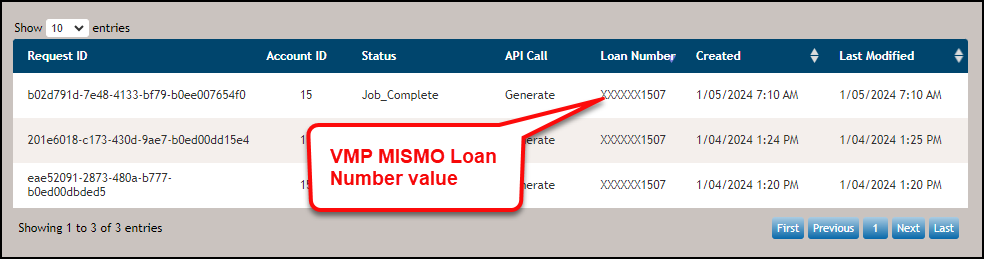 Expere Document Services Tool
Suite: 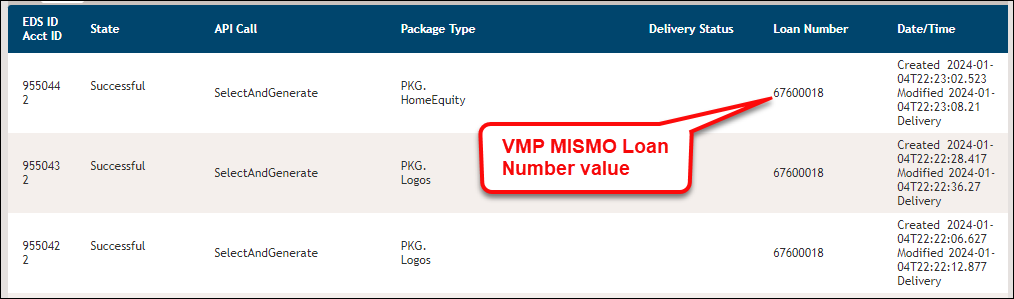 |
| DGS Core Management: content load behavior
updated |
- Type: Defect
- Reference: PBI 806071
|
Issue: Users reported a "415" error when using the
UploadTransaxction API call to upload a content library
through DGS Core Management with 'application/zip' as the
specified Content-Type of the request. |
Solution: The DGS Core Management tool has been enhanced so that
'application/zip' and
'application/binary' are added as accepted content
types. |
| DGS: OD installation Guide updated |
- Type: Enhancement
- Reference: PBI 804681
- Documentation Impacts: DGS OD Install Guide >
|
|
Summary: |
January
This release utilizes the following Nuget Packages:
- Document Generation Services version: 22.2.0.4635
- Expere Engine version: 23.4.0.5403
- DocViewer version: 23.1.0.948
- Document Generation Services Core version: 23.1.0.134
- Document Generation Services Core DocViewer version: 23.1.0.134
- Security Administration version: 6.1.0.1502
- Expere Document Services: 22.2.0.2050
- Expere Document Services Tool Suite: 22.2.0.2056
- DocumentServices: 22.2.0.237
- EZ Config:
- EZConfig Packages and Packets version: 2023.12.0.3127
- EZConfig Default Data version: 2023.12.0.626
- EZ Config Service version: 2023.12.0.697
- EZ Gateway version: 2023.12.0.696
- Databases:
- Document Generation Services Database version:
22.2.0.4635
- Packages and Packets Database version: 2023.12.0.3127
- Default Database version: 2023.12.0.626
- Security Administration Database version: 6.1.0.1502
- Expere Document Services Database version: 22.2.0.1981
Installation / Upgrade Notes
Note the following installation and upgrade changes in the January release:
- Transform variable changes:
- Octopus variable changes:
- Installation and upgrade changes:
- WSDL Changes:
| OPPSA components removed from Expere
Engine |
- Type: Feature
- Reference: PBI 788036
|
Summary: Previously, we informed you (here) that OPPSA references had been removed from our user
documentation. We have now removed actual OPPSA references in our software
code from our Expere On-Prem products, consisting of the following
methods:
- CreateOppsaPhaseRequest
- CreateOppsaPolicyOrganizationRequest
- CreateOppsaPolicyUserRequest
- DeleteOppsaBarcodeRequest
- DeleteOppsaPackageRequest
- DeleteOppsaPacketRequest
- DeleteOppsaPhaseRequest
- DeleteOppsaPolicyOrganizationRequest
- DeleteOppsaPolicyRequest
- DeleteOppsaPolicyUserRequest
- DeleteOppsaProductRequest
- GetOppsaBarcodeRequest
- GetOppsaPackageRequest
- GetOppsaPacketRequest
- GetOppsaPolicyOrganizationsRequest
- GetOppsaPolicyRequest
- GetOppsaPolicyUsersRequest
- GetOppsaProductsRequest
- PublishOppsaBarcodesRequest
- PublishOppsaPackagesRequest
- PublishOppsaPacketsRequest
- PublishOppsaPhasesRequest
- PublishOppsaPoliciesRequest
- PublishOppsaProductsRequest
- SaveOppsaBarcodeRequest
- SaveOppsaPackageRequest
- SaveOppsaPacketRequest
- SaveOppsaProductRequest
- UpdateOppsaPolicyOrganizationRequest
- UpdateOppsaPolicyUserRequest
- UploadOppsaPolicyRequest
- VerifyOppsaLoginRequest
Additionally, we have removed OPPSA related parameters from the
following methods:
- CreateTransactionRequest
- GenerateRequest
- GetPackageDataRequirementsRequest
- ListDocumentsRequest
- ListPackagesRequest
- ListPhasesRequest
- SelectAndGenerateRequest
- SelectAndGenerateTestDocumentsRequest
- SelectRequest
|
| Support enhanced for HELOC vaulting |
- Type: Feature
- Reference: PBI 797989
|
Summary: in order to support vaulting of the HELOC note, Expere has
been updated to return values in the response for
<Vault/> and <FinancialAsset/>
elements if present within a document that is part of a document package.
The response file will resemble the
following:
<r:PackageDoc PackageDocID="PKGD.AffidavitOfMortgagorNJ_Copy">
    <r:DocDescriptor>
                     <r:DocID>PKGD.AffidavitOfMortgagorNJ_Copy</r:DocID>
                     <r:DocType>Dynamic</r:DocType>
                     <r:DocDisplayName>Affidavit of Mortgagor-NJ</r:DocDisplayName>
                     <r:DocRootEntityName>INS.AffidavitOfMortgagorNJ_Copy</r:DocRootEntityName>
                     <r:ESignatureDocument>true</r:ESignatureDocument>
                     <r:Vault>true</r:Vault>
                     <r:FinancialAsset>true</r:FinancialAsset>
    </r:DocDescriptor>
    <r:DocWorkOrder>
                     <r:DocPrepare>true</r:DocPrepare>
                     <r:DocAutoselected>false</r:DocAutoselected>
                     <r:DocSuggested>false</r:DocSuggested>
                     <r:DocFormat>TaggedPDF</r:DocFormat>
                     <r:DocStyle>WKFS_StyleGuide</r:DocStyle>
    </r:DocWorkOrder>
</r:PackageDoc>
See Expere Developer Guide >
DocDescriptor for more information. |
| Engine: Watermark processing flow updated for
upcoming iText upgrade |
- Type: Enhancement
- Reference: PBI 762647
|
|
Summary: Internal analysis has determined that an upcoming iText
upgrade would impact the way watermarks function within the Expere Engine.
As a result, watermark processing has been updated within Expere to
accommodate an upcoming iText upgrade. Note: This
upgrade will not affect integrations or generated documents.
|
| Engine: AnchorText behavior enhanced |
|
Summary: The AnchorText ancillary output
functionality has been enhanced based on user feedback. As a result, the
AnchorText document included in a document package when the
AnchorText ancillary output is selected and lists each
document that contains anchors by providing the
InstanceDisplayName, the SignerRole,
and SignerName values; for
example:Application Disclosure-WI | Borrower | John Doe
|
| Engine: Ancillary Barcode Height option
honored |
|
Summary: Expere now supports specifying per-document ancillary
barcode height. The barcode height authored in the native REQ file will be
applied to that document's ancillary barcode. Note: Consider the following:
- Barcode height can be specified for all Expere-supported
ancillary barcode types.
- If no value is specified, then apply the default height
value.
- In scenarios where the barcode type is authored in the REQ while
the ancillary specifies a different barcode type, the ancillary
barcode type will take precedence.
- If a document has a footer and a barcode height defined, it is
possible the amount of space defined for the footer will need to
be adjusted to get the desired output.
- The maximum barcode height is 44 points / .61 inches. If a
larger space is specified when authoring the barcode, additional
white space will be reserved, but the barcode height will be 44
points/.61 inches.
|
| Expere: Landscape orientation behavior enhanced
for static documents |
- Type: Enhancement
- Reference: PBI 759968
|
|
Summary: Users reported that certain static documents that consisted
of both portrait and landscape page orientation did not display the
landscape-oriented pages correctly. For example, one document contained
portrait orientation all but the last page of the document, which contained
a landscape orientation. This last page was inadvertently display the page
in portrait orientation and was truncating some of the information. As a
result, Expere has been enhanced so that landscape page orientation is now
preserved in static documents. |
| Expere: Engine updated to used Wildfly
30.0 |
- Type: Enhancement
- Reference: PBI 801294
|
|
Summary: The Expere Engine has been updated to use WIldfly
30.0. |
| Engine: fillable date field behavior identified
in Embedded PDF; additional logging functionality added |
- Type: Enhancement
- Reference: PBI 795571
- Documentation Impacts: ADA Implementation Guide > Troubleshooting
|
|
Summary: During internal testing for a separate work item, it was
identified that one of the date fields did not generate as a fillable field
when eSignatureAndFieldSupport was specified for a specific Embedded PDF REQ
file. Analysis revealed that the specific Embedded PDF REQ file required an
additional content update, and thus, no coding changes were implemented.
However, additional logging functionality was added in order to identify
this issue if it occurs by providing a list of fields that need to be
removed and re-added so the document generates with the correct fillable
fields. |
| Engine: log4j and wildly logging
updates |
- Type: Enhancement
- Reference: PBI 796918
|
|
Summary: The default logging configuration has been adjusted to
remove excess and unnecessary log entries from the log file. |
| Expere Test Service Pool updates |
- Type: Enhancement
- Reference: PBI 797396
|
|
Summary: The Service and Endpoint fields have been
removed from the Test Service Pool due to an internal static code analysis.
|
| DocViewer: additional output format
supported |
- Type: Feature
- Reference: PBI 796964
|
Summary: As part of our support of additional output formats,
DocViewer has been enhanced to support a new date output of "MM/YYYY" and
"M/YYYY."Note: Example displays consist of the
following:
- MM/YYYY: 01/2024
- M/YYYY: 1/2024; 10/2024
|
| DocViewer: new Support Required Data parameter
added |
|
Summary: DocViewer has been enhanced to determine if required
documents should be available for viewing in the Document Drawer.
This functionality is enabled when passing in a
SupportRequiredData=yes parameter through
BeginSessionRequest. When this parameter is passed in
the request, only those documents that are considered "Required" are
available for viewing in the Document Drawer. |