SmartSign Plus Integration
The eOriginal SmartSign® service is designed to help capture all the benefits that eSignature technology offers by providing a customizable, branded signing solution. This enables you to conduct business faster, reduce operating costs and provide a sleeker customer experience.
Along with the extensive collection of programming interfaces, SmartSign Plus integrates with Packages and Packets. This section documents working with SmartSign Plus in that capacity.
SmartSign Plus Details
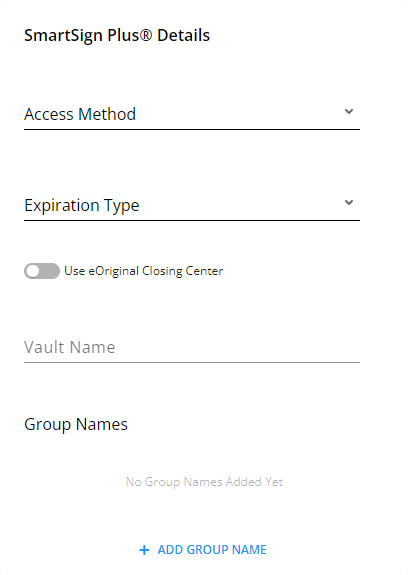
- Access Method: three possible values: Blank (default), Email, and API
- Expiration Type: three possible values: Blank (default), Electronic, and Expire to Paper
- Use eOriginal Closing Center: two possible values: Yes and No. See eOriginal Closing Center Settings below.
- Vault Name: a free text area providing the ability to add the desired name
- Group Name: allows you to add fields for additional values
eOriginal Closing Center Settings
When the Use eOriginal Closing Center toggle is enabled at the package level, additional document configuration options become available within each packet:
- Preview: Controls whether the document can be previewed in the eOriginal Closing Center. This setting can be configured individually for each document within a packet.
- PreClose: Determines if the document is part of the pre-closing process in the eOriginal Closing Center. This can be set separately for each document in the packet.
Important considerations for eOriginal Closing Center settings:
- Document-level settings are only visible and configurable when the package-level Use eOriginal Closing Center toggle is enabled
- If the package-level toggle is disabled, any previously configured document settings within packets will be hidden and not retained
- The UI placement of these document-level toggles follows the same design pattern as other package-level settings for consistency