2022 Release Two (2) Expere Engine and Tools Changelog

Expere Engine Release: 2022 Release Two (2)External release date is September 2022. Expere Engine build number is: 22.2.0.4520.

Engine: SMARTDoc 1.02
  • Type: Feature
  • Reference: PBI 722272, 727641, 729201, 729294, 733458, 732740, 737465, 723511, 726851, 725752, 726783
  • Documentation Impacts: See Features > SMARTDoc 1.02 for more information and links below if applicable.
Summary: Wolters Kluwer enhanced Expere to generate MISMO SMART Doc version 1.02. In addition to building out the functionality to support the generation of SMART Doc viewing, the following specific functionality was aded (listed in bullets below). For more information on general SMART Doc functionality, refer to the Expere Develper Guide > Using SMART Doc functionality help topic.

Hosted / Self-hosted users:

  • Watermarks (PBI 722272): When generating the SMARTDoc through Expere, the PDF created is given a 'Review Copy' watermark.
  • Valueless MISMO XPaths supported (PBI 727641): Expere now supports MISMO XPath elements that contain no values.
  • Property Address parsed (PBI 729201): for MERS registrations, the property address is now parsed; this results in updated versions of the following, when applicable:
    • /SMART_DOCUMENT/DATA/MAIN/LOAN/_APPLICATION/PROPERTY/@_StreetAddress
    • /SMART_DOCUMENT/DATA/MAIN/LOAN/_APPLICATION/PROPERTY/@_StreetAddress2
  • Ability to create SMART Doc without the PDF Copy’ (PBI 729294): Expere has been updated to select whether or not to return a PDF copy of the eNote. SMARTDoc can be created with or without PDF Copy using the following schema path: /Txn/EClosingNoPDFCopyInd; note the following:
    • If /Txn/EClosingNoPDFCopyInd is True (1) (for the SMARTDoc): PDF Copy is not created
    • If /Txn/EClosingNoPDFCopyInd is != to True (1) (for the SMARTDoc): PDF Copy is created
  • RembrandtID Support enhanced (PBI 733458): The Expere Engine now supports RembrandtID's that begin with a numeric value. The SMARTDoc DTD defines the RembrandID as an IDREF. This requires that the RembrandID can not start with a number. To support RembrandtIDs that start with a number, Expere will prepend a ‘_’ to the RembrandtID value when the value starts with a number.
    Note: This change impacts SMART Docs only.
  • Masking enhancements (PBI 732740): The Expere Engine masking functionality has been enhanced to better support masking date, currency, and percentage values in SMART Docs; this was done so that the SMARTDoc could pass MERS validation.
    Note: Expere will throw an exception on any numeric values (i.e currency, numbers containing decimals, and percentages) passing more decimals than the specified mask in the SMARTDoc. For example if $1,234.567 is passed in the transaction for a field that has $1,234.## as the mask, Expere throws an exception. Below are the exceptions depending on the type of numeric value:
    Unable to process data value with more than 4 decimal places; Please enter a valid value and resubmit transaction.
    Unsupported data value passed to smartDocMaskUpdate; view value has too many digits and does not end in zero preventing truncation;
    Unable to update smartDoc mask
    Unable to apply currency mask to data value; reformat input value to contain only two decimal places and try again.
  • New <SmartDoc\> element added (PBI 737465): To support SMART Doc functionality, the Expere Engine schema has been updated to include a new <SmartDoc\> element. See the Expere Developer Guide>DocDescriptor for more information. This value should be "1.02."

Self-hosted users:

  • Updates to Expere Testing System (PBI 723511, 726851): the Expere Testing System has been updated to now view SMARTDocs for a generated eNote. See the Expere Testing System User Guide: Using Autoselection and Assembly and Using Assembly for more information. Additionally, the Expere Testing System has been updated so that it can generate SMARTDoc documents properly when using special characters, specifically apostrophes and "&nbsp" (or non-breaking spaces).
  • Logging updates (PBI 725752): Logging enhancements have been implemented which identify the SMART Doc creation date/time stamp and the corresponding Account ID.
  • .NET and Wildfly functionality (PBI 726783): As part of this work item, Expere .NET users can now generate SMARTDocs, while the Wildfly install process was enhanced to accommodate the use of DTD's in the installation path location.
Expere Engine enhanced to support Tagged .PDF's
  • Type: Enhancement
  • Reference: PBI 705765, 713978, 723021, 725252, 709889, 721085, 729190, 720962, 718175, 711172, 693336, 686589, 723265, 728072, 733156, 735864, 729292
Summary: As a part of our continued effort to create WCAG 2.0 compatible documents we have updated the Expere Engine to now support the generation of Tagged .PDF documents. We will continue making enhancements to the Expere Engine for Tagged .PDF support, so check back for items being identified and corrected.As part of our continued work to support Tagged .PDF's, we have implemented enhancements to resolve the following WCAG 2.0-related changes:
  • (PBI 705765): Users reported that when authoring a fillable field in an embedded .PDF document, the generated .PDF displayed the product technical rules (PTR) in the fillable field. The expected behavior was that the resulting PTR value should appear in the fillable field, or the field is left blank.
  • (PBI 713978): Users reported when using Tagged PDF and MergedPDF, bookmarks did not appear in the resulting Merged PDF.
  • (PBI 723021): Users reported that the first instance of a FillableCheckbox within a grouping (GroupID) appeared as a radio button ("option" button) and was being checked by default. The expected behavior is that a checkbox should appear, and if part of a group of mutually-exclusive checkboxes, is either checked or not checked in the output depending on the authoring within the .REQ file.
  • (PBI 725252): The Header content was not tagged on the middle pages of documents despite being instructed to do so (by setting the HeaderNotice with a MiddlePages-'Yes' value).
  • (PBI 709889): Assembly errors appeared when list items appeared that started at the end of a page and continued on the subsequent page.
  • (PBI 721085): Users reported that tags within Adobe Acrobat's Tag Tree did not appear when generating a Tagged PDF.
  • (PBI 729190): Users reported that when generating a Tagged PDF, the title of the document was incorrect. Instead of displaying the Document Title from Acrobat > Properties > Initial View > Show, it was instead displaying the File Name value from the same dropdown. These values are extracted from the .REQ file. Standard PDF documents use the InstanceDisplayName value while Tagged PDF documents use Metadata > Title value. This behavior has been enhanced so that Tagged PDF documents use the Document Title value.
    Note: Tagged PDF utilize the Document Title in order to pass Adobe Acrobat's Accessibility Check.
  • (PBI 720962) Users reported that non-signature fillable fields were being added erroneously to the list of bookmarks in a generated .PDF or Tagged .PDF file. These bookmarks appeared with an "Expere-FillableField-dxxxxxx" and / or "Expere-FillableCheckbox-dxxxxxx" naming convention; the expected behavior is that bookmarks are not generated for non-signature fillable fields. This behavior has been addressed so that bookmarks are not created for the above-mentioned non-signature fillable fields in a generated .PDF or Tagged .PDF file.
  • (PBI 718175) Users reported that transactional data tags did not highlight the corresponding text in the .PDF when clicking on the tags.
  • (PBI 718175) Form tags that were added did not highlight anything in the document.
    Note: These behaviors have been resolved; transactional tagging and Form tag functionality once again operates as expected.
  • (PBI 711172): Users reported that certain lines were not being tagged in the Closing Welcome Letter. This has been resolved; all lines are now tagged in the Closing Welcome Letter.
  • (PBI 693336): Users reported the following:
    • Footer notice content was not tagged for certain middle pages of a tagged .PDF document.
    • Tags for page numbers in the tagline of the document were present.
    This has been resolved: footer notice content is properly tagged on all pages of the document, and page number tags in the tagline of the document are no longer created.
  • PBI (686589): It was reported that in a TaggedPDF document, tables that were split between pages resulted in the corresponding Adobe tag tree displaying the tables separately. A TaggedPDF document with tables that split between pages are now combined into one table in the Adobe tag tree.
  • (PBI 723265): Users reported that an Embedded PDF containing eSignature fields generated all of the eSignature fields on the PDF whether or not the party was present in the transaction. This behavior was different than that of a static or dynamic document, which did not display eSignature fields for parties that were not present in the transaction. For example, if a co-borrower was not provided, the corresponding signature and signature date fields should not be fillable in a generated PDF or Tagged PDF for an embedded PDF REQ file.
  • (PBI 728072): Users reported that SignaturePointSet was not being returned in the Expere response for embedded PDF documents.
  • (PBI 733156): Users reported that fillable checkboxes appeared without borders when generating either PDF or Tagged PDF documents. This is considered a compliance issue.
  • (PBI 735864): For documents generated from Embedded PDF REQ files, eSignature fields were present in the outputted documents even when the ESignatureAndFieldSupport ancillary option was not provided in the transaction request.
  • (PBI 729292): Users reported that barcodes did not appear for Embedded PDF outputs. Instead of a barcode appearing in the tagline, the word "barcode" simply appeared.
Expere: Embedded PDF - DiscreteParties and DiscretePartyIDs behavior enhanced in response file
  • Type: Enhancement
  • Reference: PBI 726316
Summary: A user reported that when generating an embedded PDF document, the corresponding response file did not contain any Discrete Party information (<DiscreteParties></DiscreteParties> or <DiscretePartyIDs></DiscretePartyIDs>element). This behavior has been enhanced: <DiscreteParties></DiscreteParties> and <DiscretePartyIDs></DiscretePartyIDs> elements are included in the Expere response for embedded PDF's.
Expere Engine release: build updated for .ZIP file
  • Type: Enhancement
  • Reference: PBI 710998
Summary: For those self-hosted users who install an Expere Engine, the contents of the Expere Engine release build are now being placed in a .ZIP file. This file is replacing the .ISO file that had been previously used.
Masking changes for "-"
  • Type: Enhancement
  • Reference: PBI 734825
Summary: Due to SMART Doc limitations regarding the use of a dash ("-") in alphanumeric values, the Expere Engine has been updated so that masks no longer display a dash in an alphanumeric value. For example: "12.125" will now print as "twelve and one eight" rather than "twelve and one-eight," and "123" will now print as :one hundred twenty three" rather than "one hundred twenty-three" for the generated document and SMART Doc.
FOP 2.6 performance enhanced
  • Type: Enhancement
  • Reference: PBI 711798
Summary: It was noted in Expere Engine 2022 Release One that we had identified potential performance degradation with FOP 2.6. As a result, performance issues have been addressed, and it is recommended that users increase their FOP 2.6 usage. If any issues are identified when using FOP 2.6, please alert your Professional Services Implementation Consultant or SupportLine immediately.
Expere Engine: iText 7 enhancement
  • Type: Enhancement
  • Reference: PBI 592824, 592989, 710124, 709882, 713229, 707169, 724123
Summary: It was identified that the Expere Engine used iText 5.5 that was determined to have a high security risk. As a result, we have enhanced the Expere Engine by upgrading to iText 7. Over the course of the first five months, we have updated and verifed that the Expere Engine is functional with iText 7 regarding the following:
  • eSignatures and fillable fields
  • Static documents and static document barcode support
  • Embedded PDF documents
  • Tagged PDF documents
Note: (PBI 724123): we have also upgraded to iText7 to resolve a security isue.
Expere Engine: WildFly updates
  • Type: Enhancement
  • Reference: PBI 715356, 723720
Summary: We have implemented the following Wildfly updates for this release:
  • The Expere Engine has been updated to use Wildfly version 26.1.1. No user action is required.
Expere enhanced to support optional override behavior between eSign / eNotary with recordable documents
  • Type: Enhancement
  • Reference: PBI 723515
  • Documentation Impacts: No documentation impact
Summary: Expere was enhanced in 2021 to generate recordable documents with eSignature and eNotary functionality. Expere customers requested the ability to suppress this functionality in certain scenarios. As a result, the Expere API methods have been updated so that when Txn/ExcludeESignatureAndENotaryInd is 'true' and the document contains a NotaryBlockSection element or is recordable (set in the .REQ file as an attribute of Instance > InstanceDocumentRef > Document where Recordable - 'Yes,') eSignature and eNotary functionality is suppressed and only allows for an ink / wet signature.
Note: At this time, this enhancement is supported in PDF documents but not RTF documents.
Engine: Signature Date Field naming convention updated
Summary: With the recent implementation of iText7 for Expere, the SignatureDateField naming convention has been updated to the following (example syntax): SIG_Borrower_1_1_true_1eSigDate.eSigDate. Note the existence of a second eSigDate parameter within naming.
Expere: Support added for HighlightColor Attribute to SignatureField and SignatureDateField
  • Type: Enhancement
  • Reference: PBI 710509
Summary: The Expere Engine has been updated to support the use of a new HighlightColor attribute with the <SignatureField> and <SignatureDateField> elements. When applied, the desired color appears within the fillable Signature and Date fields in the resulting PDF document.
Expere: table display issue resolved
  • Type: Enhancement
  • Reference: PBI 715595
Summary: It was reported that the Ownership of the Applicant section and preceding table did not appear on the Borrower Information Form for those users identifed as Guarantors.

The table and Ownership of the Applicant section now appear on the Borrower Information Form.

RTF Output - indent preserved with certain list use cases
  • Type: Enhancement
  • Reference: PBI 710249
Summary: Users reported that when generating the AmendmentToNote_Interest Rate_Payments_Ream document as an RTF output, lists which were broken up between paragraphs of text were indented improperly; for example: the text for the list item would be indented properly, but the number which accompanied the list item text would NOT be indented. See examples below:

RTF Output



PDF Output



This behavior has been enhanced; Expere has been updated to correctly indent the list item numbers with the subsequent list text on RTF Documents, as it does with PDF.
Encryption behavior enhanced
Summary: A user reported an issue with the password functionality in the SetEncryption ancillary output option. When running an Expere Document Services SOAP request utilizing the SetEncryption ancillary output option and user and/or owner passwords, the passwords provided would not open the .PDF file.
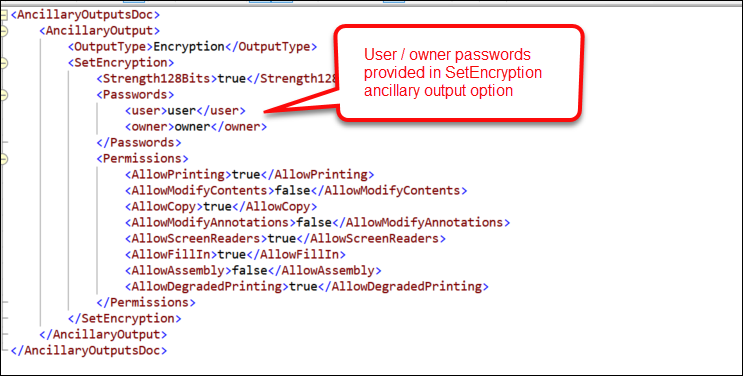
Expere has been updated to accept a password provided in the SetEncryption ancillary output > Permissions container. Furthermore, the corresponding user documentation has been updated to provide additional information on using SetEncryption; click the link in Documentation Impacts.