Expere Engine Release: 2025 Release Four (4)External
release date is November 2025. Expere Engine build number is:
25.4.0.6329.
Note: Users may notice that the 2025.4 Expere Engine release contains
updates that reference the eOriginal SmartSign®+ solution. The Expere Engine
is used to support both our Hosted and Self-Hosted ("On-Prem") customers, however, the
updates made to support SmartSign®+ were implemented solely for our Hosted
customers at this time but have Engine changes that Self-Hosted users will notice. See
Changelog entries below for more information.
| Expere: SmartSign Plus®
integration |
|
|
|
Summary: |
| Expere: merged PDF behavior enhanced |
- Type: Enhancement
- Reference: PBI 898176
|
|
Summary: users reported an error when attempting to generate a merged PDF
document package. It was discovered during our initial triage that a field name
value contained an "_" (underscore) as the last character in the value,
resulting in the error. As a result, Expere has been enhanced to successfully
parse field name values containing underscores. |
| WCAG: Expere Engine enhanced to support embedded and
Tagged .PDF's |
- Type: Enhancement
- Reference: PBI 889352
|
Summary: as a part of our continued effort to create WCAG compatible
documents we have updated the Expere Engine to now support the generation of
Tagged .PDF documents. We will continue making enhancements to the Expere Engine
for Tagged .PDF support, so check back for items being identified and corrected.
As part of our continued work to support Tagged .PDF's, we have implemented
enhancements to resolve the following WCAG-related changes in the Expere Engine
2025 Release Four:
- Embedded PDF fillable field behavior enhanced (PBI 889352): it
was reported that when attempting to generate a standard PDF using the
ESignatureAndFieldSupport ancillary option, fields
that should have been fillable were flattened instead (for example:
signature fields). This behavior has been enhanced so that generating a
standard PDF using the ESignatureAndFieldSupport
ancillary option once again results in fillable fields.
|
| Expere: Security issue and Component
upgrades |
- Type: Maintenance
- Reference: PBI 898285, 891874, 891882, 891885, 892146, 892148,
892765, 894060, 889834, 890075
|
Summary: As part of a regular cadence to review and upgrade any items
used with the Expere Engine for security issue and component upgrades, we have
upgraded the following to the latest versions:
- Security Issue Upgrades:
- Microsoft.AspNetCore.Metadata
- WildFly
- Apache Commons Collections
- Maintenance Upgrades
- Amazon Corretto Java
- Apache Commons Lang
commons-imagingdom4jlog4j- SLF4J API Module (
org.slf4j:slf4j-api)
Note: No user action is required. |
| Expere: Barcode2D behavior enhanced for
EmbeddedPDF documents |
- Type: Enhancement
- Reference: PBI 887987
|
Summary: Expere has been enhanced so when using a Barcode2D with an
EmbeddedPDF it results in a barcode that is the same as a Static PDF and can
be scanned successfully.This was the output before the enhancement: 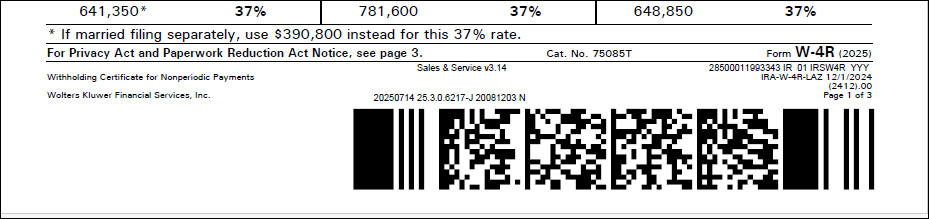 This was output after the
enhancement: 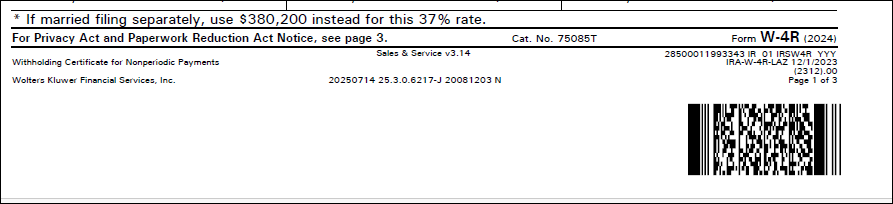 |
| Expere: WebSphere and Oracle support
removed |
|
|
|
Summary: the Expere Engine no longer supports WebSphere nor Oracle as
the integration middleware and database. All references to WebSphere and Oracle
have been removed from the Expere Implementation Guide, per the link above. |
| Expere: Echo split into EchoRequest and
EchoResponse |
- Type: Enhancement
- Reference: PBI 574133
|
|
Summary: The Expere .NET WSDL has been updated to split Echo into
EchoRequest and EchoResponse to bring it inline with our established design
patterns. |
| Expere: new Overview Guide available available
for Hosted and Self-Hosted Expere users |
|
Summary: a new Expere Workflow Guide is now available that provides
a launching point for understanding Expere; items discussed include the
following:
- Technical details
- Expere workflow processes and charts
- Security when calling Expere
- Wolters Kluwer / Expere Support structure
- Environment monitoring
- Integration process
- Supported tools
|
| Expere: Overflow page description order updated
for EmbeddedPDF documents |
- Type: Defect Correction
- Reference: PBI 876384
|
Issue: users reported that after generating an EmbeddedPDF document
containing an Overflow page, the corresponding Overflow descriptions did not
appear chronologically in the order they were authored in the .REQ file.
This was the expected output: 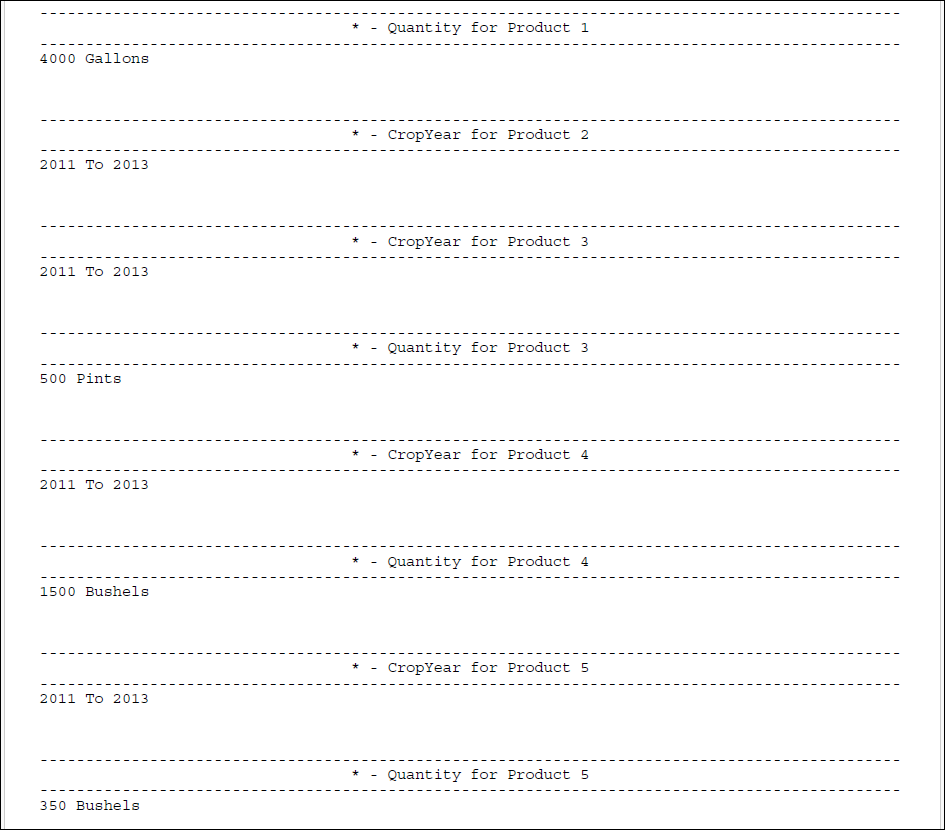 This was actual result: 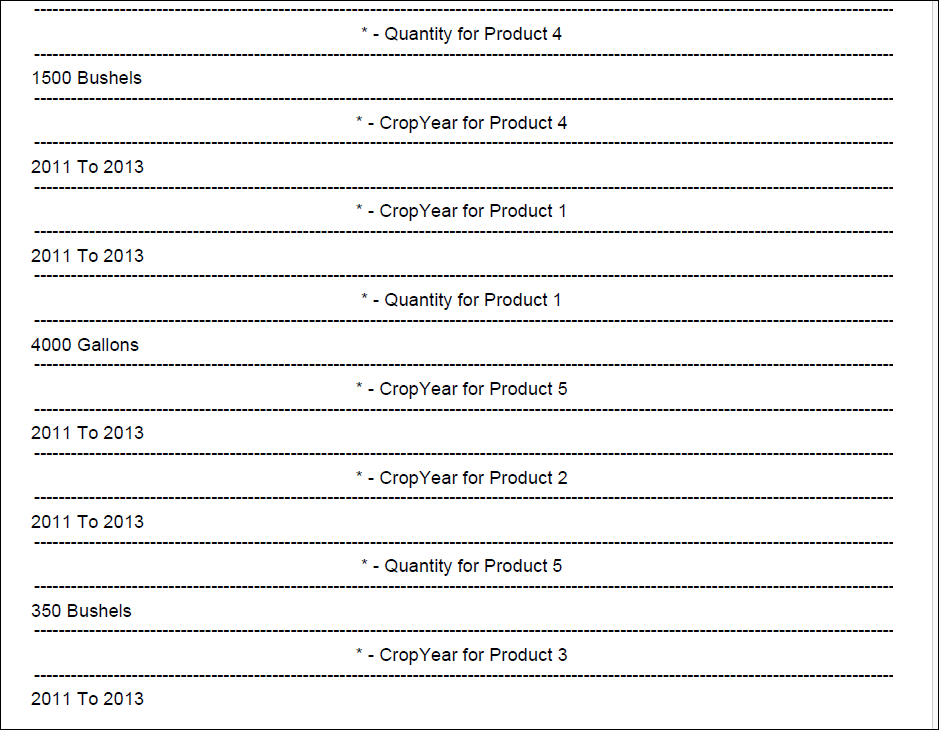 |
|
Solution: Expere has been updated so that the Overflow page
descriptions on a generated EmbeddedPDF document appear, chronologically, in
the order in which they were authored in the .REQ file. |
| Expere / SMARTDoc: Indexing Issues when Iterating
over CUSTOM paths resolved |
- Type: Defect Correction
- Reference: PBI 896048
- Documentation Impacts
|
Issue: the following issues were identified when executing
SmartDoc transactions that include both borrowers and trusts in the
SmartDocData:
- TRUST Container Indexing: TRUST containers in the ARC data
are not starting at index [1] as expected. Instead, indexing
continues from the last borrower entry. For example, if there are 4
borrowers, the first TRUST container starts at [5], leaving [1]
through [4] empty.
- INTER_VIVOS_TRUSTEE Indexing Behavior: when multiple trustees
are included in the transaction data but only one is applicable, the
ARC data still returns containers for all trustees. This results in
empty containers for the inapplicable trustees and an unexpected
index (e.g., INTER_VIVOS_TRUSTEE[3] instead of starting at [1] for
the applicable trustee).
- _SequenceIdentifier Inconsistency: The _SequenceIdentifier
value for TRUST containers is returned as "UpdateSequence". In
contrast, BORROWER and INTER_VIVOS_TRUSTEE containers return a
numeric value, leading to inconsistency in the ARC data
structure.
|
Solution: the following updates have been implemented to address
these issues
- TRUST Container Indexing: when executing SmartDoc
transactions that include both borrowers and trusts, trust-related
data now operates independently from borrower data. Trust entries
begin indexing at
[1], ensuring clear separation
and preventing the creation of blank containers.
- INTER_VIVOS_TRUSTEE Optimization: SmartDoc will no longer
return empty containers for trustees marked as inapplicable within
the
INTER_VIVOS_TRUSTEE data. This streamlines the
output and improves clarity.
- Consistent Sequence Identifier Usage: the
_SequenceIdentifier field is now applied
consistently across all iterated parties, ensuring uniformity and
simplifying downstream data processing.
|
| Expere: XPath compatibility message
addressed |
- Type: Defect Correction
- Reference: PBI 897849
|
|
Issue: a user reported receiving an XPath 2.0 Compatibility error
message despite having the XPath 1.0 checkbox enabled in the Document
Generation Services (DGS) Management Tool. |
|
Solution: the XPath 2.0 Compatibility error message no longer appears
if the XPath 1.0 checkbox is enabled in the DGS Management
Tool. |