Expere Engine Release: 2022 Release One (1)External
release date is January 2022. Expere Engine build number is:
22.1.0.4039.
| Expere Engine: Log4j updated |
- Type: Enhancement
- Reference: PBI 707674
- Compliance Impacts: This item is not a compliance or
regulatory issue.
- Documentation Impacts: No documentation impact
|
|
Summary: It was identified that the Expere Engine was using a version
of Log4j that was determined to have a medium security risk (2.17.0). We
have corrected the security finding by updating the Expere Engine with Log4j
2.17.1. |
|
Implementation Notes: This enhancement is available in the Expere
Engine 2022 Release One. |
| RTF behavior enhanced |
- Type: Defect
- Reference: PBI 705012
- Compliance Impacts: This item is not a compliance or
regulatory issue.
- Documentation Impacts: No documentation impact
|
|
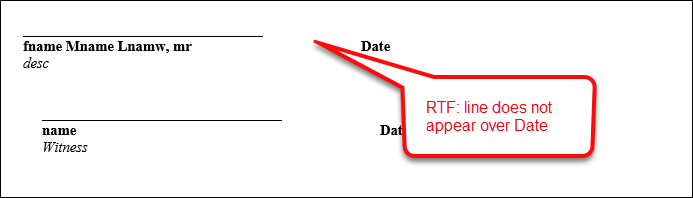
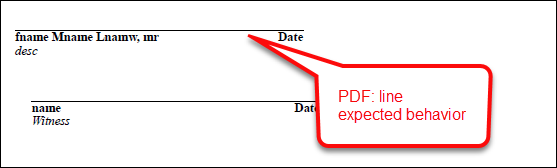
Issue: A user reported that the signature and date line on an .RTF
document did not match that of a .PDF document in that the aforementioned
lines within the .RTF were shorter than that of a corresponding
.PDF. RTF PDF
|
|
Solution: This issue has been resolved: the length of the signature
and date lines are identicial between an .RTF and .PDF document. |
|
Implementation Notes: This defect correction is available in the
Expere Engine 2022 Release One. |
| Engine enhanced to support FOP 1.1 and
2.6 |
- Type: Feature
- Reference: PBI 629931
- Compliance Impacts: This item is not a compliance or
regulatory issue.
- Documentation Impacts: Expere Developer Guide: SelectAndGenerateRequest; GenerateRequest
|
Summary: As part of our initiative to upgrade the version of FOP used
by the Expere engine for document generation from FOP 1.1 to FOP 2.6, we
have enhanced Expere to allow the use of both versions. Users may now
specify between FOP 1.1 and FOP 2.6 for document rendering using a new
FOP26 element at the root of the
SelectAndGenerateRequest and Generate
API calls.Important: Note the
following:
- We recognize that users may experience some performance
degradation when using FOP 2.6; we are aware of this and are
actively working to mitigate these issues before our next
self-hosted release.
- TaggedPDF will always render using FOP 2.6 regardless of FOP26
flag setting. This is in support of WCAG 2.0 compatibility work.
Additionally, RTF and RawXML do not use FOP for document
rendering, so this value is not applicable for those document
formats.
|
|
Implementation Notes: This feature is available in the Expere Engine
2022 Release One. |
| Expere Engine enhanced to use FOP 2.6 for
TaggedPDF documents |
- Type: Enhancement
- Reference: PBI 696660, 696662, 701342, 687273, 686589
- Compliance Impacts: This item is not a compliance or
regulatory issue.
- Documentation Impacts: No documentation impact
|
Summary: As a part of our continued effort to create WCAG 2.0
compatible documents we have updated the Expere Engine to now use FOP 2.6
when generating TaggedPDF documents. We will continue making enhancements to
FOP 2.6 for TaggedPDF support, so check back for items being identified and
corrected. Please note, WCAG support requires special content authoring and
is not currently supported ‘out of the box’. As part of our feature to
update the Expere Engine to use FOP 2.6, we made the following WCAG
2.0-related changes in the December release:
- PBI 696660: during the course of reporting an issue related to our
WCAG 2.0 feature work, an internal user reported that the Adobe
Acrobat Accessibility checker was failing. This PBI resolved that
issue so that running the Accessibility checker now completes
successfully.
- PBI 696662: we addressed three issues for this particular work
item:
- An internal user reported that our authoring tool timed out
when attempting to generate the Uniform Residential Loan
Application (URLA) as a TaggedPDF document
type. This issue has been resolved.
- An italicized word, Texas Constitution, was tagged
incorrectly and was being read out of order. This issue has
been resolved.
- A URL, www.oregonlawhelp.com, appeared in a separate
section within the Adobe tag tree rather than within the
tagging for the paragraph where it resided. This issue has
been resolved.
- PBI 701342: an internal user reported that when clicking a
Form tag within the Adobe tag tree, it resulted in the
the entire form being highlighted, rather than a particular word or
phrase. It was discovered that checkboxes associated with this
Form tag were being removed, resulting in an empty form
tag and the entire form being highlighted. This issue has been
resolved.
- PBI 687273: an internal user reported when a document contained a
column, text that spanned across multiple columns resulted in the
screen reader reading that text with each new column. The expected
behavior is that the screen reader would read the text the first
time it encountered it and would not repeat it. This issue has been
resolved.
- PBI 686589: It was reported that in a TaggedPDF document, tables
that were split between pages resulted in the corresponding Adobe
tag tree displaying the tables separately. A TaggedPDF document with
tables that split between pages are now combined into one table in
the Adobe tag tree.
|
|
Implementation Notes: This enhancement is available in the Expere
Engine 2022 Release One. |
| Support for Embedded PDF |
- Type: Feature
- Reference: PBI 677951
- Compliance Impacts: This item is not a compliance or
regulatory issue.
- Documentation Impacts: No documentation impact
|
|
Summary: Wolters Kluwer has introduced a new authoring format as part
of WCAG 2.0 compliance initiative. When authored as a "PDF." (PDF prefix),
the Expere Engine now generates documents with an embedded .PDF file of an
image. For more information, see the following Expere Authoring and Tools
changelog. |
|
Implementation Notes: This feature is available in the Expere Engine
2022 Release One. |
| RTF output: signature line behavior
enhanced |
- Type: Enhancement
- Reference: PBI 703264
- Compliance Impacts: This item is not a compliance or
regulatory issue.
- Documentation Impacts: No documentation impact
|
Summary: Users reported signature line inconsistencies that
necessitated addressing; instead of being a starndard, uniform width, the
length of the signature line directly corresponded to the number of the
characters in the value of the SignerName element. As a
result, the signature line would span across the entire width of the page.
This behavior has been enhanced so that the signature line for both RTF and
PDF outputs are 3.5" wide. |
|
Implementation Notes: This enhancement is available in the Expere
Engine 2022 Release One. |
| Engine: multiple accounts now allowed in a single
transaction with the same product |
- Type: Enhancement
- Reference: PBI 701178
- Compliance Impacts: This item is not a compliance or
regulatory issue.
- Documentation Impacts: No documentation impact
|
|
Summary: A user reported that an error occurred when opening multiple
accounts in a single transaction when where the same EZ Config (or OPPSA)
Product name was used for more than one account in the request. Internal
analysis determined that this error occurred because Expere previously only
allowed multiple accounts in a single transaction when the product name was
different for each account. As a result, this behavior has been enhanced:
Expere now supports multiple accounts in a single transaction with the same
product name. |
|
Implementation Notes: This enhancement is available in the Expere
Engine 2022 Release One. |