Expere Engine Release: 2024 Release Two (2)External
release date is September 2024. Expere Engine build number is:
24.2.0.5916.
Note: Users may notice that the 2024.2 Expere Engine release contains
updates that reference the eOriginal SmartSign®+ solution. The Expere Engine
is used to support both our Hosted and Self-Hosted ("On-Prem") customers, however, the
updates made to support SmartSign®+ were implemented solely for our Hosted
customers at this time.
| Fillable Field Default Behavior Change |
|
|
Summary: Expere has been updated to generate Fillable Fields when
specified rather than producing them by default. These changes simplify the
logic and makes Expere more maintainable. The previous default allowed
documents to support fillable fields but not eSignature fields. The new
behavior will support fillable fields when eSignatureAndFieldSupport
options are specified in the request; otherwise, fillable fields will not be
generated on the documents. (Please see Feature Page for more
details).Note:
- The
com.bankerssystems.expere.render.acroformSupport
property ONLY supports a "false" value.
- No user action is required provided that fillable fields are not
needed unless the eSignatureAndFieldSupport ancillary
output is specified. To return fillable fields without
eSignature fields (the current default behavior), the following
eSignatureAndFieldSupport ancillary output options
should be specified:
- eSignatureAndFieldSupport = true
- eSignatureCoordinatesOnly = true and
- NonSignatureFieldCoordinatesOnly = false
|
| WCAG: Expere Engine enhanced to support embedded
and Tagged .PDF's |
- Type: Enhancement
- Reference: PBI 813603, 821765, 826126, 825652
- Documentation Impacts: See below for any pertinent
links.
|
Summary: As a part of our continued effort to create WCAG compatible
documents we have updated the Expere Engine to now support the generation of
Tagged .PDF documents. We will continue making enhancements to the Expere
Engine for Tagged .PDF support, so check back for items being identified and
corrected. As part of our continued work to support Tagged .PDF's, we have
implemented enhancements to resolve the following WCAG-related changes in
Expere 2024 Release Two:
- LinkReferences in Header Rows in split tables behavior
enhanced (PBI 813603, 821765): it was reported that when a
data table was split between pages containing a LinkReference in a
header row, the table appeared as two different groupings of tags in
the Adobe Acrobat tag tree, and the linked text
(
<LinkText/> element did not appear in the
Adobe Acrobat tag tree for the first page.This behavior has been
resolved in the Adobe Acrobat tag tree: a table previously split
into two tables between pages now appears as one table, and the
LinkReference text displays correctly
- Merged PDF PAC 2021 exception resolved (PBI 826126): users
reported that the PAC 2021 compatibility checker flagged merged PDF
documents with XMP Metadata and Title in Metadata
errors. Updates were made and as a result, XMP Metadata and
Title in Metadata errors are no longer present in PAC
2021.
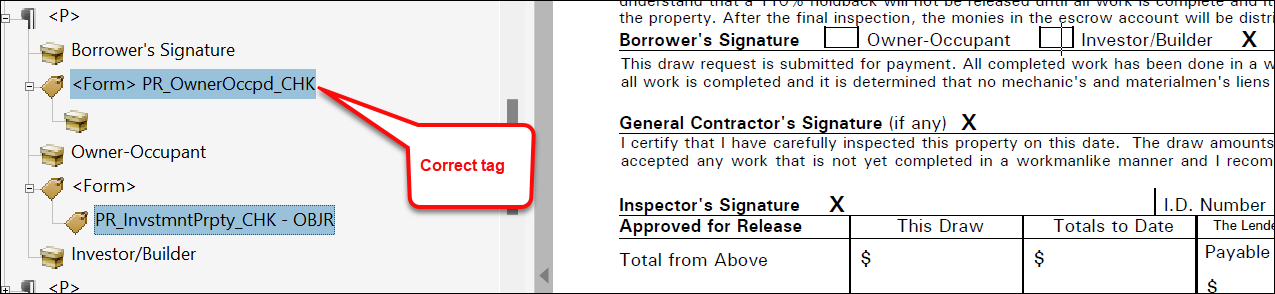
- Embedded PDF checkbox format updated (PBI 825652): it was
reported that a particular Embedded PDF document contained
checkboxes that were not read correctly by the NVDA screen reading
tool. When the NVDA tool encountered a checkbox on the generated PDF
document, the tool is expected to announce that a checkbox was
present and either checked or not checked; this was not occurring.
Internal analysis determined that the structure of certain
checkboxes in the Adobe Acrobat Tag Tree was incorrect. In the
screen shot below, the tag form is incorrect for the Investor
/ Builder checkbox compared to the Owner-Occupant
checkbox in that the tag should be structured <Form>
"CheckboxName" with a child tag for the checkbox.
Additionally, the first instance has alternate text generated
(if viewed in Properties for that tag), however it is
missing from the second instance. This behavior has been
modified so that the checkbox Adobe Acrobat Tag Tree is
structured <Form> "CheckboxName" with a child tag for
the checkbox in Embedded PDF documents.
|
Expere Engine:
PackageInformation child element name
changes |
- Type: Enhancement
- Reference: PBI 819943
- Documentation Impacts: See pertinent links below.
|
Summary: the following PackageInformation data type
child elements have been renamed and can be included in the request,
response, or PKG files:
EOriginalSSPlusPrintMailingCostCenter is now
EOriginalSSPlusPrintMailingCostCenterDescEOriginalSSPlusPrintMailingCarrierType is now
EOriginalSSPlusPrintMailingCarrierName, while
all enumerated values for this element have been removed. EOriginalSSPlusPrintMailingReturnAddress /
EOriginalSSPlusPrintMailingReturnAddressLine1 is now
EOriginalSSPlusPrintMailingReturnAddress /
                                    EOriginalSSPlusPrintMailingReturnAddressStreetAddress
EOriginalSSPlusPrintMailingReturnAddress /
EOriginalSSPlusPrintMailingReturnAddressLine2 is now
EOriginalSSPlusPrintMailingReturnAddress /
                                    EOriginalSSPlusPrintMailingReturnAddressStreetAddress2
EOriginalSSPlusPrintMailingReturnAddress /
EOriginalSSPlusPrintMailingNumCopies is now
EOriginalSSPlusPrintMailingCopiesCount See PackageInformation and EOriginalSSPlusPrintMailingReturnAddress for more
information. |
Expere:
<InstanceBarcodeValue> displays in Expere
response |
- Type: Enhancement
- Reference: PBI 838313
|
Summary: a user reported that a null pointer error would appear when
a Barcode type (for example: "PDF417") was not authored in a
Tagline element that contained a barcode (commonly
referred to a "Transaction barcode"). A previous version of the Expere
Engine was configured to allow a user to bypass the Barcode type and still
receive an <InstanceBarcodeValue> element and value in
the Expere response. However, the latest version of the Expere Engine did
not allow this. As a result, the Expere Engine has been updated to include
an <InstanceBarcodeValue> in the response for
Transaction barcodes where the type of barcode is not authored. Also, note
that by including the <InstanceBarcodeValue> value, the
response will include the <AncillaryOutputOption>
container, for example:
...
<r:InstanceBarcodeValue>987987201</r:InstanceBarcodeValue>
<r:AncillaryOutputOption>
	<r:OutputType>Barcode</r:OutputType>
	<r:Barcode>
		<r:Pattern>987987201</r:Pattern>
		<r:UseCoverPage>false</r:UseCoverPage>
		<r:FirstPageOnly>false</r:FirstPageOnly>
	</r:Barcode>
</r:AncillaryOutputOption>
...
|
| Expere: EmbeddedPDF response updated for Signer
Description |
- Type: Enhancement
- Reference: PBI 832759
|
Summary: it was reported that when using a previous version of a
document that was authored as a Static document, entering a value of
"Notary, Notary" in the SignerRole resulted in the same value appearing in
the <Description> element in the Expere response file.
Only "SignerRole:Notary" was honored.
<r:Signer>
	<r:Id>NotaryID</r:Id>
	<r:Description>Notary, Notary</r:Description>
	<r:SignaturePoints>
		<r:SignaturePoint>
			<r:IncludeDate>true</r:IncludeDate>
			<r:PageNumber>1</r:PageNumber>
			<r:PageOrder>1</r:PageOrder>
			<r:Height>26.25</r:Height>
			<r:Width>197.54999</r:Width>
			<r:SignatureText>_</r:SignatureText>
			<r:XCoordinate>155.25</r:XCoordinate>
			<r:YCoordinate>249.75</r:YCoordinate>
			<r:Type>Signature</r:Type>
			<r:FieldName>SIG_Notary, Notary_0_NotaryID_false_1_GrantorNotary_eSig</r:FieldName>
			<r:Sequencing>7</r:Sequencing>
			<r:SignatureRequired>false</r:SignatureRequired>
		</r:SignaturePoint>
	</r:SignaturePoints>
</r:Signer>
However, after this document was converted to an
EmbeddedPDF, users could no longer add a "Notary, Notary" value for the
Signer Role. As a result, Expere has been updated to support a "Notary,
Notary" SignerRole value which will be honored in the Expere response file.
Note: The "SignerRole:Notary" value will continue
to be honored and is the recommended value for SignerRole when authoring
documents with Notaries. |
| Expere: RTF output behavior enhanced |
- Type: Enhancement
- Reference: PBI 834813
|
|
Summary: a user reported that the Acknowledgment section on a
generated RTF document did not preserve space to enter data. As a result,
the Acknowledgement section on a generated RTF document preserves space
to physically enter data. Data fields authored to contain an underline
are presented in an RTF document; additionally, updates were made so
that checkboxes display similiarly to those on a PDF
document. |
Expere: <SuppressESignature/>
logic updated |
- Type: Enhancement
- Reference: PBI 829776
|
Summary: It was identified that signature fields were not being
removed in the PDF and Tagged PDF in certain scenarios when the
<SuppressESignature/> element resulted in true.
Expere has been updated so that signature fields are removed on the PDF and
Tagged PDF when <SuppressESignature/> element results in
true. |
| Expere: iText8 upgrade / enhancement |
- Type: Enhancement
- Reference: PBI 825821, 810591, 818440
|
Summary: the Expere Engine has updated to use iText8. With this
update, we have identified and addressed certain known issues; these are
listed below. Customers may notice differences in the generated PDF.
- Known differences:
- If smart quotes are authored in tooltips when generating
Tagged PDFs, Expere will convert the smart quotes to
standard quotes. Smart quotes in other parts of the
document, if they exist, will remain.
- Checkbox borders appear slightly thicker.
- Hovering over a radio button will display the field name
(for non-WKES radio buttons)
- Issues resolved:
- PDF generation behavior resolved (PBI 825821): users
reported that certain Tagged PDF documents failed to
generate a merged PDF document when using either the
MergePdf or MergedCopyPdf ancillary output
option while generating succesfully as individual PDF
documents. This behavior has been enhanced so that using
either the MergePdf or MergedCopyPdf ancillary
output option generates a merged PDF document successfully.
|
| Expere: installation media updated to include
WildFly version |
- Type: Enhancement
- Reference: PBI 838569
|
Summary: updates were made to the release media to include a WildFly
version of the Engine. The WildFly version exists in the
ExpereWildFly folder. See WildFly installation procedure >
Accessing the WildFly installation for more information on using
this version. |
| Engine: internal component upgrade to resolve
security issue |
- Type: Maintenance
- Reference: 798752, PBI 829927, 822068, 798914, 798744,
798912, 813365, 829639
|
Summary: As part of a regular cadence to review components used by
Expere Engine for security issues, we have upgraded the following
components:
- Batik 1.17
- Windows Installer XML (WiX) 3.14.1
- JSON-Java 20231013
- Apache Santuario 4.0.2
- Bouncy Castle 1.78
- io.swagger.core.v3 2.2.22
- jackson-databind_2.16.2
- jackson-core_2.16.2
- 7pzip removed in order to use the Native Windows-compatible
powershell script
Note: No user action is
required. |
| Expere Engine: internal components
upgraded |
- Type: Enhancement
- Reference: PBI 822599, 826091, 826965, 826967
|
Summary: As part of a regular cadence to review and upgrade any items
used with our Expere applications, we have upgraded the following:
- WildFly 33.0.0
- Amazon Corretto 21.0.4.7.1
Note: No user action is
required. |
Engine: <StaticSignature/>
behavior updated |
|
Summary: it was reported that when a the source document (REQ file)
used the <StaticSignature/> element, and it was the only
signature on the document, the Expere response file specified that the
document was an "InkSign" document
(<InstanceSigningInstructions/>="InkSign"Expere has been updated so that
when a document contains <StaticSignature/> and
<SignerNameAboveLine/> elements and when no
other non-<StaticSignature/> signatures are present
on the document, the <InstanceSigningInstructions/>
value is NoSignatures in the Expere response
file. |
| Expere Engine: Removal of FOP26 element |
- Type: Enhancement
- Reference: PBI 812856
|
|
Summary: Expere has been updated to completely remove the FOP26 flag
from all API's. Moving forward Expere will only support one version of
FOP. |
| Expere Testing System removed |
- Type: Enhancement
- Reference: PBI 826268
|
|
Summary: Wolters Kluwer has retired the Expere Testing System
application provided with the Expere Engine. We made this decision after our
internal security scans uncovered security vulnerabilities in the Expere
Testing System. As a result, the Expere release has been updated to remove
the "TestingSystem" folder. The Readme.txt has also been
removed. Note: We recommend uninstalling the
Expere Testing System if it is still part of your regular Expere testing
plan. |
| SMART Doc address logic enhanced |
- Type: Enhancement
- Reference: PBI 821734
|
Summary: The Expere Engine updated how the following values within
the <PARSED_STREET_ADDRESS> inside the
<PROPERTY> element of the SMARTDoc are set (see
screenshot below):
_DirectionSuffix (i.e. SW)_StreetSuffix (i.e. HIGHWAY)

Additionally, Expere will no
longer set a value for _StreetType.
|
| Expere Engine: internal code optimization with XY
Coordinate and Wolters Kluwer E-Sign (WKES) functionality |
- Type: Enhancement
- Reference: PBI 819077, 820296, 819072, 829380, 828961
|
|
Summary: As part of a regular cadence to review and upgrade any items
used with our Expere applications, the XY Coordinate and WKES, functionality
has undergone a code optimization; no user impact is expected. |
| Expere Engine: WildFly build
enhancement |
- Type: Enhancement
- Reference: PBI 822568, 825419
|
|
Summary: updates were made to automate how Wildfly is incorporated in
the the build. Note: No user action is
required. |
| Expere Engine: Saxon upgrade to 10.9 |
- Type: Enhancement
- Reference: PBI 818520
|
|
Summary: As part of the regular comprehensive security tests that are
run against Expere components, we have updated the Expere Engine to use
Saxon version 10.9. This upgrade was conducted to resolve issues where font
settings were not being preserved in the field when line breaks were present
in the transaction data. |
| Expere Engine: Font and Bold emphasis behavior
enhanced when using <br/> |
- Type: Enhancement
- Reference: PBI 800837, 740793
|
Summary: The following line break (br/>)-related
functionality has been enhanced by upgrading to Saxon 10.9:
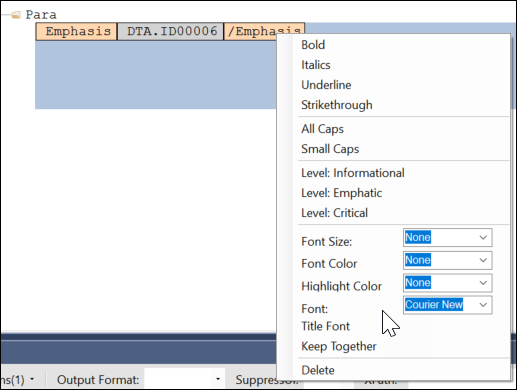
- It was reported that when a DTA in an .REQ file contained a phrase
or sentence authored with a specific font (e.g. using an "Emphasis"
tag and a Font of "Courier New"), a line break
(
<br/>) in the code resulted in the
subsequent text reverting to a default font (e.g "Times New Roman"),
rather than preserving the specified font. After the Saxon 10.9
upgrade, a font selected through an "Emphasis" tag is preserved
regardless if line breaks are used.
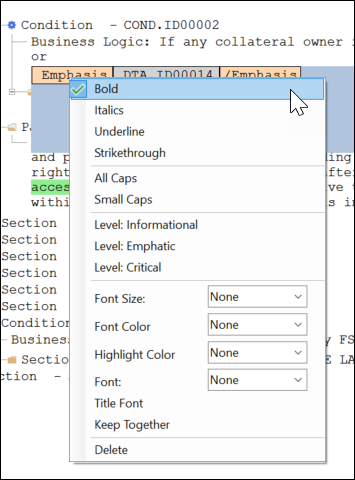
- It was reported that when a DTA in an .REQ file contained a phrase
or sentence authored with a "Bold" Emphasis tag, a line break
(
<br/>) resulted in the subsequent text not
being bolded, rather than bolding the entire phrase or sentence.
After the Saxon 10.9 upgrade, a Bold emphasis selected is preserved
regardless if line breaks are used
|
| Expere Engine: EmbeddedPDF Document Generation
enhanced |
- Type: Defect
- Reference: PBI 827803
|
|
Issue: It was identified that for a specific EmbeddedPDF REQ
(HUD203KSpecificationOfReparis-M2.req), document generation would error.
|
|
Solution: Expere has been updated to generate this document
successfully, |
| Expere: eSignature date field length
enhanced |
- Type: Enhancement
- Reference: PBI 823496
|
|
Summary: users reported that when using an eSignature date field, the
generated fillable date field did not fully display a date using "mm/dd/yy
format". Instead, the last "y" character was truncated (for example:
"10/12/2"). This behavior has been enhanced so when using an
eSignature date field, the complete date using a "mm/dd/yy" format is
displayed. Note: Users can opt for either a
"mm/dd/yy" or "mm/dd/yyyy" date format. |
| DocViewer: Third Party Cookie Phaseout |
- Type: Enhancement
- Reference: PBI 822257
|
|
Summary: Google is implementing a new "Tracking Protection" feature
that will limit the use of "third-party cookies" that track internet usage
when using Google Chrome. As part of this "third-party cookie phaseout",
DocViewer will continue to be accessible for our Expere users. |
| DocViewer: FooterNotice element now
ignored |
- Type: Enhancement
- Reference: PBI 813734
|
| Summary: DocViewer has been updated to now ignore the
FooterNotice element. Previously, DocViewer did not display any FooterNotice
elements; however, if the REQ included any xpath data items within the
FooterNotice, it caused problems with subsequent locations for the xpath in
the document display. As a result, FooterNotice elements are now ignored in
addition to not being displayed within DocViewer. |
| Expere: 2D Barcode compression behavior
enhanced |
- Type: Defect
- Reference: PBI 831295, 837547
|
|
Issue: a user reported a barcode discrepancy between two different
versions of content where a 2D Barcode was generated on the cover page of
the document. This 2D Barcode that was applied to an older, Static version
of the content resulted in a scannable barcode. However, after that same
content was converted to an Embedded PDF, the barcode was compressed,
resulting in an issue with scanning. |
| Solution: This behavior has been enhanced; as a result, using a
2D Barcode results in a barcode size equivalent to that of a Static and
Dynamic document. Functionality has also been updated so that 2D Barcodes
height closely matches the barcode field height on the Embedded PDF
pages. Note: For any barcode type that contains
text in the barcode, users may notice a font size difference, however
the barcode and value will remain the same. |
| Expere: EmbeddedPDFs to support line
breaks |
- Type: Defect
- Reference: PBI 818892
|
Issue: a user reported that an Embedded PDF document containing line
breaks in transaction data (coded as <br/>) displayed
the actual <br/> syntax in the generated PDF document
instead of adding line breaks to the transaction data. |
|
Solution: Expere has been updated so that generated EmbeddedPDF
documents display actual transaction data containing line breaks. |
| Embedded PDF document not honoring
eSignatureDateSupport Ancillary Option |
|
Issue: it was reported that generating an Embedded PDF file using an
ESignatureAndFieldSupport ancillary output >
eSignatureDateSupport = "false" the resulting date
field was fillable and appeared as a <SignaturePoint/>
in the corresponding Expere response file. |
Solution: This behavior has been resolved so that if using an
ESignatureAndFieldSupport ancillary output >
eSignatureDateSupport = "false", the resulting date
field is not signable, and the Expere response file should only display a
SignaturePoint container for the signature field with
an IncludeDate = "true". |