2025 Release Three (3) Expere Engine and Tools Changelog

Expere Engine Release: 2025 Release Three (3)External release date is August 2025. Expere Engine build number is: 25.3.0.6270.

Note: Users may notice that the 2025.3 Expere Engine release contains updates that reference the eOriginal SmartSign®+ solution. The Expere Engine is used to support both our Hosted and Self-Hosted ("On-Prem") customers, however, the updates made to support SmartSign®+ were implemented solely for our Hosted customers at this time but have Engine changes that Self-Hosted users will notice. See Changelog entries below for more information.
Expere: SmartSign Plus® integration
Summary: as part of our ongoing work to integrate SmartSign Plus® with Expere,
  • /Txn/EOriginalSSPlusDeliveryType 0, Blank, or Missing logic updated (PBI 872181): the /Txn/EOriginalSSPlusDeliveryType 0, Blank, or Missing logic has been updated to now fully support an Expere-generated eNote. For more information, refer to Expere - SmartSign Plus® Integration Guide > Expere-generated eNote placeholder and Expere-generated dynamic eNote Workflow Outline > Step 7 Note
  • Participant mailing behavior enhanced (PBI 870321): the Expere SmartSign Plus® integration has been enhanced so that the package will succeed when multiple recipients along with mailing information are passed to SmartSign Plus; however, not all participants are intended to be a signer of any given document. For more information, refer to Expere - SmartSign Plus® Integration Guide > Print Fulfillment Workflow.
    Note:
    • For transactions that fall under this use case a "Successful with Warnings" message will be returned. "A mailing request was not generated for Rembrandt ID {id} due to missing participant."
    • The package will be mailed to the participants that fulfill all the SmartSignPlus mailing requirements.
  • SmartSignPlusPackageStatus API created for SOAP and REST integrations (PBI 861050 / 861051):
    • users can now retrieve a SmartSignPlus package status with either a new SmartSignPlusPackageStatus SOAP or REST API call, depending on their integration. For more information, refer to the following topics within the Expere Document Services Web Services Guide:
  • Optional Custom Packet Document Data (PBI 871220): the Generate and SelectAndGenerate Request and Responses (used with Expere EZ Config Packages and Packets in this case) have been updated to include a new optional PacketDocumentCustomDataItems element within the DocumentRef element. For more information, refer to Expere Document Services Web Services Guide > DocumentRef and PacketDocumentCustomDataItems.
    Note: The PacketDocumentCustomDataItems name / value pair appears as an attribute of the DocInstance element in the Expere response.
  • Expiration Setup-related XPaths deprecated (PBI 871714): the following XPaths have been removed from the Expiration Setup table in the SmartSign Plus® Integration Guide:
    • /Txn/EOriginalSSPlusSingleElectronicPackageEmailAddress
    • /Txn/EOriginalSSPlusSingleElectronicPackageFirstName
    • /Txn/EOriginalSSPlusSingleElectronicPackageLastName

    For more information, refer to Expere - SmartSign Plus® Integration Guide > Expere Transaction XPaths for eOriginal.

Expere: EmbeddedPDF Overflow pages enhancements
  • Type: Feature
  • Reference: PBI 874959, 876382, 871238, 874971
Summary: Expere has been enhanced to support field overflow functionality on EmbeddedPDF documents through the following work items:
  • Tagline element behavior enhanced (PBI 874959): it was reported in some cases where, even when following the proper naming conventions for tagline fields, the fields were not being excluded from the tag tree when generating a PDF. Expere has been enhanced so that the overflow page or primary embeddedPDF document (for example: first page) do not have these <Form> elements in the tag tree and passes accessibility checker; instead, they will appear as artifacts in the Content Panel.
  • Fillable field presence on overflow pages (PBI 876382 / 871238): it was reported that fillable fields were appearing on overflow pages in the following scenarios:
    • when data overflowed onto a second overflow page, fillable fields are present on that second page
    • the dashed lines surrounding the overflow descriptions on the overflow pages when more than one field overflowed

    Expere has been enhanced so that these are not fillable fields on the overflow pages.

  • Multiple overflow desciption bolding behavior updated (PBI 874971): it was reported that when multiple overflow descriptions were present, the Adobe Acrobat Accessibility Checker failed and the first overflow description was bolded while the remaining overflow descriptions appeared with no additional formatting. After further investigation, it was determined that the first overflow description was being created twice causing it to appear bold as well as causing the accessibility to fail. Expere has been enhanced so that the overflow descriptions are only produced once so that they do not appear bold and preventing an accessibility error.
Expere: SMARTDoc _StreetAddress parsing logic updates
Summary: Expere has enhanced the Street Address inside a SMARTDoc. If the incoming _StreetAddress value is 100 characters or less, Expere will place that entire value into _StreetName. This will help prevent incorrect parsing when the address is more unique (i.e. does not have a road designation, for example:. "St", "Ave", "Ln", etc). If the _StreetAddress value is greater than 100 characters, Expere will continue to parse _StreetAddress into its various component, for example: _HouseNumber, _DirectionPrefix, etc.
Note: The 100 character limit is a MERS restriction on the length of _StreetName.
Expere: XPath 1.0 Compatibility Mode update
Summary: in preparation of our feature to disable XPath 1.0 Compatibility Mode, com.bankerssystems.expere.xPath_1_0_Compatibility element has been set to "false" in the bsi.properties file. This will officially disable XPath 1.0 Compatibility Mode on all transactions; for more information, refer to the Feature page > XPath 1.0 Compatibility Mode to be disabled
WCAG: Expere Engine enhanced to support embedded and Tagged .PDF's
  • Type: Enhancement
  • Reference: PBI 877546, 879578, 845789, 847317, 855362
Summary: As a part of our continued effort to create WCAG compatible documents we have updated the Expere Engine to now support the generation of Tagged .PDF documents. We will continue making enhancements to the Expere Engine for Tagged .PDF support, so check back for items being identified and corrected. As part of our continued work to support Tagged .PDF's, we have implemented enhancements to resolve the following WCAG-related changes in Expere 2025 Release Two:
  • List items in tag tree enhanced to be semantically meaningful (PBI 877546): it was reported that <Div> tags were present within List teams in the Adobe Acrobat tag tree for a Tagged PDF document, specifically within an <LBody> tag.

    Expere has been enhanced so that all instances of <Div> under an <LBody> are removed; as a result, child tags of the <Div> tag are moved to the <LBody> parent.

  • Logging enhanced (PBI 879578): logging was updated to include a WARN message if an EmbeddedPDF document contains an empty field with a "widget" (a component of a fillable field).
  • <Figure> tag behavior updated in Tag Tree (PBI 845789): users reported that <Figure> tags were appearing as direct children under <P> tags when part of a list (in a <Lbl> tag) in some Tagged PDF documents. Per WCAG requirements, <Figure> tags should appear as children of <Lbl> when part of a list. This behavior has been modified so that <Figure> tags appear as direct children of <Lbl> tags when part of a list in a Tagged PDF document.
  • Support added for hyperlink and email address alternative text (PBI 847317): users reported that some hyperlinks in dynamic Tagged PDF documents did not contain corresponding alternate text, which is a WCAG requirement. Alternate text is available within the Object Properties > Tag > Alternate Description for Links dialog. for the appropriate tag and is read by the screen reader.

    As a result, Expere has been updated so that authored dynamic documents contains corresponding alternate text when generated as a Tagged PDF document. For more information, see ADA Implementation Guide > Working with Alternate Text for Links and Email Addresses.

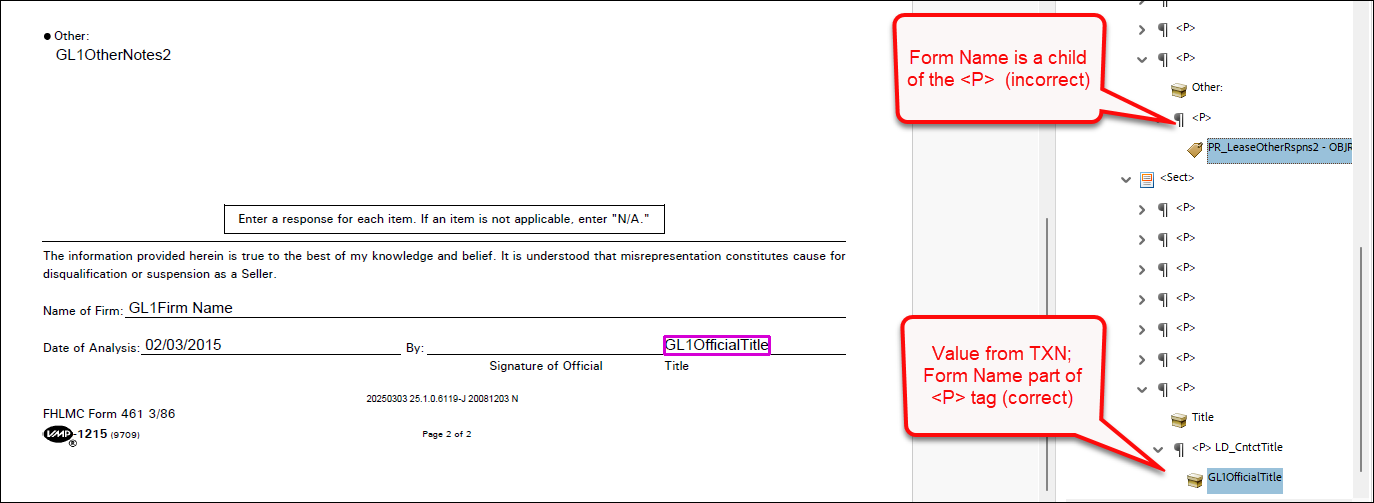
  • Assembled PDF Form field tags (PBI 855362): it was reported that form fields were not being tagged consistently in Tagged EmbeddedPDF documents. Some fields were tagged with the Form Name passed in the parent <P> tag and text passed in the transaction XPath value, while other tag names incorrectly contained the Field Name instead of the transaction XPath value. This behavior has been modified so that tag names now correctly display the transaction XPath value for embedded PDF documents.
    Note: This enhancement has been implemented for individual Tagged EmbeddedPDF documents only; further development is required for merged Tagged EmbeddedPDF documents.


Expere: CUSTOM path support added for SMARTDoc data
Summary: users reported execution errors when attempting to map data under CUSTOM/TRUST in the SMARTDoc. As a result, Expere SMARTDoc functionality has been updated to allow iteration over the //CUSTOM/TRUST[#] and //CUSTOM/TRUST[#]/TRUSTEE[#]) XPaths.
Expere.NET: docRequiresSignature removed
Summary: within the Expere.NET interface, docRequiresSignature has been removed from the ExpereAPI SOAP API > DocDescriptor element.
Expere: indexes added for elements for UpdateTransaction
Summary: the following enhancement have been implemented when working with indexes:
  • (PBI 784650) a user requested that Index values be added to all elements to all "collection containers" (i.e. parent elements) in UpdateTransaction returned transaction. As a result, the merged transaction resulting from Expere’s UpdateTransaction has been updated to include Indexes for all elements sequentially, retaining the order of the items as they exist.
  • (PBI 885574) Expere has been updated so users can pass in a new <ReIndexTransactionInd> = '1' element and value in the transaction in order to utilize indexes. No user action is required; by default the <ReIndexTransactionInd> indicator is set to '0' and is not required to be passed in the transaction.
Expere: Logo height and width behavior enhanced
  • Type: Enhancement
  • Reference: PBI 877157
Summary: Expere .NET has been updated to allow an empty value for either the <HeightInInches/> or <WidthInInches/> element when passing in a logo as an ancillary output. The expected behavior is that users can pass in either a <HeightInInches/> or <WidthInInches/> element and Expere will auto-scale the logo; see example below:

<AncillaryOutputsDoc>
	<AncillaryOutput>
		<OutputType>Logo</OutputType>
		<Logo>
			<Image>/9j/4AA...Br9abRRQA1+lNoooA//2Q==</Image>
			<Justification>Center</Justification>
			<Placement>AllPages</Placement>
			<HeightInInches>1.8</HeightInInches>
			<WidthInInches></WidthInInches>
			<AlternateText>Test Logo</AlternateText>
		</Logo>
	</AncillaryOutput>
</AncillaryOutputsDoc>

Expere .NET has been updated to allow either a <HeightInInches/> or <WidthInInches/> element with an empty value when passing in a logo as an ancillary output.

Expere: Logging enhanced
  • Type: Enhancement
  • Reference: PBI 877158, 878579, 872893
Summary: we have made the following logging enhancements:
  • (PBI 877158) Logging was updated to include references to FOP rather than FOP 2.6.
  • (PBI 878579) As part of a larger effort to analyze usage of ESignatureAndFieldSupport and SignaturePointSet ancillary outputs, we have added an INFO level logging message when ESignatureAndFieldSupport and SignaturePointSet ancillary outputs are used together in the same transaction request.
  • (PBI 872893) Expere has been enhanced to now log a WARN message if the transaction data provides the same ID for two or more different parties.
Expere / Requirements Editor: SMARTDoc / eNote Preview functionality enhanced
  • Type: Enhancement
  • Reference: PBI 874776
Summary: users reported an error when attempting to generate a preview of an eNote-specific .REQ file in the Requirements Editor tool ("RE4"). This behavior has been enhanced so that Expere can now generate a preview of an eNote-specific .REQ file in the Requirements Editor tool.
Engine: Saxon upgrade to 12.7
  • Type: Enhancement
  • Reference: PBI 872377
Summary: As part of the regular comprehensive security tests that are run against Expere components, we have updated the Expere Engine to use Saxon version 12.7.
Expere: list of supported special characters available
Summary: As part of a request to identify supported and unsupported characters, we have enhanced our user documentation to provide a list of supported characters.
Expere: user documentation enhanced for DiscreteParty scenarios
Summary: the Expere user documentation has been updated to better communicate how Discrete Parties are returned in the response in certain signing and merging scenarios.
Expere: Error when Header/FooterNotice includes MiddlePage and LinkText
  • Type: Defect Correction
  • Reference: PBI 870350
Issue: a user reported that a custom document failed to generate as a Tagged PDF. Internal analysis revealed that the issue was caused by a footer enhancement deployed during our March Hosted Expere release.
Solution: Expere has been updated so that Tagged PDF documents successfully generate when they include any of the following combinations:
  • A FooterNotice or HeaderNotice, either MiddlePage='Yes' / 'No' and document contains a LinkText element.
  • Fillable fields in FooterNotices and are generated when FirstPage='Yes' and MiddlePages='Yes', and LastPage='No' .