Expere Engine Release: 2025 Release One (1)External
release date is March 2025. Expere Engine build number is:
25.1.0.6119.
Note: Users may notice that the 2025.1 Expere Engine release contains
updates that reference the eOriginal SmartSign®+ solution. The Expere Engine
is used to support both our Hosted and Self-Hosted ("On-Prem") customers, however, the
updates made to support SmartSign®+ were implemented solely for our Hosted
customers at this time.
| Expere: ability to return document instance
information |
- Type: Feature
- Reference: PBI 858408, 858412, 858413, 864173, 858414
- Documentation Impacts
|
Summary: as part of our feature to integrate additional properties
into a document instance, Expere now returns a new
InstanceProperty element and Name and
Value child elements in the Expere response when
authoring Dynamic or EmbeddedPDF REQ document. For example, these elements
can be authored to return non-signing entity information in the response.
Note:
- There is a WSDL and simultaneous code change required for this
feature.
- Static documents are out of scope for this feature.
|
| Expere: XPath 1.0 Compatibility Mode
updates |
|
|
|
Summary: In preparation of our feature to disable XPath 1.0 Compatibility
Mode, we have made the following updates: |
| Expere: Expanding merging PDF options |
|
|
Summary: we have completed the work to support merged PDF documents by
Discrete Parties. The following functionality is supported:
- Expere supports generating multiple merged PDF documents based on the
discrete party or parties specified for each document through the use of
new
MergedCopyPDFDiscreteParty and
PdfMergeDiscreteParty options.
- Expere has been enhanced so that when either a
MergedCopyPdfDiscreteParty or
PdfMergeDiscreteParty ancillary output is passed
the merged PDF files' Document Title is set to the original
PacketName.
- Both
MergedCopyPDFDiscreteParty and
PdfMergeDiscreteParty ancillary outputs are
supported when Packets are authored as part of the PKG file in the
content library.
|
| WCAG: Expere Engine enhanced to support embedded and
Tagged .PDF's |
- Type: Enhancement
- Reference: PBI 855580, 840417, 833078, 837807, 845069, 846766,
849713, 851484, 852050, 813755
|
Summary: As a part of our continued effort to create WCAG compatible
documents we have updated the Expere Engine to now support the generation of
Tagged .PDF documents. We will continue making enhancements to the Expere Engine
for Tagged .PDF support, so check back for items being identified and corrected.
As part of our continued work to support Tagged .PDF's, we have implemented
enhancements to resolve the following WCAG-related changes in Expere 2025
Release One:
- Bookmark behavior enhanced (PBI 855580): users reported that
bookmarks starting with the word "Initials" did not appear in the
Bookmarks section of a tagged EmbeddedPDF document. In the
example below, the bookmark for "Step 1 - Title Transaction Type"
highlights "Initial Title" in the Bookmarks section of the tagged
PDF document, however "Initial Title" does not appear in the
Bookmarks section.
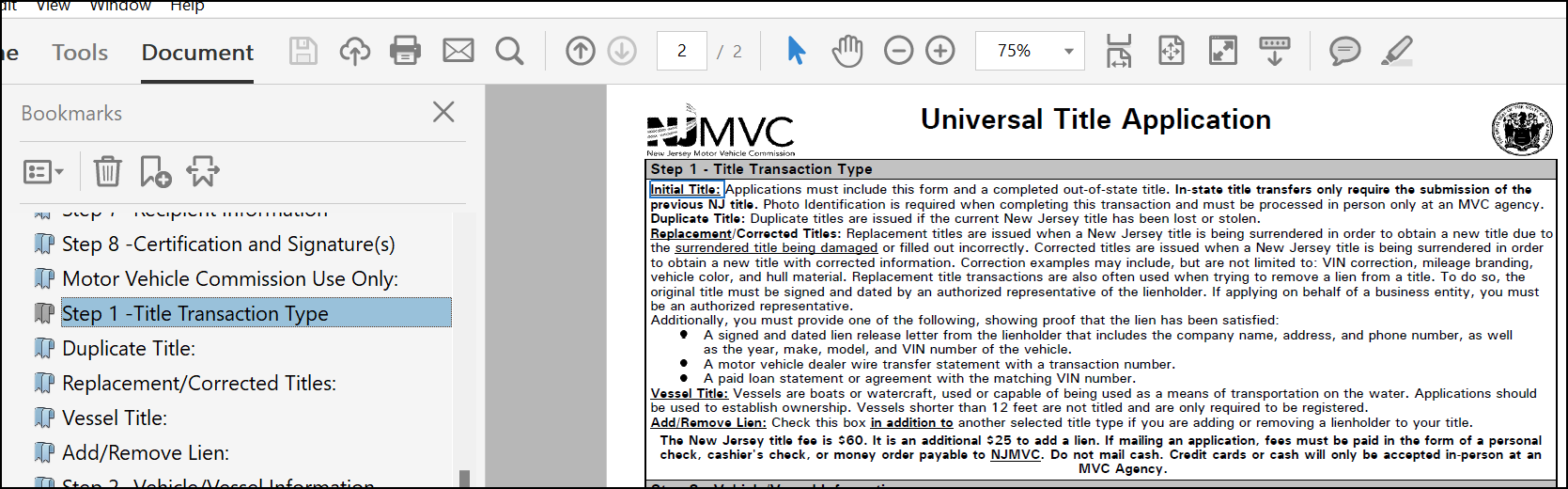 This behavior has been enhanced so that
bookmarks starting with the word "Initial" or "Signature" appear in
the Bookmarks section for Tagged and standard EmbeddedPDF
documents and Tagged Dynamic documents.
- Tagged PDF document behavior enhanced when using eSignatures with XY
Coordinates (PBI 813755): Tagged PDF documents have been
enhanced to remove empty <P> tags in the Signature area when
ESignatureAndFieldSupport ancillary option is not specified
- "Characters in a text object cannot be mapped to Unicode" behavior
addressed (PBI 840417): users reported that the PAC 24 WCAG
validation tool was displaying a "Characters in a text object cannot be
mapped to Unicode" error on merged, tagged PDF documents. Internal
analysis determined that the issue occurred when a text form field
contained an empty, flattened string value. Flattening the text form
field creates a text object on the pdf, and since it is empty, it cannot
be mapped to Unicode.
This behavior has been addressed; merged, tagged
PDF documents no longer produce the "Characters in text object
cannot be mapped to Unicode" error in PAC 24.
- Tagline field behavior enhanced (PBI 833078): it was reported
that tagline "Form" fields in the source REQ file are appearing in the
Adobe Acrobat Tag Tree for a tagged PDF document, despite not being
authored.
This behavior has been enhanced; when generating a tagged
Embedded PDF document, tagline "Form" fields no longer appear in the
Adobe Acrobat Tag Tree.
- Assembled PDF Form field tag behavior enhanced (PBI 837807);
users reported that Embedded PDF documents generated as tagged PDF's
contained empty
<Form> fields with the expectation
that these fields contain a value extracted from the request
transaction. This behavior has been enhanced: form fields are tagged
correctly for Embedded PDF documents so that the value for the field is
present in the tag tree.
<Form>
tags replaced with <P> tags in certain
situations (PBI 845069): a user reported that
<Form> tags were incorrectly present in the
Adobe Acrobat tag tree instead of a more appropriate
<P> tag. This behavior has been enhanced to use
<P> tags rather than the
<Form> tag when populating the document with
conditional data.<Form>
tags replaced with <Figure> tags in
certain situations (PBI 846766): a user reported that
<Form> tags were incorrectly present in the
Adobe Acrobat tag tree instead of a more appropriate
<Figure> tag when using checkboxes and radio
buttons. This behavior has been enhanced to use
<Figure> tags rather than the
<Form> tag for checkboxes and radio buttons when
these options are not fillable fields.- Table behavior enhanced when empty
<TH> cells are
present (PBI 849713): a user reported that empty heading cells
in a table were being tagged as a <TH>. This
behavior has been enhanced to now tag empty table heading cells as
<TD>.
- List tagging behavior updated (PBI 851484): it was reported that
lists that did not contain a "marker" (in other words: a numerical value
or a bullet) displayed a tag for a nonexistent marker in the Adobe
Acrobat tag tree. This behavior has been updated so that these
nonexistent markers no longer appear as tags in the Adobe Acrobat tag
tree.
- Alternate Text for Spanish Checkboxes (PBI 852050): it was
reported that the alternate text for checkboxes in Spanish on documents
generated from EmbeddedPDF REQ were in English. This behavior has been
updated so that the alternate text for checkboxes indicated as Spanish
(i.e. entire document is in Spanish or a section is in Spanish) reads in
Spanish
|
| Expere: Enhance ListAllOrganizations and
ListOrganizations |
- Type: Enhancement
- Reference: PBI 852317
|
|
Summary: users reported that ListAllOrganizations did not return
'OrganizationDescription' when using a File System like it does when using the
database to store content. Expere's ListAllOrganizations and
ListOrganizations APIs have been updated to return 'OrganizationDescription'
as specified in the Organization.xml for 'OrganizationDescription' in both
responses when using the File System to store content. If Organization.xml
does not specify an 'OrganizationDescription', then 'org name' will be
returned for 'OrganizationDescription' in the response. |
| Expere: FooterNotice’s MiddlePages attribute
update |
- Type: Enhancement
- Reference: PBI 860750
|
Summary: users reported that initial fields in the
FooterNotice were not fillable for all middle pages when
MiddlePages=yes was specified in the .REQ file. This
behavior has been enhanced so that when MiddlePages=yes is
specified in the FooterNotice, all middle pages will have
fillable initial fields in the FooterNotice for standard and
Tagged PDF documents. |
Expere: Embedded PDF updated to support a
SignatureType of "Initials" |
- Type: Enhancement
- Reference: PBI 823346
|
Summary: users requested that the Expere Engine be updated so that the
SignatureType element can be set to "Initials" for an
Embedded PDF document, resulting in a <SignaturePoint>
element containing a <Type> value of "Initials". This is
done in the Product Technical Rule (PTR) in the native REQ file; see Modifying the PTR for the Signature Areas -
Static/PDF > Step Two (2) in the Requirements Editor (RE4) User Guide
for more information.Expere is updated so that when
"SignatureType:Initials" is authored for a field on an
EmbeddedPDF, the Expere Response includes a
<SignaturePoint> with <Type>
value of "Initials". |
| Expere: PDF behavior enhanced when attempting to
digitally sign multi-signature document |
- Type: Enhancement
- Reference: PBI 843273
|
|
Summary: users reported that when digitally signing a multi-signature PDF
document would result in an error when saving the document. Users were forced to
close Adobe Acrobat and reopen it in order to digitally sign and then save the
document. Expere has been enhanced so that users are not required to exit Adobe
Acrobat and reopen a document in order to sign it multiple times. |
| Expere: Embedded PDF - Conditioning Fillable
Field |
- Type: Enhancement
- Reference: PBI 823345
|
Summary: currently fillable fields on Embedded PDF documents do not
honor conditional logic on when the field appears as a fillable field.
Expere has been enhanced so that conditional logic can be added to
FieldFields of all types (i.e. ‘Initial’, ‘Text’) to
allow users to electronically enter data. |
| Expere: Internal Code Optimization when using Expere
EZ Config Packages and Packets logos |
- Type: Enhancement
- Reference: PBI 850491, 850662
|
|
Summary: as part of a regular cadence to review and upgrade any items
used with our Expere application, the Engine has been undergone a code
optimization to better support logos used with Expere EZ Config Packages and
Packets. |
| Expere: Logging enhanced |
- Type: Enhancement
- Reference: PBI 848421
|
Summary: we have enhanced logging to provide more details about how long
it takes to complete a transaction.Note: No user action is
required. Integrators may notice an increase in the size of Expere log
files; if noticing a slight performance issue, additional logging can be
turned off through the following line in the log4j2.xml
file: <Logger name="performance.com.bankerssystems.framework.services.Microflow"
additivity="false" level="info"> <AppenderRef ref="CONSOLE"/></Logger>
|
| Expere: Logging enhanced when more than one eNote
is autoselected |
- Type: Enhancement
- Reference: PBI 852175
|
|
Summary: we have enhanced logging when more than one eNote gets
autoselected. Note: Transactions attempting to
generate multiple eNotes will still fail. |
| Expere: Logging enhanced for packet-level ancillary
output options |
- Type: Enhancement
- Reference: PBI 851089, 848145
|
|
Summary: we have enhanced logging regarding packet-level ancillary output
options. Additional details, including the stack trace, are provided about
whether or not packet-level ancillary output options are being used. |
| Expere: installation enhanced to use
JRE |
- Type: Enhancement
- Reference: PBI 864409
|
|
Summary: the Expere Installation with WildFly has been updated to
use a Java Runtime Environment (JRE) instead of a Java Developer Kit (JDK)
in order to reduce the installation size. |
| Expere: SmartDoc/eNote ARC validation
updated |
- Type: Enhancement
- Reference: PBI 851965
|
Summary: when the mask $#,###.## was being passed, the
DataLinkDescription value was not appending the cents to
the dollar amount. Expere has been updated so that the correct number of zeroes
are now appended in order to match the format of the mask; for example: "1000"
becomes "1000.00". |
| SMARTDoc user documentation enhancements |
|
|
|
Summary: the SMART Doc validation tables in the Using SMART Doc functionality / dynamic
Expere eNotes online help topic has been updated to include a
comprehensive list of defined Output Format selections and their
corresponding SMART Doc Mask options. |
| Expere: Security Issue and Component Upgrades |
- Type: Maintenance
- Reference: PBI 853704, 844857, 826968, 840186, 848185, 840187,
840188, 846840, 858126, 864522
|
Summary: As part of a regular cadence to review and upgrade any items
used with Expere Engine for security issue and component upgrades, we have
upgraded the following:
- Security Issue Upgrades:
- Upgrades:
- Amazon Corretto 21.0.6.7.1
- Apache Commons IO, version 2.17.0
Note: No user action is required. |
| Expere: large XML request optimization |
- Type: Maintenance
- Reference: PBI 850716
|
|
Summary: As part of a regular cadence to review and upgrade any items
used with our Expere applications, our code was optimized to better handle how
our microservices handle large XML requests; no user impact is
expected. |
| Expere: Sequencing issue of Signature / Signature
Date fields for WKES |
- Type: Defect
- Reference: PBI 840807
|
Issue: it was reported that the signature date field was being
sequenced higher than the signature field when using Wolters Kluwer E-Sign
(WKES) ancillary output; this sequencing value is part of the signature date
field naming convention (for example:
WKES_Signdate_firstname_lastname@domain.com_10028-28).
WKES has a requirement that signature fields are the highest sequenced field
for our signers. As a result, the signature date field did not display a
value on the signed document. |
|
Solution: This behavior has been enhanced so that signature date
fields once again display a value on the signed document by modifying the
sequencing so that signature fields contain the highest sequenced number in
its naming convention. |