2023 Release Two (2) Expere Engine and Tools Changelog
Expere Engine Release: 2023 Release Two (2)External release date is June 2023. Expere Engine build number is: 23.2.0.5043.
| Engine: Support for Embedded PDF documents for Tagged PDFs |
|---|
|
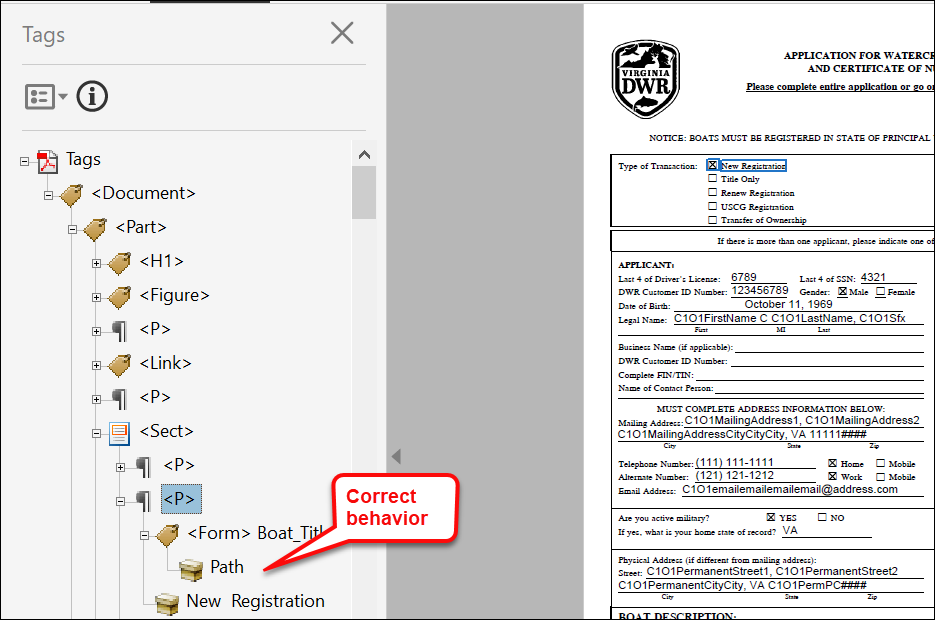
| Summary: Expere has been enhanced to support a new authoring format, embedded PDF, that has an imported PDF file in the content file (.REQ file). This new .REQ type allows user to import a tagged PDF and specify fields (checkbox or test) as fillable or not. Embedded PDF also has the ability to have signatures which can be configured to be electronically signed if desired. In this release, Embedded PDF functionality supports tagging for WCAG 2.0 compatibility, when a Tagged PDF document option is specified. |
| WCAG 2.0: Expere Engine enhanced to support Tagged .PDF's |
|---|
|
Summary: As a part of our continued effort to create WCAG 2.0
compatible documents we have updated the Expere Engine to now support the
generation of Tagged .PDF documents. We will continue making enhancements to
the Expere Engine for Tagged .PDF support, so check back for items being
identified and corrected. As part of our continued work to support Tagged
.PDF's, we have implemented enhancements to resolve the following WCAG
2.0-related changes:
|
| WCAG 2.0: Expere Engine enhanced to support embedded .PDF's |
|---|
|
Summary: As part of our continued effort to create WCAG 2.0
compatible documents, we have updated the Expere Engine to support a new
document format that we refer to as Embedded PDF. The Embedded PDF will
allow Expere to support Tagged PDFs of what was traditionally Static REQs.
We will continue making enhancements to the Expere Engine for Embedded PDF
REQ files, so check back for items being identified and corrected. As part
of our continued work to support Tagged PDFs for Embedded PDF REQ files, we
will have implemented the below enhancements:
|
| Expere: electronic signing enhancements - associating Notaries and Witnesses to a known signer |
|---|
|
Summary: Expere has been enhanced to support associating Notaries and
Witnesses with a known or unknown signer to make the entire signing process
eSignable. As a result, we have implemented the following:
Note: A corresponding content update is required
in order to use this functionality. There is no user action at this
time. Example Notary response snippet: Example Witness response snippet: |
| Engine: Barcode processing flow updated for upcoming iText upgrade |
|---|
|
|
Summary: Internal analysis has determined that an upcoming iText
upgrade would impact the way barcodes function within the Expere Engine. As
a result, barcode processing has been updated within Expere to accommodate
an upcoming iText upgrade. Note: This upgrade will not
affect integrations or generated documents. |
| Engine: Encryption behavior enhanced |
|---|
|
| Summary: Previously, a transaction using an Encryption ancillary output and containing a combination of RTF and PDF document options would fail as Encryption can only be applied to PDF documents. Expere has been enhanced so that while an Encryption ancillary output can still only be applied to PDF documents, the transaction will not fail and a document package can be generated. |
| Engine: Notary fillable field behavior enhanced |
|---|
|
Summary: It was reported that despite the electronic signature
("eSignature") for a borrower being suppressed, and thus unable to be
electronically signed, the fields in the Notary section within the same
document appeared as fillable in the generated PDF. The expected behavior is
that when signatures are "wet sign", the notary and all associated fields
should not appear as fillable. Additionally, the presence of
<SuppressESignature/> in a particular element (for
example: a Notary section) within the .REQ file will result in those fields
not appearing as fillable. |
| Engine: Show dropdown / File Name behavior enhanced |
|---|
|
| Summary: It has been identified that when generating a dynamic document with the most recent version of FOP (2.8) as a standard PDF, Document Title value (found in Adobe Acrobat > Document Properties > Initial View > Show dropdown) is specified rather than the File Name value. Expere has been enhance to specify the File Name value when generating a standard PDF using the most recent version of FOP (2.8) from a dynamic REQ file. |
| Engine: SelectAndGenerate call behavior enhanced |
|---|
|
Summary: A user reported that a transaction failed to generate and
return documents with a SelectAndGenerate method. Internal
analysis determined that an Expere assembly service incorrectly handled a
unique ID that was present within the content library. Expere has been
enhanced so that internally, any unique ID present in a document package is
handled so that the package generates successfully. |
| Engine: fillable checkboxes checked by default with static documents |
|---|
|
Summary: it was identified that fillable checkboxes were selected by
default when generating a Static document. The Engine has been enhanced so
that when generating a Static document, a fillable checkbox is ONLY selected
if the corresponding PTR in the REQ file results in PRINT
"Checked:true;".Note: In the REQ file, a
fillable checkbox PTR will contain the following syntax if a checkbox is
checked by default when generating a document: PRINT
"Checked:true;"; an unchecked checkbox will either contain
no syntax or the following syntax: PRINT
"Checked:false;". |
| Engine: updated to use Saxon 11.4 |
|---|
|
| Summary: As part of the regular comprehensive security tests that are run against Expere components, we have updated the Expere Engine to use Saxon version 11.4. |
| Engine: fillable field naming convention updated for static and dynamic documents |
|---|
|
Summary: We had previously updated the Expere eSignature naming
convention to replace "dots" or "periods" (".") with "underscores" ("_") for
Signature fields and Signature Date fields when generating dynamic, static,
and embedded PDF REQ's. In this release we have enhanced the naming
convention for Non-Signature and Signature Data fields to now use
"underscores" ("_") instead of "dots" or "periods" ("."); for example:
BR_1_Phone_VA or Community_Number for
FillableFields and
Signatory_Attest_Checkbox or
Flood_Hazard_Yes for
FillableCheckboxes. Note:
|
| Engine: Encryption behavior enhanced |
|---|
|
| Summary: Previously, a transaction using an Encryption ancillary output and containing a combination of RTF and PDF document options would fail as Encryption can only be applied to PDF documents. Expere has been enhanced so that while an Encryption ancillary output can still only be applied to PDF documents, the transaction will not fail and a document package can be generated. |
| Engine: Borrower element naming convention enhanced for SMARTDocs |
|---|
|
| Summary: To work more consistently with eOriginal workflows, Expere has updated the SignatureIDRef naming convention to use _RoleType's value plus _SignatureOrderNumber's value plus the text of 'SignatureLine' within the <SIGNATURE_MODEL> for each signer; for example: the SignatureIDREF="Borrower1SignatureLine", SignatureIDREF="Borrower2SignatureLine"). |
| Engine: SMARTDoc missing formatted value |
|---|
|
| Issue: During the course of testing a separate SMARTDoc-related item, internal users discovered that an exception was thrown when no value was present for formats requiring a numeric value, such as currency, dates, and percent fields. As a result, a document was not generated. |
| Solution: This issue has been resolved: Expere now allows an empty string (no value) for numerical formats with a SMARTDoc. |
| Expere Testing System: build framework updated for 2023 Release Two |
|---|
|
| Summary: The Expere Testing System build framework has been updated to support the latest version of our static code analysis tool. There is no change in user functionality. |
| DocViewer: eSignature field behavior enhanced with Embedded PDFs |
|---|
|
| Summary: It was reported that the Product Technical Rules (PTR) used to generate certain data within an .REQ file were appearing in eSignature fields in DocViewer. This behavior has been enhanced so that no PTR code appears in the eSignature fields. |
| DocViewer: InstanceDisplayName behavior enhanced for Embedded PDF documents |
|---|
|
Summary: It was reported that when viewing documents in DocViewer,
the Form to View First dropdown did not display a form name, which is
derived from the InstanceDisplayName in the requirements
(.REQ file). As a result, DocViewer has been enhanced to display the
InstanceDisplayName in the Form to View First dropdown. |
| DocViewer: XPath Attributes behavior enhanced |
|---|
|
| Summary: A user reported that adding a custom XPath attribute resulted in an "[object Object]" value to display in an editable field rather than the actual value. As a result, DocViewer has been enhanced to support the use of custom XPath attributes: "[object Object]" no longer appears in a corresponding dropdown. |
| DocViewer: underline special characters behavior enhanced |
|---|
|
Summary: A user reported that a discrepany existed in the way an
underlined word appeared in DocViewer compared to a standard PDF. For
example: in the REQ, a "product technical rule" (PTR) is used to add
business logic and rules to underline the last name of the parties for a
particular state using HTML code <u>"./LastName
"</u> in the PTR to produce the underline. When
generating a PDF, the state was underlined correctly. However, when using
DocViewer, the HTML Code
<u>LastName</u> appeared
instead. This behavior has been modified so that DocViewer will no longer display the HTML code used to add underlines. |