2021 Release One (1) Expere Engine and Tools Changelog
Expere Engine Release: 2021 Release One (1)External release date is August 2021. Expere Engine build number is: 2021.1.0.1526.
- WCAG 2.0: Empty figure tags / blank paragraph behavior enhanced
- Barcodes: barcodeInter25 format enhanced
- WCAG 2.0: Waiver of Grantors Rights-GA tagging and screen reading enhanced
- WCAG 2.0: DocumentReference / hyperlink tagging and screen reader behavior enhanced
- Read order and signature bookmark behavior enhanced
- Barcode scaling enhanced
- Support for Font, FontSize, and Underline added for Signatures
- Expere response updated to return EmailAddress in DiscreteParty
- Unique identifier created for each notary block (eNotary feature enhancement)
Supplemental 2021.1.2 release
| Expere Engine: Log4j updated |
|---|
|
| Summary: We previously informed you that the Expere Engine was using a vulnerable version of Log4j that was determined to have a security risk. As a result, we upgraded the Expere Engine to Log4j version 2.15.0. On December 14th, Apache confirmed another medium vulnerability that required an update to Log4j version 2.16.0. They have since confirmed an additional critical vulnerability on December 20th that requires an update to version 2.17.0. As a result, we have upgraded the Expere Engine to use Log4j version 2.17.0. |
| User action: For the latest Expere install, which includes an updated Expere Testing System with the Log4j security finding corrected, refer to the Product Download Site (PDS) and download the 2021.1.2 Engine. Consult your Professional Services representative or the Expere Implementation Guide for installation assistance. |
| Implementation Notes: This enhancement is available in the supplemental 2021.1.2 Release posted on the Product Download Site. |
| Expere Testing System: Log4j updated |
|---|
|
Summary: It was identified that the Expere Testing System was using a
vulnerable version of Log4j that was determined to have a security risk. We
have corrected the security finding and created an Expere release containing
an updated version of the Expere Testing System which includes the security
remediation. Users will notice that previous versions of Expere contained an
ExpereTestingSystem.ear and
ExpereTestingSystem.war file. With the latest release
of Expere, only the .WAR file is created. |
| User action: For the latest Expere install, which includes an
updated Expere Testing System with the Log4j security finding corrected,
refer to the Product Download Site (PDS) and download the 2021.1.2 Engine.
Consult your Professional Services representative or the Expere
Implementation Guide for installation assistance. Note: Consult the Expere Implementation Guide: Installation with WebSphere
topic to upgrade the Log4j2.xml and
ExpereTestingSystem.properties
files. |
| Implementation Notes: This enhancement is available in the supplemental 2021.1.2 Release posted on the Product Download Site. |
Supplemental 2021.1.1 release
| Expere Engine: Log4j updated |
|---|
|
| Summary: It was identified that the Expere Engine was using a vulnerable version of Log4j that was determined to have a security risk. We have corrected the security finding and created an Expere release containing an updated Expere Engine which includes the security remediation. For an updated Expere Engine to correct the Log4j security finding, refer to the Product Download Site (PDS) and install the 2021.1.1 Engine which contains the security correction. Consult your Professional Services representative or the Expere Implementation Guide for installation assistance. |
| Implementation Notes: This enhancement is available in the supplemental 2021.1.1 Release posted on the Product Download Site. |
2021.1 release
| Fee Merging behavior enhanced |
|---|
|
| Issue: A user reported that Default Data for Late Fee and Prepayment Penalty information resulted in duplicate Late Fee information when merging Default Data with the request transaction. Subsequently, this duplicate information resulted in an error in DocViewer. |
| Solution: This issue has been addressed: policies containing Late Charges and Prepayment Penalties exist now merge correctly into the request transaction. |
| Implementation Notes: This defect correction is available in the 2021 Release One of the Expere Enginesupplemental July release of Hosted Expere / Expere Document Services. |
| WCAG 2.0: Empty figure tags / blank paragraph behavior enhanced |
|---|
|
|
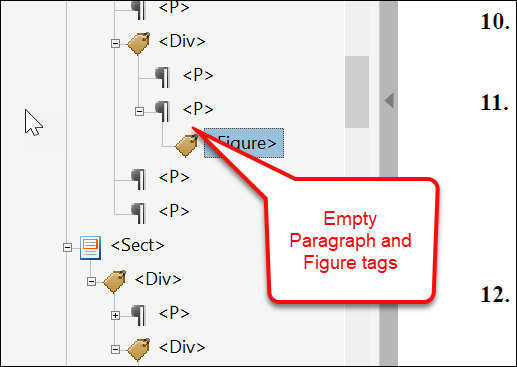
Summary: Users reported an issue with empty Paragraph and
Figure tags when running a full accessibility check in Adobe Acrobat.
It was determined that the stylesheet used when generating the document inserted
duplicate blocks that did not contain any content.
This behavior has been enhanced: empty Paragraph and Figure tags are no longer created in the tag tree and will not cause a full accessibility check to fail. |
| Implementation Notes: This enhancement is available in the supplemental July release of Hosted Expere / Expere Document Services2021 Release One of the Expere Engine. |
| Barcodes: barcodeInter25 format enhanced |
|---|
|
|
Summary: It was discovered that barcodeInter25 requires an even
number of characters in the barcode pattern in order to function properly;
as a result, when an odd number of characters is provided for a
barcodeInter25 barcode type, we are prepending a 0 to the barcode. Note: as a reminder, BarcodeInter25 is a numeric-only
barcode type. |
| Implementation Notes: This enhancement is available in the Expere Engine 2021 Release One. |
| WCAG 2.0: Waiver of Grantors Rights-GA tagging and screen reading enhanced |
|---|
|
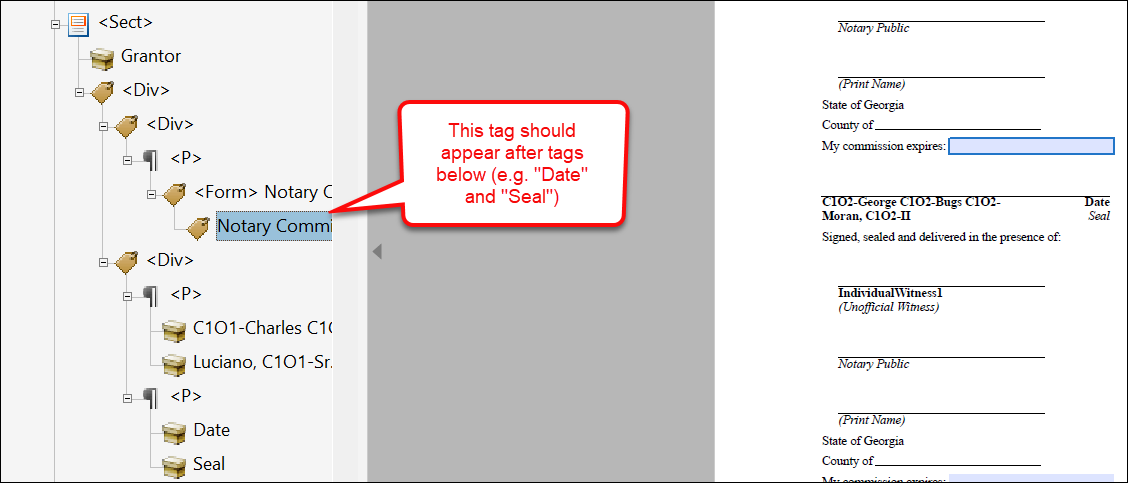
Summary: The following WCAG 2.0-related items have been addressed regarding the Waiver of Grantors Rights-GA document:
This issues have been resolved; tagging and screen reading behaviors have been enhanced to act as expected. |
| Implementation Notes: This enhancement is available in the 2021 Release One of the Expere EngineJuly release of Hosted Expere / Expere Document Services. |
| WCAG 2.0: DocumentReference / hyperlink tagging and screen reader behavior enhanced |
|---|
|
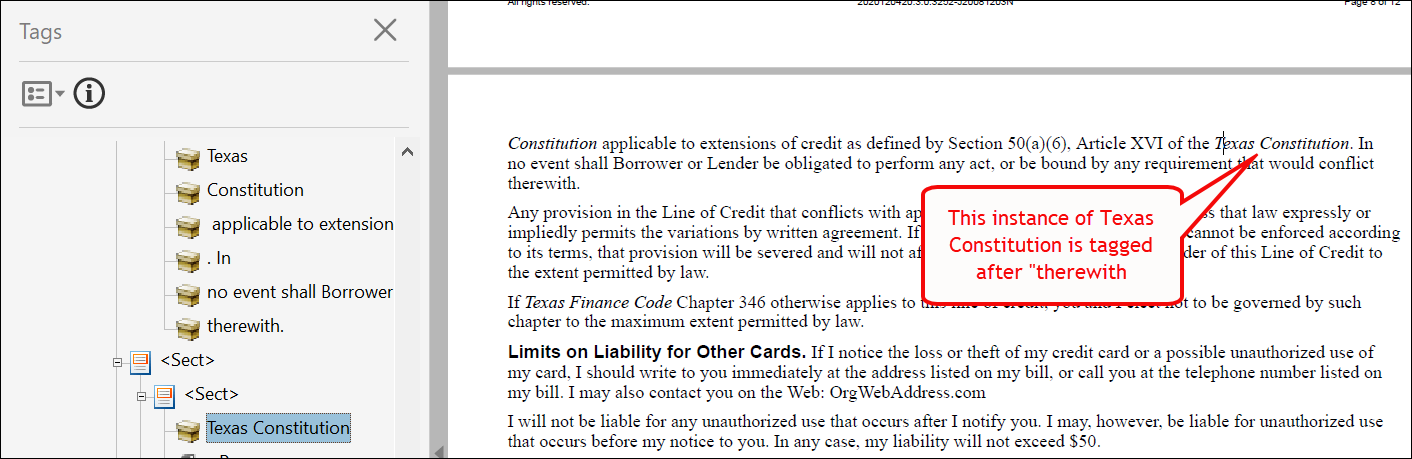
Summary: The following WCAG 2.0-related items have been addressed (applicable document appears in bold next to the bulleted issue):
|
| Technical Notes: |
| Implementation Notes: This enhancement is available in the June release of Hosted Expere / Expere Document Services2021 Release One of the Expere Engine. |

| eOriginal > Upload feature: Sequence order added to response |
|---|
|
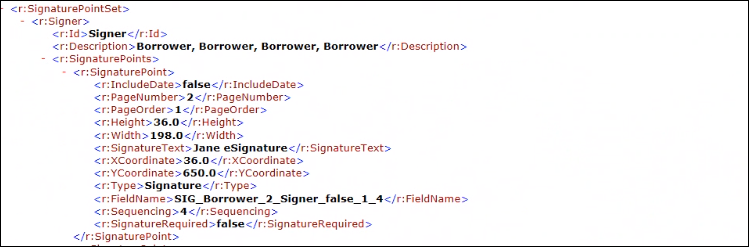
Summary: As a part of our eOriginal Upload feature, the Expere response
has been updated to include <Sequencing> and <FieldName> in the response
under SignaturePointSet. This will be returned for all fillable field types
when either ESignatureAndFieldSupport or
ESignatureCoordinates is provided in the request (I.e.
ESignatureAndFieldSupport and / or
ESignatureCoordinates = true). |
|
Technical Notes: Sample response snippet below:
|
| Implementation Notes: This feature is available in the April release of Hosted Expere / Expere Document Services2021 Release One of the Expere Engine. |
| BRE and InsertInstructions Feature: BRE returned in InstanceProperties |
|---|
|
| Summary: Expere has been updated to return Business Return Envelope (BRE) and InsertInstructions when authored in content. These indicators are used in Wolters Kluwer Hosted Expere integrations for Print delivery of document packages to indicate when a BRE or extra inserts should be included in the package when printed and mailed form Wolters Kluwer Print Fulfillment. Self-hosted Expere customers may chose to ignore these values. |
| Implementation Notes: This feature is available in the 2021 Release One of the Expere Engine . |
| Read order and signature bookmark behavior enhanced |
|---|
|
Summary: Users reported the following issues:
This behavior has been enhanced: for non-merged, single documents, the screen reader reads the items in the correct order while bookmarks appear in the correct order. |
| Implementation Notes: This enhancement is available in the April release of Hosted Expere / Expere Document Services2021 Release One of the Expere Engine. |


| Barcode scaling enhanced |
|---|
|
Summary: A user reported receiving an error when using a long barcode
pattern. We had previously limited the number of characters that could be
entered in the <Pattern/> element within the
<AncillaryOutput/> > <Barcode/> container within a
request. However, we have now enhanced the <Pattern/>
element to no longer limit the number of characters that could be entered. As a
result, Expere has been enhanced to now support larger number of characters
through scaling. |
| Implementation Notes: This enhancement is available in the March release of Document Generation Services2021 Release One of the Expere Engine. |
| Expere EngineExpere Engine / Document Generation Services: SuppressPaperDelivery element/value returned with DiscreteParty for dynamic and static documents |
|---|
|
Summary: As part of feature work to integrate Hosted Expere with Wolters
Kluwer E-Sign, we updated the Expere Engine to return a new
SuppressPaperDelivery element (PBI 658905) and value in the
DiscreteParty section of the Expere response. If this value
is set to "true," a paper delivery group is not created for the particular
discrete party containing the "true" value. For this particular PBI, development
and testing was conducted when using static documents to ensure the
SuppressPaperDelivery element and value are returned in the
Expere response. |
Technical Notes: Sample response code
below: |
| Implementation Notes: This enhancement is available in the February release of Document Generation Services2021 Release One of the Expere Engine. |
| Expere Engine: DefaultData fees behavior enhanced |
|---|
|
|
Summary: Users reported that Default Data policy fees did not merge with
request transaction fees; instead, they appeared after the existing fees. This
behavior has been enhanced so that Default Data fees are merged with existing
fees under the same fee name. Response sample before enhancement: 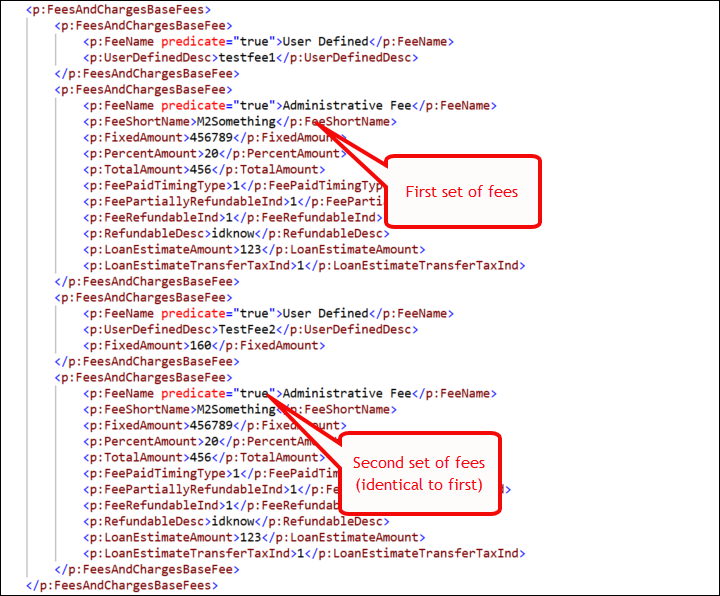 Response sample after enhancement: 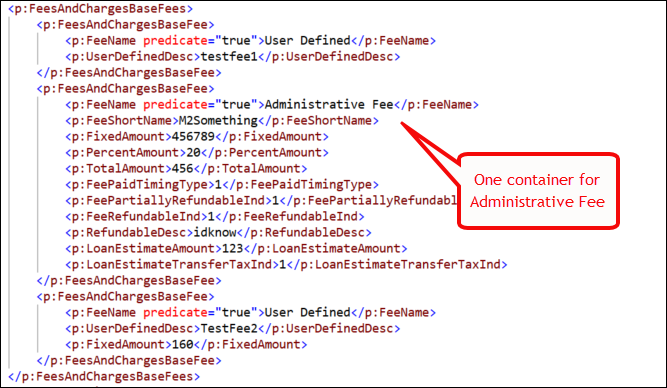 Note: if no fees exist on the
transaction, all fees from default data are appended to the transaction;
additionally, deposit fees with the same name that have fee details present
will have any matching detail nodes merged. |
| Implementation Notes: This enhancement is available in the 2021 Release One of the Expere EngineMarch release of Document Generation ServicesMarch release of Hosted Expere / Expere Document Services. |
| Expere Engine: Support for Font, FontSize, and Underline added for Signatures |
|---|
|
Summary: It was determined that Expere needed to support specifying a
specific font and its size, and the ability to add an underline to a Signature
and Signature Date field. As a result Font, Font
Size, and Underline parameters are now supported
for the SignatureField and SignatureDateField
elements. |
| Implementation Notes: This enhancement is available in the January release of Hosted Expere / Expere Document Services2021 Release One of the Expere Engine2021 Release One (1) of the Expere Engine. |
| Expere Engine: Response updated to return EmailAddress in DiscreteParty |
|---|
|
Summary: The DiscreteParty parameter has been updated to return an Email Address value (EmailAddress) in the Expere response file when provided in a request transaction. |
Technical Notes: Sample request: Sample response: |
| Implementation Notes: This enhancement is available in the 2021 Release One of the Expere Engine. |
| Expere Engine: Unique identifier created for each notary block (eNotary feature enhancement) |
|---|
|
Summary: As an enhancement to our eNotary feature, we have modified the
Expere Engine to automatically add a SignatureUniqueIdentifier
element for each field in a Notary Block; the
SignatureUniqueIdentifier element now connects the fields
within the Notary Block to the notary signature so the electronic delivery
platform knows which fields are associated with each specific notary signature.
Note: The SignatureUniqueIdentifier element can be present
as a child in the <SignaturePoint/> and in the
<FillableField/> (<Fillablefield/> and
) set areas of the
transaction request. |
Technical Notes: See the following <SignaturePoint/>
> <SignatureUniqueIdentifier/> code sample
below: |
| Implementation Notes: This enhancement is available in the December release of Expere Document Services / Hosted Expere2021 Release One of the Expere Engine. |