2022 Changelog Entries - Octopus Deploy delivery
You may need to clear your cookies, data, and browsing history. Some users may notice that changelogs do not appear on this page. If that is the case, clear your cookies.
DecemberExternal release date is December.
- Document Generation Services version: 22.2.0.4283
- Expere Engine version: 22.3.0.4737
- DocViewer version: 22.2.0.842
- Document Generation Services Core version: 22.3.0.80
- Document Generation Services Core DocViewer version: 22.3.0.80
- Security Administration version: 3.1.2.3603
- Expere Document Services: 22.2.0.1713
- DocumentServices: 22.2.0.156
- EZ Config:
- EZConfig Packages and Packets version: 2022.11.0.2932
- EZConfig Default Data version: 2022.11.0.220
- EZ Config Service version: 2022.11.0.409
- EZ Gateway version: 2022.11.0.547
- Databases:
- Document Generation Services Database version: 22.2.0.4283
- Packages and Packets Database version: 2022.11.0.2932
- Default Database version: 2022.11.0.220
- Security Administration Database version: 3.1.2.3603
- Expere Document Services Database version: 22.2.0.1713
Installation / Upgrade Notes
Note the following installation and upgrade changes in the September release:
- Transform variable changes:
- None
- Octopus variable changes:
- None
- Installation and upgrade changes:
- None
| WCAG 2.0: Engine / Document Generation Services enhanced to support Tagged .PDF's - December OD Release |
|---|
|
Summary: As a part of our continued effort to create WCAG 2.0
compatible documents we have updated the Expere Engine to now support the
generation of Tagged .PDF documents. We will continue making enhancements to
the Expere Engine for Tagged .PDF support, so check back for items being
identified and corrected. As part of our continued work to support Tagged
.PDF's, we have implemented enhancements to resolve the following WCAG
2.0-related changes in the December release:
|
| DGS: Support Package Name in Content URI |
|---|
|
Summary: Document Generation Services has been updated to process a
request that specifies the EZ Config Packages and Packets' "Package Name"
or "Package ID" in the Content URI. For example:
BaseLibrary.PKGPKT.160011 or
BaseLibrary.PKGPKT.DepositAccountOpening.The update
affects the following methods:
Note: Do not use duplicate Package Names
wthin a given alias across Lines of Business. |
| Expere: Assembly errors addressed |
|---|
|
Summary: Users reported the following rendering errors:
|
| Expere: Notary SignatureRequired element set to 'true' but returned as 'false' in response |
|---|
|
Summary: Users reported that the Expere Response XML returned for the
<SignatureRequired> element and value was set to
‘false’ for a notary <SignatureRequired> element despite
the value being set to "true" in the request transaction. The Expere Engine
has been enhanced so that the response value for the
<SignatureRequired> element matches the
<SignatureRequired> value in the
transaction. |
| DocViewer: Data collection behavior enhanced for Representative Entities |
|---|
|
Summary: Users reported that RepresentativeEntities
XPaths and corresponding child nodes starting at the second level (after the
root node) did not appear in DocViewer. DocViewer has been enhanced to
now display all |
NovemberExternal release date is November.
- Document Generation Services version: 22.2.0.4240
- Expere Engine version: 22.3.0.4686
- DocViewer version: 22.2.0.837
- Document Generation Services Core version: 22.3.0.80
- Document Generation Services Core DocViewer version: 22.3.0.80
- Security Administration version: 3.1.2.3597
- Expere Document Services: 22.2.0.1701
- DocumentServices: 22.2.0.145
- EZ Config:
- EZConfig Packages and Packets version: 2022.10.0.2923
- EZConfig Default Data version: 2022.10.0.187
- EZ Config Service version: 2022.10.0.403
- EZ Gateway version: 2022.10.0.542
- Databases:
- Document Generation Services Database version: 22.2.0.4240
- Packages and Packets Database version: 2022.10.0.2923
- Default Database version: 2022.10.0.187
- Security Administration Database version: 3.1.2.3597
- Expere Document Services Database version: 22.2.0.1701
Installation / Upgrade Notes
Note the following installation and upgrade changes in the September release:
- Transform variable changes:
- DGS sample
transforms.xmlfile: new transform property added; see PBI's 743936 and 733634 - EDS sample
transforms.xmlfile: new transform property added; see PBI 733644. - DocViewer / Expere Document Services: AppPool Identity User parameterized; se PBI 735722.
- DGS sample
- Octopus variable changes:
- None
- Installation and upgrade changes:
- DGSCore updated to .NET version 6.0
- Document Service updated to .NET version 6.0
| Engine / Document Generation Services: QR Barcode functionality implemented - dynamic, static, embedded PDF documents |
|---|
|
|
Summary: The Expere Engine and Document Generation Services have been
enhanced to support the use of QR Barcodes as an ancillary output option
when generating PDF documents. The QR barcode is .5 x .5 inches in size when
generated on documents and depending on the barcode alignment, the central
scanning point is equidistant from the surrounding document margins
regardless of the barcode size. Note: This feature
applies to dynamic, static, and embedded PDF documents and does not
apply to transactional barcodes.
|
| DGSCore / Document Service: upgrade to .NET 6 |
|---|
|
| Summary: DGSCore and DocumentService have been upgraded to .NET version 6.0. |
DGS sample transforms.xml file:
new transform property added |
|---|
|
Summary: The DGS transforms.xml has been updated:
|
EDS sample transforms.xml file:
new transform property added |
|---|
|
Summary: Users can now hide the Expere EZ Transform option on
the EDS Tool Suite > SERVICES page by setting the
EZTransformInstalled property in the EDS transform var
file to "false". For example:
|
| DocViewer / Expere Document Services: AppPool Identity User parameterized |
|---|
|
Summary: Wolters Kluwer is currently transitioning between hosted
application and server providers. As part of this rollout, the DocViewer
applications are now configurable to allow Domain accounts to be used as the
app pool identity instead of running as a network service. With that said,
this change was implemented for internal purposes; there is no external user
action required. The examples below for the DocViewer TestWebApp display an
initial setting (<Property Id="TestWebApp.RunAppPoolAsUser"
Value="false"/> that is set to "false" by default. Users would
then set the AppPool User Domain value and subsequent username and password
values.
DocViewer
|
OctoberExternal release date is October.
- Document Generation Services version: 22.2.0.4240
- Expere Engine version: 22.3.0.4585
- DocViewer version: 22.2.0.824
- Document Generation Services Core version: 22.1.0.16
- Document Generation Services Core DocViewer version: 22.1.0.16
- Security Administration version: 3.1.2.3581
- Expere Document Services: 22.2.0.1695
- DocumentServices: 22.2.0.133
- EZ Config:
- EZConfig Packages and Packets version: 2022.9.0.2845
- EZConfig Default Data version: 2022.9.0.163
- EZ Config Service version: 2022.9.0.398
- EZ Gateway version: 2022.9.0.536
- Databases:
- Document Generation Services Database version: 22.2.0.4214
- Packages and Packets Database version: 2022.9.0.2845
- Default Database version: 2022.9.0.163
- Security Administration Database version: 3.1.2.3581
- Expere Document Services Database version: 22.2.0.1695
Installation / Upgrade Notes
Note the following installation and upgrade changes in the September release:
- Transform variable changes:
- None
- Octopus variable changes:
- None
- Installation and upgrade changes:
- None
| Tool Suite: field length behavior updated |
|---|
|
Summary: The behavior of the following fields have been modified:
|
| Management Tool: field length behavior updated |
|---|
|
Summary: In order to maintain consistent security protocols, the
Document Generation Services Management Tool length and data type validation
has been enhanced for the following:
|
| Management Tool: performance improvements when deploying libraries |
|---|
|
| Summary: The Document Generation Services Management Tool has been updated to improve performance time when deploying libraries. |
SeptemberExternal release date is September.
- Document Generation Services version: 22.2.0.4198
- Expere Engine version: 22.2.0.4520
- DocViewer version: 22.2.0.819
- Document Generation Services Core version: 22.1.0.16
- Document Generation Services Core DocViewer version: 22.1.0.16
- Security Administration version: 3.1.2.3547
- Expere Document Services: 22.2.0.1676
- DocumentServices: 22.2.0.133
- EZ Config:
- EZConfig Packages and Packets version: 2022.8.0.2833
- EZConfig Default Data version: 2022.8.0.151
- EZ Config Service version: 2022.8.0.390
- EZ Gateway version: 2022.8.0.521
- Databases:
- Document Generation Services Database version: 22.2.0.4198
- Packages and Packets Database version: 2022.8.0.2833
- Default Database version: 2022.8.0.151
- Security Administration Database version: 3.1.2.3547
- Expere Document Services Database version: 22.2.0.1676
Installation / Upgrade Notes
Note the following installation and upgrade changes in the September release:
- Transform variable changes:
- DGS Core / DGS Core DocViewer; see PBI 733885 below.
- DGS: New internal-only transform property added
<CleanAfterBuild>; see PBI 739222
- Octopus variable changes:
- None
- Installation and upgrade changes:
- None
| DGS Core / DGS Core DocViewer: AppPool Identity User parameterized |
|---|
|
Summary: Wolters Kluwer is currently transitioning between hosted
application and server providers. As part of this rollout, the DGSCore and
DGScore DocViewer applications are now configurable to allow Domain accounts
to be used as the app pool identity instead of running as a network service.
With that said, this change was implemented for internal purposes; there is
no external user action required. The examples below for DGS Core and DGS
Core DocViewer display an initial setting (<Property
Id="DGSCORE.RunAppPoolAsUser" Value="false"/> and
<Property Id="DGSCORE.DocViewer.RunAppPoolAsUser"
                            Value="false"/>
) that is set to "false" by default. Users would
then set the AppPool User Domain value and subsequent username and password
values. DGS
Core DGS
Core
DocViewer
|
| Integrators: Management Service updated to support longer file names |
|---|
|
| Summary: As part of the Wolters Kluwer effort to transition beween hosted application and service providers, we identified an issue where MIcrosoft Windows limits filename paths to 260 characters. The new provider filename path is increased beyond 260 characters. In order to accommodate this change, an internal registry change was implemented, yet the new provider does not recognize this registry. As a result, the Document Generation Services Management Services internal library has been updated to optionally use an external tool that handle file paths that exceed the 260 character limit. |
Management Service: new
CleanAfterBuild transform property added |
|---|
|
Summary: We have added a new internal transform property,
<CleanAfterBuild> to the DGS
transforms.xml file. When set to "true" (default
value), it deletes folders and subsequent files within these said folders,
that are created when deploying content to the DGS Management Service. |
| DocViewer: Cross-Origin issue identified and addressed |
|---|
|
|
Summary: Users reported receiving a "401" error when attempting to
access DocViewer in the Hosted Expere CT environment. Internal analysis
determined that the root cause stemmed from a cross-origin issue (commonly
referred to as "CORS") within DocViewer. As a result, DocViewer was rolled back to a previous version during the July CT deployment. |
| DocViewer: Sequencing Behavior Enhanced |
|---|
|
| Summary: DocViewer has been updated to ensure that the number sequencing used within a list continues across separate lists where intended without restarting the numbering at 1. |
| DocViewer: eNotary information hidden |
|---|
|
| Summary: DocViewer has been enhanced to no longer display the eNotary section. This enhancement was implemented so that the eNotary display behavior matched that of Signature section. |
| DocViewer / Embedded .PDF: Fillable Field appearance enhanced |
|---|
|
| Summary: Users reported that the Product Technical Rule (PTR) from the original authoring document (.REQ) was appearing in fillable fields within an embedded .PDF file in DocViewer. The PTR is considered background information using during the authoring process and should not appear. This behavior has been enhanced; DocViewer has been updated so that the Product Technical Rule does not appear in a fillable field. |
| DocViewer: Embedded PDF field behavior enhanced |
|---|
|
|
Summary: Users reported that when generating an embedded .PDF file
for viewing in DocViewer, some field text was misaligned: overlap occurred
in some fields while values appeared in the wrong fields. This behavior has been enhanced; field text is aligned properly and appears in the correct fields |
| DocViewer: table rendering behavior enhanced |
|---|
|
|
Summary: DocViewer users reported that document display did not match
that of a .PDF output when a file contained tables with a different number
of columns defined for different row. As a result, columns had shifted, and
a middle column was narrower than expected. The output of these DocViewer documents now matches that of a .PDF output. |
DocViewer: EndSession timeout
extended |
|---|
|
Summary: Users reported that DocViewer timed out when the following
occurred:
This behavior has been enhanced; we have extended our timeout time
to five (5) minutes when calling the |
AugustExternal release date is August.
- Document Generation Services version: 22.2.0.4134
- Expere Engine version: 22.2.0.4402
- DocViewer version: 22.1.0.745
- Document Generation Services Core version: 22.1.0.16
- Document Generation Services Core DocViewer version: 22.1.0.16
- Security Administration version: 3.1.2.3515
- Expere Document Services: 22.2.0.1676
- DocumentServices: 22.2.0.0112
- EZ Config:
- EZConfig Packages and Packets version: 2022.7.0.2817
- EZConfig Default Data version: 2022.7.0.111
- EZ Config Service version: 2022.7.0.0.375
- EZ Gateway version: 2022.7.0.503
- Databases:
- Document Generation Services Database version: 22.2.0.4134
- Packages and Packets Database version: 2022.7.0.2817
- Default Database version: 2022.7.0.111
- Security Administration Database version: 3.1.2.3515
- Expere Document Services Database version: 22.2.0.1678
Installation / Upgrade Notes
Note the following installation and upgrade changes in the August release:
- Transform variable changes:
- None
- Octopus variable changes:
- None
- Installation and upgrade changes:
- DocumentService updated to version 5.0
| DocumentService: EZ Transform - Generate, Generate Synchronous, Select Synchronous calls updated for REST API |
|---|
|
Summary: As part of our feature to allow users to test custom
transactions without making an API call, we have added a new
EZTransformStylesheet schema within the
generate,generate-synchronous, and
select-synchronous methods. Within this
EZTransformStylesheet element, users can select the
specific stylesheet (stylesheetName) and version
(stylesheetVersion) to use with a transaction. For more
information, refer to the link above. |
| DocumentService: upgrade to .NET 5 |
|---|
|
| Summary: DocumentService has been upgraded to version 5.0. |
JulyExternal release date is July.
- Document Generation Services version: 22.2.0.4134
- Expere Engine version: 22.1.0.4359
- DocViewer version: 22.1.0.745
- Document Generation Services Core version: 22.1.0.16
- Document Generation Services Core DocViewer version: 22.1.0.16
- Security Administration version: 3.1.2.3507
- Expere Document Services: 22.2.0.1676
- DocumentServices: 22.2.0.99
- EZ Config:
- EZConfig Packages and Packets version: 2022.6.0.2807
- EZConfig Default Data version: 2022.6.0.92
- EZ Config Service version: 2022.6.0.366
- EZ Gateway version: 2022.6.0.496
- Databases:
- Document Generation Services Database version: 22.2.0.4134
- Packages and Packets Database version: 2022.6.0.2807
- Default Database version: 2022.6.0.92
- Security Administration Database version: 3.1.2.3507
- Expere Document Services Database version: 22.2.0.1667
Installation / Upgrade Notes
Note the following installation and upgrade changes in the July release:
- Transform variable changes:
- None
- Octopus variable changes:
RabbitMQURLproperty in theDGSTransformVartransform variableDGSCORE.RabbitMQHostproperty in theDGSCoreTransformVartransform variableDocumentService.RabbitMqURLproperty in theDocumentServiceTransformVartransform variable
- Installation and upgrade changes:
- None
| Management Tool: Bulk Redirect - new Alias List page created |
|---|
|
| Summary: Document Generation Services Management Tool users may now redirect one or more aliases from the same library. As a result, we have created a new Updating Aliases by Library page that allows users to move aliases between a current and redirected library. |
| EZ Transform - SelectAndGenerate, Generate, Select, and SelectSynchronous API calls updated |
|---|
|
Summary: As part of our feature to allow users to test custom
transactions without making an API call, we have added a new
EZTransform element within the
SelectAndGenerate, Generate,
Select, and SelectSynchronous methods.
Within this EZTransform element, users can select the
specific stylesheet (StylesheetName) and version
(Stylesheetversion) to use with a transaction. For more
information, refer to the links above. |
| Engine: SMARTDoc 1.02 |
|---|
|
|
Summary: Wolters Kluwer enhanced Expere to generate MISMO SMART Doc
version 1.02. The work items below encapsulate the changes Wolters Kluwer
Expere Engine development implemented for this feature: Hosted / Self-hosted users:
Self-hosted users:
|
| RabbitMQ Support enhanced |
|---|
|
Summary: The DocGenServices, DGSCoreManagement, and DocumentService
transform.xml files have been updated to allow users to
set a URL for the RabbitMQ application using a new
RabbitMQURL variable. In Octopus Deploy, users would set the following property / transform variable names:
|
| SelectedPackageId behavior enhanced |
|---|
|
Summary: A user reported that during an implementation related to
DocViewer, Document Generation Services did not honor the selected package
parameter during a BeginSession API call. This has been
resolved; Document Generation Services now honors the selected package
parameter during a |
| Management Tool / Management Service: behavior enhanced to only support pre-built libraries |
|---|
|
Summary: The Document Generation Services Management Tool now only
allows users to upload pre-built content libraries. Internal analysis
determined that using pre-built was preferable to using the Management Tool
to build content for the following reasons:
Note: The pre-built content check process looks
at the first level of the .ZIP file (Content and ERLContent folders)
when performing a library deploy. |
| Tool Suite: Scrubbed data enhancements |
|---|
|
|
Summary: The Document Generation Services Tool Suite contains the ability to scrub certain information from a customer's transaction, such as social security numbers, email addresses, etc. The data that resides in a customer's transaction has been reviewed and updates made for 2022.
|
| Tool Suite / Web Services user documentation: additional details related to using the Days To Expire function |
|---|
|
Summary: The Document Generation Services Tool Suite and Web Services
guides have been updated to note that when using the
DaysToPersistInLongTermStorage parameter (whether
making a Select and Generate or Select / Generate call), the default value
is "7" (days), and that users may enter a value of "-1" to immediately the
transaction from the database. |
| DocViewer: eNotary information hidden |
|---|
|
| Summary: DocViewer has been enhanced to no longer display the eNotary section. This enhancement was implemented so that the eNotary display behavior matched that of Signature section. |
DocViewer: EndSession timeout
extended |
|---|
|
Summary: Users reported that DocViewer timed out when the following
occurred:
This behavior has been enhanced; we have extended our timeout time
to five (5) minutes when calling the |
| DocViewer: table rendering behavior enhanced |
|---|
|
|
Summary: DocViewer users reported that document display did not match
that of a .PDF output when a file contained tables with a different number
of columns defined for different row. As a result, columns had shifted, and
a middle column was narrower than expected. The output of these DocViewer documents now matches that of a .PDF output. |
| DocumentService: enhance logo height and width behavior |
|---|
|
|
Summary: Users reported that they were required to enter both a
height and width value for a logo. This behavior is incorrect; users are
only required to enter one value (either for width or height). This behavior
has been enhanced; users are once again only required to enter a width or
height value when adding a logo. Additionally, we have enhanced our DGS-related user documentation to provide further information when working with logos. |
June
MayExternal release date is May 2022.
- Document Generation Services version: 22.2.0.4065
- Expere Engine version: 22.1.0.4068
- DocViewer version: 22.1.0.745
- Document Generation Services Core version: 21.1.0.3588
- Document Generation Services Core DocViewer version: 21.1.0.3588
- Security Administration version: 3.1.2.3289
- Expere Document Services: 21.1.0.1491
- DocumentServices: 21.4.0.94
- EZ Config:
- EZConfig Packages and Packets version: 2022.5.0.2787
- EZConfig Default Data version: 2022.5.0.58
- EZ Config Service version: 2022.5.0.339
- EZ Gateway version: 2022.5.0.467
- Databases:
- Document Generation Services Database version: 22.2.0.4065
- Packages and Packets Database version: 2022.5.0.2787
- Default Database version: 2022.5.0.58
- Security Administration Database version: 3.1.2.3289
- Expere Document Services Database version: 21.1.0.1491
Installation / Upgrade Notes
Note the following installation and upgrade changes in the May release:
- Transform variable changes:
- None
- Octopus variable changes:
- None
- Installation and upgrade changes:
- DGS Core updated to .NET 5.0.16
- EZ Gateway and EZ Service updated to .NET 6.0.4Note: with the release of .NET 5, this product is no longer referred to as ".NET Core" but .NET" only.
| Support discontinued for Internet Explorer 11 (IE11) |
|---|
|
| Summary: As of June 15, 2022, Wolters Kluwer will no longer support Internet Explorer 11. Our recommended browsers for accessing Wolters Kluwers hosted applications will be Google Chrome and Microsoft Edge (Chromium-based, current two versions). Wolters Kluwer does not anticipate prevalent issues for users accessing the application(s) via IE11. However, Wolters Kluwer will no longer remediate problems that are specific to the IE11 browser. |
| Expere Engine: WildFly updated |
|---|
|
| Summary: The Expere Engine has been updated to use Wildfly version 26.0.1. |
| Encryption behavior enhanced |
|---|
Summary: A user reported an issue with the password functionality in
the SetEncryption ancillary output option. When running an
Expere Document Services SOAP request utilizing the
SetEncryption ancillary output option and
user and/or owner passwords, the
passwords provided would not open the .PDF file. 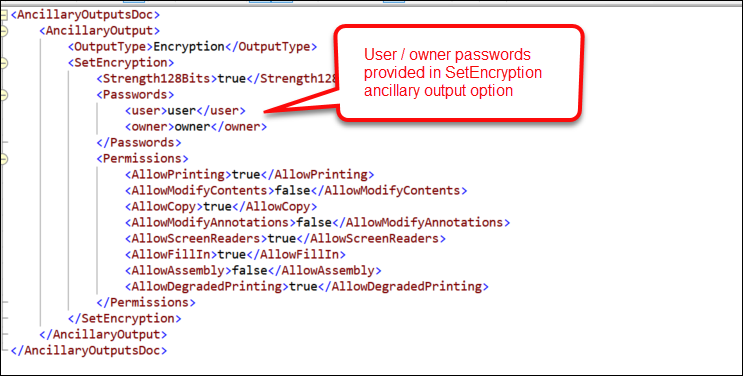 Expere has been updated to accept
a password provided in the |
| DGS Core: update to .NET 5.0.16 |
|---|
|
| Summary: DGS Core has been updated from version 3.1 to 5.0.16. |
| UCD element removed from DocumentService WSDL |
|---|
|
| Summary: As part of a larger effort to remove functionality that is no longer used or supported, UCD has been removed from the DocumentService WSDL. No user action is required. |
| DocViewer: SignatureField and SignatureDateField display behavior enhanced |
|---|
|
Summary: Users reported that DocViewer displayed an error when
executing files containing a SignatureField and
SignatureDateField. These elements are used to author
signatures outside of a SignatureSection; with this change
DocViewer was updated to handle these fields appropriately. Users will no
longer see an error and the area for the SignatureField and
SignatureDateField will function identically to that of a
SignatureSection. |
| DocViewer: eNotary information hidden |
|---|
|
| Summary: DocViewer has been enhanced to no longer display the eNotary section. This enhancement was implemented so that the eNotary display behavior matched that of Signature fields. |
| Tool Suite: EZ Transform stylesheet selection option |
|---|
|
| Summary: As part of our feature to allow users to test custom transactions without making an API call, we have added a new Expere EZ Transform option within the Document Generation Services Tool Suite > SERVICES page. Users can select an account and corresponding stylesheet to use with a transaction. For more information, refer to the link above. |
AprilExternal release date is April 2022.
- Document Generation Services version: 22.1.0.4021
- Expere Engine version: 22.1.0.4068
- DocViewer version: 21.2.0.734
- Document Generation Services Core version: 21.1.0.3588
- Document Generation Services Core DocViewer version: 21.1.0.3588
- Security Administration version: 3.1.2.3041
- Expere Document Services: 21.1.0.1491
- DocumentServices: 21.4.0.66
- EZ Config:
- EZConfig Packages and Packets version: 2022.4.0.2778
- EZConfig Default Data version: 2022.4.0.40
- WoltersKluwerFS.EzService.Service version: 2022.4.0.332
- EZ Gateway version: 2022.4.0.438
- Databases:
- Document Generation Services Database version: 22.1.0.4021
- Packages and Packets Database version: 2022.4.0.2778
- Default Database version: 2022.4.0.40
- Security Administration Database version: 3.1.2.3041
- Expere Document Services Database version: 21.1.0.1491
Installation / Upgrade Notes
Note the following installation and upgrade changes in the April release:
- Transform variable changes:
- None
- Octopus variable changes:
- None
- Installation and upgrade changes:
- None
Changelog entries
| ToolSuite: correct LoanIdentifier displayed on SUPPORT page |
|---|
|
Summary: With this release, when viewing the SUPPORT page in
the ToolSuite the Loan Identifier field matches the
/Txn/Notes/Note/LoanIdentifier value from the
transaction xml. |
| Implementation Notes: This enhancement correction is available in the April release of Document Generation Services. |
| Expere: PDFMerge and Barcode Support |
|---|
|
| Issue: It was discovered through internal testing that in certain instances, when generating documents as a Merged PDF with an ancillary output of barcodes, some documents within the Merged PDF were not receiving the barcode. Instead, the barcode area was being reserved with an empty fillable field. |
| Solution: This issue has been corrected. Barcodes are being created on all applicable documents within the Merged PDF. |
| Implementation Notes: This defect correction is available in the April release of Hosted Expere / Expere Document Services. |
| Expere: table display issue resolved |
|---|
|
|
Summary: It was reported that the Ownership of the Applicant
section and preceding table did not appear on the Borrower Information
Form for those users identifed as Guarantors. The table and Ownership of the Applicant section now appear on the Borrower Information Form. |
| Implementation Notes: This enhancement is available in the April release of Hosted Expere / Expere Document Services |
| RTF Output - indent preserved with certain list use cases |
|---|
|
|
Summary: Users reported that when generating the
AmendmentToNote_Interest Rate_Payments_Ream document as an RTF
output, lists which were broken up between paragraphs of text were indented
improperly; for example: the text for the list item would be indented
properly, but the number which accompanied the list item text would NOT be
indented. See examples below: RTF Output  PDF Output  This behavior has been enhanced; Expere has been updated to correctly indent the list item numbers with the subsequent list text on RTF Documents, as it does with PDF. |
| Implementation Notes: This enhancement is available in the April release of Hosted Expere / Expere Document Services. |
MarchExternal release date is March 2022.
- Document Generation Services version: 21.1.0.3735
- Expere Engine version: 22.1.0.4068
- DocViewer version: 21.2.0.846
- Document Generation Services Core version: 21.1.0.3588
- Document Generation Services Core DocViewer version: 21.1.0.3588
- Security Administration version: 3.1.2.2894
- Expere Document Services: 21.1.0.1491
- DocumentServices: 21.4.0.66
- EZ Config:
- EZConfig Packages and Packets version: 2022.3.0.2752
- EZConfig Default Data version: 2022.3.0.1265
- EZ Config Service version (renamed to WoltersKluwerFS.EzService.Service): 2022.3.0.323
- EZ Gateway version: 2022.3.0.429
- Databases:
- Document Generation Services Database version: 21.1.0.3735
- Packages and Packets Database version: 2022.3.0.2752
- Default Database version: 2022.3.0.1265
- Security Administration Database version: 3.1.2.2894
- Expere Document Services Database version: 21.4.0.66
Installation / Upgrade Notes
Note the following installation and upgrade changes in the March release:
- Transform variable changes:
- None
- Octopus variable changes:
- EZ Config Service has been renamed to WoltersKluwerFS.EzService.Service
- Installation and upgrade changes:
- None
Changelog entries
| Document display issue resolved |
|---|
|
|
Summary: Users reported that static documents did not display in
DocViewer due to such factors as the number and size of embedded
transactions and the presence of inline graphics. This behavior has been enhanced; DocViewer has been updated to better handle documents containing inline graphics and embedded transactions. |
| Implementation Notes: This enhancement is available in the March release of DocViewer. |
| General Updates |
|---|
|
| Summary: This release includes general updates not visible to the user. |
FebruaryExternal release date is February 2022.
- Document Generation Services version: 21.1.0.3735
- Expere Engine version: 22.1.0.4053
- DocViewer version: 21.2.0.846
- Document Generation Services Core version: 21.1.0.3588
- Document Generation Services Core DocViewer version: 21.1.0.3588
- Security Administration version: 3.1.2.2713
- Expere Document Services: 21.1.0.1491
- DocumentServices: 21.4.0.66
- EZ Config:
- EZConfig Packages and Packets version: 2022.2.0.2733
- EZConfig Default Data version: 2022.2.0.1255
- EZ Config Service version: 2022.2.0.285
- EZ Gateway version: 2022.2.0.401
- Databases:
- Document Generation Services Database version: 21.1.0.3735
- Packages and Packets Database version: 2022.2.0.2733
- Default Database version: 2022.2.0.1255
- Security Administration Database version: 3.1.2.2713
- Expere Document Services Database version: 21.1.0.1491
Installation / Upgrade Notes
Note the following installation and upgrade changes in the February release:
- Transform variable changes:
- None
- Octopus variable changes:
- None
- Installation and upgrade changes:
- None
Changelog entries
| DocViewer: supported added for representative entity beneficiaries |
|---|
|
| Summary: A user reported that an error occurred in DocViewer when a representative entity element is included as child element of beneficiaries. We have enhanced DocViewer to accommodate this functionality. |
| Implementation Notes: This enhancement is available in the February release of Document Generation Services. |
| Support for Embedded PDF |
|---|
|
| Summary: Wolters Kluwer has introduced a new authoring format as part of WCAG 2.0 compliance initiative. When authored as a "PDF." (PDF prefix), the Expere Engine now generates documents with an embedded .PDF file of an image. For more information, see the following Expere Authoring and Tools changelog. |
| Implementation Notes: This feature is available in the Expere Engine 2022 Release One. |
| FOP 2.6 indicator added to internal application |
|---|
|
|
Summary: As part of our initiative to upgrade the version of FOP used
by the Expere engine for document generation from FOP 1.1 to FOP 2.6, we
have enhanced our internal Document Generation Services Management Tool to
now include a checkbox on the Add an Alias page to indicate the use
of FOP 2.6. This functionality allows you to test your documents to ensure
functionality works as expected; it also allows you to perform a comparison
of documents before ultimately releasing to your end users. Important: Please note that there is a risk
of your documents appearing differently when using FOP 2.6. For example,
internal analysis determined that 1.) a minor indentation discrepancy
existed for bullets and numeric lists either increasing or decreasing
the space from a point; 2.) transaction barcodes do not appear on any
FOP 2.6-generated content. Additionally, you can set the FOP 2.6 value on the main MANAGE ALIASES page in addition to the Add an Alias page. |
| Implementation Notes: This feature is available in the February release of Document Generation Services. |
| Engine enhanced to support FOP 1.1 and 2.6 |
|---|
|
Summary: As part of our initiative to upgrade the version of FOP used
by the Expere engine for document generation from FOP 1.1 to FOP 2.6, we
have enhanced Expere to allow the use of both versions. Users may now
specify between FOP 1.1 and FOP 2.6 for document rendering using a new
FOP26 element at the root of the
SelectAndGenerateRequest and Generate
API calls.Important: Note the
following:
|
| Implementation Notes: This feature is available in the Expere Engine 2022 Release One. |
| Expere Engine: inline packets now honoring logo details |
|---|
|
| Issue: A user reported receiving an error on a SelectAndGenerate request when using an EZ Config Default Data Org with a logo, with a Packages and Packets package. It was found that Expere only honored the LogoID parameter within a Logo ancillary output if the Logo was the first option when more than one ancillary option existed within a request. |
| Solution: This issue has been corrected. |
| Implementation Notes: This defect correction is available in the January release of Document Generation Services. |
| Expere Engine: Log4j updated |
|---|
|
| Summary: It was identified that the Expere Engine was using a version of Log4j that was determined to have a medium security risk (2.17.0). We have corrected the security finding by updating the Expere Engine with Log4j 2.17.1. |
| User action: For the latest Expere install, which includes an updated Expere Testing System with the Log4j security finding corrected, refer to the Product Download Site (PDS) and download the 2022.1 Engine. Consult your Professional Services representative or the Expere Implementation Guide for installation assistance. |
| Implementation Notes: This enhancement is available in the January release of Document Generation Services. |
| Engine: multiple accounts now allowed in a single transaction with the same product |
|---|
|
| Summary: A user reported that an error occurred when opening multiple accounts in a single transaction when where the same EZ Config (or OPPSA) Product name was used for more than one account in the request. Internal analysis determined that this error occurred because Expere previously only allowed multiple accounts in a single transaction when the product name was different for each account. As a result, this behavior has been enhanced: Expere now supports multiple accounts in a single transaction with the same product name. |
| Implementation Notes: This enhancement is available in the Expere Engine 2022 Release One. |
| RTF output: signature line behavior enhanced |
|---|
|
Summary: Users reported signature line inconsistencies that
necessitated addressing; instead of being a starndard, uniform width, the
length of the signature line directly corresponded to the number of the
characters in the value of the SignerName element. As a
result, the signature line would span across the entire width of the page.
This behavior has been enhanced so that the signature line for both RTF and
PDF outputs are 3.5" wide. |
| Implementation Notes: This enhancement is available in the Expere Engine 2022 Release One. |
| General Updates |
|---|
|
| Summary: This release includes general updates not visible to the user. |
JanuaryExternal release date is January 2022.
- Document Generation Services version: 21.1.0.3617
- Expere Engine version: 21.2.0.4024
- DocViewer version: 21.2.0.814
- Document Generation Services Core version: 21.1.0.3588
- Document Generation Services Core DocViewer version: 21.1.0.3588
- Security Administration version: 3.1.2.2471
- Expere Document Services: 21.1.0.1486
- DocumentServices: 21.4.0.66
- EZ Config:
- EZConfig Packages and Packets version: 2022.1.0.2713
- EZConfig Default Data version: 2022.1.0.1216
- EZ Config Service version: 2022.1.0.269
- EZ Gateway version: 2022.1.0.394
- Databases:
- Document Generation Services Database version: 21.1.0.3617
- Packages and Packets Database version: 2022.1.0.2713
- Default Database version: 2022.1.0.1216
- Security Administration Database version: 3.1.2.2471
- Expere Document Services Database version: 21.1.0.1486
Installation / Upgrade Notes
Note the following installation and upgrade changes in the January release:
- Transform variable changes:
- None
- Octopus variable changes:
- None
- Installation and upgrade changes:
- None
Changelog entries
| Merged PDF and PKGPKT package behavior enhanced |
|---|
|
| Issue: A user reported receiving an error when attempting to generate documents with EZ Config Packages and Packets. Internal analysis revealed that this issue occurred when a transaction was used that did not autoselect any of the documents within a PKGPKT packet and the subsequent attempt to merge nonexistent documents failed. When attempting to merge the documents for this packet, an error occurred due to no documents being selected for the given Packet. |
| Solution: This issue has been resolved; empty packets are skipped during the merge process. As a result, no error occurs and documents that are autoselected are generated and merged appropriately. |
| Implementation Notes: This defect correction is available in the January release of Document Generation Services. |
| General Updates |
|---|
|
| Summary: This release includes general updates not visible to the user. |