2021 Changelog Entries - Octopus Deploy delivery
Supplemental December releaseExternal release date is December 2021.
- Document Generation Services version: 21.1.0.3641
- Expere Engine version: 21.2.0.3997
- DocViewer version: 21.2.0.814
- Document Generation Services Core version: 21.1.0.3588
- Document Generation Services Core DocViewer version: 21.1.0.3588
- Security Administration version: 3.1.2.2414
- Expere Document Services: 21.1.0.1451
- DocumentServices: 21.1.0.259
- EZ Config:
- EZConfig Packages and Packets version: 2021.13.0.2690
- EZConfig Default Data version: 2021.13.0.1213
- EZ Config Service version: 2021.13.0.260
- EZ Gateway version: 2021.11.0.357
- Databases:
- Document Generation Services Database version: 21.1.0.3641
- Packages and Packets Database version: 2021.13.0.2690
- Default Database version: 2021.13.0.1213
- Security Administration Database version: 3.1.2.2414
- Expere Document Services Database version: 21.1.0.1451
Installation / Upgrade Notes
Note the following installation and upgrade changes in the August release:
- Transform variable changes:
- None
- Octopus variable changes:
- None
- Installation and upgrade changes:
- None
Changelog entries
| Expere Engine: Log4j updated |
|---|
|
| Summary: We previously informed you that the Expere Engine was using a vulnerable version of Log4j that was determined to have a security risk. As a result, we upgraded the Expere Engine to Log4j version 2.15.0. On December 14th, Apache confirmed another medium vulnerability that required an update to Log4j version 2.16.0. They have since confirmed an additional critical vulnerability on December 20th that requires an update to version 2.17.0. As a result, we have upgraded the Expere Engine to use Log4j version 2.17.0. |
| User action: For the latest Expere install, which includes an updated Expere Testing System with the Log4j security finding corrected, refer to the Product Download Site (PDS) and download the 2021.1.2 Engine. Consult your Professional Services representative or the Expere Implementation Guide for installation assistance. |
| Implementation Notes: This enhancement is available in the Supplemental December release of Document Generation Services. |
| Expere Testing System: Log4j updated |
|---|
|
Summary: It was identified that the Expere Testing System was using a
vulnerable version of Log4j that was determined to have a security risk. We
have corrected the security finding and created an Expere release containing
an updated version of the Expere Testing System which includes the security
remediation. Users will notice that previous versions of Expere contained an
ExpereTestingSystem.ear and
ExpereTestingSystem.war file. With the latest release
of Expere, only the .WAR file is created. |
| User action: For the latest Expere install, which includes an
updated Expere Testing System with the Log4j security finding corrected,
refer to the Product Download Site (PDS) and download the 2021.1.2 Engine.
Consult your Professional Services representative or the Expere
Implementation Guide for installation assistance. Note: Consult the Expere Implementation Guide: Installation with WebSphere
topic to upgrade the Log4j2.xml and
ExpereTestingSystem.properties
files. |
| Implementation Notes: This enhancement is available in the Supplemental December release of Document Generation Services. |
DecemberExternal release date is December 2021.
- Document Generation Services version: 21.1.0.3641
- Expere Engine version: 21.2.0.3940
- DocViewer version: 21.2.0.814
- Document Generation Services Core version: 21.1.0.3588
- Document Generation Services Core DocViewer version: 21.1.0.3588
- Security Administration version: 3.1.2.2414
- Expere Document Services: 21.1.0.1451
- DocumentServices: 21.1.0.259
- EZ Config:
- EZConfig Packages and Packets version: 2021.13.0.2690
- EZConfig Default Data version: 2021.13.0.1213
- EZ Config Service version: 2021.13.0.260
- EZ Gateway version: 2021.11.0.357
- Databases:
- Document Generation Services Database version: 21.1.0.3641
- Packages and Packets Database version: 2021.13.0.2690
- Default Database version: 2021.13.0.1213
- Security Administration Database version: 3.1.2.2414
- Expere Document Services Database version: 21.1.0.1451
Installation / Upgrade Notes
Note the following installation and upgrade changes in the August release:
- Transform variable changes:
- None
- Octopus variable changes:
- None
- Installation and upgrade changes:
- None
Changelog entries
| Expere Engine: Log4j updated |
|---|
|
| Summary: It was identified that the Expere Engine was using a vulnerable version of Log4j that was determined to have be a security risk. We have corrected the security finding by updating the Expere Engine to use an updated secure version of Log4j. |
| Implementation Notes: This enhancement is available in the December release of Document Generation Services. |
| Expere Engine enhanced to use FOP 2.6 |
|---|
|
Summary: As a part of our continued effort to create WCAG 2.0
compatible documents we have updated the Expere Engine to now use FOP 2.6
when generating TaggedPDF documents. We will continue making enhancements to
FOP 2.6 for TaggedPDF support, so check back for items being identified and
corrected. Please note, WCAG support requires special content authoring and
is not currently supported ‘out of the box’. As part of our feature to
update the Expere Engine to use FOP 2.6, we made the following WCAG
2.0-related changes in the December release:
|
| Implementation Notes: This feature / enhancement work is available in the December release of Document Generation Services. |
| Integrators: new CheckRequiredData API |
|---|
|
Summary: As part of our Required Data API feature, we have added a
new CheckRequiredData API method to the DocViewer
SessionSvc. This new API method allows users to call
DocViewer to determine if any documents for a given transaction contain
required data fields which have not been completed. |
| Technical Notes: This change requires an update to your WSDL. |
| Implementation Notes: This feature is available in the December release of Document Generation Services. |
| Document list returned for an EZ Config package |
|---|
|
| Summary: Document Generation Service now returns a list of documents for an EZ Config Package. Additionally, we have updated the Document Generation Services Tool Suite to return a list of documents for an EZ Config Package when selecting the Use Packages and Packets checkbox. |
| Technical Notes: This new feature does not require any WSDL changes. |
| Implementation Notes: This feature is available in the December release of Document Generation Services. |
| Engine: multiple accounts now allowed in a single transaction with the same product |
|---|
|
| Summary: A user reported that an error occurred when opening multiple accounts in a single transaction when where the same EZ Config (or OPPSA) Product name was used for more than one account in the request. Internal analysis determined that this error occurred because Expere previously only allowed multiple accounts in a single transaction when the product name was different for each account. As a result, this behavior has been enhanced: Expere now supports multiple accounts in a single transaction with the same product name. |
| Implementation Notes: This enhancement is available in the December release of Document Generation Services. |
| RTF output: signature line behavior enhanced |
|---|
|
Summary: Users reported signature line inconsistencies that
necessitated addressing; instead of being a starndard, uniform width, the
length of the signature line directly corresponded to the number of the
characters in the value of the SignerName element. As a
result, the signature line would span across the entire width of the page.
This behavior has been enhanced so that the signature line for both RTF and
PDF outputs are 3.5" wide. |
| Implementation Notes: This enhancement is available in the December release of Document Generation Services. |
NovemberExternal release date is November 2021.
- Document Generation Services version: 21.1.0.3614
- Expere Engine version: 21.2.0.3865
- DocViewer version: 21.2.0.801
- Document Generation Services Core version: 21.1.0.3588
- Document Generation Services Core DocViewer version: 21.1.0.3588
- Security Administration version: 3.1.2.2164
- Expere Document Services: 21.1.0.1451
- DocumentServices: 21.1.0.316
- EZ Config:
- EZConfig Packages and Packets version: 2021.12.0.2679
- EZConfig Default Data version: 2021.12.0.1202
- EZ Config Service version: 2021.12.0.249
- EZ Gateway version: 2021.11.0.357
- Databases:
- Document Generation Services Database version: 21.1.0.3614
- Packages and Packets Database version: 2021.12.0.2679
- Default Database version: 2021.12.0.1202
- Security Administration Database version: 3.1.2.2164
- Expere Document Services Database version: 21.1.0.1451
Installation / Upgrade Notes
Note the following installation and upgrade changes in the August release:
- Transform variable changes:
- None
- Octopus variable changes:
- None
- Installation and upgrade changes:
Changelog entries
| DocViewer Embedded PDF |
|---|
|
| Summary: As part of our overall effort to convert static to dynamic documents, DocViewer has been enhanced to allow viewing the new an embedded .PDF document type. DocViewer can now view and extract an embedded .PDF file. Typical DocViewer functionality is also supported through the documents, such as data entry and field interaction. |
| Implementation Notes: This feature is available in the November release of Document Generation Services. |
| Octopus Deploy: enhance AppSecurityTokenCache to be renamed |
|---|
|
Summary: A user requested that we allow the
AppSecurityTokenCache database name to include the ability
to prepend a prefix to the name of the database. We have created new Octopus
Deploy variables DGSDB_TokenCacheDBName and
EDSDB_TokenCacheDBName that allow users to rename the
AppSecurityTokenCache database name. |
| Implementation Notes: This enhancement is available in the November release of Document Generation Services. |
| ESignatureAndFieldSupport XY Coordinates Only behavior enhanced |
|---|
|
Issue: Users reported that when passing in an
ESignatureAndFieldSupport ancillary option with
Coordinates only set to "true," transaction data was not printed on the
document for those fields which would normally contain data. |
| Solution: This behavior has been enhanced after internal analysis; transaction data now appears and prints as expected expected when ESignatureAndFieldSupport with Coordinates Only = ‘true’ is set. |
| Implementation Notes: This defect correction is available in the November release of Document Generation Services. |
OctoberExternal release date is October 2021.
- Document Generation Services version: 21.1.0.3574
- Expere Engine version: 21.1.0.3847
- OPPSA version: 20.7.0.151
- DocViewer version: 21.1.0.773
- Document Generation Services Core version: 21.1.0.3526
- Document Generation Services Core DocViewer version: 21.1.0.3526
- Security Administration version: 3.1.2.1999
- Expere Document Services: 21.1.0.1403
- DocumentServices: 21.1.0.259
- EZ Config:
- EZConfig Packages and Packets version: 2021.10.0.2664
- EZConfig Default Data version: 2021.10.0.1196
- EZ Config Service version: 2021.10.0.244
- EZ Gateway version: 2021.10.0.357
- Databases:
- Document Generation Services Database version: 21.1.0.3574
- OPPSA Database version: 20.7.0.151
- Packages and Packets Database version: 2021.10.0.2664
- Default Database version: 2021.10.0.1196
- Security Administration Database version: 3.1.2.1999
- Expere Document Services Database version: 21.1.0.1403
Installation / Upgrade Notes
Note the following installation and upgrade changes in the October release:
- Transform variable changes:
- Octopus variable changes:
- None
- Installation and upgrade changes:
- None
| Default data items now returned when using EZ Config PKGPKT items |
|---|
|
|
Summary: It was reported that users could not select the line of
business after selecting Logo and Default Data from the Default
Data > EZ Config Merge Options dropdown when an EZ Config PKGPKT
content URI was identified. As a result, the list of available lines of
business in the LOB dropdown did not appear. This behavior has been
enhanced; the list of available of lines of business now appear in the
LOB dropdown. Note: this issue also impacted REST requests where
PKGPKT was used for the content URI and Default Data was specified in
the request; the resulting documents did not include the Default Data
information. This has also been corrected. Packages and Packets content
can now be used with Default Data. |
| Implementation Notes: This enhancement is available in the October release of Document Generation Services. |
| ESignatureAndFieldSupport XY Coordinates Only behavior enhanced |
|---|
|
Issue: Users reported that when passing in an
ESignatureAndFieldSupport ancillary option with
Coordinates only set to "true," transaction data was not printed on the
document for those fields which would normally contain data. |
| Solution: This behavior has been enhanced after internal analysis; transaction data now appears and prints as expected expected when ESignatureAndFieldSupport with Coordinates Only = ‘true’ is set. |
| Implementation Notes: This defect correction is available in the October release of Document Generation Services. |
SeptemberExternal release date is September 2021.
- Document Generation Services version: 21.1.0.3479
- Expere Engine version: 21.1.0.3808
- OPPSA version: 20.7.0.151
- DocViewer version: 21.1.0.750
- Document Generation Services Core version: 21.1.0.3322
- Document Generation Services Core DocViewer version: 21.1.0.3322
- Security Administration version: 3.1.2.1871
- Expere Document Services: 21.1.0.1372
- DocumentServices: 21.1.0.259
- EZ Config:
- EZConfig Packages and Packets version: 2021.10.0.2659
- EZConfig Default Data version: 2021.10.0.1185
- EZ Config Service version: 2021.10.0.238
- EZ Gateway version: 2021.10.0.353
- Databases:
- Document Generation Services Database version: 21.1.0.3479
- OPPSA Database version: 20.7.0.151
- Packages and Packets Database version: 2021.10.0.2659
- Default Database version: 2021.10.0.1185
- Security Administration Database version: 3.1.2.1871
- Expere Document Services Database version: 21.1.0.1372
Installation / Upgrade Notes
Note the following installation and upgrade changes in the September release:
- Transform variable changes:
- Octopus variable changes:
- None
- Installation and upgrade changes:
- STS now utilizes .NET Framework 4.8.
Changelog entries
| OPPSA Conversion: enhancements and behavior/functionality modifications |
|---|
|
Summary:
|
| Implementation Notes: These enhancements and defects are available in the September release of Document Generation Services. |
| New AnchorText ancillary output type added |
|---|
|
| Summary: We have implemented a new feature where users can now author documents that contain text anchors for signature and date fields. Through this new feature, we have added a new ancillary output type called "AnchorText" that, when selected, allows third party eSiging applications to add initial, signature, and date fields to a document. |
| Implementation Notes: This feature is available in the September release of Document Generation Services. |
AugustExternal release date is August 2021.
- Document Generation Services version: 21.1.0.3335
- Expere Engine version: 21.1.0.3665
- OPPSA version: 20.7.0.151
- DocViewer version: 21.1.0.693
- Document Generation Services Core version: 21.1.0.3322
- Document Generation Services Core DocViewer version: 21.1.0.3322
- Security Administration version: 3.1.2.1460
- Expere Document Services: 21.1.0.1321
- DocumentServices: 21.1.0.214
- EZ Config:
- EZConfig Packages and Packets version: 2021.7.0.2654
- EZConfig Default Data version: 2021.7.0.1182
- EZ Config Service version: 2021.7.0.232
- EZ Gateway version: 2021.7.0.349
- Databases:
- Document Generation Services Database version: 21.1.0.3335
- OPPSA Database version: 20.7.0.151
- Packages and Packets Database version: 2021.7.0.2654
- Default Database version: 2021.7.0.1182
- Security Administration Database version: 3.1.2.1640
- Expere Document Services Database version: 21.1.0.1321
Installation / Upgrade Notes
Note the following installation and upgrade changes in the August release:
- Transform variable changes:
- DocumentService:
- EZTransformInstalled: (values: "true/false")
-
Expere Document Services:
- DeliveryInstalled: (values: "true/false")
- Document Generation Services
- TODPODCredentialsVisible: (values: "true/false")
- ExpereHealthCheckLib: (value: the name of the HealthCheck
library that is used to check if Expere is running, for example:
1.ExpereHealthCheck.1.ORG.WoltersKluwerFinancialServices.Root
- DocumentService:
- Octopus variable changes:
- None
- Installation and upgrade changes:
- EZ Config Default Data and Packages and Packets now require .NET Core 5.0.8
Changelog entries
| Tool Suite: UCD Functionality removed |
|---|
|
| Summary: Due to deprecated functionality, we have removed the UCD section and Request UCD checkbox within the Document Generation Services Tool Suite. We have renamed this section to TRID Merge and have preserved the checkbox of the same name. |
| Implementation Notes: This enhancement is available in the August release of Document Generation Services. |
| WSDL and Tool Suite: TaggedPDFEmbeddedFont document format no longer supported |
|---|
|
| Summary: TaggedPDFEmbeddedFonts is no longer supported as a document format. The TaggedPDFEmbeddedFonts has been removed as a DocumentFormatTypeEnum from the WSDL. Additionally, Tagged PDF Embedded Fonts is no longer available as a Document Format option within the Document Generation Services Tool Suite. |
| Implementation Notes: This enhancement is available in the August release of Document Generation Services. |
| eOriginal / Tool Suite: new Test on Demand / Preview on Demand flag (available in future release) |
|---|
|
Summary: When integrating with eOriginal, we have added a new
property to the Document Generation Services transforms.xml file:
TODPODCredentialsVisible. When set to "true," the DGS
Setup page will display a section to enter credentials for
TestOnDemand and PreviewOnDemand sections in the CT environment. |
| Technical Notes: This enhancement is NOT available in the Production environment. |
| Implementation Notes: This portion of the overall enhancement is available in the August release of Document Generation Services. For example, users will see the new property in the Document Generation Services transforms.xml file; however, the SETUP page changes will not be available until a future date. |
| Expere Engine: WildFly upgrade |
|---|
|
| Summary: Expere has been upgraded to include version 24.0.0 of WildFly. |
| Technical Notes: There is no user action required. |
| Implementation Notes: This enhancement is available in the August release of Document Generation Services. |
JulyExternal release date is July 2021.
- Document Generation Services version: 21.1.0.3335
- Expere Engine version: 21.1.0.3686
- OPPSA version: 20.7.0.151
- DocViewer version: 21.1.0.693
- Document Generation Services Core version: 21.1.0.3322
- Document Generation Services Core DocViewer version: 21.1.0.3322
- Security Administration version: 3.1.2.1640
- Expere Document Services: 21.1.0.1335
- DocumentServices: 21.1.0.224
- EZ Config:
- EZConfig Packages and Packets version: 2021.7.0.2634
- EZConfig Default Data version: 2021.7.0.1131
- EZ Config Service version: 2021.7.0.200
- EZ Gateway version: 2021.7.0.344
- Databases:
- Document Generation Services Database version: 21.1.0.3335
- OPPSA Database version: 20.7.0.151
- Packages and Packets Database version: 2021.7.0.2634
- Default Database version: 2021.7.0.1131
- Security Administration Database version: 3.1.2.1640
- Expere Document Services Database version: 21.1.0.1335
Installation / Upgrade notes
Note the following installation and upgrade changes in the July release:
- Transform variable changes:
- None
- Octopus variable changes:
- None
- Installation and upgrade changes:
- .NET Core Runtime and Windows Hosting has been upgraded to version 3.1.14 for STS and Document Generation Services Core.
Changelog entries
| Tool Suite: EZ Config support options updated |
|---|
|
| Issue: Previously, we had updated the Expere Document Services Tool Suite with a new EZ Config Merge Options section. Further analysis determined that we needed to implement additional enhancements to this section. |
Solution: The EZ Config Merge Options section has been updated
to the following:
|
| Implementation Notes: This defect correction is available in the in the July release of Document Generation Services. |
| System Requirements enhanced for Tool Suite user guide |
|---|
|
| Summary: As we enhance consistency for all our end user documentation deliverables, we are ensuring that system requirements information is present in the appropriate artifacts, specifically the Document Generation Services Tool Suite User Guide: System Requirements |
| Implementation Notes: This enhancement is available in the July release of Document Generation Services. |
| On-Prem feature: addition of Expere Document Services and DocumentService as installation components |
|---|
|
| Summary: As part of a feature to enhance and support our On-Prem users, Expere Document Services and DocumentService are now available as independent, installable components. |
| Implementation Notes: This feature is available in the July release of Document Generation Services . |
| Document Format behavior enhanced |
|---|
|
| Summary: Previously, the Document Generation Services (DGS) Tool Suite required users to select the Document Format. By requiring the Document Format to be selected it would override the value set within EZ Config Packages and Packets when Merge EZ Config data was used. . As a result, this behavior has been enhanced: we are no longer requiring that users select the Document Format in the DGS tool suite. If no value is provided in either DGS or EZ Config Packages and Packets, the default format will be PDF. |
| Implementation Notes: This enhancement is available in the July release of Document Generation Services. |
| Tool Suite: OPPSA Conversion to EZ Config - Support for EZ Config Product and Organization for Select and Generate / Generate functions |
|---|
|
|
Summary: As part of the OPPSA conversion project to EZ Config, the
Tool Suite has been updated to allow users to pass in an EZ Config Product
and/or Organization into either a Select and Generate and Select / Generate
method. This allows users to merge logo and product information into an
Expere transaction without utilizing EZ Config's UpdateTransaction API.
The Tool Suite functionality for each of the aforementioned pages has been updated to include a new EZ Merge Options dropdown; this replaces the Default Data > Apply Logo from Default Data checkbox. For more information, consult the Tool Suite User Guide: Select and Generate, Select / Generate pages. |
| Implementation Notes: This feature is available in the July release of Document Generation Services. |
| Integrators: OPPSA Conversion to EZ Config - Support for EZ Config Product and Organization for SelectAndGenerate / Generate methods |
|---|
|
|
Summary: As part of the OPPSA conversion project to EZ Config,
Document Generation Services has been updated to allow users to pass in an
EZ Config Product and/or Organization into either a SelectAndGenerate and
Generate API method. This allows users to merge logo and product information
into an Expere transaction without utilizing EZ Config's UpdateTransaction
API. Document Generation Services has been updated to pass in a new
|
Technical Notes: Sample
request: |
| Implementation Notes: This feature is available in the July release of Document Generation Services. |
Supplemental March releaseExternal release date is April 29, 2021.
- Document Generation Services version: 21.1.0.3066
- Expere Engine version: 21.1.0.3566
- OPPSA version: 20.7.0.151
- DocViewer version: 21.1.0.693
- Document Generation Services Core version: 21.1.0.3048
- Document Generation Services Core DocViewer version: 21.1.0.3048
- Security Administration version: 3.1.2.1460
- EZ Config:
- EZConfig Packages and Packets version: 2021.3.0.2561
- EZConfig Default Data version: 2021.3.0.1047
- EZ Config Service version: 2021.3.0.114
- EZ Gateway version: 2021.3.0.325
- Databases:
- Document Generation Services Database version: 21.1.0.3066
- OPPSA Database version: 20.7.0.151
- Packages and Packets Database version: 2021.3.0.2561
- Default Database version: 2021.3.0.1047
- Security Administration Database version: 3.1.2.1460
Installation / Upgrade notes
Note the following installation and upgrade changes in the May release:
- Transform variable changes:
- None
- Octopus variable changes:
- None
- Installation and upgrade changes:
- None
Changelog entries
| DocViewer: KeyCollection behavior enhanced |
|---|
|
| Summary: Users reported seeing a conflicting data error when merging their transaction .XML with certain products in EZ Config Default Data. The error appeared when merging their transaction with a product that included a policy that had been copied or reposted where that policy has language conditioned on certain jurisdictions. The policies with language or values conditioned on their organization's jurisdiction were being reset during a copy or repost. The values provided for each state and for each different xpath were being applied to the same list of states and the same xpath throughout the policy, which caused the conflicting data error |
| Implementation Notes: This enhancement is available in the expanded March release of Document Generation Services. |
| Expere Engine: updated to use latest version of WildFly (no user action required) |
|---|
|
|
Summary: To adhere to internal security requirements, the Expere
Engine has been updated to use WildFly 23.0.0. Note: As WildFly is
self-contained within the Expere Engine installation, there is no user
action required. |
| Implementation Notes: This enhancement is available in the expanded March release of Document Generation Services. |
| Expere Engine: UpdateTransaction behavior enhanced when using ApplyToAll with collections (Salesforce case # 00795513) |
|---|
|
| Issue: Per Salesforce case 795513, a user reported that extra containers were created when merging Expere TXN transactions with EZ Config Default Data and using an overlay file. When multiple collateral items existed within the transaction XML, Expere incorrectly merged the transaction with the EZ Config Default Data product. |
| Solution: Expere will now merge items that are set in the overlay file appropriately. |
| Implementation Notes: This defect correction is available in the expanded March release of Document Generation Services. |
March
March Installation / Upgrade notes
Note the following installation and upgrade changes since the September 2020 release:
- Transform variable changes:
- DGSCore:
EZConfigInstalled; the following variables are enabled only if theEZConfigInstalledvariable is enabled (true or false value):SERVICES.EZConfigService.BaseAddress; example "Value="magnum-pi.wkmnlab.net/DocGenServices"/>"SERVICES.EZConfigService.UserName; example: "admin1"SERVICES.EZConfigSErvice.Password; example: "xxxxxxxxx
Note: These settings allow DGSCore to do an EZConfig repost if DGSCore is being used to update an alias. If not using UpdateAlias through DGSCore, EZConfigInstalled can be set to "false." If UpdateAlias is being used, setEZConfigInstalledto "true."BaseAddresswould be “server/DocGenServices." This is the server where DGS is present.UserName/Passwordwould be an STS user with View All Accounts or Edit All Accounts permission.
- DGSCore:
- Octopus variable changes:
- None
- Installation and upgrade changes:
- Remove ASP.NET MVC3 and/or MVC4 if installed.
- .NET Core Runtime and Windows Hosting has been upgraded to version 3.1.12 for STS and Document Generation Services Core.
- Installing Expere: users are no longer required to change the
<sizeOfPolicy maxDepth="100000"
                                maxDepthExceededBehavior="abort"/>”
. This step has been removed from the Expere installation topic.
Changelog Entries
| Barcode scaling enhanced |
|---|
|
Summary: A user reported receiving an error when using a long barcode
pattern. We had previously limited the number of characters that could be
entered in the <Pattern/> element within the
<AncillaryOutput/> > <Barcode/> container within
a request. However, we have now enhanced the <Pattern/>
element to no longer limit the number of characters that could be entered.
As a result, Expere has been enhanced to now support larger number of
characters through scaling. |
| Implementation Notes: This enhancement is available in the March release of Document Generation Services. |
| Expere Engine / Document Generation Services: SuppressPaperDelivery element/value returned with DiscreteParty for dynamic and static documents |
|---|
|
Summary: As part of feature work to integrate Hosted Expere with
Wolters Kluwer E-Sign, we updated the Expere Engine to return a new
SuppressPaperDelivery element and value in the
DiscreteParty section of the Expere response. If this
value is set to "true," a paper delivery group is not created for the
particular discrete party containing the "true" value. For this particular
PBI, development and testing was conducted when using static documents to
ensure the SuppressPaperDelivery element and value are
returned in the Expere response. |
Technical Notes: Sample response code
below: |
| Implementation Notes: This enhancement is available in the March release of Document Generation Services. |
| Expere Engine: DefaultData fees behavior enhanced |
|---|
|
|
Summary: Users reported that Default Data policy fees did not merge
with request transaction fees; instead, they appeared after the existing
fees. This behavior has been enhanced so that Default Data fees are merged
with existing fees under the same fee name. Response sample before enhancement: 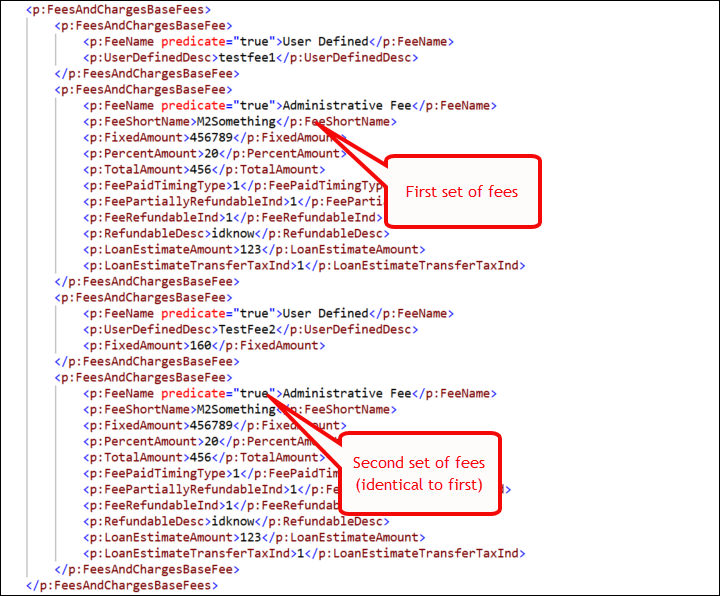 Response sample after enhancement: 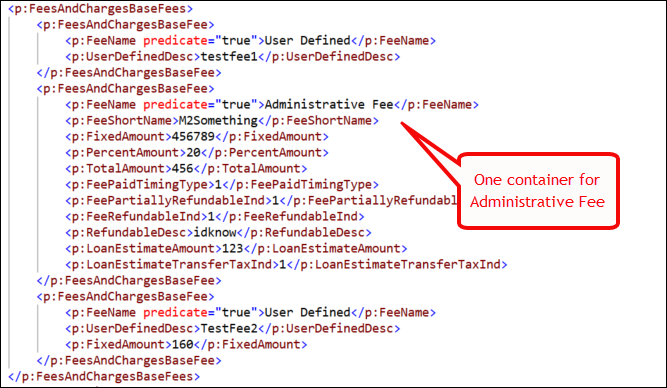 Note: if no
fees exist on the transaction, all fees from default data are appended
to the transaction; additionally, deposit fees with the same name that
have fee details present will have any matching detail nodes
merged. |
| Implementation Notes: This enhancement is available in the March release of Document Generation Services. |
| RAW_XML character behavior enhanced |
|---|
|
Summary: Users reported that improperly encoded characters appeared
when using the RAW_XML document format, particularly in the
copyrightDate value, after every
dwState element, after certain
emphasis elements, and where an empty line appears in
the response. This behavior has been enhanced: improperly encoded characters
no longer appear when RAW_XML is the selected document format. |
| Implementation Notes: This enhancement is available in the March release of Document Generation Services. |
| Integrators: EmailAddress added as a parameter in WSDL and response file |
|---|
|
Summary: The EmailAddress parameter has been added
to the DiscreteParty data type in the Expere Document
Services DocServices WSDL. Additionally, the response file
returns the EmailAddress in the
DiscreteParty container. Adding the email address to
Discrete Party opens up the opportunity to better integrate with electronic
delivery products, like Wolters Kluwer E-Sign (WKES). |
| Implementation Notes: This enhancement is available in the March release of Document Generation Services. |
| Document Generation Services: Unique identifier created for each notary block (eNotary feature enhancement) |
|---|
|
Summary: As an enhancement to our eNotary feature, we have modified
Document Generation Services to automatically add a
SignatureUniqueIdentifier element for each field in a
Notary Block; the SignatureUniqueIdentifier element now
connects the fields within the Notary Block to the notary signature so the
electronic delivery platform knows which fields are associated with each
specific notary signature. Note that we updated the Expere Engine in 2020 Release Three with this enhancement; see PBI 647196. Note: The
SignatureUniqueIdentifier element can be present as
a child in the <SignaturePoint/> and in the
<FillableField/> (<Fillablefield/>
and ) set areas of
the transaction request. |
Technical Notes: See the following
<SignaturePoint/> >
<SignatureUniqueIdentifier/> code sample
below: |
| Implementation Notes: This enhancement is available in the March release of Document Generation Services. |
JanuaryExternal release date is January 2021.
- Document Generation Services version: 20.3.0.2744
- Expere Engine version: 20.3.0.3249
- OPPSA version: 20.7.0.151
- DocViewer version: 20.3.0.616
- Document Generation Services Core version: 20.3.2595
- Document Generation Services Core DocViewer version: 20.3.2595
- Security Administration version: 3.1.1.1200
- EZ Config:
- EZConfig Packages and Packets version: 2020.9.0.2457
- EZConfig Default Data version: 2020.11.0.903
- EZ Config Service version: 2020.5.0.58
- EZ Gateway version: 2020.9.0.265
- Databases:
- Document Generation Services Database version: 20.3.0.2744
- OPPSA Database version: 20.7.0.151
- Packages and Packets Database version: 2020.9.0.2457
- Default Database version: 2020.11.0.903
January Installation / Upgrade notes
Note the following:
- No third party updates were applied for this monthly release.
- No transform variable changes were made.
Changelog entries
| Expere Engine: Unique identifier created for each notary block (eNotary feature enhancement) |
|---|
|
Summary: As an enhancement to our eNotary feature, we have modified
the Expere Engine to automatically add a
SignatureUniqueIdentifier element for each field in a
Notary Block; the SignatureUniqueIdentifier element now
connects the fields within the Notary Block to the notary signature so the
electronic delivery platform knows which fields are associated with each
specific notary signature. Note: The
SignatureUniqueIdentifier element can be present as
a child in the <SignaturePoint/> and in the
<FillableField/> (<Fillablefield/>
and ) set areas of
the transaction request. |
Technical Notes: See the following
<SignaturePoint/> >
<SignatureUniqueIdentifier/> code sample
below: |
| Implementation Notes: This enhancement is available in the January release of Document Generation Services. |
| Expere Engine: Response updated to return EmailAddress in DiscreteParty |
|---|
|
Summary: The DiscreteParty parameter has been
updated to return an Email Address value (EmailAddress) in
the Expere response file when provided in a request transaction. |
Technical Notes: Sample request:
Sample response: |
| Implementation Notes: This enhancement is available in the January release of Document Generation Services. |
| Expere Engine: Support for Font, FontSize, and Underline added for Signatures |
|---|
|
Summary: It was determined that Expere needed to support specifying a
specific font and its size, and the ability to add an underline to a
Signature and Signature Date field. As a result Font,
Font Size, and Underline parameters
are now supported for the SignatureField and
SignatureDateField elements. |
| Implementation Notes: This enhancement is available in the January release of Document Generation Services. |
Integrators: WSDL and response file updated to
use DocumentProfileId in
DocInstance |
|---|
|
Summary: Previously, the DocumentProfileId parameter
resided within the eOriginal data type. We have determined
that we need to place the parameter within a more meaningful location; as a
result, the DocumentProfileId is now in the
DocumentInstance parameter. The new location, combined
with other parameters within the DocumentInstance parameter
will provide more context as to which Document Profile ID's correspond to a
particular document. As a result, we have updated the Document Generation
Services DocumentService WSDL to add a
DocumentProfileId to the DocInstance
parameter. The response file will now return the
DocumentProfileId element in the
DocInstance container.Note: This is an optional
parameter and will only appear in the response when the eOriginal
Document Profile ID is present for the given document. |
Technical Notes: Sample response file below
(DocumentProfileId is bolded at the bottom of
the DocInstance
container): |
| Implementation Notes: This enhancement is available in the January release of Document Generation Services. |