Transaction Data in Barcodes: Formatting and Examples
Transaction data within barcodes is supported within Expere EZ Config Packages and Packets.
Types of Schema Points (xpaths)
Transaction data (Knowledge Base schema point referred to as an xpath) can be specified in the barcode pattern as a variable, which is then resolved with a value during Expere Document Generation request processing.
There are two types of schema points:
- Non-Repeatable Elements (/txn-level schema points): A schema point that is referenced once with one corresponding value in the transaction XML file.
- Repeatable Elements (collection/container schema points): A schema point that is repeatable, used to collect multiple pieces of data for each occurrence. For instance, if multiple borrowers exist, this element is repeatable with corresponding schema points and values for each borrower.
Formatting Schema Points for use in the Barcode Pattern
- To use schema points (xpaths) as variables in the pattern, each xpath must
be enclosed with the percent (%) symbol to indicate it is a variable for
Expere processing logic.
- Example: %/Txn/OrgLegalName%
- Use of a repeatable schema point (xpath) allows for additional formatting
syntax for further configuration:
- Specific Repeatable Element:
- Brackets with an index number value can be used to indicate
which repeatable element value to use if multiples are
present in the transaction XML file.
- Example: %//Txn/Notes/Note[1]/LoanIdentifier%
- Brackets with an index number value can be used to indicate
which repeatable element value to use if multiples are
present in the transaction XML file.
- Iterate Repeatable Elements:
- A wildcard symbol for a repeatable xpath can be used to
indicate that processing logic should iterate through all
repeatable elements and apply the value appropriately to the
corresponding document instance.
- Example: %/Txn/Deposit/Accounts/Account[#]/AccountType%
- A wildcard symbol for a repeatable xpath can be used to
indicate that processing logic should iterate through all
repeatable elements and apply the value appropriately to the
corresponding document instance.
- Specific Repeatable Element:
General Processing Rules
- If a schema point (xpath) is specified in the barcode pattern and the transaction XML file does not include that xpath or no value is present, Expere processing renders the barcode without any value.
- For repeatable schema points (xpath) using the wildcard to indicate
iterating, Expere processing uses the value of the first repeatable element
(index=1) from the transaction XML file to include in the barcode if a given
document instance does not include a corresponding value in the transaction
XML file. Note: To avoid errors during processing, for nested repeatable schema points, each collection/container element must indicate a specific index number or the wildcard symbol if multiples are present in the transaction XML file.
- Example: %/Txn/Deposit/Accounts/Account[#]/Holders/Holder[#]/PartyType%
- If the barcode pattern includes a repeatable schema point (xpath), the system uses the value of the first repeatable element (index=1) from the transaction XML file when resolving the barcode pattern for documents that produce a single instance.
Barcode Rendering Examples
Example 1: Non-repeatable schema point
Transaction XML Data: Assume the transaction includes data for a non-repeatable schema point with the desire to include the value in the barcode.
Organization Legal Name Value = WestBranch
Barcode Pattern
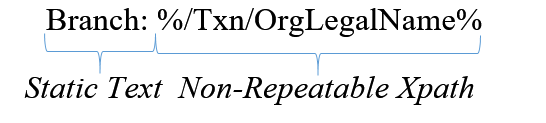
Barcode Rendering
For all documents rendered, the barcode value is resolved as follows:
Branch: WestBranch
Example 2: Repeatable schema point using an Index to indicate use of a specific value
Transaction XML Data: Assume the transaction includes 2 notes, each possibly having a different value for the loan purpose type with the desire to always include the first repeatable element in the barcode for all documents rendered.
Note [1]: Purpose Type=Commercial
Note [2]: Purpose Type=Agriculture
Barcode Pattern
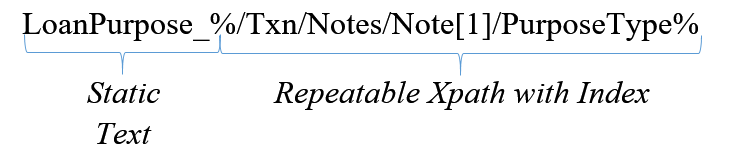
Barcode Rendering
For all documents rendered, the barcode value is resolved to include first repeatable element ([1]) value as follows:
LoanPurpose_Commercial
Example 3: Repeatable schema point using wildcard to indicate iterate processing
Transaction XML Data: Assume the transaction includes data for 2 deposit accounts, each with a corresponding account identifier value to include in the barcode for the 2 instances of the Truth In Savings Disclosure and one instance of Terms and Conditions.
Account [1]: Type=Savings, Account Identifier=111
Account [2]: Type=Checking, Account Identifier=222
Barcode Pattern
Barcode Rendering
Assume that the transaction produces 2 documents; one that produces an instance for each type of account and the other that produces one instance for the transaction.
Truth In Savings Disclosure – Generates an instance for each account:
- Truth In Savings-Savings Barcode Value: Type_111
- Truth In Savings-Checking Barcode Value: Type_222
Terms and Conditions – Generates single instance for the transaction:
- Document Barcode Value: Type_111
Error Handling Rules
Expere Document Generation request processing will error for the following reasons.
- Error: Unable to extract value for xpath [xpath name] for barcode pattern. More
than one value returned.
- If a schema point (xpath) is a repeatable element and does not have an index or iterator wildcard specified and resolves to multiple values based on the transaction XML file, the request processing will error.
- Error: Unable to extract value for xpath. Invalid xpath expression.
- If a schema point (xpath) is specified in the barcode pattern with an incorrect format, the request processing will error (e.g. extraneous forward slashes).