Barcode Details: Defining the Barcode Pattern
The barcode pattern can be constructed with one or more optional components. The pattern may include any combination of the following components:
- Static text. Any character (letter, number, symbol). The percent (%) symbol cannot be used as that is the reserved delimiter symbol for variables.
- Expere predefined system variables
*. The following predefined elements are available for use:
- %page% . Individual page number of the document.
- %totalpages%. Total number of pages for the document.
- %docsequence%. Document sequence number. This variable is computed across all documents rendered, not per the document set for each packet.
- %docsequencetotal%. Total document sequence number. This variable is computed across all documents rendered, not per the document set for each packet.
- %docname%. Instance display name of the document.
- %date%. Current system date in MM/DD/YYYY format.
Note that these elements must be defined exactly as named as they are case sensitive. If entered incorrectly or otherwise mismatched, the system will treat them as static text when rendering the barcode.
- Transaction data. (Knowledge Base schema point referred to as an xpath.)*
Schema points (xpaths) can be specified in the barcode pattern as a variable which
is then resolved with a value during Expere Document Generation request processing.
- To use schema points (xpaths) as variables within the pattern, each xpath must be enclosed with the percent (%) symbol to indicate it is a variable.
- The values for each schema point (xpath) are provided within the transaction XML file and used when resolving the xpath variable specified within the barcode pattern.
- Packages and Packets Metadata Title Variables*. Any metadata title(s)
defined in the Define Metadata card can be used in the pattern as a variable which
would be resolved with a value during Expere Document Generation request processing.
- To use Metadata Titles as variables in the pattern, the metadata value must be enclosed with the percent (%) symbol to indicate it is a variable.
- The values for each Metadata Title are entered per each document in the package. This is the value used when resolving the Metadata Title variables used in the barcode pattern.
Note that these elements must be defined exactly as named as they are case sensitive. If entered incorrectly or otherwise mismatched, the system will treat them as static text when rendering the barcode.
*The variables in the pattern are placeholders or definitions to specific data which is resolved to use data values during processing.
Ordering: The order of the components in the barcode pattern defines the order of the data when constructing and rendering the barcode on the document.
Empty Values: When resolving Metadata Title variables where there is no corresponding value for a given document, the barcode will ignore the variable and concatenates the remaining components.
The barcode pattern must be entered using designated syntax for the variables so Expere Document Service requests can resolve the variable values correctly. Expere pre-defined System variables must be entered in the exact format as outlined above. Metadata Title Variables must be entered exactly as they are named when created in the ‘Define Metadata’ card.
The following values must be enclosed with the percent (%) symbol for system logic to recognize that those variable values need to be resolved:
- Expere predefined system variables
- metadata title variables
- transaction data schema points
Example:
The following example depicts use of all components.
- Assume a Metadata Title named ‘DocIDRef’ has been created.
- Assume for Document ABC, that a Metadata Value of ‘REFABC198’ was entered for Metadata Title ‘DocIDRef’.
- Assume the desired pattern includes pre-defined expere page variables, the Metadata Title as a variable, some static text to describe the variables as well static symbol as a delimiter for each value.
- Assume the value for schema point /Txn/Deposit/Accounts/Account/AccountType is Savings.
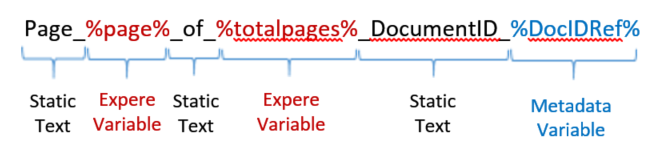
Page%page%of%totalpages%
Resolved Barcode Value
When the Expere Document Service request is processed, the system has logic to replace the variables with corresponding data values for the barcode rendered on each document.
Use the above example assumptions and pattern, the barcode would resolve as follows when the document generates:
Page_1_of_3_DocumentID_REFABC198_Savings