2023 Release Three (3) Expere Engine and Tools Changelog
Expere Engine Release: 2023 Release Three (3)External release date is October 2023. Expere Engine build number is: 23.3.0.5245.
| Expere: new Augment Transaction functionality supported |
|---|
|
Summary: The Augment Transaction file provides the ability to author
logic for setting an XPath value based on the transaction xml and have the
transaction xml updated (augmented) prior to autoselection and document
generation. For example: the value of
/Txn/Notes/Note/NoteCommercialsStandardType can be set
in the AugmentTransaction file based on other XPaths in the transaction xml.
Then /Txn/Notes/Note/NoteCommercialsStandardType’s value
can be referenced in PTRs verses repeating the logic defined in the Augment
Transaction file in the numerous PTRs throughout the content. Expere can
update, or "augment" an incoming request if the transaction xml contains an
/Txn/AugmentTransactionInd = true element and value.
When this value is provided, Expere resolves the XPath(s) in the related
line of business Augment Transaction file based on the transaction XML and
sets the XPath(s) in the transaction. Remaining autoselection logic is
employed and documents are generated. This functionality can be utilized
with content packages or EZ Config Packages and Packets’ Packages.
Note: In order to utilize this feature, users
must consume an updated base content package that supports this feature.
The content used with this feature must have been built with version
23.3 or newer. |
| OPPSA references removed from Hosted Expere and Document Generation Services applications; user documentation updated for Expere On-Prem, Hosted Expere, and Document Generation Services |
|---|
|
Summary: We have removed references to OPPSA-related components in
our user documentation. Actual OPPSA references in our software code,
including the WSDL, will be removed from our Expere On-Prem, Hosted Expere,
and Document Generation Services products in the following releases:
Note: Expere has not supported OPPSA since Fall
2021. |
| WCAG: Expere Engine enhanced to support embedded .PDF's |
|---|
|
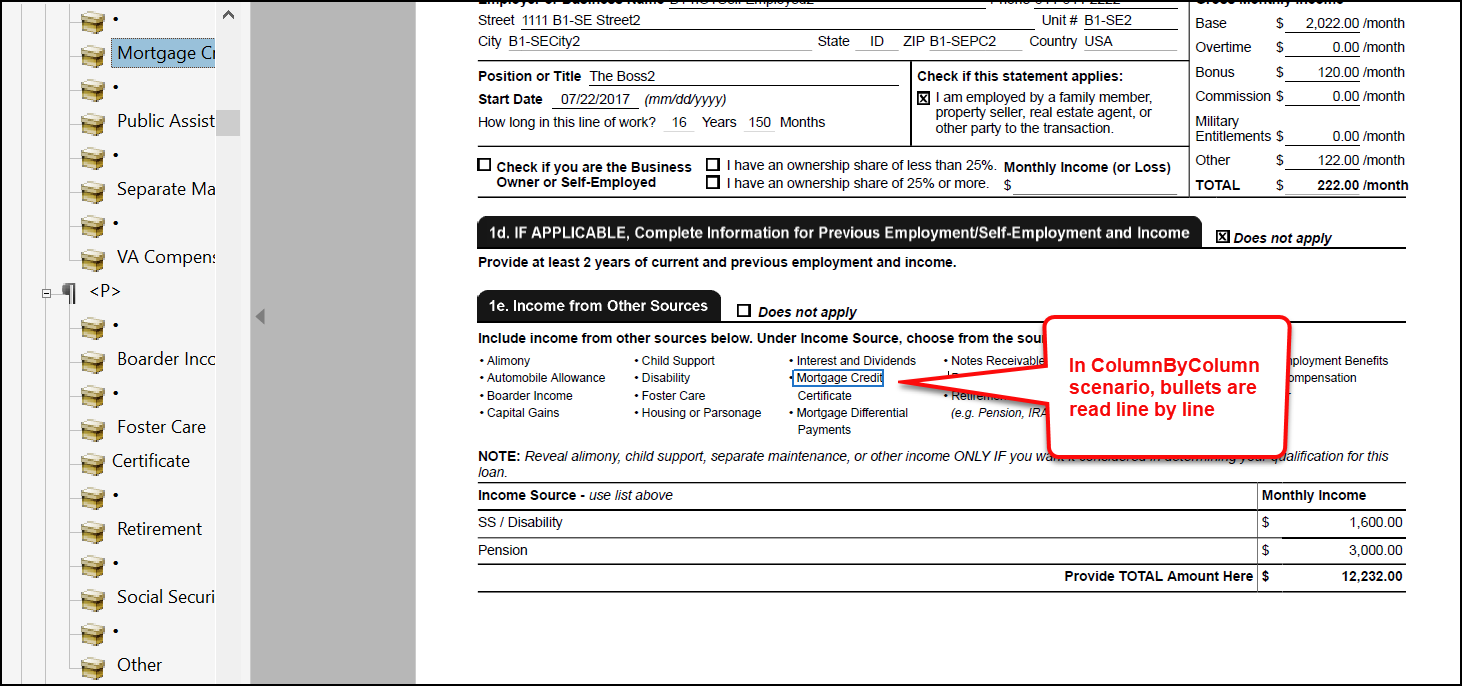
Summary: As part of our continued effort to create WCAG compatible
documents, we have updated the Expere Engine to support a new document
format that we refer to as Embedded PDF. The Embedded PDF will allow Expere
to support Tagged PDFs of what was traditionally Static REQs. We will
continue making enhancements to the Expere Engine for Embedded PDF REQ
files, so check back for items being identified and corrected. As part of
our continued work to support Tagged PDFs for Embedded PDF REQ files, we
will have implemented the below enhancements:
|
| WCAG: Expere Engine enhanced to support Tagged .PDF's |
|---|
|
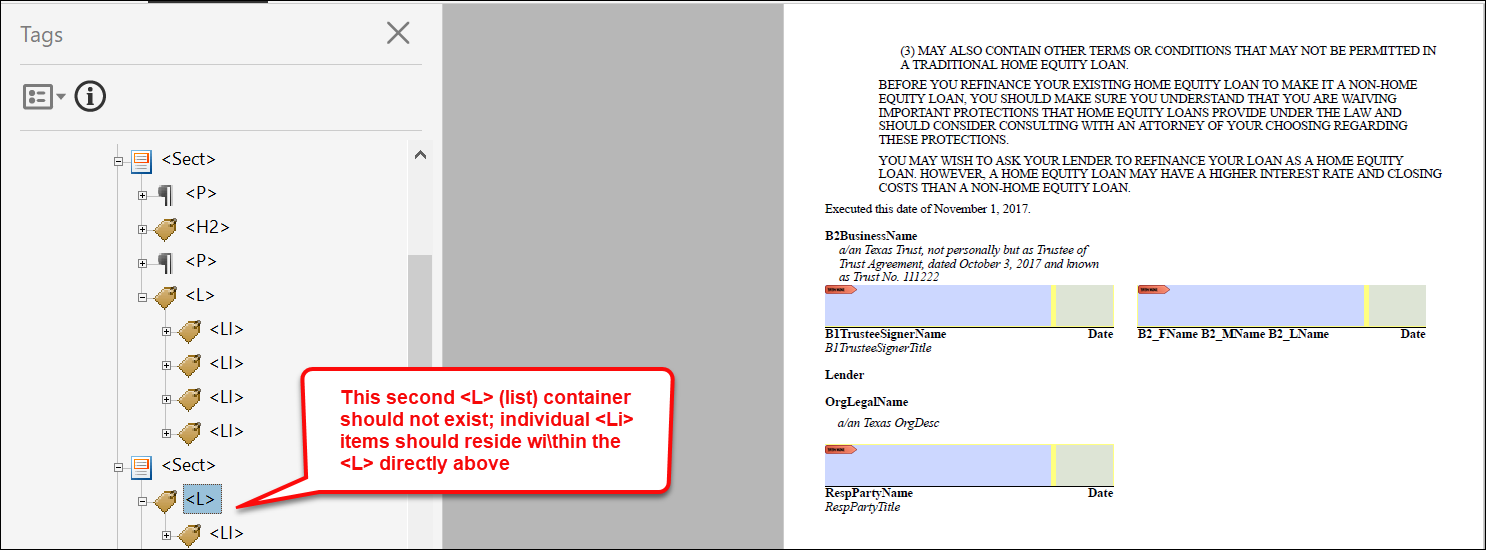
Summary: As a part of our continued effort to create WCAG ompatible
documents we have updated the Expere Engine to now support the generation of
Tagged .PDF documents. We will continue making enhancements to the Expere
Engine for Tagged .PDF support, so check back for items being identified and
corrected. As part of our continued work to support Tagged .PDF's, we have
implemented enhancements to resolve the following WCAG-related changes:
|


| Expere: option to specify Barcode Height for transaction barcodes |
|---|
|
Summary: The Expere Engine has been enhanced to support a specified
transaction barcode height through the use of a new "Height" element in the
Requirements Editor. This new element value is modified in the Requirements
Editor and can be used with the following barcode types:
Note: QR Barcode is not supported with
Transaction Barcodes. Note: If changing the
barcode height, it is recommended to test with scanning software to
ensure readability. |
| Engine: Apache FOP version in Adobe Acrobat displayed for merged PDF documents |
|---|
|
|
Summary: Per user request, we have enhanced the Expere Engine to
populate an Adobe Acrobat PDF properties with the Apache FOP version that
was used to generate the PDF in a merged PDF document. The PDF
Producer field accessible through Adobe Acrobat > Document
Properties dialog box > Description tab displays the FOP
version for individual PDF documents, for merged PDF documents, it displays
the iText version. Users can now view the FOP version used for merged PDF documents in the Document Properties dialog box > Custom tab; the FOP version will appear under the Value column for each document. |
| Expere: special characters supported in barcode value when applied by a mask in %docname% |
|---|
|
| Summary: It was reported that document generation fails when an ancillary barcode value utilizing %docname% (instance display name) contains a DTA with the "$1,234.50" output format. Analysis determined that special characters (i.e. “$”) being applied by the output format (i.e. “$1,234.50”) was not being handled properly. Expere has been enhanced so that ancillary barcodes containing special characters (i.e "$") being applied by an output format (i.e. “$1,234.50”) result in successful document generation with the appropriate barcode value. |
| Expere: Electronic signings enhanced when Signer Name is unknown - all party types |
|---|
|
Summary: The Expere Engine has been updated to set the value for
<SignatureText> to an underscore ('_') in the Expere
response when the party type does not have a Name value in the
transaction request (and is not determined until the actual signing process;
for example: a notary or witness).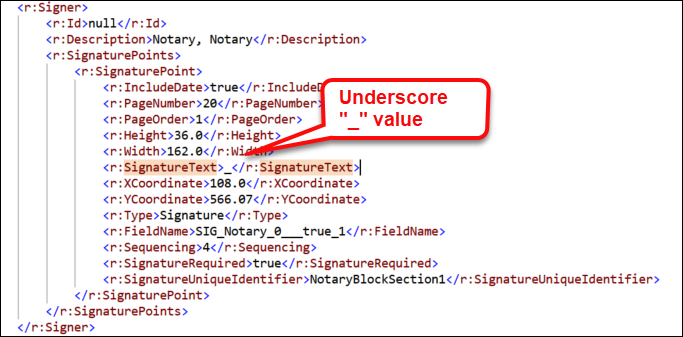 |
| Expere: Dynamic documents enhanced when using radio buttons / GroupIDs with a merged PDF |
|---|
|
Summary: When generating Dynamic documents into a merged PDF
containing radio buttons (mutually exclusive checkboxes), fields were not
named uniquely across the individual documents within the merged PDF. This
behavior has been enhanced for Dynamic documents using radio buttons with
GroupIDs. As a result, Expere now sets the GroupIDs uniquely between
different document instances when a PdfMerge or MergeCopyPDF
ancillary output is specified by appending "_#" to existing field names
(UniqueName _#; for example:
"OfferGroup_1"). |
| Expere: Engine updated to use Amazon Corretto Java 8 for WildFly and Expere .NET |
|---|
|
| Summary: The Expere Engine has been updated to use the latest version of Amazon Coretto Java 8 (8.382.05.1 as of this release) when using either Wildfly or Expere.NET. |
| Expere: support added for custom Embedded PDF documents when no desire to produce a Tagged PDF output |
|---|
|
| Issue: It was reported if an Embedded PDF was not completely tagged (fillable fields not tagged) that generating a standard PDF resulted in an error. |
|
Solution: The Expere Engine was updated to generated standard PDF's
when an Embedded PDF document is not completely tagged. Note: While these Embedded PDF documents will generate
as a Tagged PDF, they will not comply with WCAG
standards. |
| Engine: Saxon component change |
|---|
|
| Summary: The Expere Engine uses Saxon as its XSLT processer. Internal analysis determined that a recent Saxon upgrade for use with the Expere Engine was unnecessary at this time. As a result, we have changed the version of Saxon used by the Expere Engine to 9.9.1-7. |
Engine: BSI.Properties
acroformSupport property and eSignatureAndFieldSupport
ancillary output behavior resolved |
|---|
|
Issue: It was discovered during the course of testing a related issue
that when the BSI.Properties acroformSupport property was
set to "false" and the eSignatureAndFieldSupport ancillary
output was not passed in a transaction request that certain field lines,
checkboxes, and radio buttons would not appear in the resulting Dynamic PDF
document. 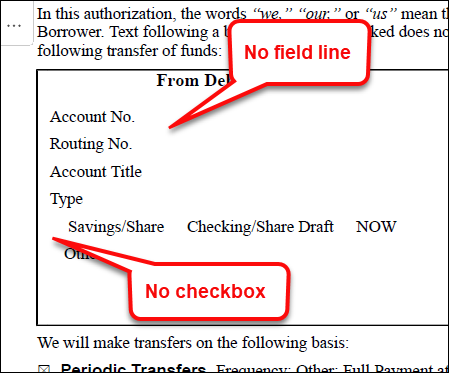 |
Solution: This issue has been resolved: fillable fields, checkboxes,
and radio buttons appear on Dynamic PDF documents when
BSI.Properties acroformSupport is set to "false" and
eSignatureAndFieldSupport is not passed in the
transaction request. |
| DocViewer: scrolling behavior updated |
|---|
|
| Summary: When clicking on the “Additional Appointment of Agents” field in the Data Entry drawer (left-hand pane), it did not advance to the corresponding location in the Document Display (body of the document in DocViewer). This behavior has been modified so that DocViewer now scrolls correctly to the correct location in the document. |
| DocViewer: caching protocol updated |
|---|
|
| Summary: DocViewer has been enhanced to only cache those documents that are autoselected, rather than all documents for a particular package. |