Duplicating Transactions
A transaction can easily be duplicated by right-clicking on the transaction tab and
selecting Duplicate.
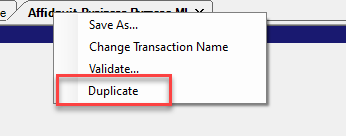
When a transaction is duplicated, Requirements Editor creates a duplicate transaction embedded within the document with the same structure and attributes. The new transaction has the same name as the original appended with "_Copy". Example: a duplicate of Affidavit-Business Purpose-MI becomes Affidavit-Business Purpose-MI_Copy.