Document Properties
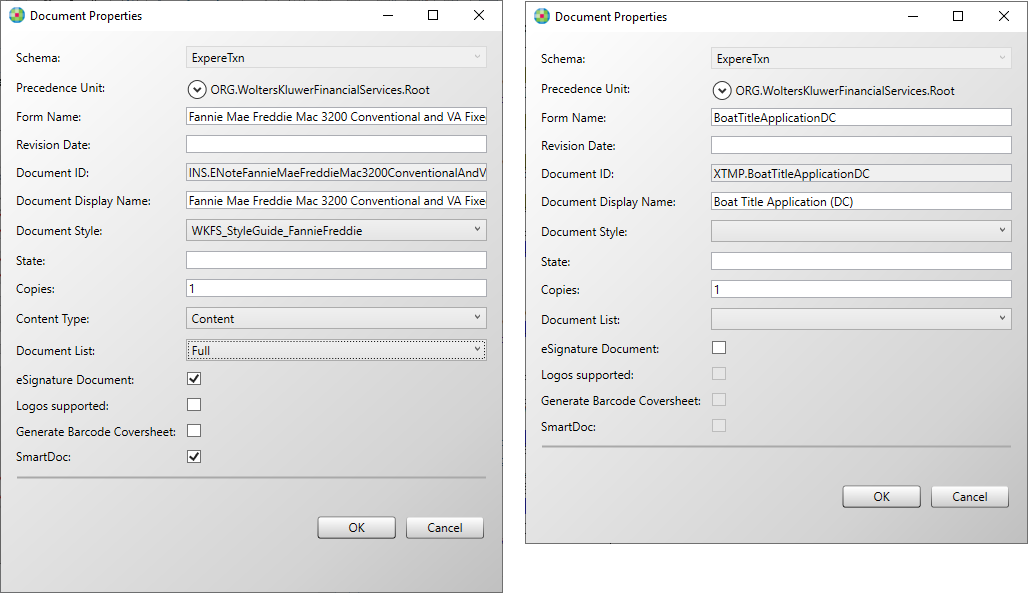
The Document Properties dialog provides the ability to set and view specific properties
associated with the current document.
Note: The Document Properties dialog displays
different properties for dynamic documents vs. static documents.
The Document Properties dialog can be displayed for an open document by selecting .
| Property | Description | Applies to Doc Type |
|---|---|---|
| Schema | Allows you to select the schema to which this document is to be
associated Note: You can only select the schema during document creation.
Once the document is created, the Schema selection option is
disabled. |
Dynamic Static |
| Precedence Unit | Allows you to set the precedence level for the document. By default, this value populates with as ORG.WoltersKluwerFinancialServices.Root representing the base precedence structure for an REQ file. | Dynamic Static |
| Form Name | The form name is typically determined prior to authoring the REQ file and is supplied in a requirements document (along with the Document ID and Document Display Name). The naming convention for a form name is to mirror the document name with no spaces. The form name is also the value used as the REQ file name. | Dynamic Static |
| Revision Date | Allows you to enter a revision date for the document. This date is not automatically updated when the document is saved. | Dynamic Static |
| Document ID | (Required) A value defining the technical name for the REQ file that is
used in processing. Valid values include the characters a-z, A-Z, 0-9,
underscore, and a dash; invalid characters include spaces or special
characters (&, ‘, []).
Note:
|
Dynamic Static |
| Document Display Name | (Optional) The form name as it is intended to appear in a list of documents. For example, a form name of ContributionInstructions might have a display name of Contribution Instructions. | Dynamic Static |
| Document Style | Identifies the stylesheet used for default metadata values and to
define the presentation of the form when a preview is generated. Default
choices are:
Note: The Document Style list includes only
stylesheets located in the Core folder. If the Core folder does not
exist, the feature defaults to the items in the ContentItems
folder. |
Dynamic Static |
| State | Used to define a jurisdiction target for the REQ file. | Dynamic Static |
| Copies | Allows you to indicate the number of copies to be made for this
requirements file when it is executed/utilized by other tools. The default
is 1. Note:
|
Dynamic Static |
| Content Type | Allows you to set the type of content this document is to be
considered. Choices are:
|
Dynamic |
| Line of Business | Allows you to select a Line of Business to associate with the
document. Note:
|
Dynamic |
| Document List | Allows you to select the following options:
|
Dynamic Static |
| eSignature Document | Indicates the document is an eSignature document. If this option is not selected, electronic signatures will not appear within the signature fields of the executed document. | Dynamic Static |
| Logos supported | Selecting this option allows a logo to be added to a requirement
document. Notice:
|
Dynamic |
| Generate Barcode Coversheet | Selecting this option sets the corresponding attribute in the document
to true (see example below) and generates a barcode coversheet.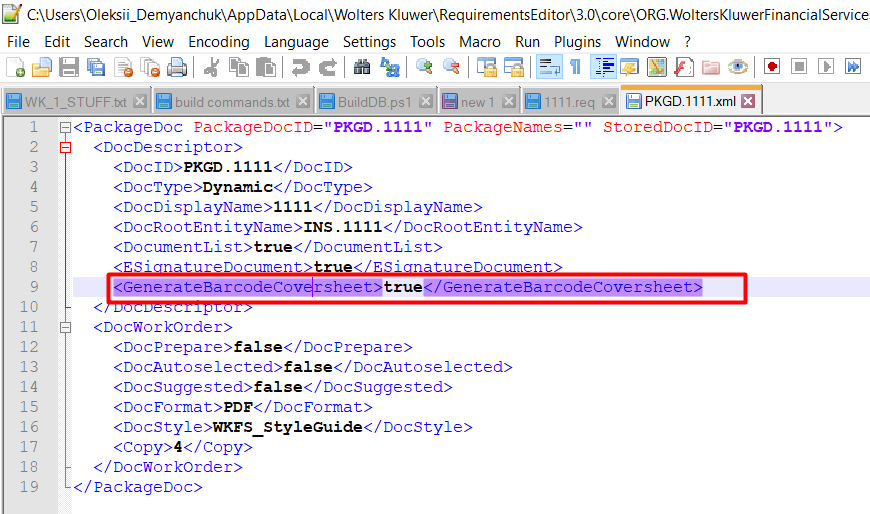 |
Dynamic |
| SmartDoc | Selecting this option causes the smartDoc attribute to be added
to the REQ file.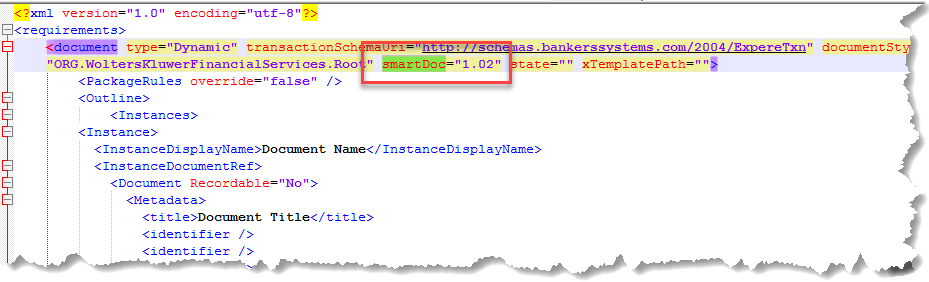 This subsequently adds a new element,
SmartDoc, to the PKGD file with a value of 1.02. 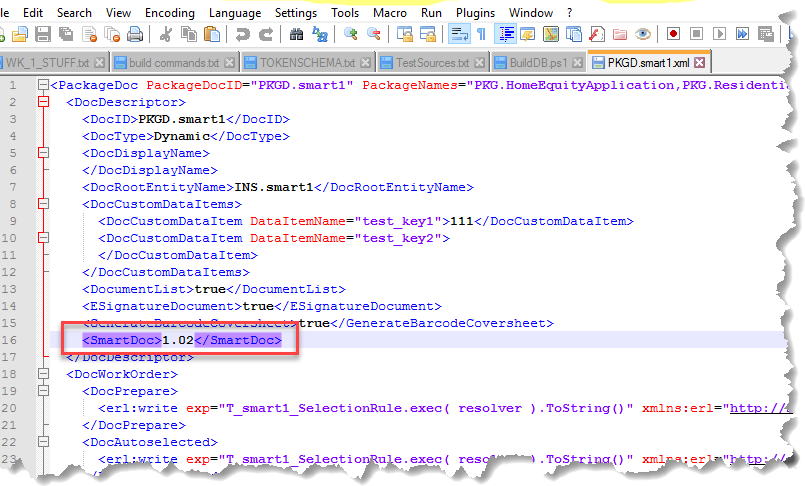 When executing a SmartDoc, the Expere Engine returns PDF and XML documents. Also, the XHTML is automatically extracted from the generated XML file and placed into a separate XHTML (.xml) file. The default applications are used to display each document. Note: This feature is currently disabled for
Static documents.
|
Dynamic Static |
| XTemplate | (Required) A required value that associates the REQ file to an XTemplate file. | Static |