Working with the Document Editor
The Document Editor is a unique authoring perspective providing an editable design view of a requirements file (REQ). This perspective opens as a separate window and displays the contents of active requirements file in an author, or design, view. This perspective provides an alternative to the Outline Editor that displays a requirements files in a text, or XML tags, view. Consider this perspective as the "author" mode whereas the Outline Editor perspective is a more traditional "text" mode for XML editing.
Note: The Document Editor is installed as an optional feature as part of the Requirements Editor advanced installation program.
This perspective provides a more visual means to author and edit document. As you author a document in the Document Editor, the document remains available in the Outline Editor and any changes made within either perspective are synchronized to update the corresponding perspective.
Note: This perspective is only available for dynamic documents.
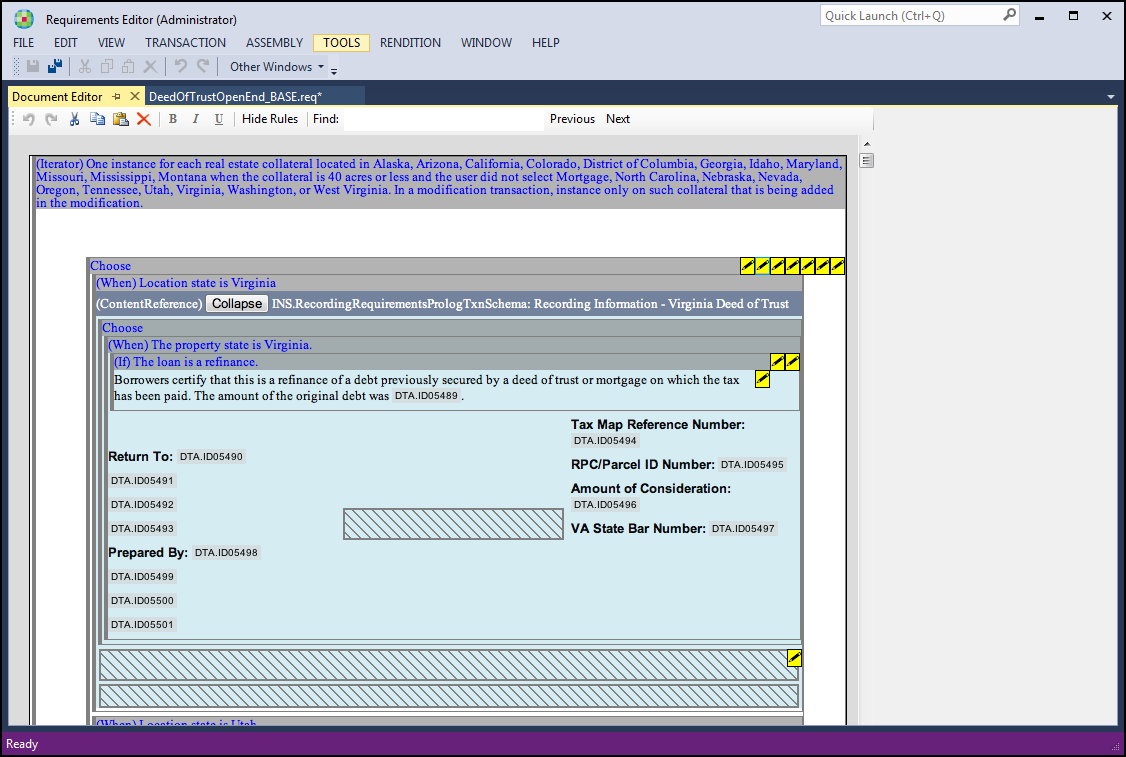
The Document Editor perspective is available from the View menu when a dynamic requirements files is open in the Outline Editor perspective. To view a dynamic document in author mode; in the View menu, click Document Editor. In this example, a general DeedOfTrust document is displayed in the Document Editor.
Note: Associated schemas are stored locally. This means the editor does not retrieve the schema each time a document is opened.