About Dynamic Document Structure
A typical dynamic requirements file resembles the following structure.
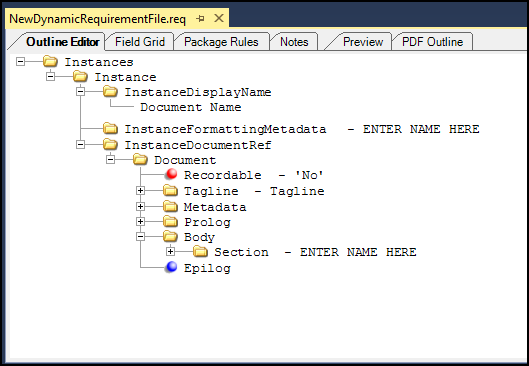
Document Child Elements
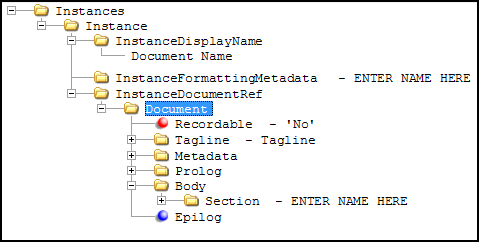
The following elements are valid as child elements of Document.
- Appendix
- BlankPageNotice
- Body (comprising sections)
- Choose
- Condition
- ConditionInverse
- ContentReference
- CoverPage
- EnableHighlight
- EnableSignatureBox
- EnableSignatureX
- Epilog
- FooterNotice
- HeaderNotice
- InactiveContent
- Iterator
- Metadata
- Note (the Note element must be added, it is not a default element of the Document node)
- Prolog
- RestoreScope
- SaveScope
- SuppressESignature
- Tagline
- Traits
- Adding a Traits element automatically adds three Trait child
elements with the Name element value for each already populated in
order to identify the Trait elements for LetterID, LetterDescription
and LetterVersion.
<Traits>
       <Trait>
              <Name>LetterId</Name>
              <Value></Value>
       </Trait>
       <Trait>
              <Name>LetterDescription</Name>
              <Value></Value>
       </Trait>
       <Trait>
              <Name>LetterVersion</Name>
              <Value></Value>
       </Trait>
</Traits>
It is possible to wrap the Trait, Name or Value elements within a Condition element.
- Adding a Traits element automatically adds three Trait child
elements with the Name element value for each already populated in
order to identify the Trait elements for LetterID, LetterDescription
and LetterVersion.
Document Element Attributes
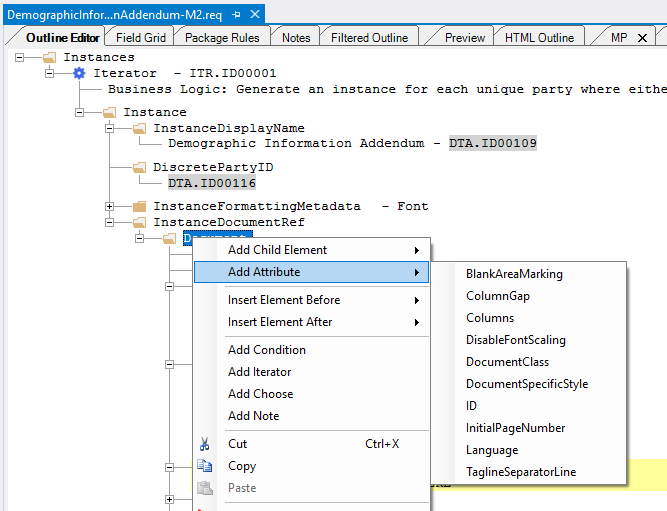
| BlankAreaMarking | Overrides the insertion of the “This area intentionally left
blank.” language. The StyleGuide standard and default setting includes this language in any vertical blank space that exceeds 1.5” in the body of the document (it will not appear at the end of the document if there is more than 1.5” of blank space). Set this value to No if the document you are creating should not print this language. An example of when this language should not be used is on a model form where additional text is not usually allowed. |
| ColumnGap | Indicates the column gap in inches or points. Setting this attribute overrides the default value of 22 points. |
| Columns | Overrides the StyleGuide standard and default of two (2) columns for the document layout. By setting the value for this attribute to one (1) the document content will span the entire width of the page. |
| DisableFontScaling | Disables the font scaling for the current document. Default is Yes. |
| DataFieldUnderline | Adds document level underlining functionality in the Requirements Editor. The attribute is used to apply underlines to all data fields within an entire document and is exclusively used with the Rendition plug-in. |
| DocumentClass | Currently has no impact on the document. |
| DocumentSpecificStyle | Used to indicate which stylesheet should be used for Non-Runtime publishing. |
| InitialPageNumber | Allows you to indicate the number at which page numbering will start. |
| Language | Allows you to set the language for the document. This value also affects certain elements, such as PageNumbering. For example, if Language is set to es or es-US the PageNumbering output will be Página # de # (ex.: Página 1 de 3). For documents that utilize the IntegratedDisclosures stylesheet, the output will be PÁGINA # DE # (ex.: PÁGINA 1 DE 3). |
| Recordable | Determines if the document is recordable. |
| Role | The value SmallBody denotes one-column format for Document content. |
| TaglineSeparatorLine | Used to place a horizontal line above the footer. Default
(attribute value not set) is the same as setting the attribute to
Yes. |