The Add Custom Node feature, available for all nodes (elements and attributes)
in a Transaction tree, allows you to create custom schema nodes without closing the
REQ to add it manually.
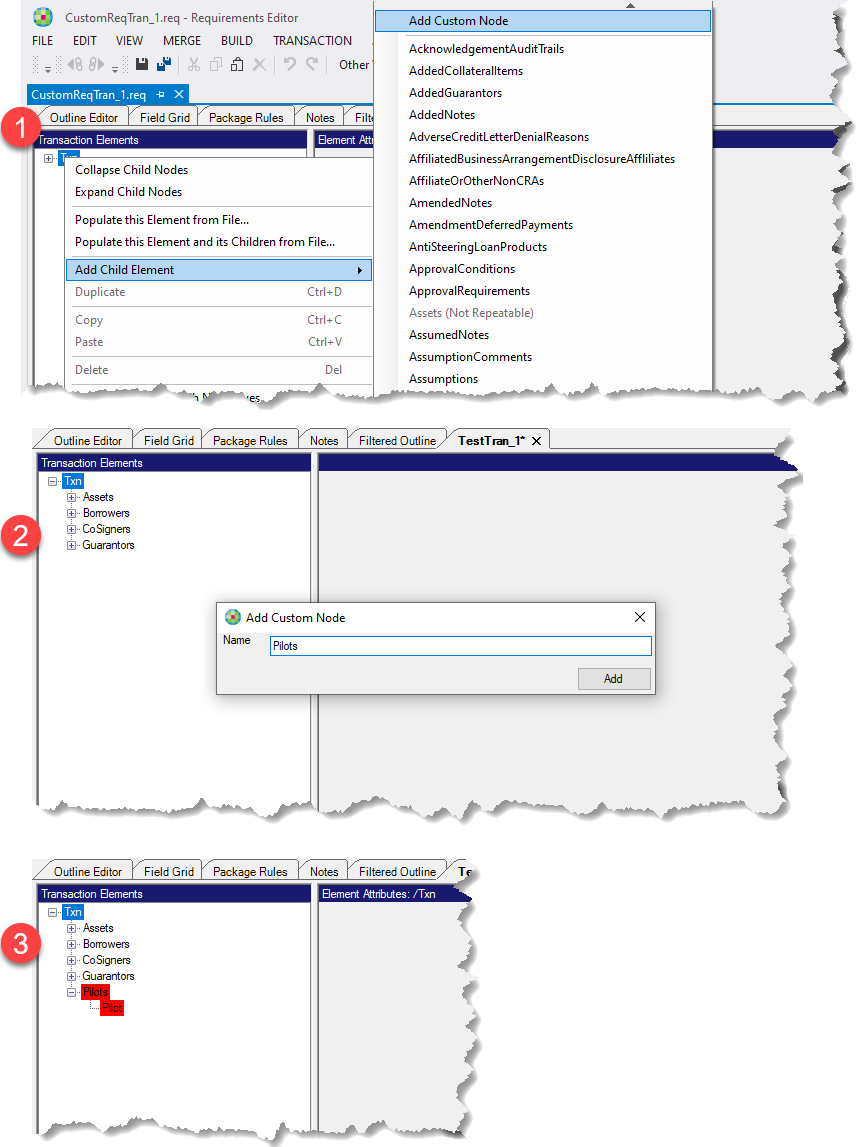
To add a custom Transaction node:
- Right-click the desired Txn node and select . The Add Custom Node dialog is
displayed.
Note: The Add Custom
Node feature is available anywhere within the
Transaction tree that the Add Child Element node
is available.
- Enter the name of the custom node and select Add. If
desired or necessary, continue to add a nested custom
node.
- The custom node(s) appear in the Transaction tree. In order
to easily distinguish the custom nodes from regular schema
nodes, custom nodes have a red background color.
|
|