Form View (Static Documents)
The Form View tab displays the entire document in a manner that resembles the strucuture and look of the form as it will appear when generated as a PDF. When using this Form View to view and edit a static requirements file, it is a common practice to open the PTR Editor. The PTR Editor displays the business logic and product technical rule for each field in the requirements file.
Form View is available exclusively for static documents and is the default
perspective displays when a static requirements file is opened. This is an example of
the Form View with the PTR Editor also open in a static document.
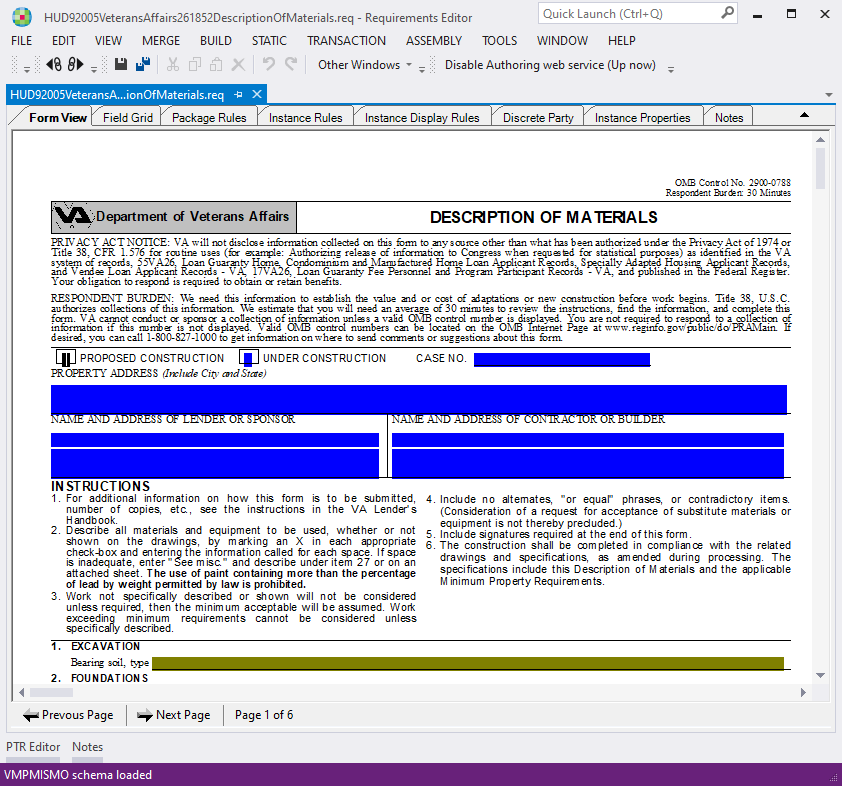
In the Form View, you can navigate through the document using the
Previous Page and Next Page buttons. You can also adjust how the
document is displayed in the perspective through several options available in the
View menu.
- Normal: Displays the document withing the document pane in the normal, or default size. This is slightly smaller than full page width expansion.
- Page Width: Displays the document with the full width expanded.
- Page Height: Displays the document with the full height of the document showing (from the top to bottom).
- Full Page: Displays the entire document within the document pane