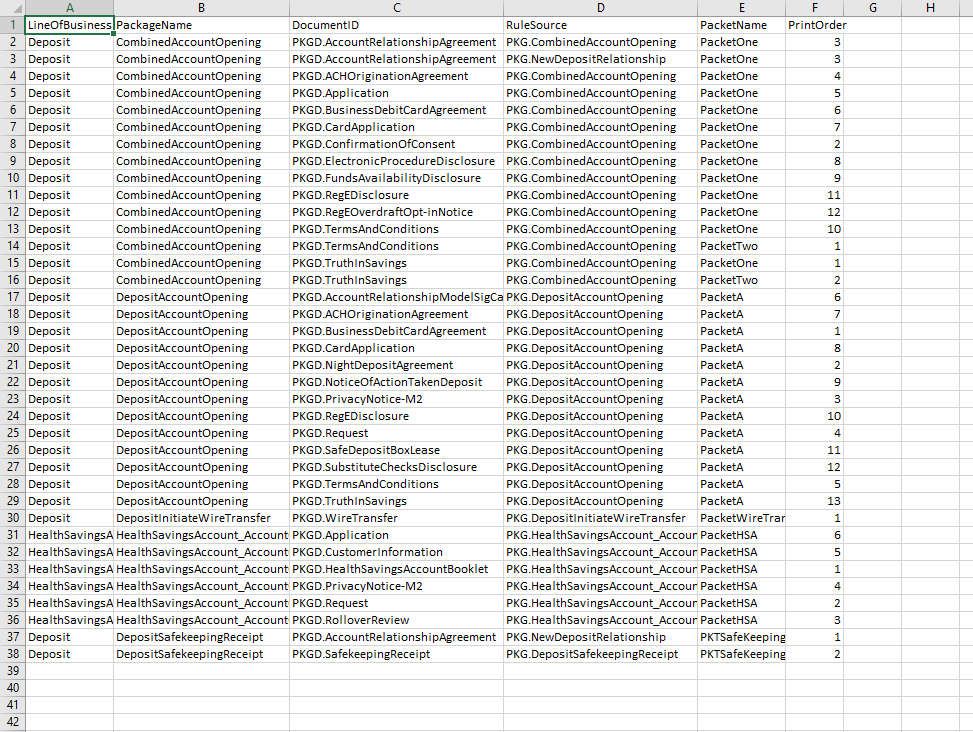
Print Order Report
The Print Order report returns a list of all the documents in the packets for each
package for a selected Alias and Line(s) of Business. The report includes the following
details:
- Line of Business
- Package Name
- Rule Source(s)
- Packet Name(s)
- Print Order
The report is based on the Package and the number of rows in the report is based on the number of documents in a package. This includes the documents with the same DocumentID but different Rule Sources. For example, a document that is included twice from separate Rule Sources is listed twice within the report.
If data is not returned for a cell, the cell is left blank. For example, if a package without corresponding documents or without a packet, the column is left blank.
Sample Print Order Report
The Content Print Order Report displays the report in the following format: