2024 Expere EZ Config Changelog
These changelog entries outline changes and enhancements made to the Expere EZ Config products for each release: Packages and Packets (PP), Default Data (DD), and EZ Gateway/EZ Service (EZ).
Hosted environments:See our Release Schedule calendar to view maintenance event information for the Production environment.
| DD: Preview or In Branch Document topic updated |
|---|
|
Summary: In order to bring clarity to working with
Preview and In Branch documents, The Working with Shelf Docs topic
has been retitled Working with Preview and In Branch Documents.
Also,
|
| PP: Options added for Discrete party MergePDF |
|---|
|
Summary: In order to facilitate the ability to merge
PDFs by discrete parties, two new values have been added to the
Output Type list:
For more information, refer to Packet Settings in the Expere EZ Config Packages and Packets User Guide. |
| EZ Gateway: Fields added for Discrete party MergePDF |
|---|
|
Summary: EZ Gateway InLine package has been updated to
support the following Ancillary Options (Output Types):
|
| EZ Service: SmartSign Plus Control Vault and Financial Asset in PnP - Audit Report Update |
|---|
|
| Summary: The Audit Report has been updated to reflect changes made to the Vault and to the Financial Asset data. |
| PP: SmartSign Plus Vault & Financial Asset control in PnP |
|---|
|
| Summary: Vault and Financial Asset toggles have been
added to the Package Details page. These toggles allow you to
indicate whether or not the item(s) should be vaulted or assigned as
a financial asset. The Package level toggles affect each toggle
for all documents. The Document level toggles affect only the
selected document. Each toggle has
three options: Off, Null (empty) and On.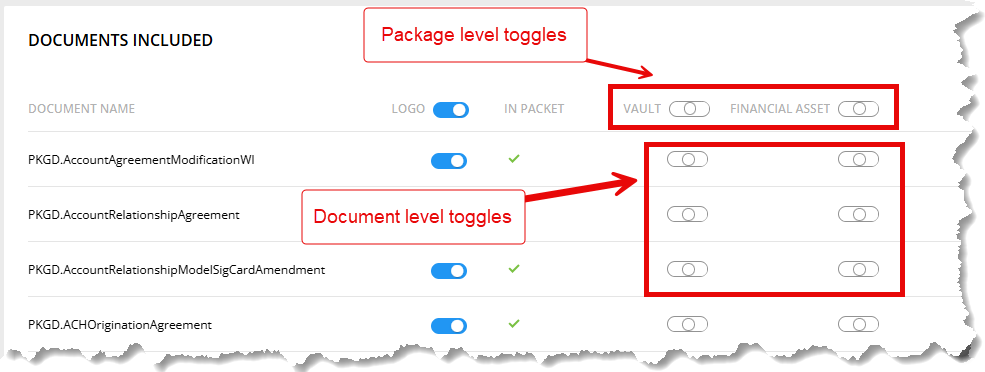
|
| EZ Gateway: SmartSign Plus Vault & Financial Asset control in PnP |
|---|
|
| Summary: The SmarSign Plus toggles for Vault and Financial Asset have been updated so that Packages and Packets overrides any values within the REQ files. |
| DD: Watermarks for Preview Documents |
|---|
|
| Summary: The watermark of "PREVIEW" is now applied for Preview documents in Default Data for the Customer Test environment. For more information, refer to About Watermarks in the EZ Config Default Data User Guide. |
| DD: APIs created/updated for Preview and In Branch Documents button |
|---|
|
Summary: The APIs connected to the Generate Document
button have been updated to ensure:
|
| DD: UI & Package API Call updated for Preview and In Branch Documents |
|---|
|
Summary: The following UI updates have been made
|
| DD: API created for Preview and In Branch Documents to call EZGateway |
|---|
|
| Summary: An API has been created for Default Data to
call EZGateway to get a list of packages in the table. UI drop down
lists have been updated to show the new data. The API calls
EZGateway to get the following Package and Packets data:
Also, a new transform variable,
DefaultData.EZGatewaySettings. HostUrl, has been created to
connect to EZGateway. |
| PP: API created for Preview and In Branch Documents |
|---|
|
| Summary: An API has been created for Default Data Docs in order for Default Data to call Packages & Packets. There is one new API per application (EZ Gateway, Default Data, Packages and Packets) based on the Alias selected which returns a list of packages containing packets. In turn, packets contain the documents. UI drop down lists have been updated to show the new data. |
| EZ: API created for Preview and In Branch Documents to call Packages and Packets |
|---|
|
Summary: An API has been created for Default Data to
call Packages and Packets. UI drop down lists have been updated to
show the new data. The API calls Packages and Packets for the
following data:
|
| DD: UI updated for Preview and In Branch Documents |
|---|
|
| Summary: The Default Data interface has been updated to
include a page for the Preview and In Branch Documents feature. The
Preview and In Branch Documents feature within Default Data is
identified as Generate Documents. This feature can be accessed by
selecting . A new topic, Working with Preview and In
Branch Documents, has been added to the Default Data
User Guide providing details to generate Preview and In Branch
Documents. |
| DD:/EZ: Indexes applied |
|---|
|
Summary: Indexes have been applied for Default Data and
EZService. Applied Indexes are as follows:
The existing migration has been updated to exclude
"Delete" |
| EZ:/PP:/DD: Latest dependent components updated |
|---|
|
| Summary: All dependant components for EZ Services, EZ Gateway, Packages and Packets and Default Data have been updated. This update does not include an Angular update. |
| DD: Unique index added to DB records |
|---|
|
| Summary: In order to help prevent duplicate organizations, policies and products, an ID has been added to the database for each record. These IDs are comprised of: Account + Alias+ LOB+ EntityName (org, product or policy). |
| DD: Upgrade to Angular 17 |
|---|
|
| Summary: Default Data has been upgraded to use Angular 17. No change in appearance or functionality has occurred. |
| DD: New holding pages created |
|---|
|
| Summary: Two new pages have been created for future availability. These pages, Select Documents and Documents, will be used for downloading Sample Docs and Docs. Refer to future release notes for more details. |
| DD: Change to columns |
|---|
|
Summary: The OrganizationName column has been
changed to Name. Also, the following columns have been
changed to allow only 255 characters:
|
| DD: Navigation bar display update |
|---|
|
| Summary: Previously, when various popup dialogs were displayed the navigation bar submenu was still accessible in certain instances, allowing for navigation away from the current page. The left navigation bar submenu has now been hidden when a popup appears on the screen. |
| DD: Import Default Data updates |
|---|
|
Summary: The Import feature of Default Data has been
updated to inform the user if they select a file:
|
| DD: Update to applicabilities management |
|---|
|
| Summary: Previously, during a Repost, the Applicability
was removed from the Policy and Product because in the new content
there is not such applicability. Consequently, the Audit Report
showed a record only for removed applicability from Policy, but not
from Product. Default Data has been updated so that the Audit
Report correctly displays all updated records. |
| DD: Update to deleting all Organizations |
|---|
|
| Summary: Previously, the Organizations table was
viewable at the bottom of the Organization List page when all
Organizations were deleted, flashing for a few seconds before
disappearing. This has been resolved and now the
Organizations table does not appear after deleting all
Organizations. |
| PP: Duplicate Type in Audit Report |
|---|
|
| Summary: Previously, when performing an Import or
Repost, duplicates were appearing in the Type and Entity columns in
the Audit Report. This was due to how data was being handled in the
database. Now, the Entity column is empty when the Type and
Entity columns contain the same value. |
| PP: Update webhelp links |
|---|
|
Summary: Due to restructuring of online documentation,
links to help have been updated for the following pages:
|
| PP: Update to Watermarks Location list |
|---|
|
Summary: Previously, the Watermarks Location list was
not fully displayed.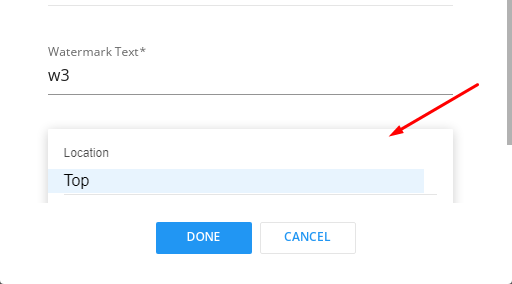 This
has been resolved and now the entire list displays as
expected. 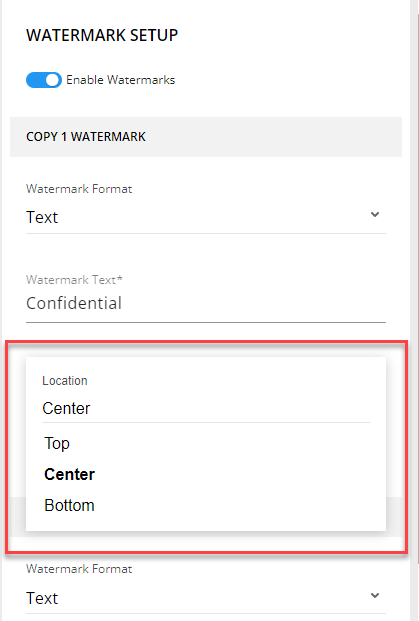 |
| PP: Upgrade to .NET8 |
|---|
|
| Summary: Packages and Packets has been updated to support .NET 8. |
| PP: Folder nesting reduced |
|---|
|
| Summary: In order to reduce the number of folders used in the hosting of Packages and Packets, the folder structure has been changed from WoltersKluwerFS.PKGPKT\angularApp\pkgpkt to WoltersKluwerFS.PKGPKT\angularApp\. |
| PP: Movement of disabled Add icon resolved |
|---|
|
| Summary: Previously, when buttons were disabled (+ Add Packet, + Add Barcode, + Add Metadata, + Add GroupName), the Plus icon (+) portion of the button still had motion (indicating a clicked button) when clicked. This has been modified so that the Plus icon of a disabled button does not move when clicked. |
| PP: SmartSign Plus: Document link added |
|---|
|
Summary: A link has been added to the top of the
SmaretSign Plus card to provide easy access to the SmartSign Plus
Integration topic of the Expere EZ Config Packages and Packets User
Guide.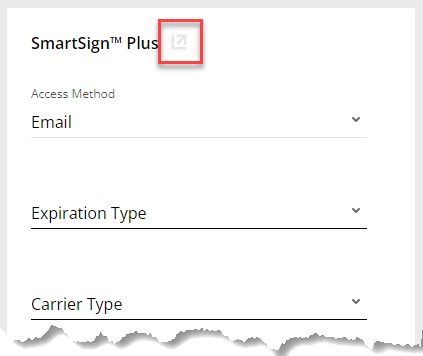 |
| DD: Upgrade to .NET8 |
|---|
|
| Summary: Default Data has been updated to support .NET 8. |
| DD: Bulk Delete update |
|---|
|
| Summary: In order to identify exactly which records are being deleted, the LOB is now displayed on the Delete Details page. |
| DD: Web element typography updated |
|---|
|
Summary: Various web elements have been updated to
ensure consistency in font, font size and font color. The following
pages were enhanced:
|
| DD: Update to Audit Report for New Bulk Delete Page |
|---|
|
Summary: In order to help track bulk deletes, the Audit
Report now includes bulk delete actions. The actions in the report
include:
Multiple report records can be performed for an Alias name
(after an Alias has been repopulated). |
| DD: Updates for Export Activity for Default Data |
|---|
|
Summary: The Export Activity for Default Data page has
been updated so that:
|
| DD: Update to Delete Activity for Default Data page |
|---|
|
Summary: Previously, when visiting the Delete Activity
for Default Data page with no content source alias, an error message
with a red background was displayed at the top of the page.
Likewise, when selecting ADD EXPORT, a similar message was
displayed.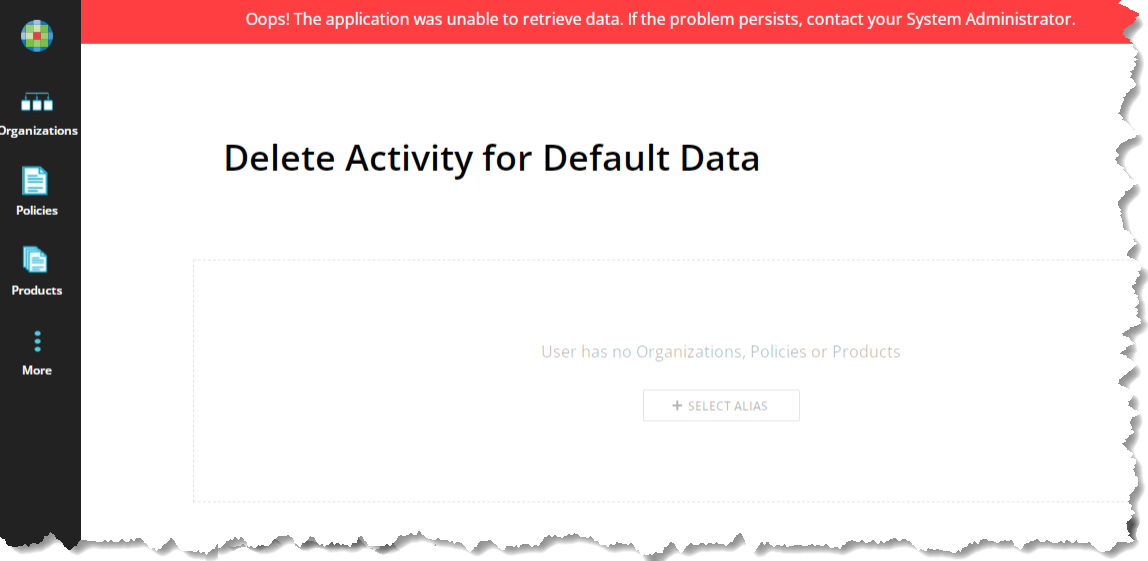 With
the advent of the previous task (Updates for Export Activity for Default Data), this
page has been updated so that the error message does not appear
with the red banner. |
| DD: Sorting update for Oganizations page |
|---|
|
| Summary: The Organizations page has been updated so that: when sorting organizations on the Organizations page by Content Source Alias, selecting the Organizations button from the main navigation will reset the sorting to the default alphabetical order by Name. |
| DD: Update to Navigation bar access |
|---|
|
| Summary: Previously, when various popup dialogs were displayed the main navigation bar was still accessible, allowing for navigation away from the current page. The left navigation bar has now been disabled during these instances. |
| DD: Blue line styling updated |
|---|
|
| Summary: The blue lines under input fields of the Add Organization, Add Policy, Add Product, Copy Organization, and Logo Setup dialogs have been updated to a thickness and appearance consistent with the application. |
| EZ: Upgrade to .NET8 |
|---|
|
| Summary: EZService and EZGateway have been updated to support .NET 8. |
| PP: Scrollbar modifications in edit.doc.list.modal.list.component component |
|---|
|
| Summary: The "perfect scrollbar" has been replaced with the standard browser scrollbar in the edit.doc.list.modal.list.component component. |
| PP: Scrollbar modifications in setrule-panel.component |
|---|
|
| Summary: The "perfect scrollbar" has been replaced with the standard browser scrollbar in the setrule-panel.component. |
| PP: SmartSign Plus, Create Package - Expiration Type values updated |
|---|
|
| Summary: The Expiration Type value has been changed from Expire to Paper to Expire to Print. |
| PP: SmartSign Plus, Create Package - Field name updates |
|---|
|
Summary: Within the SmartSign Plus card the following
changes were made to field names:
|
| DD: Update to Audit Report for New Bulk Delete Page (Intermediate Table) |
|---|
|
| Summary: |
| DD: Audit report updated |
|---|
|
Summary: The Audit report now contains the values for
Insurer, Policy and Organization Types.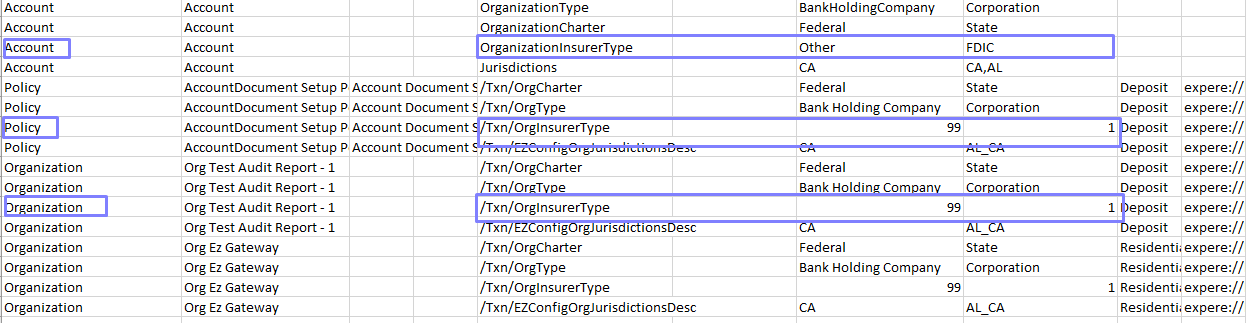 |
| DD: Ability to Delete Bulk Delete Record |
|---|
|
| Summary: Default Data now offers the ability to delete Bulk Deletion records. Deleted records are not retained and are irretrievable. |
| DD: New UI tests |
|---|
|
| Summary: New UI tests have been created to handle wrong names with symbols in the Add Organization, Add Policy, and Add Product popups and also in the single Copy Organization, Copy Policy, and Copy Product popups. |
| DD: Scrollbar modification |
|---|
|
| Summary: The previous scrollbar has been replaced with a modern scrollbar. |
| DD: Bulk Delete implemented |
|---|
|
| Summary: A new Bulk Delete feature has been implemented
for Default Data. This allows you to delete all Policies,
Organizations or Products simultaneously for a chosen Content Source
Alias. Deleted
content is not retained and irretrievable. Only the Basic and
Edit permission levels have the ability to sue the bulk delete
feature. |
| DD: Handling of Audit Report date range |
|---|
|
Summary: The Audit Report date range has been updated
to validate the dates entered, such as:
|
| PP: SmartSign Plus, Print Carrier Type | ||
|---|---|---|
|
||
Summary: A new field, Print Carrier Type, has been added
to the SmartSign Plus details card. The following options are
currently available:
|
| PP: SmartSign Plus, Create Package update |
|---|
|
Summary: The following XSD path were updated as
indicated:
|
| PP: SmartSign Plus, Print Return Address Fields |
|---|
|
Summary: The following fields have been added to the
SmartSign Plus details card to facilitate entering Print Return
Address information:
These fields are free text fields. |
| PP: SmartSign Plus, Print Return Address State |
|---|
|
| Summary: A new field, Return Address State, has been added to the SmartSign Plus details card. This field is a two digit drop list containing the abbreviated forms of all US territories, as well as military bases (AE and AP) This field is located in the SmartSign Plus card under the Return Address City field. |
| PP: Scrollbar modifications in setrule modal list control |
|---|
|
| Summary: The "perfect scrollbar" has been replaced with the standard browser scrollbar in the setrule modal list component. |
| PP: Scrollbar modifications in dropdown control |
|---|
|
| Summary: The "perfect scrollbar" has been replaced with the standard browser scrollbar in the dropdown control. |
| DD: Multiple IRAs UI Update |
|---|
|
| Summary: An information icon has been added to the
Assign Policies on the Product Details page. When hovered over, the
following message is displayed: IRA policies
should not be combined with non-IRA policies. For additional
information, see Help |
| DD: Edit Policy Applicabilities enhancement |
|---|
|
| Summary: The scrollbar has been removed for the Edit Policy Applicabilities popup (after the Edit button is selected). |
| DD: Search Enhancement |
|---|
|
| Summary: The Search feature has been updated so that after searching for an Organization, Policy or Product (depending on the page you are on). If you use the column heading to sort the displayed records and then clear the Search field, all records are displayed again and sorted alphanumerically by the Name. |
| DD: Modification to Export Types |
|---|
|
Summary: The Add Export dialog has been updated to so
that the Type list contains only those types that exist in the
account. For example, if no products have been configured for the
Organization, Products will not appear in the Type
list.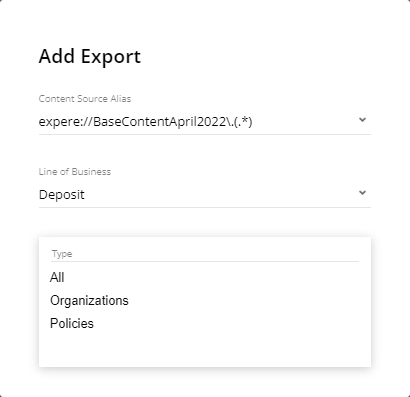 |
| DD: Changes to data range in Audit Report |
|---|
|
| Summary: Previously, the styling was inconsistent for the Audit Report Date Range controls. These controls have been updated to ensure that the date ranges match and the styling is consistent. |
| DD: Bulk Delete implemented |
|---|
|
Summary: A Bulk Delete function has been implemented on
the Organizations, Policies and Products pages. This feature allows
you to select any number of items on the page and then select
Delete from the footer of the page. |
| DD: Copy Policy enhancements |
|---|
|
| Summary: Copy Policies has been modified to have the same appearance as previous versions. This includes verifying background colors and titles. |
| DD: Update Rule 13.2.5 |
|---|
|
| Summary: Rules have been updated in order to meet the ASVS security requirements for Default Data. Now, REST services explicitly check the incoming Content-Type to be the ones expected, such as application/xml or application/json. |
| PP: SmartSign Plus, Create Package - Access Method values updated |
|---|
|
| Summary: Within the SmartSign Plus Details section, The display value in the UI has been changed from API to In Person. Also, values for this option have been updated to only two possible values: Email (default) and In Person". |
| PP: SmartSign Plus, Create Package - Values can now return to non-selected |
|---|
|
| Summary: The SmartSign Plus Details Create Package options now have the ability to reset to their non-selected states with the exception of the Access Method field. |
| PP: SmartSign Plus, Create Package - New Print Cost Center field |
|---|
|
Summary: A new field, Print Cost Center, has been
added to SmartSign Plus Details card. This field is a text box allowing
you to freely enter the associated Print Mailing Cost Center.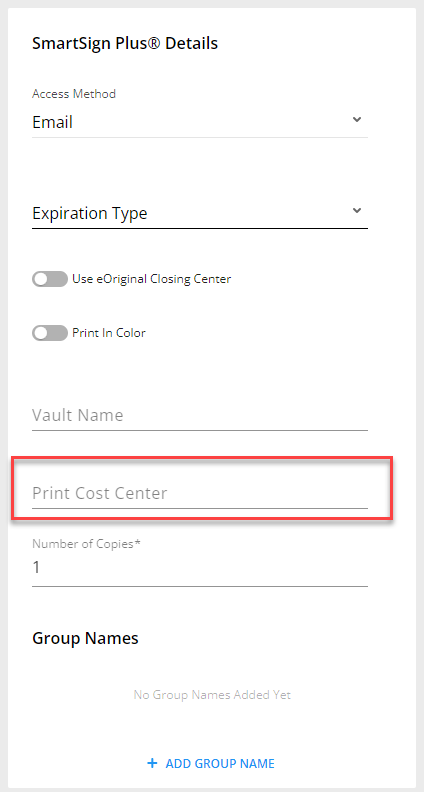 |
| PP: SmartSign Plus, Create Package - Print Number Of Copies |
|---|
|
Summary: A new option is available in the SmartSign Plus
Details card allowing you to indicate if you intend to use Print Number
of Copies via SmartSign Plus. The selection has a limit of 100 copies
with a default of 1.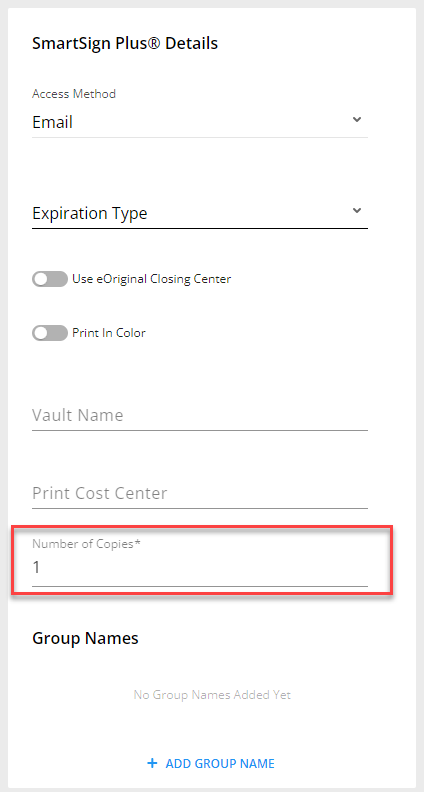 |
| PP: SmartSign Plus, Create Package - Print Color Indicator |
|---|
|
Summary: The SmartSign Plus Details card has been updated
to include a Print in Color option. The possible values for this
field are Yes and No (default).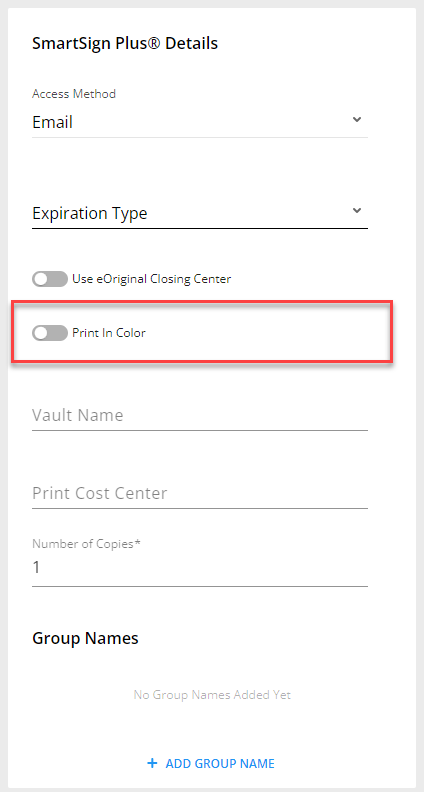 |
| PP: Add Paging to Packages and Packets Screen |
|---|
|
Summary: Pagination has been added to the Packets screen
resulting in a quicker load time. |
| PP: Documentation updated for Watermark and Barcode specifications |
|---|
|
Summary: The Expere EZ Config Packages and Packets User
Guide has been updated to reflect:
|
| PP: Update to SmartSign Plus Details card |
|---|
|
Summary: A new feature, Use eOriginal Closing
Center, has been added to the SmartSign Plus Details card with two
possible values: Yes and No.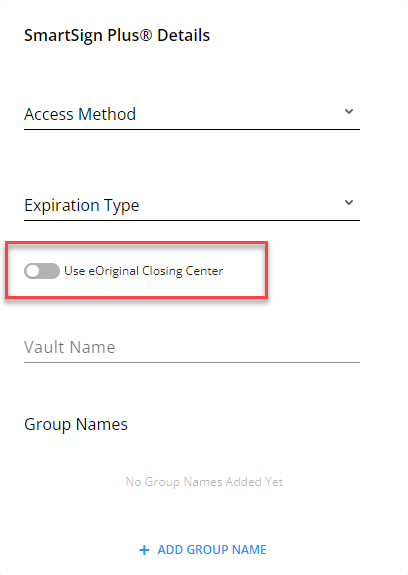 |
| PP: New SmartSign Plus Details card |
|---|
|
Summary: Packages and Packets now includes the ability to
add SmartSign Plus Details.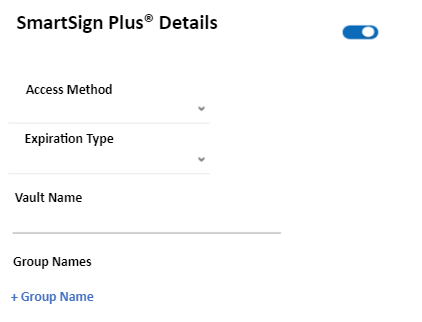 This card provides the ability to indicate the following settings.
|
| PP: Audit Report Output and Document Type Fields updated |
|---|
|
| Summary: When the Output Type and Document Format Type fields are changed, they are now shown in the Audit Report. |
| PP: Tagged PDF Output Type Added |
|---|
|
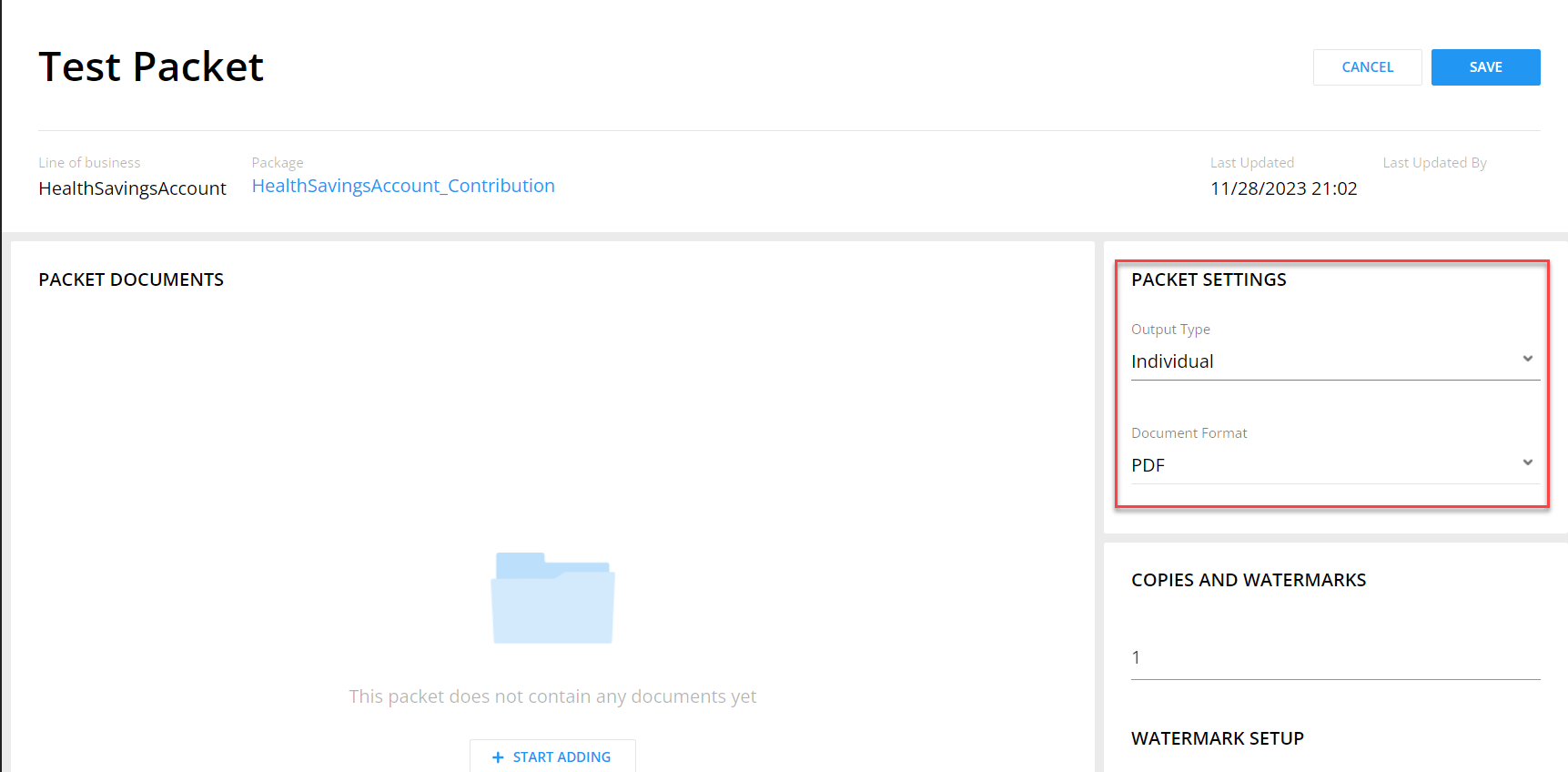
| Summary: Packages and Packets now includes the ability to
define Tagged PDF as an output type. As a result, we have updated the
program and separated Output Type and Document Format into two separate
options on the Packet Settings card.
The following Document Formats are available. Note that PDF and RTF-Commercial Only were previously available within the Output Type field.
|
| PP: Package List Search |
|---|
|
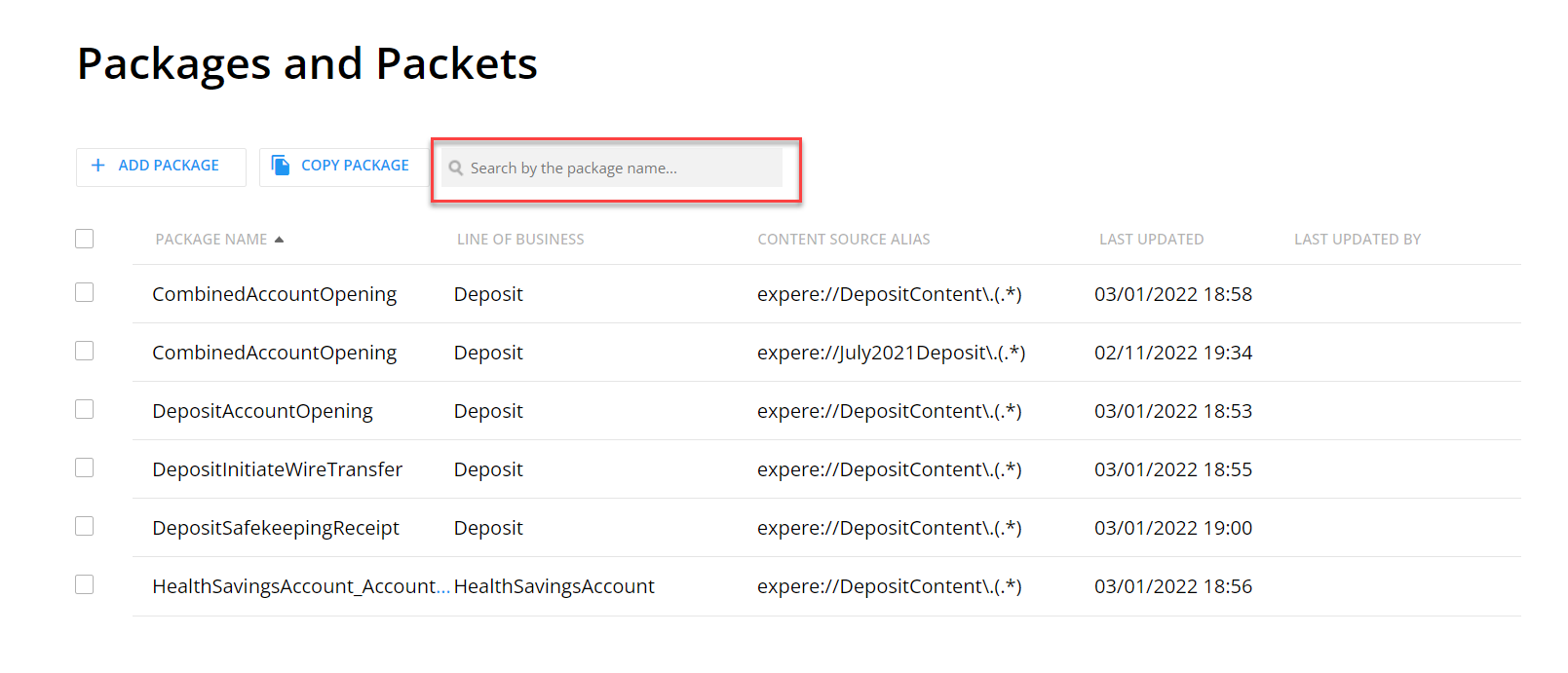
| Summary: Packages and Packets now includes the ability to
search within the Product List. We have added a search field to the
Product List page. Enter your search criteria within this field to
filter and display only those projects matching the search criteria.
|
| DD: Sorting Update |
|---|
|
| Summary: The Last Updated column has been modified so that the descending (down) arrow is displayed when the dates are shown in descending order and the ascending (up) arrow is displayed when the dates are shown in ascending order. |
| DD: Pagination added to Policies screen |
|---|
|
Summary: Pagination has been added to the Organization
screen resulting in a quicker load time. Note the following:
|
| DD: Add Paging to Products Screen |
|---|
|
Summary: Pagination has been added to the Organization
screen resulting in a quicker load time. Note the following:
|
| DD: Correction to displayed message |
|---|
|
| Summary: When copying a Product and a restricted character
is used in the Product Name, the same red message is now displayed when
you try to do Single Copy and add special characters: ' ‘ ’ "
“ ” / \ & : * ? < > | Please follow these
restrictions:
|
| DD: Pagination added to Organization Screen |
|---|
|
Summary: Pagination has been added to the Organization
screen resulting in a quicker load time. |
| OPPSA Conversion Logic removed |
|---|
|
| Summary: OPPSA Conversion logic has been removed from EZ Config, therefore the OPPSA to Default Data: Data Conversion Guide has been removed and is no longer available. |
| DD: Audit Report: Account Information |
|---|
|
Summary: We have updated the Audit Report to include
Account Information, including the following items:
|
| DD: Policy List Search |
|---|
|
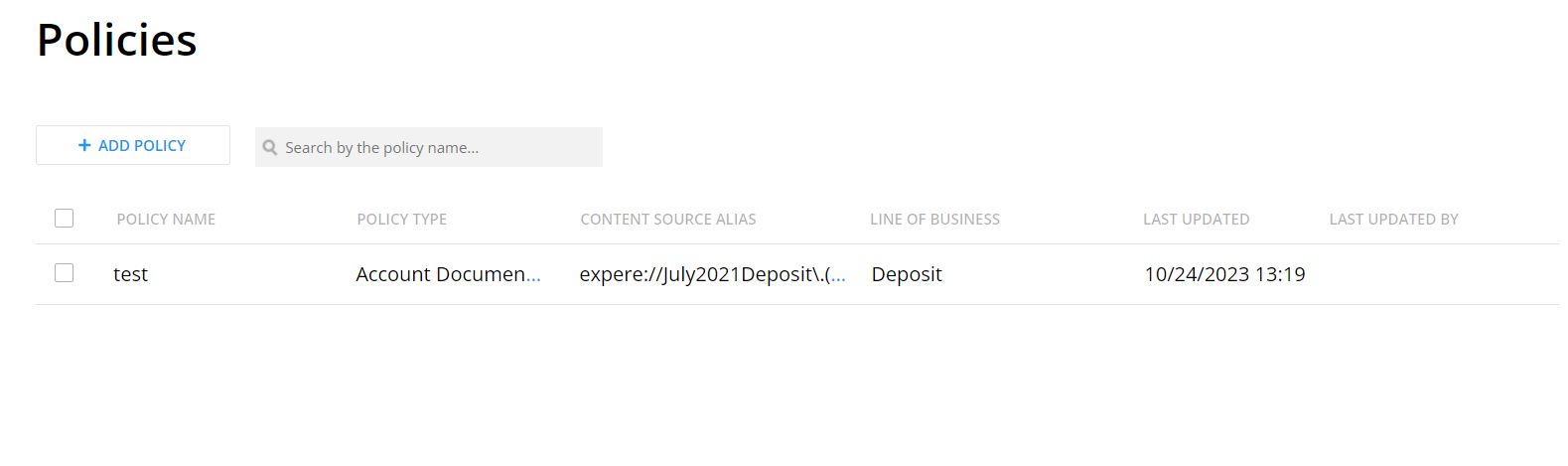
| Summary: Default Data now includes the ability to search
within the Policy List. We have added a search field to the Policy List
page. Enter your search criteria within this field to filter and display
only those projects matching the search criteria.
|
| EZ:/PP:/DD: General Updates |
|---|
|
| Summary: General updates this release are limited to reviewing all dependent components and making any necessary updates. |
| EZ: General Updates |
|---|
|
| Summary: General updates this release are limited to reviewing all dependent components and making any necessary updates. |
| PP: Update to SmartSign Plus Details card |
|---|
|
| Summary: A new feature, Use eOriginal Closing
Center, has been added to the SmartSign Plus Details card
with two possible values: Yes and No. |
| PP: New SmartSign Plus Details card |
|---|
|
| Summary: Packages and Packets now includes the ability
to add SmartSign Plus Details. This card provides the ability to indicate the following settings.
|
| PP: Audit Report Output and Document Type Fields updated |
|---|
|
| Summary: When the Output Type and Document Format Type fields are changed, they are now shown in the Audit Report. |
| PP: Tagged PDF Output Type Added |
|---|
|
| Summary: Packages and Packets now includes the ability
to define Tagged PDF as an output type. As a result, we have updated
the program and separated Output Type and Document Format into two
separate options on the Packet Settings card.
The following Document Formats are available. Note that PDF and RTF-Commercial Only were previously available within the Output Type field.
|
| PP: Package List Search |
|---|
|
| Summary: Packages and Packets now includes the ability
to search within the Product List. We have added a search field to
the Product List page. Enter your search criteria within this field
to filter and display only those projects matching the search
criteria.
|
| DD: Pagination added to Organization Screen |
|---|
|
| Summary: Pagination has been added to the Organization
screen resulting in a quicker load time. |
| OPPSA Conversion Logic removed |
|---|
|
| Summary: OPPSA Conversion logic has been removed from EZ Config, therefore the OPPSA to Default Data: Data Conversion Guide has been removed and is no longer available. |
| DD: Audit Report: Account Information |
|---|
|
Summary: We have updated the Audit Report to include
Account Information, including the following items:
|
| DD: Policy List Search |
|---|
|
| Summary: Default Data now includes the ability to
search within the Policy List. We have added a search field to the
Policy List page. Enter your search criteria within this field to
filter and display only those projects matching the search criteria.
|
| PP:, DD:, EZ: General Updates |
|---|
|
| Summary: General updates this release are limited to reviewing all dependent components and making any necessary updates. |