2023 Expere EZ Config Changelog
These changelog entries outline changes and enhancements made to the Expere EZ Config products (Packages and Packets, Default Data, and EZ Gateway/EZ Service) for each release.
Hosted environments: See our Release Schedule calendar to view maintenance event information for the Production environment.
| PP: General Updates |
|---|
|
| Summary: General updates this release are limited to reviewing all dependent components and making any necessary updates. |
| PP: Audit Report: Packet Watermark |
|---|
|
| Summary: We have updated the Audit Report to generate only one record when the watermark type is specified as None for a packet. Previously the report contained three redundant entries in this scenario. |
| PP: Repost Details Cleanup |
|---|
|
| Summary: We have updated the Repost Details page to remove the finger cursor from the display, |
| PP: General Updates |
|---|
|
| Summary: General updates this release are limited to reviewing all dependent components and making any necessary updates. |
| DD: Audit Report: Logo Alternate Text |
|---|
|
| Summary: We have updated the Audit Report to include when alternate text is added, removed, or changed for a logo. |
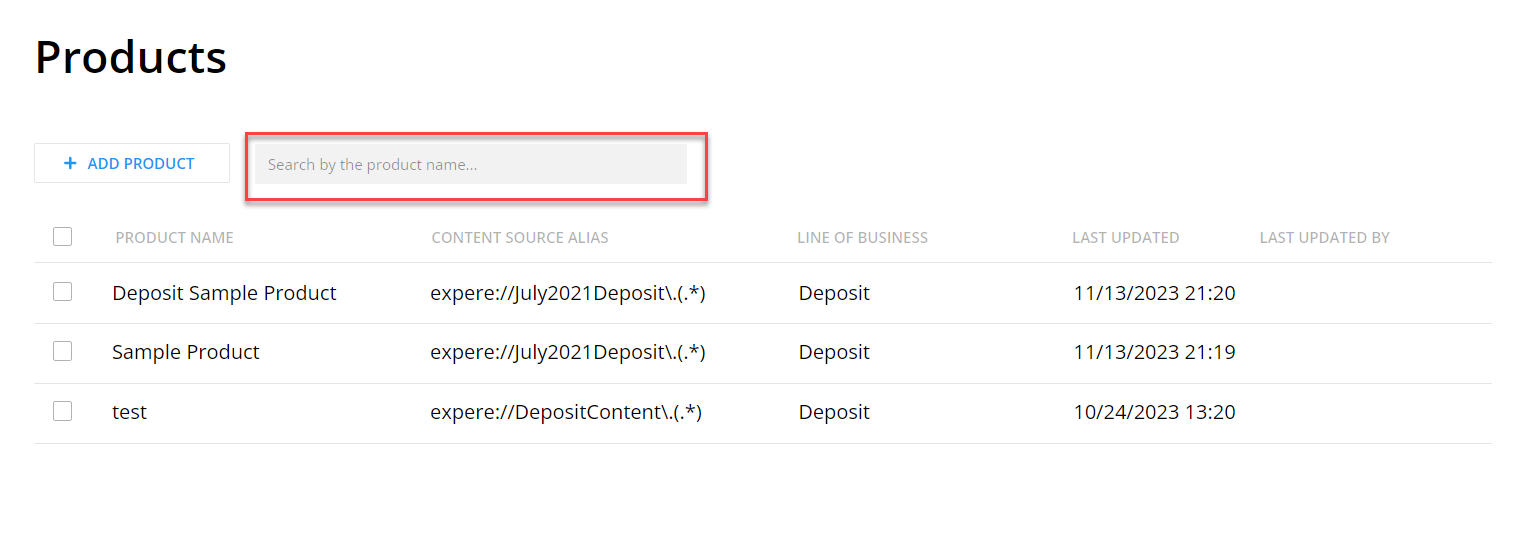
| DD: Product List Search |
|---|
|
| Summary: Default Data now includes the ability to
search within the Product List. We have added a search field to the
Product List page. Enter your search criteria within this field to
filter and display only those projects matching the search criteria.
|
| DD: .NET 7 Now Supported |
|---|
|
| Summary: Default Data now supports the use of .NET 7. |
| DD: General Updates |
|---|
|
| Summary: General updates this release are limited to reviewing all dependent components and making any necessary updates. |
| EZ: General Updates |
|---|
|
| Summary: General updates this release are limited to reviewing all dependent components and making any necessary updates. |
| PP: Audit Reporting and History Feature |
|---|
|
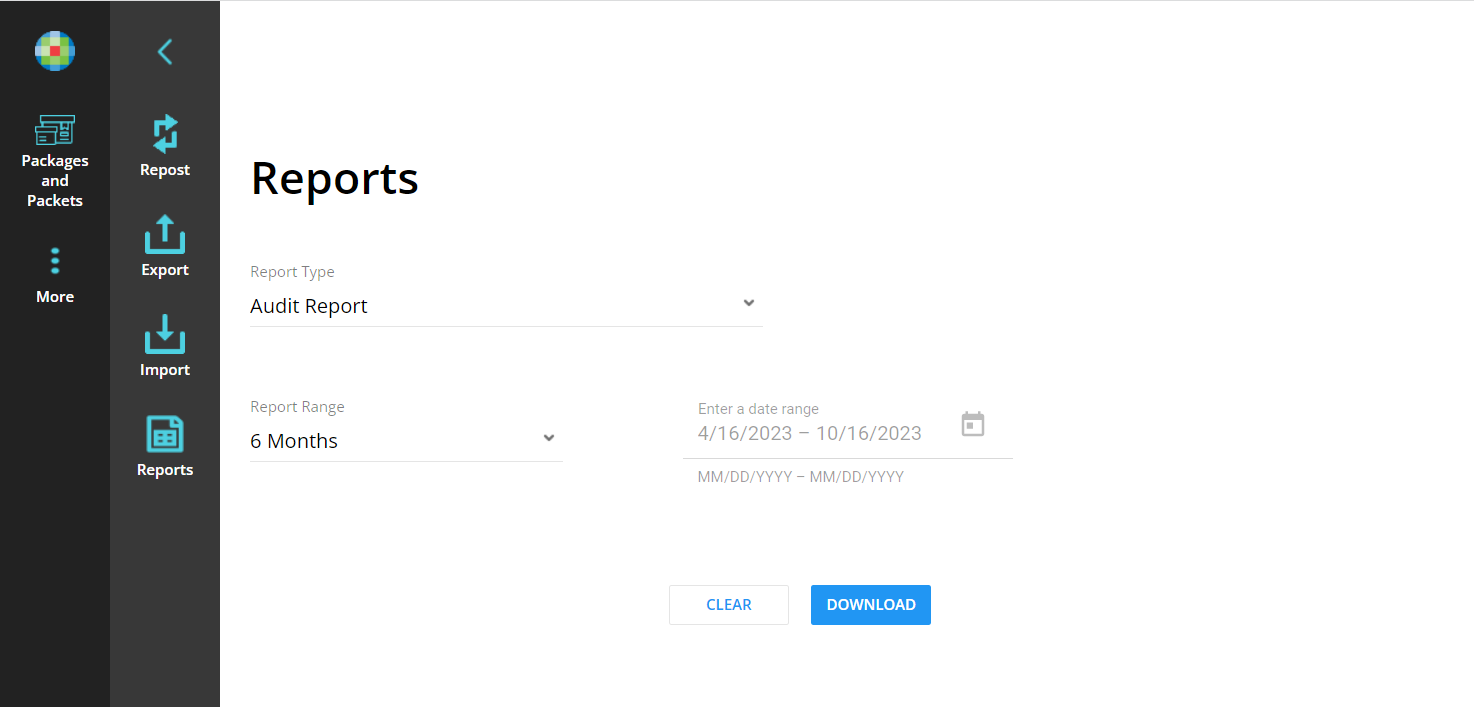
| Summary: This release introduces the Audit Reporting
feature. This feature allows you to request a change history report
for a specific period of time and includes all the change details,
including who, when, and what was changed (both before and after
values). The audit report can be used to provide valuable
information in the following scenarios:
We have added the Audit Report option to the Report Type field. When selected, the Audit Report page displays.
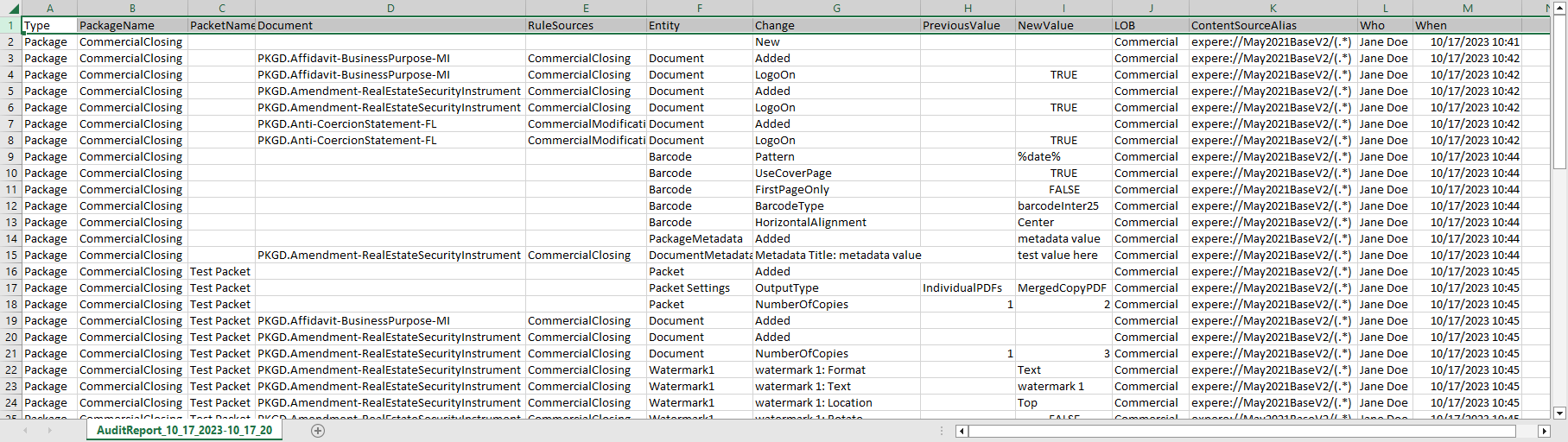
Sample Report
The Audit History Report
includes the following information:
|
| PP: General Updates |
|---|
|
| Summary: General updates this release are limited to reviewing all dependent components and making any necessary updates. |
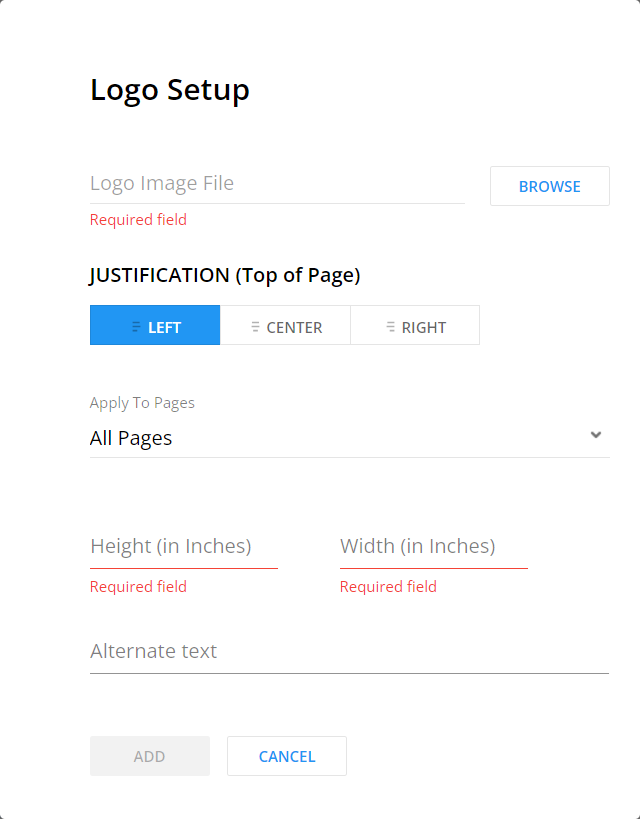
| DD: Alternate Text on Logos |
|---|
|
| Summary: Default Data now supports the addition of
alternate text on logos. Alternate text is required when selecting
Tagged PDF in order to meet accessibility requirements. The Logo
Setup page now contains an Alternate Text field for you to specify
the alternate text for the logo. You may enter up to 50 characters.
|
| DD: Organization List Search |
|---|
|
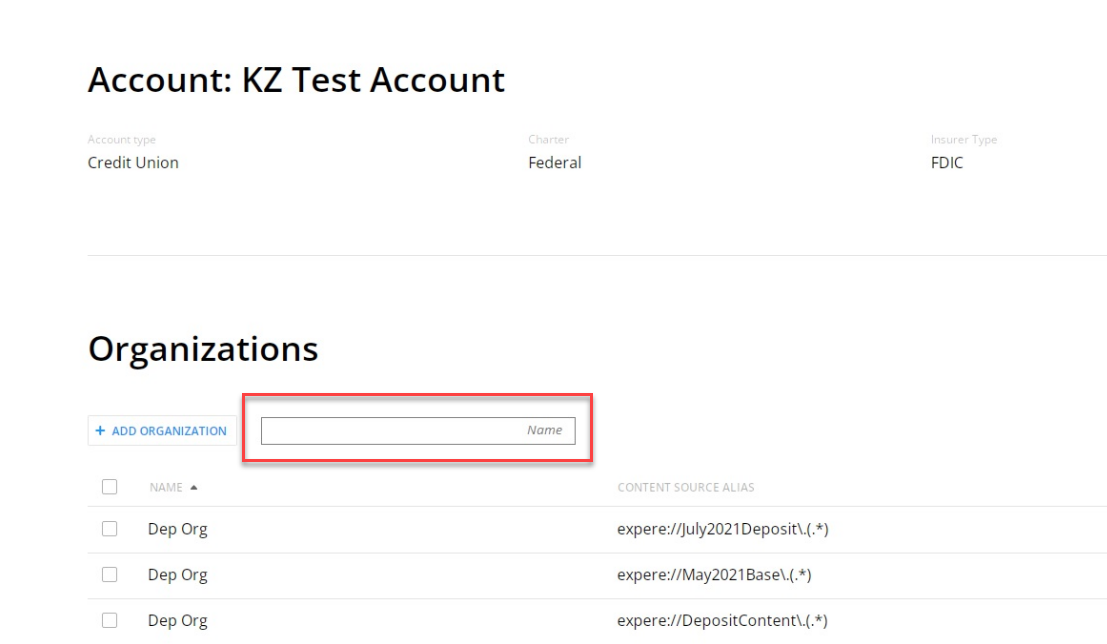
| Summary: Default Data now includes the ability to
search within the Organization List. We have added a search field to
the Organization List page. Enter your search criteria within this
field to filter and display only those organizations matching the
search criteria.
|
| DD: Audit Report: Updated Policy Enhancement |
|---|
|
| Summary: We have updated the Audit Report so that when a user updates the policy, the report lists one record as Updated Policy. Previously, the report recorded the change as Removed Policy and Added Policy. |
| DD: General Updates |
|---|
|
| Summary: General updates this release are limited to reviewing all dependent components and making any necessary updates. |
| EZ: General Updates |
|---|
|
| Summary: General updates this release are limited to reviewing all dependent components and making any necessary updates. |
| PP: Reference Authorization Token Update |
|---|
|
|
Previously, we added support of reference authorization tokens to Expere EZ Config Packages and Packets, which are intended to prevent errors for users assigned to large numbers of accounts. Previously, the tokens had the potential to became too large for the application gateway and could cause errors. With this release, we have updated the transform properties as follows:
|
| PP: Upcoming Audit Reporting Feature |
|---|
|
| Summary: We are working to deliver Audit Reporting functionality in a future release. In the meantime, you will see that the Reports menu now includes a new Audit Report option. The Audit Reporting functionality is currently under development and not yet supported within the application. Additional information will be provided when the Audit Reporting feature is available for use. |
| PP: General Updates |
|---|
|
| Summary: General updates this release are limited to reviewing all dependent components and making any necessary updates. |
| DD: Audit Reporting Feature |
|---|
|
| Summary: This release introduces the Audit Reporting
feature. This feature allows you to request a change history report
for a specific period of time and includes all the change details,
including who, when, and what was changed (both before and after
values). The audit report can be used to provide valuable
information in the following scenarios:
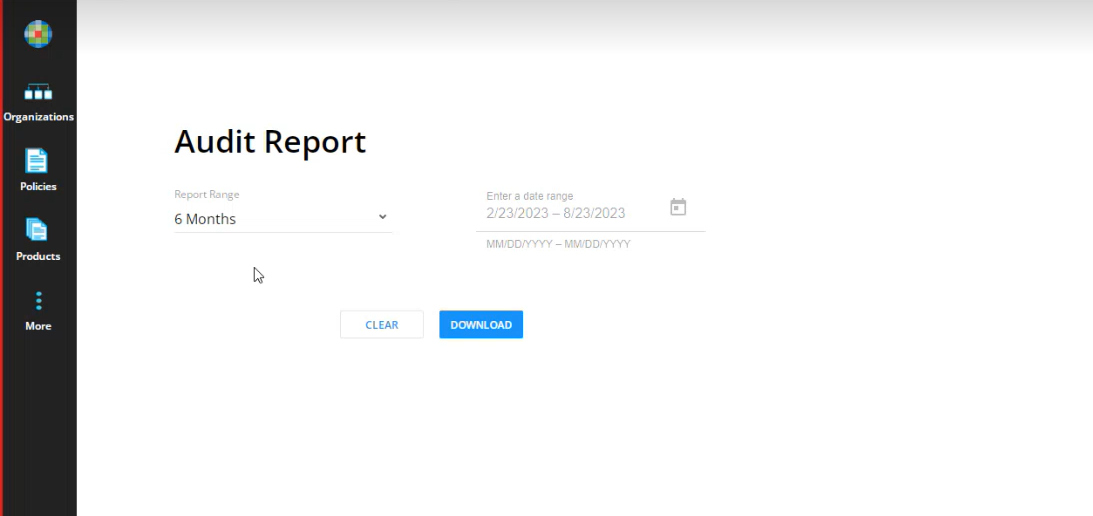
We have added a Report option to the More menu. When selected, the Audit Report page displays.
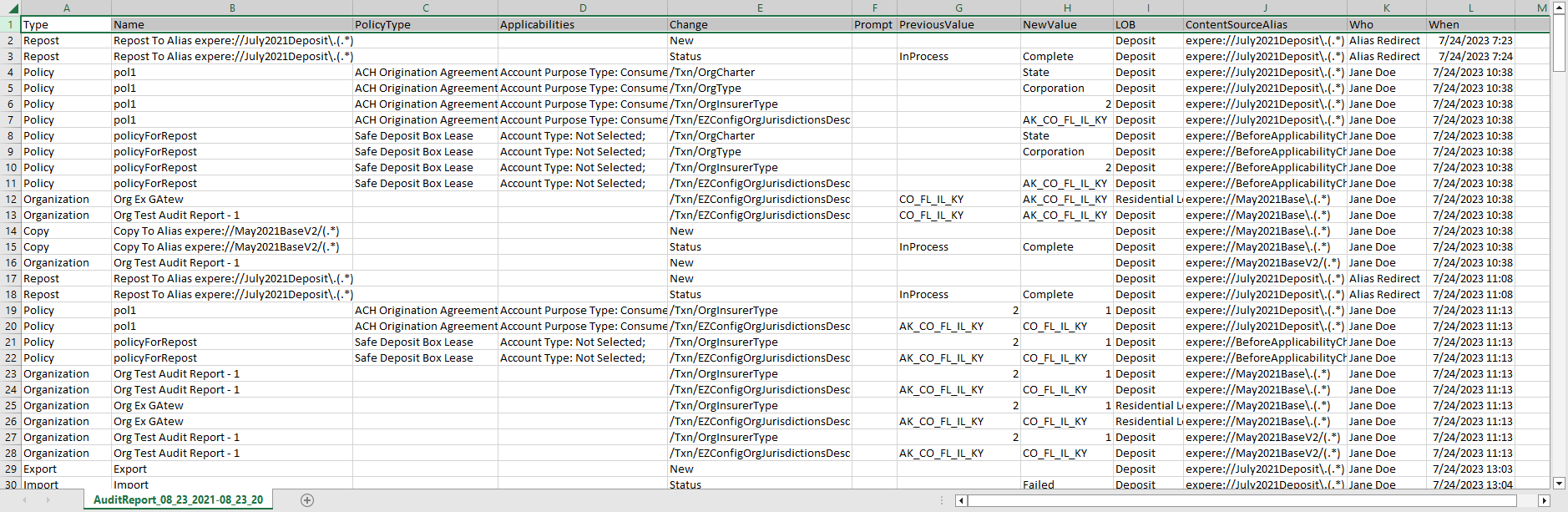
Sample Report
The Audit History Report
includes the following information:
|
| DD: Reference Authorization Token Updates |
|---|
|
|
Previously, we added support of reference authorization tokens to Expere EZ Config Packages and Packets, which are intended to prevent errors for users assigned to large numbers of accounts. Previously, the tokens had the potential to became too large for the application gateway and could cause errors. With this release, we have updated the transform properties as follows:
|
| DD: General Updates |
|---|
|
| Summary: General updates this release are limited to reviewing all dependent components and making any necessary updates. |
| EZ: General Updates |
|---|
|
| Summary: General updates this release are limited to reviewing all dependent components and making any necessary updates. |
| PP: Upcoming Audit Reporting Feature |
|---|
|
| Summary: We are working to deliver Audit Reporting functionality in a future release. In the meantime, you will see that the Reports menu now includes a new Audit Report option. The Audit Reporting functionality is currently under development and not yet supported within the application. Additional information will be provided when the Audit Reporting feature is available for use. |
| PP: General Updates |
|---|
|
| Summary: General updates this release are limited to reviewing all dependent components and making any necessary updates. |
| DD: Upcoming Audit Reporting Feature |
|---|
|
| Summary: We are working to deliver Audit Reporting functionality in a future release. In the meantime, you will see that the More menu now includes a new Reports option, and when selected displays the new Audit Report. The Audit Reporting functionality is currently under development and not yet supported within the application. Additional information will be provided when the Audit Reporting feature is available for use. |
| DD: Enhanced Error Information On Import |
|---|
|
| We have enhanced the Import function error messages to now help identify which products may be missing policies when an import fails due to non-exsistent policies for products. With this release, the program now displays an icon next to the products that contain no policies when the import fails due to missing policies. |
| DD: General Updates |
|---|
|
| Summary: General updates this release are limited to reviewing all dependent components and making any necessary updates. |
| EZ: API Update: Parameters Required for Package with Logo Data by Organization Name API |
|---|
|
We have updated the parameters for the Package with Logo Data
by Organization Name API so that all request parameters are now
required. This change ensures the following:
|
| EZ: Enhanced Logging Now Includes Correlation ID |
|---|
|
| We have enhanced the logging functionality for Import, Export, and Copy functions by implementing a Correlation ID to improve application logging and troubleshooting. |
| EZ: General Updates |
|---|
|
| Summary: General updates this release are limited to reviewing all dependent components and making any necessary updates. |
| PP: Upcoming Audit Reporting Feature |
|---|
|
| Summary: We are working to deliver Audit Reporting functionality in a future release. In the meantime, you will see that the Reports menu now includes a new Audit Report option. The Audit Reporting functionality is currently under development and not yet supported within the application. Additional information will be provided when the Audit Reporting feature is available for use. |
| PP: General Updates |
|---|
|
| Summary: General updates this release are limited to reviewing all dependent components and making any necessary updates. |
| PP: Reference Authorization Token Support |
|---|
|
|
Expere EZ Config Packages and Packets now supports the use of reference authorization tokens. These tokens are intended to prevent errors for users assigned to large numbers of accounts. Previously, the tokens had the potential to became too large for the application gateway and could cause errors. Two new transform properties have been added to support the use of reference authorization tokens. |
| DD: Upcoming Audit Reporting Feature |
|---|
|
| Summary: We are working to deliver Audit Reporting functionality in a future release. In the meantime, you will see that the More menu now includes a new Reports option, and when selected displays the new Audit Report. The Audit Reporting functionality is currently under development and not yet supported within the application. Additional information will be provided when the Audit Reporting feature is available for use. |
| DD: General Updates |
|---|
|
| Summary: General updates this release are limited to reviewing all dependent components and making any necessary updates. |
| DD: Reference Authorization Token Support |
|---|
|
|
Expere EZ Config Default Data now supports the use of reference authorization tokens. These tokens are intended to prevent errors for users assigned to large numbers of accounts. Previously, the tokens had the potential to became too large for the application gateway and could cause errors. Two new transform properties have been added to support the use of reference authorization tokens. |
| EZ: General Updates |
|---|
|
| Summary: General updates this release are limited to reviewing all dependent components and making any necessary updates. |
| EZ: Changes to Update Transaction and Update Transaction by Name API Information |
|---|
|
| Expere has updated how the program handles transaction data related to duplicate fee names derived from EZ Config Default Data. As a result, we have added clarification to the EZ Config EZ Gateway Web Services Guide regarding how Expere now handles duplicate fee information. |
| PP: Upcoming Audit Reporting Feature |
|---|
|
| Summary: We are working to deliver Audit Reporting functionality in a future release. In the meantime, you will see that the Reports menu now includes a new Audit Report option. The Audit Reporting functionality is currently under development and not yet supported within the application. Additional information will be provided when the Audit Reporting feature is available for use. |
| PP: General Updates |
|---|
|
| Summary: General updates this release are limited to reviewing all dependent components and making any necessary updates. |
| DD: Upcoming Audit Reporting Feature |
|---|
|
| Summary: We are working to deliver Audit Reporting functionality in a future release. In the meantime, you will see that the More menu now includes a new Reports option, and when selected displays the new Audit Report. The Audit Reporting functionality is currently under development and not yet supported within the application. Additional information will be provided when the Audit Reporting feature is available for use. |
| DD: General Updates |
|---|
|
| Summary: General updates this release are limited to reviewing all dependent components and making any necessary updates. |
| EZ: General Updates |
|---|
|
| Summary: General updates this release are limited to reviewing all dependent components and making any necessary updates. |
| PP: Upcoming Audit Reporting Feature |
|---|
|
| Summary: We are working to deliver Audit Reporting functionality in a future release. In the meantime, you will see that the Reports menu now includes a new Audit Report option. The Audit Reporting functionality is currently under development and not yet supported within the application. Additional information will be provided when the Audit Reporting feature is available for use. |
| PP: Import Popup Display |
|---|
|
| Summary: This release includes changes to the Import popup page so that if an invalid file type is selected for import, the message now reads only "Invalid File." The "Required File" verbiage no longer displays behind "Invalid File." |
| PP: General Updates |
|---|
|
| Summary: General updates this release are limited to reviewing all dependent components and making any necessary updates. |
| DD: Upcoming Audit Reporting Feature |
|---|
|
| Summary: We are working to deliver Audit Reporting functionality in a future release. In the meantime, you will see that the More menu now includes a new Reports option, and when selected displays the new Audit Report. The Audit Reporting functionality is currently under development and not yet supported within the application. Additional information will be provided when the Audit Reporting feature is available for use. |
| DD: Saving Account Changes |
|---|
|
| Summary: This release updates the Account saving logic so that if an account update fails, any data that was changed is no longer inadvertantly saved. As a result, either all changes are successfully saved, or all changes are not saved. |
| DD: General Updates |
|---|
|
| Summary: General updates this release are limited to reviewing all dependent components and making any necessary updates. |
| EZ: .NET 7 Now Supported |
|---|
|
| Summary: EZ Gateway now supports the use of .NET 7. |
| EZ: General Updates |
|---|
|
| Summary: General updates this release are limited to reviewing all dependent components and making any necessary updates. |
| PP: Upcoming Audit Reporting Feature |
|---|
|
| Summary: We are working to deliver Audit Reporting functionality in a future release. In the meantime, you will see that the Reports menu now includes a new Audit Report option. The Audit Reporting functionality is currently under development and not yet supported within the application. Additional information will be provided when the Audit Reporting feature is available for use. |
| PP: Optional Database Encryption Support |
|---|
|
| Summary: We have added an optional transform variable
to allow the database encryption to be configurable to account for
scenarios in which the related encrypted data transfer connects to
an unencrypted database. This variable is necessary only in instances where self-hosted clients do not have have TLS/SSL Encryption enabled on their SQL server, and the connection to the database fails. Set the following Encryption variable to False to restore the database connection. In all other instances, the variable is unnecessary, and the default value can be used.
|
| PP: General Updates |
|---|
|
| Summary: General updates this release are limited to reviewing all dependent components and making any necessary updates. |
| DD: Upcoming Audit Reporting Feature |
|---|
|
| Summary: We are working to deliver Audit Reporting functionality in a future release. In the meantime, you will see that the More menu now includes a new Reports option, and when selected displays the new Audit Report. The Audit Reporting functionality is currently under development and not yet supported within the application. Additional information will be provided when the Audit Reporting feature is available for use. |
| DD: Repost without Same Line of Business |
|---|
|
| Summary: This release includes changes to the repost functionality to ensure that the repost no longer fails when the content being reposted to does not contain the Line of Business under which the Organization was created. |
| DD: Optional Database Encryption Support |
|---|
|
| Summary: We have added an optional transform variable
to allow the database encryption to be configurable to account for
scenarios in which the related encrypted data transfer connects to
an unencrypted database. This variable is necessary only in instances where self-hosted clients do not have have TLS/SSL Encryption enabled on their SQL server, and the connection to the database fails. Set the following Encryption variable to False to restore the database connection. In all other instances, the variable is unnecessary, and the default value can be used.
|
| DD: General Updates |
|---|
|
| Summary: General updates this release are limited to reviewing all dependent components and making any necessary updates. |
| EZ: Optional Database Encryption Support |
|---|
|
| Summary: We have added an optional OD variable to allow
the database encryption to be configurable to account for scenarios
in which the related encrypted data transfer connects to an
unencrypted database. This variable is necessary only in instances where self-hosted clients do not have have TLS/SSL Encryption enabled on their SQL server, and the connection to the database fails. Set the following Encryption variable to False to restore the database connection. In all other instances, the variable is unnecessary, and the default value can be used.
|
| EZ: General Updates |
|---|
|
| Summary: General updates this release are limited to reviewing all dependent components and making any necessary updates. |
| PP: Account Search Field Changes |
|---|
|
Summary: We have updated the behavior of the Account
Search field to include the following changes:
|
| PP: OD Installation Changes to Accommodate STSv6 |
|---|
|
Summary: Our authentication and authorization
application, STS, has upgraded to a new version. As a result, the
following information related to STSv6 has been updated with the EZ
Config Packages and Packets Octopus Deploy (OD) process:
|
| PP: General Updates |
|---|
|
| Summary: General updates this release are limited to reviewing all dependent components and making any necessary updates. |
| DD: Account Search Field Added |
|---|
|
Summary: This release includes the addition of a Search
field to the Account list. This field allows you to enter criteria
by which to search for a specific account, eliminating the need to
scroll through the Account list for users with access to multiple
accounts.
|
| DD: Delete Policies After Bulk Copy |
|---|
|
| Summary: This release resolves an issue related to the ability to delete policies. Previously, the program displayed an error whenever users attempted to delete multiple policies after performing a bulk copy. This release resolves that issue, and multiple policies can now be deleted without error. |
| DD: OD Installation Changes to Accommodate STSv6 |
|---|
|
Summary: Our authentication and authorization
application, STS, has upgraded to a new version. As a result, the
following information related to STSv6 has been updated with the EZ
Config Default Data Octopus Deploy (OD) process:
|
| DD: General Updates |
|---|
|
| Summary: General updates this release are limited to reviewing all dependent components and making any necessary updates. |
| EZ: OD Installation Changes to Accommodate STSv6 |
|---|
|
Summary: Our authentication and authorization
application, STS, has upgraded to a new version. As a result, the
following information related to STSv6 has been updated with the EZ
Gateway Octopus Deploy (OD) process:
|
| EZ: General Updates |
|---|
|
| Summary: General updates this release are limited to reviewing all dependent components and making any necessary updates. |
We deployed a supplemental April CT release on April 17th to address an internally found defect for Default Data. Refer to PBI 768788 for additional information.
| DD: Default Data Update |
|---|
|
| Summary: This release includes updates to Default Data
to resolve a defect inadvertently introduced to the program within
the April release that prevents users from updating or editing any
organization data when the organization is associated to policies or
products. The defect was limited to the CT environment and was never introduced to the Production environment. This Supplemental Release resolves the defect in CT and will be automatically included in the normal release to Production. |
| PP: New Transform Variable: Message Queue |
|---|
|
| Summary: This release includes the addition of new
transform variable to provide a way to set a queue name for the
upcoming Audit Report functionality, which will be available in a
future release.
|
| PP: New Transform Variable: Data Encryption |
|---|
|
| Summary: This release includes the addition of new
transform variable. The purpose of this variable is to update the
connection string to support the encryption of in transit data.
"False" is the default value; set this value to "True" to bypass certificate validation. |
| PP: Behind the Scenes Enhancements |
|---|
|
| Summary: This release includes updates to Packages and Packets with identical changes previously made to Default Data (PBI 756723), where duplicate policies were inadvertently created. While the duplication of packages and packets has not occurred, we have replicated the changes previously made in Default Data to Packages and Packets as well to maintain consistent application behavior and to prevent from any future incidents. |
| PP: Packet Required Indication |
|---|
|
| Summary: This release includes update to the Packet card to indicate that at least one Packet is required for a package. The actual functionality within Packages and Packets has not changed; this update is solely to provide more user-friendly messaging within the program. |
| PP: Account List Limit |
|---|
|
| Summary: This release includes changes to the Account List to ensure users are able to see all accounts available. Account search functionality was released in February, and shortly after the release, we discovered that users with access to more than 90 accounts were unable to search for accounts or scroll the account list via the More button to view more than the first 90 accounts in the list. This release corrects this issue, and users can now search all the accounts to which they have access or scroll through those accounts via the More button. |
| PP: "Soft" Delete No Longer Available |
|---|
|
| Summary: This release includes changes to how the program handles the removal of deleted data from the program database. Previously, deleted data items were removed from the program's user interface but were retained within the program's database and flagged within the database as being deleted (known as a 'soft delete'). With the addition of the upcoming Audit Reporting feature, those data items with the delete flag are now physically removed from the database, and any future deleted data items will not be saved within the database with a delete flag and instead will be permanently removed. |
| PP: General Updates |
|---|
|
| Summary: General updates this release are limited to reviewing all dependent components and making any necessary updates. |
| DD: New Transform Variable: Message Queue |
|---|
|
| Summary: This release includes the addition of new
transform variable to provide a way to set a queue name for the
upcoming Audit Report functionality, which will be available in an
upcoming release.
|
| DD: New Transform Variable: Data Encryption |
|---|
|
| Summary: This release includes the addition of new
transform variable. The purpose of this variable is to update the
connection string to support the encryption of in transit data.
"False" is the default value; set this value to "True" to bypass certificate validation. |
| DD: "Soft" Delete No Longer Available |
|---|
|
| Summary: This release includes changes to how the program handles the removal of deleted data from the program database. Previously, deleted data items were removed from the program's user interface but were retained within the program's database and flagged within the database as being deleted (known as a 'soft delete'). With the addition of the upcoming Audit Reporting feature, those data items with the delete flag are now physically removed from the database, and any future deleted data items will not be saved within the database with a delete flag and instead will be permanently removed. |
| DD: General Updates |
|---|
|
| Summary: General updates this release are limited to reviewing all dependent components and making any necessary updates. |
| EZ: New Octo-Deploy Variables: Message Queue |
|---|
|
Summary: This release includes the addition of new
Octopus Deploy variables to provide a way to set a queue name for
the upcoming Audit Report functionality, which will be available in
a future release.
EzConfigServiceDefaultDataQueueNameEzConfigServicePackagesAndPacketsQueueName
|
| EZ: New Octopus Deploy Variable: Data Encryption |
|---|
|
| Summary: This release includes the addition of new
Octopus deploy variable. The purpose of this variable is to update
the connection string to support the encryption of in transit data.
"False" is the default value; set this value to "True" to bypass certificate validation. |
| EZ: General Updates |
|---|
|
| Summary: General updates this release are limited to reviewing all dependent components and making any necessary updates. |
| PP: Account Search Field Added |
|---|
|
| Summary: This release the addition of a Search field to the Account list. This field allows you to enter criteria by which to search for a specific account, eliminating the need to scroll through the Account list for users with access to multiple accounts. |
| PP: General Updates: User Interface |
|---|
Summary: This release includes several small updates to
the user interface, including:
|
| PP: Invalid Client Message Resolved |
|---|
|
| Summary: With this release we have resolved the issue of an "Invalid Client" error message displaying and affecting the ability to log back in to the program. Users are no longer required to clear the site cookies in order to clear this error. |
| PP: General Updates |
|---|
|
| Summary: This release includes general updates not visible to the user. |
| DD: General Updates: User Interface |
|---|
|
Summary: This release includes several small updates to
the user interface, including;
|
| DD: Invalid Client Message Resolved |
|---|
|
| Summary: With this release we have resolved the issue of an "Invalid Client" error message displaying and affecting the ability to log back in to the program. Users are no longer required to clear the site cookies in order to clear this error. |
| DD: Duplicate Policies and Products Resolved |
|---|
|
| Summary: This release includes changes to ensure that
creating a policy or product no longer creates duplicate policies or
products. Previously some users experienced issues where the new
policy or product appeared twice in the list. Note: Duplicate policies or products can be
deleted by clicking the ellipses button and selecting
Delete. |
| DD: General Updates |
|---|
|
| Summary: This release includes general updates not visible to the user. |
| EZ: General Updates |
|---|
|
| Summary: This release includes general updates not visible to the user. |
| PP: Properties Popup Window Changes |
|---|
|
| Summary: The Document Properties popup window has been updated. The Done button has been replaced with the Close button for scenarios in which no metadata has been defined for the package. |
| PP: General Updates: User Interface |
|---|
|
| Summary:This release includes an update to the interface to improve the alignment of certain fields on the Import Detail and Export Detail pages. |
| PP: General Updates |
|---|
|
| Summary: This release includes general updates not visible to the user. |
| DD: New STS Permissions |
|---|
|
| Summary: This release includes changes to the STS
Permissions for Expere EZ Config Default Data users. Note: These new permissions allow you to
segregate duties more easily within EZ Config Default
Data The following additional permissions are now available:
|
| DD: Saving Product Details |
|---|
|
| Summary: This release includes changes to the Product Detail page so that when saving a product displaying a warning (indicating an applicability is set to NULL), the applicability NULL value resets to the default settings, and the warning icon disappears from the Product List page. |
| DD: General Updates |
|---|
|
| Summary: This release includes general updates not visible to the user. |
| EZ: General Updates |
|---|
|
| Summary: This release includes general updates not visible to the user. |