Question Mark (?) Icons
The ? icon indicates there are variations regarding how text will appear within a paragraph. The paragraph displayed will remain with variations based on the data selected. For example: clicking the ? icon next to Issued/Expiration Date results in a prompt for collection of data.

Clicking on the dropdown arrow displays a list of options.
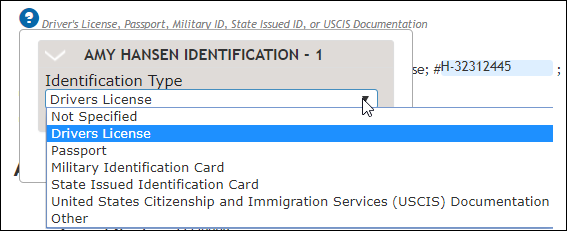
Selecting the option that applies to the transaction will change what appears in the paragraph. In this case, selecting Drivers License or another option such as Passport will change the data fields next to Gov. Issued Photo ID (Drivers License # to Passport #)
Clicking anywhere in the document closes the data point display.
Filtering on required data
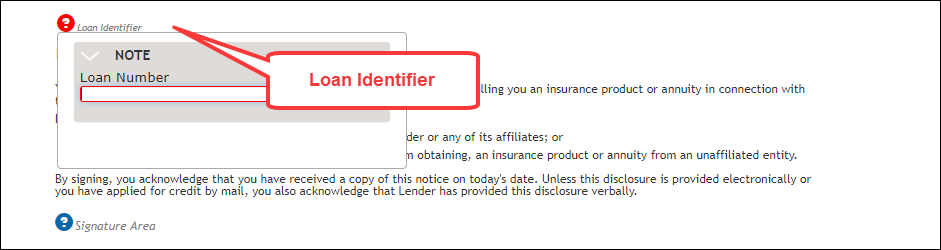
When an overlay dictionary with a "RequiredUIField" flag set to "1" and the SupportedRequiredFields flag set to "true" has been passed in, with the BeginSession input, the ? symbol will appear in red if any required data fields are contained within it. The field within the section is outlined in red. Upon entering data in the required fields the Required count indicator, in the upper right corner, will decrease in count. In the example below, clicking the red ? icon next to Loan Identifier displays a Loan Number field which requires data entry.