Defining the Number of Rows (SortByWrapper Element)
The SortByWrapper element is used to set the number of disbursement lines
appearing on a generated page. The element iterates over the number of payments and then
totals them together. Attributes on the element then define how the totals are presented
on the generated output. A use case for this behavior is a requirement for a total of
fifteen rows of Payoffs and Payments to be included on page 3 of Closing
Disclosures, even if the transaction has less than fifteen disbursements, to
comply with TILA/RESPA regulations.
Note: If the
/Txn/Notes/Note[1]/DisbursementToOthersAmount is passed in the
transaction data, the payments lines are set to show 15 lines total by default. The
SortByWrapper element mimics that behavior for situations where
DisbursementToOthersAmount is not passed in the transaction
data.
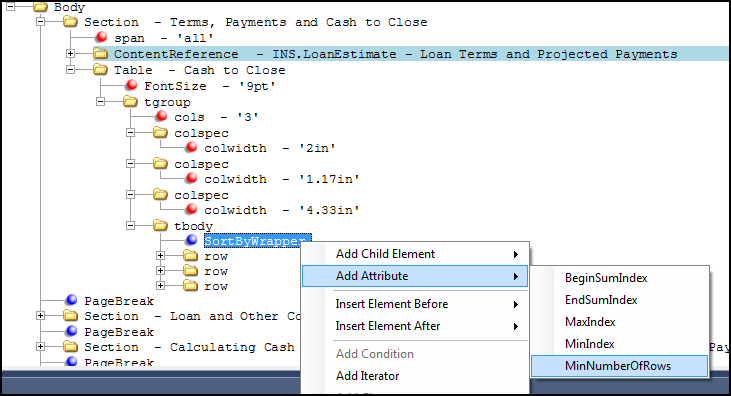
The SortByWrapper element is available as a child element on a table body (tbody) element using the Add Child Element option or can be added before or after a row element (row) using the Insert Element After/Before options. The element can also be added as a child to an Iterator element.
The SortByWrapper element comprises five attributes; three attributes that can be used to
determine how to present the payment lines and two attributes defining how to sum
entries in the table.
Note: The BeginSumIndex, MinIndex, and MaxIndex
are based off the iterator index, not the overall index.
- BeginSumIndex: When a value is supplied to this attribute, it defines how to sum additional items within a table. This value should be one (1) greater than the MaxIndex value. See Summing tables
- EndSumIndex: When a value is supplied to this attribute, it defines the how to sum the values that appear in the table, even if additional values have been passed. For example, if 15 items have been passed but only 10 rows appear in the table, set the value to 10. The EndSumIndex value should be greater than BeginSumIndex value and less than or equal to the MaxIndex value. See Summing Values within a Table
- MaxIndex: When a value is supplied to this attribute, it defines the highest index number (maximum number of rows) to render on the table. Any rows with an index higher that the MaxIndex value are truncated and not rendered in the generated document.
- MinIndex: When a value is supplied to this attribute, it defines the lowest possible index number (number of rows) to render on the table. Any row with an index less than the MinIndex value is truncated and not rendered in the generated document.
- MinNumberOfRows: When a value is supplied to this
attribute, it defines the minimum number of rows that will be generated. If the
attribute isn't used, the MaxIndex number is used. If the attribute is
supplied with a value greater than the number of rows naturally generated
by the iterator then extra blank rows are added in the output. If the attribute
is supplied with a value less than or equal to the number of rows
naturally generated by the iterator, then no rows are appended.Note: This attribute is used when at least one item is passed; if no items are passed then you must create a condition to print all blank lines.