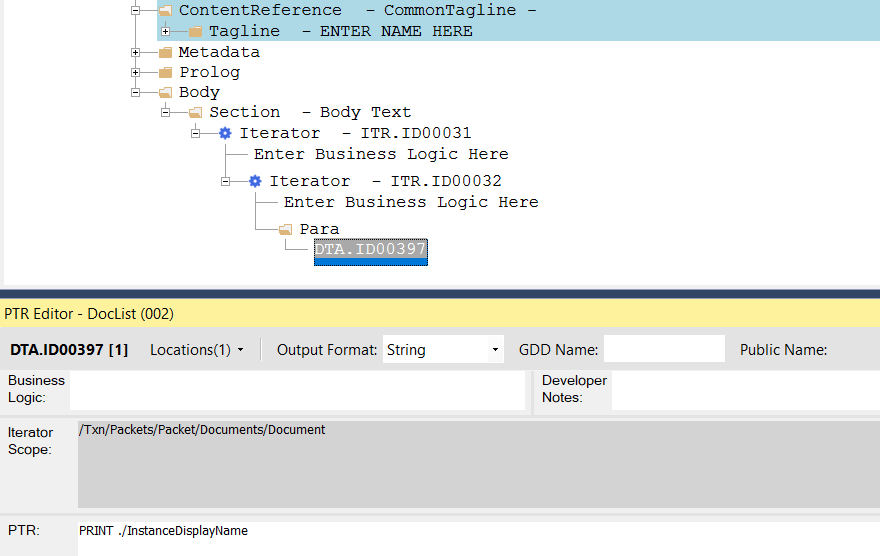
Document List
With Requirements Editor you can generate a list of relevant documents for a specific transaction. This list can then be automatically populated into a document, such as a Closing Agenda or Welcome Letter.
Expere understands the documents included in a request by looking at the response file, and populates that list to the content.
- ExpereTxn.xsd includes the document list information:
- /Txn/Packets/Packet/Documents/Document/DocumentName
- /Txn/Packets/Packet/Documents/Document/InstanceDisplayName
- (Empty): Indicates that this isn't a document list document (same as if the checkbox is currently unchecked)
- Partial: Indicates the document contains a partial list of documents in the package
- Full: Indicates the document contains the full list of documents in the package (same as if the document list checkbox is currently checked)
When Expere identifies a REQ file that's a Document List document, it adds the document list information to the ExpereTxn transaction. This allows PTRs to be written against that information.
Supported functionality
- Ability to Author a Document List isn't restricted to a particular
document or location (Dynamic Only) Note:
- Don't use Document List when authoring Static documents. It’s available today as an option, but isn't supported and will be removed in the future.
- You can author the Document List on Dynamic and PDF documents.
- The dynamic document will present any Static or Dynamic document name in the list per the request.
- Single OR Double Column lists: supported but will need to be authored
- List format: Bullet, Numeric, or Simple List format
- Margin Requirements: follow the structure of REQ file
- Multi-Page Lists: lists that expand more than one page
- Page Break: needs to be authored if required
- Order of the List: matches the order in the Response
- Each document and instance is included in the generated list
- List Document Name options
- PacketName if authored
- DocumentName if authored
- InstanceDisplayName if authored
- For PDF documents, DocumentListDataItems can be added as children of the
Instance element. The following elements are
supported.
<DocumentListDataItems>
   <DocumentListDataItem>
      <Name>Name</Name>
      <Value>Value</Value>
   </DocumentListDataItem>
</DocumentListDataItems>
Authoring examples
If iterating over /Txn/Packets/Packet: this allows you to print the PacketName with a DTA (PRINT ./PacketName)
Workflow
The workflow is as follows.
Authored REQ file > Engine identifies if a REQ file is a Document List document > Expere generates all documents except for the REQ that contains the Document List and updates the TXN with the schema and information (see below) > Expere then generates the REQ file that has the Document List flag with the correct information.
TXN Schema
/Txn/Packets/Packet/Documents/Document/DocumentName
/Txn/Packets/Packet/Documents/Document/InstanceDisplayName
<Txn>
    <Packets>
        <Packet>
            <PacketName>Packet1</PacketName>
            <Documents>
                <Document>
                    <DocumentName>My First Document Name</DocumentName>
                        <InstanceDisplayName>My First Document Instance Display Name</InstanceDisplayName>
                    </Document>
                <Document>
                    <DocumentName>My Second Document Name</DocumentName>
                    <InstanceDisplayName>My Second Document Instance Display Name</InstanceDisplayName>
                </Document>
            </Documents>
        </Packet>
        <Packet>
            <PacketName>Packet2</PacketName>
            <Documents>
                <Document>
                    <DocumentName>My Third Document Name</DocumentName>
                        <InstanceDisplayName>My Third Document Instance Display Name</InstanceDisplayName>
                </Document>
                <Document>
                    <DocumentName>My Forth Document Name</DocumentName>
                    <InstanceDisplayName>My Forth Document Instance Display Name</InstanceDisplayName>
                </Document>
            </Documents>
        </Packet>
    </Packets>
</Txn>