Metadata
- The tagline is typically a common .REQ file.
- The tagline file is pulled into a new document by using a Content Reference.
You will not always have multiple titles, or conditions before the title. You must have a title, a publisher, and rights. The trademark and copyright symbols must be cut and pasted off a Word document, at this time, as you can not create these symbols in the tool.
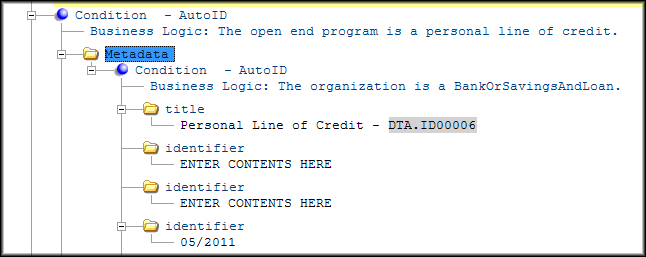
The title element adds a title and subtitle to a Document or Section. Add a title to a Formal Paragraph or Table. The Stylesheet produces section titles in various ways depending on the level of the section. You may only have one title that will print for each section. You may add conditions before any title element to determine which title to print.
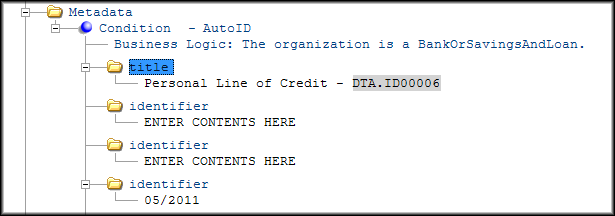
A special kind of data item is used: a substitution item; this allows you to complete the information that changes from document to document with values entered into the instance definition. For example, the state abbreviation needs to print for the data item highlighted below in the title element.
- title: followed by a dash and than a data item with a substitution name of State Abbreviation if this is a state specific document. This may not be the same as the document title. Refer to the markup to determine what should be used for the title in the tagline.
- FormInformation: contains the child elements of FormNumber and
RevisionDate, and is used instead of the Identifier element that appears when
you create a new .REQ file. FormNumber is the form number. If the form number
includes the state abbreviation, the same substitution name is used that was
used in the title. There may be multiple FormInformation elements. This would
occur for Fannie Mae documents where we include the Fannie Form number and
revision date along with the WKFS one. RevisionDate is made up of a data item
with a substitiution name of Revision Date or Control Date. The date is supplied
by the instance definition.Note: Fannie/Freddie documents that have an agency revision date that should be entered as part of the FormNumber.
- publisher: usually Bankers Systems TM or VMP®, or both (cobranded).
- rights: is always Wolters Kluwer Financial Services, if we are copyrighting the document the © symbol is included followed by the first year we filed a copyright registration (current year if this is a brand new document) and then a substitution item for Copyright Year (year the revision is being done, usually the current year).
- IntDiscFinancialInstitutionDefinedField: Due to the spacing constraints in
the tagline, this element was added so that a user can pass FI information
instead of using a barcode. You can enter a maximum of 28 characters before the
information becomes truncated. Requirements Editor arranges the information to
be displayed correctly in the second row of the tagline.Note: This only impacts the Integrated Disclosures documents.
- copyrightDate: Allows you to enter copyright information including year, year range and copyright symbol. The text "Wolters Kluwer Financial Services, Inc" is automatically inserted after the copyright information. If the element is added but values are not entered, "Wolters Kluwer Financial Services, Inc" is still rendered by default. If present, the rights and publisher elements are not rendered.
- identifier: To accommodate the maximum character count for the Loan ID on
the Integrated Disclosure documents, the width of the columns have been modified
for the first instance of the identifier to meet Integrated Disclosure
requirements. You can place up to 30 characters into the [field] without the
information flowing to the second row. Note: This only impacts the Integrated Disclosures documents.